Partition error while using windows 7 Home basic

MeeshaZee

New member
Local time
4:10 PM
Messages
2
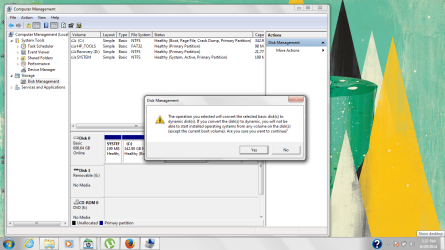
I am using windows 7 home basic 64 bit. I am unable to partition my drive which is causing a lot of problem as I have 300+ GB unallocated memory. Can anyone please help me?
 

Attachments

  • Untitled.png
    Untitled.png
    734.3 KB · Views: 7

My Computer

Computer type
Laptop
Computer Manufacturer/Model Number
HP
OS
Windows 7 home basic 64 bit
Yeah right, that is a classic because the OEMs make all partitions primary partitions although there is really no need for it. So at this moment you have 4 primary partitions and cannot create an additional partition without ending up with the dreaded dynamic partitions.

The solution is to convert one of the primaries (except the active system partition) into a logical partition. Then you can create more than a hundred additional partition because the first logical partition will act as extended partition under which additional logical partitions can be created.

The best candidate for the conversion is the C partition. There is no need for it to be a primary partition because your boot partition is the active system partition.

The tool to use for that operation is the bootable CD of Partition Wizard. The .iso for that is in the last box of the link. Burn that to a CD and load the PC with that CD. Here is a video tutorial on how that is done:

http://www.partitionwizard.com/vide...l-partition/primary-or-logical-partition.html

Another option you have is to add the unallocated space to the C partition. Here is how:

http://www.partitionwizard.com/video-help/extend_partition/extend_partition.html
 

My Computer

Computer Manufacturer/Model Number
HP, Dell, Gateway, Toshiba - 4 laptops and 2 desktops
OS
Vista, Windows7, Mint Mate, Zorin, Windows 8
CPU
from 1.6GHz Duo to i7
Monitor(s) Displays
2x HP w2207
Hard Drives
5x HDD, 7x SSD, 12x Externals
Keyboard
with trackball - no mices
Mouse
Trackball mice
Internet Speed
DSL 6000
Is there any way to convert C disk into a logical drive without the use of a bootable CD?
 

My Computer

Computer type
Laptop
Computer Manufacturer/Model Number
HP
OS
Windows 7 home basic 64 bit
It is too risky to attempt converting/resizing/moving "C" partition from within Windows. Doing this type of operations outside of Windows is always recommended to minimize the chance of potential data loss.

You should also create and keep a "System Repair Disc" prior to converting "C".

http://www.sevenforums.com/tutorials/2083-system-repair-disc-create.html

You may need to run "Startup Repair" using the "System Repair Disc" or "Windows installation Disc" after completing the conversion ( as the conversion process may change the volume GUID which may resulted in an invalid BCD store ).
 

My Computer

Computer type
PC/Desktop
OS
Windows 7 Ultimate x64
Is there any way to convert C disk into a logical drive without the use of a bootable CD?
No that is not possible. You cannot manipulate an OS partition from withing that partition whilst the OS is running.

What you can do with Disk Management is to convert the tools partition. That should work. It is another possible solution.
 

My Computer

Computer Manufacturer/Model Number
HP, Dell, Gateway, Toshiba - 4 laptops and 2 desktops

OS
Vista, Windows7, Mint Mate, Zorin, Windows 8
CPU
from 1.6GHz Duo to i7
Monitor(s) Displays
2x HP w2207
Hard Drives
5x HDD, 7x SSD, 12x Externals
Keyboard
with trackball - no mices
Mouse
Trackball mice
Internet Speed
DSL 6000
You didn't say why you are trying to add another partition, but since your screenshot has covered up the partition layout area, we can not see what is available. The tools partition is very small, so converting it will be of little value.
 

My Computer

Computer type
PC/Desktop
Computer Manufacturer/Model Number
Custom
OS
Win7 Pro 32-bit, Win8 Pro 32-bit
CPU
AMD Phenom II X6 1090T
Motherboard
Gigabyte
Memory
4GB ddr3 1300
Graphics Card(s)
AMD HD 4290 onboard
Sound Card
Builtin Realtek HD Audio
Monitor(s) Displays
Samsung 24" widescreen, LG 23" widescreen
Screen Resolution
1920x1200/1920x1080
Hard Drives
Kingston 256GB SSD
Keyboard
Logitech Illuminated Keyboard
Mouse
Logitech M705 wireless mouse
Antivirus
Norton Av 2013
Browser
IE v10
The tools partition is very small, so converting it will be of little value.
Mark, this is not the point. He has to convert one partition to a logical partition in order to be able to create an extended partition. The tools partition is a possible candidate.

He has 300+GB unallocated space. That's the space he is going to use for additional partitions.
 

My Computer

Computer Manufacturer/Model Number
HP, Dell, Gateway, Toshiba - 4 laptops and 2 desktops
OS
Vista, Windows7, Mint Mate, Zorin, Windows 8
CPU
from 1.6GHz Duo to i7
Monitor(s) Displays
2x HP w2207
Hard Drives
5x HDD, 7x SSD, 12x Externals
Keyboard
with trackball - no mices
Mouse
Trackball mice
Internet Speed
DSL 6000
Back
Top