Partition / Extended : Logical Drives

How to Create Extended Partition / Logical Drives Where Needed

The Windows Master Boot Record (MBR) partition structure supports a total of only four (4) partitions per Hard Disk Drive / Solid State Drive, they can be either 4 Primary partitions or three (3) Primary partitions and a single (1) Extended partition.
This shows the different methods to create an Extended partition wherever you need one so you can create as many Logical drives as there are available drive letters that can be used to install a Windows Operating System or for data storage.
   Warning

As with anything that makes changes to the Windows structure there is always the chance for an error to occur, it would be advisable to make reliable backups to the external media of your choice of any important data, i.e. pictures, music or documents, that you would not want to lose before you make any changes to your system, it is always better to be safe than sorry.

Let's get started!
If there are 3 existing Primary partitions on the HDD / SSD already, the fourth partition created using Windows disk management will be an Extended partition by default.

To view the relevant information on the partition structure, type diskmgmt.msc in the Windows start menu search box, then right click the entry and click "Run as Administrator" if you should get a User Account Control (UAC) prompt enter your user credentials and click Yes.


Method One

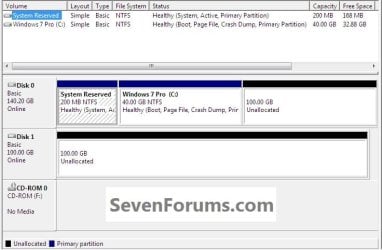
This is what I'll be starting with.
click any image to enlarge
Start.jpg
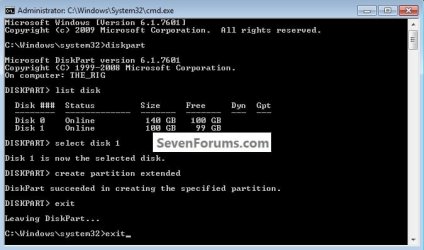
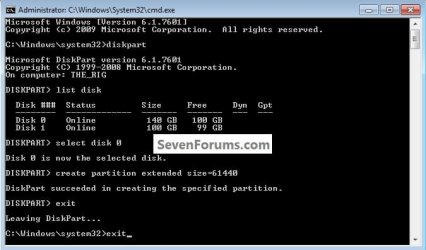
1) Open an elevated command prompt, in the command window that opens type diskpart and hit the <enter> key, all commands are followed by <enter>.

Here are the commands, click the images below to see how they are implemented.
list disk

select disk # (# = target disk number)

create partition extended

exit (2 times to close the command window)
If you need to create a specific size Extended partition, use this command.
create partition extended size=61440 <- 60GB
It has to be entered as MB and 1024MB = 1GB so 1024x60 = 61440

You can create any size you need using the formula above.
disko_size.jpg
disk1.jpg
disk0_size_2.jpg
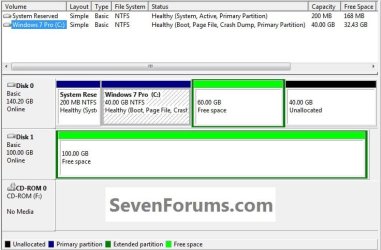
2) Now in Windows disk management right click the Extended partition Free Space to create Logical drive(s) as needed, anything created within an Extended will be a Logical drive by default.

You can create as many Logical drives within an Extended partition as there are available drive letters; you can create and name the drives in any way you like, this is just an example.
Logical.jpg


Method Two

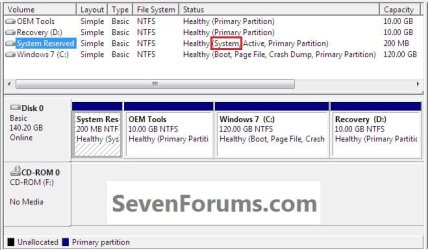
Here's the situation a lot of people are finding themselves in when purchasing a factory built PC these days, a single HDD and all the partitions taken by the manufacturer, leaving no chance of creating any additional partitions.
The fortunate side of a layout like this is the use of the new Windows 7 System Reserved partition and it being the System Volume, where the Windows boot files are stored.

If this is the situation you're in, after you have made back-ups of the data you need to save to external media and created the set of factory recovery disks or better still, created a complete image of the entire HDD to external media that can be restored if the need ever arises, have a look at the information below.
click image to enlarge
2.1.jpg
   Warning

If you do not have the Windows System Reserved or a System Primary partition completely separate from the Windows 7 partition present that is marked as the "System" partition in disk management do not attempt this, if you do Windows will not boot as Windows will not/is not able to boot / start independently from an Extended partition Logical drive, the system boot files must be stored on a Primary partition to execute.

Windows XP users, do not do this or XP will not boot at all.

Start by downloading the Partition Wizard Bootable ISO file from either link below then use the Windows 7 USB/DVD Download Tool to create a bootable DVD or USB flash drive.

Partition Wizard Free Bootable CD

OR

Partition Wizard Bootable Flash Drive
To boot the disk, in the BIOS set the PC boot order to boot first from the CD/DVD or USB drive, insert the PWBD and restart the PC, it'll take a few minutes for it to setup with no input at all from the user needed.
Once the program has started you can remove the CD/DVD or USB if you like.

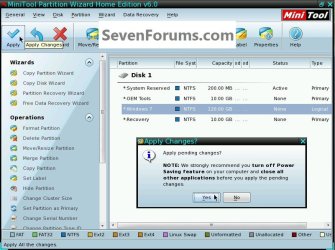
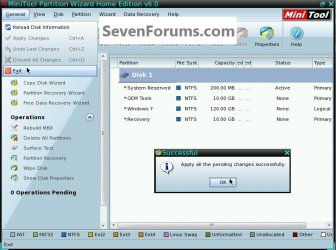
1) In the Partition Wizard program, right click the Windows 7 partition and click Modify then Set as Logical; then at the top left Action bar click Apply; then click Yes for the conformation dialog box.
click any image to enlarge
2.2.jpg
2.3.jpg
2) You will get a Pending window but that just takes seconds to complete and then click OK for the Successful dialog box.

Then remove the PWBD from the CD/DVD or USB drive and at the upper left corner click General then Exit to close the Partition Wizard program and restart Windows 7.
2.8.1.jpg
Restart Windows a couple times before you proceed to make sure all is well.

In the Windows 7 start menu search box type diskmgmt.msc then right click the entry and click "Run as Administrator" if you get a User Account Control (UAC) prompt enter your user credentials and click Yes.

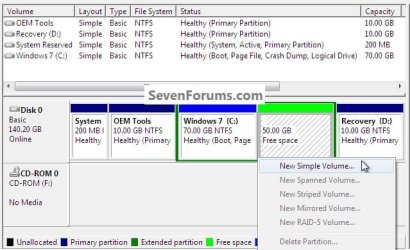
3) In disk management right click the Windows 7 partition and click Shrink Volume you can accept the offered size or you can create a specific size, don't make Windows 7 too small so installed programs/apps have the needed room.
click any image to enlarge
2.5.jpg
4) Now right click the new Extended partition Free Space and click New Volume to create the Logical drive(s) one at a time as needed.
2.6.jpg
It is suggested to restart Windows every time you make a change to let Windows 7 accept the changes to the system without issue.
2.7.jpg
Enjoy! :)


Last edited by a moderator:
I don't understand why, in method 2, I wouldn't just start at 3) without downloading the tool. Let's say I want to make a separate drive to store restore points from C: (the boot drive) because I keep getting volsnap error 25 and deletion of all points. I have a systems drive, C: and D: (recovery). Why not just shrink C: and create a separate drive to store restore points that way? Not that I quite understand how to move where I store them yet but I'm reading up on it. Just wondering.

Hello pxfragonard,

I'm afraid that restore points can only be stored on the drive letter they are for. :(

Thanks for your reply. I can't help wondering now why volsnap error 25 keep happening and they keep telling me to either store the restore points elsewhere or reduce the i/o load? I rarely have devices running. Can too many browser tabs cause it? But mostly why do they say store the shadow copies off the disc if it can't be done? Am I misunderstanding it? Can I store shadow copies off the disc? Aren't they the same as restore points? I just reset my machine to factory too!
 

My Computer

Computer Manufacturer/Model Number
HP Pavilion p6745f
OS
Microsoft Windows 7 Home Premium 64-bit 7601 Multiprocessor Free Service Pack 1
CPU
Intel(R) Core(TM) i5-2300 CPU @ 2.80GHz
Motherboard
PEGATRON CORPORATION 2AB6
Memory
6 GB
Graphics Card(s)
Radeon 6750 1gb
Sound Card
(1) IDT High Definition Audio CODEC (2) Intel(R) Display A
Monitor(s) Displays
Acer x193w
Hard Drives
(1) WDC WD15EARS-60MVWB0 (2) Generic- Compact Flash USB Device (3) Generic- MS/MS-Pro USB Device (4) Generic- SD/MMC USB Device (5) Generic- SM/xD-Picture USB Device (6) WD My Book 1110 USB Device
PSU
Internal 500W (100V-240V)
Case
Mid-size ATX
Cooling
unknown
Keyboard
HP usb multimedia keyboard
Mouse
HP usb compliant mouse
Internet Speed
256 kbps
Other Info
Ver: CHI_713.bin vCHI7.13
As far as I know shadow copies are only stored on the same drive as it's for as well.

For what you want, you might consider creating system images using a free program like Macrium Reflect. This way you can save them where you like. This will be considerably more reliable than restore points and shadow copies.
 

My Computer

Computer type
PC/Desktop
Computer Manufacturer/Model Number
Self built custom
OS
64-bit Windows 11 Pro for Workstations
CPU
Intel i7-8700K OC'd to 5 GHz
Motherboard
ASUS ROG Maximus XI Formula Z390
Memory
64 GB (4x16GB) G.SKILL TridentZ RGB DDR4 3600 MHz
Graphics Card(s)
ASUS ROG-STRIX-GTX1080TI-O11G-GAMING
Sound Card
Integrated
Monitor(s) Displays
2 x Samsung Odyssey G7 27"
Screen Resolution
2560x1440
Hard Drives
1TB Samsung 990 PRO M.2,
4TB Samsung 990 PRO PRO M.2,
TerraMaster F8 SSD Plus NAS
PSU
Seasonic Prime Titanium 850W
Case
Thermaltake Core P3
Cooling
Corsair Hydro H115i
Keyboard
Logitech wireless K800
Mouse
Logitech MX Master 4
Internet Speed
2 Gb/s Download and 100 Mb/s Upload
Antivirus
Malwarebyte Anti-Malware Premium
Browser
Google Chrome
Other Info
Logitech Z625 speaker system,
Logitech BRIO 4K Pro webcam,
HP Color LaserJet Pro MFP M477fdn,
APC SMART-UPS RT 1000 XL - SURT1000XLI,
Galaxy S23 Plus phone
As far as I know shadow copies are only stored on the same drive as it's for as well.

For what you want, you might consider creating system images using a free program like Macrium Reflect. This way you can save them where you like. This will be considerably more reliable than restore points and shadow copies.

Aren't those a lot bigger, Shawn? And doesn't Windows do restore points anyway? Why Macrium? I hear people praise it but I've never had a prob restoring pc from a Windows-made system image. Excuse my curiosity and thanks for your time.
 

My Computer

Computer Manufacturer/Model Number
HP Pavilion p6745f
OS
Microsoft Windows 7 Home Premium 64-bit 7601 Multiprocessor Free Service Pack 1
CPU
Intel(R) Core(TM) i5-2300 CPU @ 2.80GHz
Motherboard
PEGATRON CORPORATION 2AB6
Memory
6 GB
Graphics Card(s)
Radeon 6750 1gb
Sound Card
(1) IDT High Definition Audio CODEC (2) Intel(R) Display A
Monitor(s) Displays
Acer x193w
Hard Drives
(1) WDC WD15EARS-60MVWB0 (2) Generic- Compact Flash USB Device (3) Generic- MS/MS-Pro USB Device (4) Generic- SD/MMC USB Device (5) Generic- SM/xD-Picture USB Device (6) WD My Book 1110 USB Device
PSU
Internal 500W (100V-240V)
Case
Mid-size ATX
Cooling
unknown
Keyboard
HP usb multimedia keyboard
Mouse
HP usb compliant mouse
Internet Speed
256 kbps
Other Info
Ver: CHI_713.bin vCHI7.13
Marium would let you create a full system image, and be able to save it where you like.
 

My Computer

Computer type
PC/Desktop
Computer Manufacturer/Model Number
Self built custom
OS
64-bit Windows 11 Pro for Workstations
CPU
Intel i7-8700K OC'd to 5 GHz
Motherboard
ASUS ROG Maximus XI Formula Z390
Memory
64 GB (4x16GB) G.SKILL TridentZ RGB DDR4 3600 MHz
Graphics Card(s)
ASUS ROG-STRIX-GTX1080TI-O11G-GAMING
Sound Card
Integrated
Monitor(s) Displays
2 x Samsung Odyssey G7 27"
Screen Resolution
2560x1440
Hard Drives
1TB Samsung 990 PRO M.2,
4TB Samsung 990 PRO PRO M.2,
TerraMaster F8 SSD Plus NAS
PSU
Seasonic Prime Titanium 850W
Case
Thermaltake Core P3
Cooling
Corsair Hydro H115i
Keyboard
Logitech wireless K800
Mouse
Logitech MX Master 4
Internet Speed
2 Gb/s Download and 100 Mb/s Upload
Antivirus
Malwarebyte Anti-Malware Premium
Browser
Google Chrome
Other Info
Logitech Z625 speaker system,
Logitech BRIO 4K Pro webcam,
HP Color LaserJet Pro MFP M477fdn,
APC SMART-UPS RT 1000 XL - SURT1000XLI,
Galaxy S23 Plus phone
Marium would let you create a full system image, and be able to save it where you like.

Yes, but so does Windows backup and restore. Click on "Make System Image." UAC approval, check, pick location. Don't get the difference. Why is Macrium better?
 

My Computer

Computer Manufacturer/Model Number
HP Pavilion p6745f
OS
Microsoft Windows 7 Home Premium 64-bit 7601 Multiprocessor Free Service Pack 1
CPU
Intel(R) Core(TM) i5-2300 CPU @ 2.80GHz
Motherboard
PEGATRON CORPORATION 2AB6
Memory
6 GB
Graphics Card(s)
Radeon 6750 1gb
Sound Card
(1) IDT High Definition Audio CODEC (2) Intel(R) Display A
Monitor(s) Displays
Acer x193w
Hard Drives
(1) WDC WD15EARS-60MVWB0 (2) Generic- Compact Flash USB Device (3) Generic- MS/MS-Pro USB Device (4) Generic- SD/MMC USB Device (5) Generic- SM/xD-Picture USB Device (6) WD My Book 1110 USB Device
PSU
Internal 500W (100V-240V)
Case
Mid-size ATX
Cooling
unknown
Keyboard
HP usb multimedia keyboard
Mouse
HP usb compliant mouse
Internet Speed
256 kbps
Other Info
Ver: CHI_713.bin vCHI7.13
Macrium is more reliable and flexible than Windows Backup and Windows System Image, but either will do the trick.
 

My Computer

Computer type
PC/Desktop
Computer Manufacturer/Model Number
Self built custom
OS
64-bit Windows 11 Pro for Workstations
CPU
Intel i7-8700K OC'd to 5 GHz
Motherboard
ASUS ROG Maximus XI Formula Z390
Memory
64 GB (4x16GB) G.SKILL TridentZ RGB DDR4 3600 MHz
Graphics Card(s)
ASUS ROG-STRIX-GTX1080TI-O11G-GAMING
Sound Card
Integrated
Monitor(s) Displays
2 x Samsung Odyssey G7 27"
Screen Resolution
2560x1440
Hard Drives
1TB Samsung 990 PRO M.2,
4TB Samsung 990 PRO PRO M.2,
TerraMaster F8 SSD Plus NAS
PSU
Seasonic Prime Titanium 850W
Case
Thermaltake Core P3
Cooling
Corsair Hydro H115i
Keyboard
Logitech wireless K800
Mouse
Logitech MX Master 4
Internet Speed
2 Gb/s Download and 100 Mb/s Upload
Antivirus
Malwarebyte Anti-Malware Premium
Browser
Google Chrome
Other Info
Logitech Z625 speaker system,
Logitech BRIO 4K Pro webcam,
HP Color LaserJet Pro MFP M477fdn,
APC SMART-UPS RT 1000 XL - SURT1000XLI,
Galaxy S23 Plus phone
Thanks, Shawn.
 

My Computer

Computer Manufacturer/Model Number
HP Pavilion p6745f
OS
Microsoft Windows 7 Home Premium 64-bit 7601 Multiprocessor Free Service Pack 1
CPU
Intel(R) Core(TM) i5-2300 CPU @ 2.80GHz
Motherboard
PEGATRON CORPORATION 2AB6
Memory
6 GB
Graphics Card(s)
Radeon 6750 1gb
Sound Card
(1) IDT High Definition Audio CODEC (2) Intel(R) Display A
Monitor(s) Displays
Acer x193w
Hard Drives
(1) WDC WD15EARS-60MVWB0 (2) Generic- Compact Flash USB Device (3) Generic- MS/MS-Pro USB Device (4) Generic- SD/MMC USB Device (5) Generic- SM/xD-Picture USB Device (6) WD My Book 1110 USB Device
PSU
Internal 500W (100V-240V)
Case
Mid-size ATX
Cooling
unknown
Keyboard
HP usb multimedia keyboard
Mouse
HP usb compliant mouse
Internet Speed
256 kbps
Other Info
Ver: CHI_713.bin vCHI7.13
Anytime. :)
 

My Computer

Computer type
PC/Desktop
Computer Manufacturer/Model Number
Self built custom
OS
64-bit Windows 11 Pro for Workstations
CPU
Intel i7-8700K OC'd to 5 GHz
Motherboard
ASUS ROG Maximus XI Formula Z390
Memory
64 GB (4x16GB) G.SKILL TridentZ RGB DDR4 3600 MHz
Graphics Card(s)
ASUS ROG-STRIX-GTX1080TI-O11G-GAMING
Sound Card
Integrated
Monitor(s) Displays
2 x Samsung Odyssey G7 27"
Screen Resolution
2560x1440
Hard Drives
1TB Samsung 990 PRO M.2,
4TB Samsung 990 PRO PRO M.2,
TerraMaster F8 SSD Plus NAS
PSU
Seasonic Prime Titanium 850W
Case
Thermaltake Core P3
Cooling
Corsair Hydro H115i
Keyboard
Logitech wireless K800
Mouse
Logitech MX Master 4
Internet Speed
2 Gb/s Download and 100 Mb/s Upload
Antivirus
Malwarebyte Anti-Malware Premium
Browser
Google Chrome
Other Info
Logitech Z625 speaker system,
Logitech BRIO 4K Pro webcam,
HP Color LaserJet Pro MFP M477fdn,
APC SMART-UPS RT 1000 XL - SURT1000XLI,
Galaxy S23 Plus phone
Need ye old wisdom. I have a 3T external HDD. I would like to put images of a number of PCs. Of course I will need more than 4 partitions. My question is: can an image be created and stored on a logical partition within the extended partition and then be used to re-image the PC?
 

My Computer

Computer type
PC/Desktop
Computer Manufacturer/Model Number
All
OS
Windows 7 Home Premium
Other Info
I work on many PCs/Laptops for people to get hands on experience. I am a student at a technical college learning about computers and networks.

My Computer

Computer type
PC/Desktop
Computer Manufacturer/Model Number
Self built custom
OS
64-bit Windows 11 Pro for Workstations
CPU
Intel i7-8700K OC'd to 5 GHz
Motherboard
ASUS ROG Maximus XI Formula Z390
Memory
64 GB (4x16GB) G.SKILL TridentZ RGB DDR4 3600 MHz
Graphics Card(s)
ASUS ROG-STRIX-GTX1080TI-O11G-GAMING
Sound Card
Integrated
Monitor(s) Displays
2 x Samsung Odyssey G7 27"
Screen Resolution
2560x1440
Hard Drives
1TB Samsung 990 PRO M.2,
4TB Samsung 990 PRO PRO M.2,
TerraMaster F8 SSD Plus NAS
PSU
Seasonic Prime Titanium 850W
Case
Thermaltake Core P3
Cooling
Corsair Hydro H115i
Keyboard
Logitech wireless K800
Mouse
Logitech MX Master 4
Internet Speed
2 Gb/s Download and 100 Mb/s Upload
Antivirus
Malwarebyte Anti-Malware Premium
Browser
Google Chrome
Other Info
Logitech Z625 speaker system,
Logitech BRIO 4K Pro webcam,
HP Color LaserJet Pro MFP M477fdn,
APC SMART-UPS RT 1000 XL - SURT1000XLI,
Galaxy S23 Plus phone
You just made my day. Thanks.
 

My Computer

Computer type
PC/Desktop
Computer Manufacturer/Model Number
All
OS
Windows 7 Home Premium
Other Info
I work on many PCs/Laptops for people to get hands on experience. I am a student at a technical college learning about computers and networks.
You're most welcome, but it is recommended to keep images saved to a separate hard drive than the Windows drive. This way if the Windows drive should fail, you'll still be able to restore the image on a new hard drive.
 

My Computer

Computer type
PC/Desktop
Computer Manufacturer/Model Number
Self built custom
OS
64-bit Windows 11 Pro for Workstations
CPU
Intel i7-8700K OC'd to 5 GHz
Motherboard
ASUS ROG Maximus XI Formula Z390
Memory
64 GB (4x16GB) G.SKILL TridentZ RGB DDR4 3600 MHz
Graphics Card(s)
ASUS ROG-STRIX-GTX1080TI-O11G-GAMING
Sound Card
Integrated
Monitor(s) Displays
2 x Samsung Odyssey G7 27"
Screen Resolution
2560x1440
Hard Drives
1TB Samsung 990 PRO M.2,
4TB Samsung 990 PRO PRO M.2,
TerraMaster F8 SSD Plus NAS
PSU
Seasonic Prime Titanium 850W
Case
Thermaltake Core P3
Cooling
Corsair Hydro H115i
Keyboard
Logitech wireless K800
Mouse
Logitech MX Master 4
Internet Speed
2 Gb/s Download and 100 Mb/s Upload
Antivirus
Malwarebyte Anti-Malware Premium
Browser
Google Chrome
Other Info
Logitech Z625 speaker system,
Logitech BRIO 4K Pro webcam,
HP Color LaserJet Pro MFP M477fdn,
APC SMART-UPS RT 1000 XL - SURT1000XLI,
Galaxy S23 Plus phone
I will be saving the images to an external drive. I need to create images for 8 PCs to start with. That is why I want to create an extended partition with many logical partitions within the extended partition as I can. Of course that will depend on image sizes. Then save each image to their own logical partition. Am I looking at this right?
 

My Computer

Computer type
PC/Desktop
Computer Manufacturer/Model Number
All
OS
Windows 7 Home Premium
Other Info
I work on many PCs/Laptops for people to get hands on experience. I am a student at a technical college learning about computers and networks.
That sounds good to me. :)
 

My Computer

Computer type
PC/Desktop
Computer Manufacturer/Model Number
Self built custom
OS
64-bit Windows 11 Pro for Workstations
CPU
Intel i7-8700K OC'd to 5 GHz
Motherboard
ASUS ROG Maximus XI Formula Z390
Memory
64 GB (4x16GB) G.SKILL TridentZ RGB DDR4 3600 MHz
Graphics Card(s)
ASUS ROG-STRIX-GTX1080TI-O11G-GAMING
Sound Card
Integrated
Monitor(s) Displays
2 x Samsung Odyssey G7 27"
Screen Resolution
2560x1440
Hard Drives
1TB Samsung 990 PRO M.2,
4TB Samsung 990 PRO PRO M.2,
TerraMaster F8 SSD Plus NAS
PSU
Seasonic Prime Titanium 850W
Case
Thermaltake Core P3
Cooling
Corsair Hydro H115i
Keyboard
Logitech wireless K800
Mouse
Logitech MX Master 4
Internet Speed
2 Gb/s Download and 100 Mb/s Upload
Antivirus
Malwarebyte Anti-Malware Premium
Browser
Google Chrome
Other Info
Logitech Z625 speaker system,
Logitech BRIO 4K Pro webcam,
HP Color LaserJet Pro MFP M477fdn,
APC SMART-UPS RT 1000 XL - SURT1000XLI,
Galaxy S23 Plus phone
This tute is still the best.

RIP, BFK.
 

My Computer

Computer type
PC/Desktop
Computer Manufacturer/Model Number
dell precision t3400 tower
OS
Linux Lite 3.2 x64; Windows 7, 8.1
CPU
Core2Duo 2.4
Memory
6GB ddr2
Graphics Card(s)
nVidia
Hard Drives
120gb SSD, 1TB HD, 2TB HD; sata II
Internet Speed
12/2
Browser
Vivaldi, Slimjet (Chromium) x64
Back
Top