Partition in Windows 7 Home Premium without formatting

kulerdenyu

New member
Local time
12:40 AM
Messages
7
Hi all,
I'm new in this forum and this is my first post. I'm from Indonesia so pardon me if my English is not that good. I just got a new Dell laptop with a Windows 7 Home Premium installed but only one partition exist. I need another partition just to separate the OS and my files (documents, musics, videos, and stuff) and really want to avoid all the troubles on formatting.
I've searched the web for tutorials but only found some for Windows 7 home basic, ultimate and others (not Home Premium).
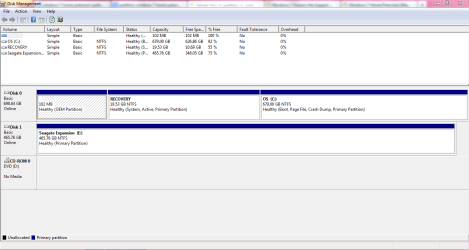
What I need to know is, those tutorials (for home basic, ultimate, and others), does it works also for Windows 7 Home Premium? if no, can you help me by explaining it step by step? or point me to the link for it? (attached is my Disk Management screen shot)
Oh, I've already installed some programs on it. Should I uninstall those programs before doing any partition? and just some info, I'll be installing some light game and some graphic program (sketchup, illustrator, photoshop, etc) on my laptop. Maybe it will affect the partition size in some ways.
I think that's all. Hope I give enough information (or too much? :o). Glad I found this forum. Thanks before, friends.
 

Attachments

  • Disk Management.PNG
    Disk Management.PNG
    24.4 KB · Views: 199

My Computer My Computer

OS
Windows 7 Home Premium 64-bit SP1

My Computer My Computer

Computer type
PC/Desktop
Computer Manufacturer/Model Number
Build #1
OS
Windows 8.1 Pro x64
CPU
Intel i7 3770K @4.5GHz
Motherboard
ASUS P8Z77-V PRO
Memory
Corsair Vengeance 2x4GB DDR3 1600MHz Low Profile (White)
Graphics Card(s)
Gigabyte Radeon HD 7850 (2GB GDDR5)
Sound Card
Integrated on motherboard
Monitor(s) Displays
23" LG LCD/LED IPS
Screen Resolution
1920*1080
Hard Drives
Samsung EVO 128GB SSD
Seagate Barracuda 2GB 7200rpm
2x Seagate FreeAgent [500gb]
PSU
Corsair TX650W V2 (80+ Bronze)
Case
NZXT Phantom 410 White
Cooling
Corsair H100 Water Cooler
Keyboard
Microsoft Desktop 2000 Wireless Keyboard
Mouse
Microsoft Desktop 2000 Wireless Mouse
Internet Speed
95 Mb/s Download 70 Mb/s Upload
Antivirus
MSE + MBAM Pro
Browser
Firefox
Thanks for your fast reply, Tom. Thank you, couldn't have done it without Google translate and Word's spell check. :cool:
I will see the link you've posted and post the result soon.
 

My Computer My Computer

OS
Windows 7 Home Premium 64-bit SP1
If I may. You also have proper writing skills. You Caps Loc and punctuation keys on your keyboard also work properly. It was enjoyable to read your post.
Thank you for becoming a member.
 

My Computer My Computer

Computer type
PC/Desktop
Computer Manufacturer/Model Number
Home made Desktop
OS
Windows 10 Pro. 64/ version 1709 Windows 7 Pro/64
CPU
Intel i7-6800K @ 4.3
Motherboard
ASUS X-99 Deluxe II
Memory
Corsair Platinum 16 gig @2400
Graphics Card(s)
EVGA GTX 1070 OC
Monitor(s) Displays
Asus 27" LED LCD/VE278Q
Screen Resolution
1920-1080 or 1280-720 HDMI
Hard Drives
INTEL SSD 730-240 Gb Sata 3.0/
PSU
EVGA Platium 1200W
Case
Phanteks Luxe Tempered Glass 8 fans/ one radiator
Cooling
XSPC/ Water Cooled CPU
Keyboard
Das 4 Professional
Mouse
Logitech M705/MX Anywhere 2-S
Internet Speed
100 mbits
Antivirus
Microsoft Security Essentials/ Malwarebytes Premium 3.0/ SAS
Browser
I.E. 11 default/Firefox/ ISP Time Warner Cable/Spectrum
Other Info
LG BluRay Burner/
Sound system-KLipsch-THX/
Icy Dock ssd Hot Swap bays.
kulerdenyu,

I assume that you want to split that big C: partition and leave a small part for your OS and program files and another partition for Data.

My suggestion is to use DiskManagement..

If the results are not sufficient for your needs, then use PartitionWizard.

After creating the 2nd partition, then here is the approach I follow:
On D: (the data drive), I create following folders:
Documents,
Music,
Videos,
Pictures

then I change the properties of the corresponding libraries such that the new folders are the default folders for those libraries.

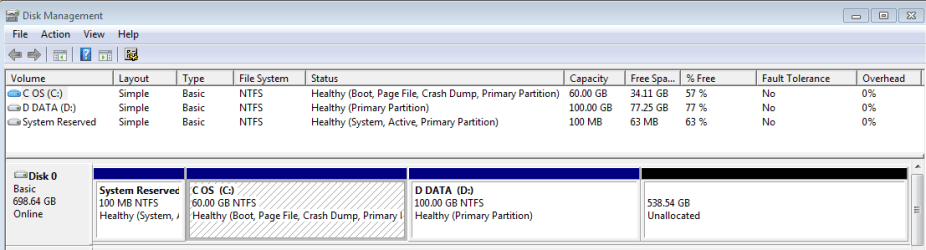
Here is my present layout,created using DiskManagement;

ToshS875D Disk Layout.PNG

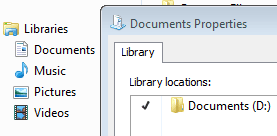
And here is a Snip showing that my Document folder points to D:\Documents

My Libraries.PNG

All of this reminds me that I need to update my system specs to reflect the new laptop.
 

My Computer My Computer

Computer Manufacturer/Model Number
Toshiba Satellite S875D-S7239 laptop
OS
MS Windows 7 Ultimate SP1 64-bit
CPU
AMD A10-4600M
Motherboard
AMD Pumori (Socket FT1)
Memory
6.00 GB Dual-Channel DDR3 @ 798MHz (11-11-12-28)
Graphics Card(s)
AMD Radeon HD 7660G
Sound Card
High Definition Audio Device
Monitor(s) Displays
Generic PnP Monitor (1600x900@60Hz)
Screen Resolution
1600x900@60Hz
Hard Drives
SSD 119GB Corsair CSSD-V128GB2 ATA Device
Keyboard
Standard PS/2 Keyboard
Mouse
HP Wireless Optical Mobile Mouse Model FHA-3410
Internet Speed
What the local pub, local coffee shop offers.
Other Info
Optical Drive:MATSHITA BD-CMB UJ160B ATA Device


Also have an Asus ha1002xp netbook with Win 7 Ultimate installed.
If I may. You also have proper writing skills. You Caps Loc and punctuation keys on your keyboard also work properly. It was enjoyable to read your post.
Thank you for becoming a member.

Thank you, Layback Bear. Glad to join this forum. I’m looking forward to learn a lot about Windows 7 in this forum.
 

My Computer My Computer

OS
Windows 7 Home Premium 64-bit SP1
kulerdenyu,

I assume that you want to split that big C: partition and leave a small part for your OS and program files and another partition for Data.

My suggestion is to use DiskManagement..

If the results are not sufficient for your needs, then use PartitionWizard.

After creating the 2nd partition, then here is the approach I follow:
On D: (the data drive), I create following folders:
Documents,
Music,
Videos,
Pictures

then I change the properties of the corresponding libraries such that the new folders are the default folders for those libraries.

Here is my present layout,created using DiskManagement;

View attachment 226530

And here is a Snip showing that my Document folder points to D:\Documents

View attachment 226531

All of this reminds me that I need to update my system specs to reflect the new laptop.

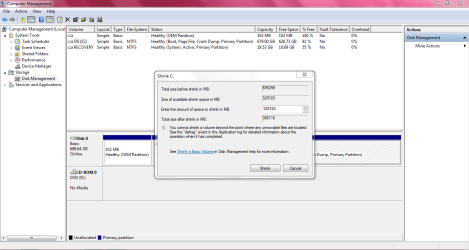
Yes, I just wanted to separate the OS and the data, in case I need to reinstall my Windows. And yes, I’m using Disk Management to do the partition. However, I encountered a problem in shrinking part (creating an unallocated space). When I tried to shrink my C drive, it appears that I can only shrink it half, approximately 300 GB (snip attached). What I need is, to leave around 100 GB for C drive (OS) and have the rest for my Data. Can I do that? Or maybe you can recommend a proper size for my C drive?
Thanks before.
 

Attachments

  • Shrink problem.PNG
    Shrink problem.PNG
    37.1 KB · Views: 65

My Computer My Computer

OS
Windows 7 Home Premium 64-bit SP1

My Computer My Computer

Computer type
PC/Desktop
Computer Manufacturer/Model Number
Skylake Special #666
OS
Windows 10 Pro x64
CPU
Intel Core i7 6700K
Motherboard
Asus Sabertooth Z170 Mark 1
Memory
GSkill TridentZ RGB 16GB 3600 16-16-16-36
Graphics Card(s)
EVGA GTX 980 Ti SC x2
Sound Card
Realtek High Definition
Monitor(s) Displays
AOC G2460PG
Screen Resolution
1920 x 1080 144Hz
Hard Drives
Samsung 860 Pro 256GB, Seagate Barracuda 4TB x2
PSU
EVGA 1000 P2, EVGA White Custom Braided Cables
Case
Corsair Vengeance C70 Gunmetal Black
Cooling
Corsair H100i v2, Corsair ML120 x2, Thermal Grizzly Kryonaut
Keyboard
Logitech G910 Orion Spectrum
Mouse
Logitech G700s
Internet Speed
Verizon Fios Quantum Gateway 75/75
Antivirus
Windows Defender, Malwarebytes Free 3.8.3
Browser
Chrome
Other Info
Corsair SP120 x4, LG Blu-ray Drive, Durabrand HT-395 100 Watt Dolby Digital Amp, Corsair H2100 Wireless 7.1 Headset
kulerdenyu,
Thought that might happen. One must do that initial shrink immediately.

There is a very easy solution: PartitionWizard.

Burn PartitionWizard to a CD and boot from the CD.

Free download Magic Partition Manager Software, partition magic alternative, free partition magic, partition magic Windows 7 and server partition software - Partition Wizard Online

http://www.sevenforums.com/tutorials/93322-partition-wizard-use-bootable-cd.html

I also recommending making a Win7 System Image Backup to an external usb drive first as a precautionary measure. I've never had any problems. The only possible problem is malfunction on the part of the operator.

To make a system image backup:
Win | type Backup and Restore | ENTER key
Ignore all messages and choose System Image in the left-hand column.
From here on, everything is rather obvious.
We also have a tutorial:
http://www.sevenforums.com/tutorials/663-backup-complete-computer-create-image-backup.html
 

My Computer My Computer

Computer Manufacturer/Model Number
Toshiba Satellite S875D-S7239 laptop
OS
MS Windows 7 Ultimate SP1 64-bit
CPU
AMD A10-4600M
Motherboard
AMD Pumori (Socket FT1)
Memory
6.00 GB Dual-Channel DDR3 @ 798MHz (11-11-12-28)
Graphics Card(s)
AMD Radeon HD 7660G
Sound Card
High Definition Audio Device
Monitor(s) Displays
Generic PnP Monitor (1600x900@60Hz)
Screen Resolution
1600x900@60Hz
Hard Drives
SSD 119GB Corsair CSSD-V128GB2 ATA Device
Keyboard
Standard PS/2 Keyboard
Mouse
HP Wireless Optical Mobile Mouse Model FHA-3410
Internet Speed
What the local pub, local coffee shop offers.
Other Info
Optical Drive:MATSHITA BD-CMB UJ160B ATA Device


Also have an Asus ha1002xp netbook with Win 7 Ultimate installed.
I would suggest you to use Partition Wizard Bootable CD. to do the partitioning. There are some video tutorials for what to do and how to do.

For shrinking an existing partition, follow : How to Move/Resize Partition with partition manager? Partition Wizard Move/Resize Partition Video Help.

To create a partition in the unallocated space , follow : How to Create Partition with partition manager? Partition Wizard Create Partition Video Help .

After partitioning C, better you rebuild your MBR : How to Rebuild MBR with partition magic? Partition Wizard Rebuild MBR Video Help.

And, it would be better if you format the new partition as logical .
 

My Computer My Computer

Computer type
PC/Desktop
Computer Manufacturer/Model Number
Self Assembled
OS
Microsoft Windows 10 Pro Insider Preview 64-bit
CPU
Intel(R) Core(TM) i3-4130 CPU @ 3.40GHz
Motherboard
Gigabyte Technology Co., Ltd. B85M-D3H
Memory
Corsair Vengence 4GB x2 (8.00GB Dual-Channel DDR3 @ 798MHz)
Graphics Card(s)
2047MB GeForce GTS 450 (ZOTAC International)
Sound Card
Onboard (Realtek High Definition Audio)
Monitor(s) Displays
LG Flatron E2040T
Screen Resolution
1600x900
Hard Drives
Western Digital 1 TB
Seagate 500 GB
PSU
Corsair VS550
Case
Cooler Master K380
Cooling
Cooler Master Seidon 120V Plus
Keyboard
Logitech MK260r
Mouse
Logitech MK260r
Internet Speed
PMPL Broadband
Antivirus
Windows Defender + MBAM
Browser
Firefox
Other Info
Dell Studio 15" Laptop
I agree with all except for the later: logical partitions are unneeded in this case.
 

My Computer My Computer

Computer Manufacturer/Model Number
Toshiba Satellite S875D-S7239 laptop
OS
MS Windows 7 Ultimate SP1 64-bit
CPU
AMD A10-4600M
Motherboard
AMD Pumori (Socket FT1)
Memory
6.00 GB Dual-Channel DDR3 @ 798MHz (11-11-12-28)
Graphics Card(s)
AMD Radeon HD 7660G
Sound Card
High Definition Audio Device
Monitor(s) Displays
Generic PnP Monitor (1600x900@60Hz)
Screen Resolution
1600x900@60Hz
Hard Drives
SSD 119GB Corsair CSSD-V128GB2 ATA Device
Keyboard
Standard PS/2 Keyboard
Mouse
HP Wireless Optical Mobile Mouse Model FHA-3410
Internet Speed
What the local pub, local coffee shop offers.
Other Info
Optical Drive:MATSHITA BD-CMB UJ160B ATA Device


Also have an Asus ha1002xp netbook with Win 7 Ultimate installed.
Needed, coz the OP may think to partition the HDD further at any point of time. Just an attempt, and convert the entire disk to dynamic.

When an op is seeking an advise on partitioning, we must to accept that he is not a hardcore geek like some of the long time members of SF. It is better to make things easier and with some more free options for them.


  1. After three primary partition, if partitioning further, go for logical.
  2. With four primary partitions, before going for further partitioning, first convert one to logical.
Among these two, option one is more acceptable, to me.
 

My Computer My Computer

Computer type
PC/Desktop
Computer Manufacturer/Model Number
Self Assembled
OS
Microsoft Windows 10 Pro Insider Preview 64-bit
CPU
Intel(R) Core(TM) i3-4130 CPU @ 3.40GHz
Motherboard
Gigabyte Technology Co., Ltd. B85M-D3H
Memory
Corsair Vengence 4GB x2 (8.00GB Dual-Channel DDR3 @ 798MHz)
Graphics Card(s)
2047MB GeForce GTS 450 (ZOTAC International)
Sound Card
Onboard (Realtek High Definition Audio)
Monitor(s) Displays
LG Flatron E2040T
Screen Resolution
1600x900
Hard Drives
Western Digital 1 TB
Seagate 500 GB
PSU
Corsair VS550
Case
Cooler Master K380
Cooling
Cooler Master Seidon 120V Plus
Keyboard
Logitech MK260r
Mouse
Logitech MK260r
Internet Speed
PMPL Broadband
Antivirus
Windows Defender + MBAM
Browser
Firefox
Other Info
Dell Studio 15" Laptop
neither is realistic,in my opinion, in these days and times.
Each to his own, said the man as he kissed the cow.
 

My Computer My Computer

Computer Manufacturer/Model Number
Toshiba Satellite S875D-S7239 laptop
OS
MS Windows 7 Ultimate SP1 64-bit
CPU
AMD A10-4600M
Motherboard
AMD Pumori (Socket FT1)
Memory
6.00 GB Dual-Channel DDR3 @ 798MHz (11-11-12-28)
Graphics Card(s)
AMD Radeon HD 7660G
Sound Card
High Definition Audio Device
Monitor(s) Displays
Generic PnP Monitor (1600x900@60Hz)
Screen Resolution
1600x900@60Hz
Hard Drives
SSD 119GB Corsair CSSD-V128GB2 ATA Device
Keyboard
Standard PS/2 Keyboard
Mouse
HP Wireless Optical Mobile Mouse Model FHA-3410
Internet Speed
What the local pub, local coffee shop offers.
Other Info
Optical Drive:MATSHITA BD-CMB UJ160B ATA Device


Also have an Asus ha1002xp netbook with Win 7 Ultimate installed.
Thank you for your suggestion, AddRAM. Do you mind explaining why I need to leave my OS drive at 200 GB?

I’m currently downloading partition wizard now and making a system image backup to an external usb drive. One question, do I really need to boot from Partition Wizard cd? Or can I use the MiniTool Partition Wizard instead the bootable cd? Coz from what I saw in those tutorial videos posted by Arc, he launched the Partition Wizard from his desktop inside the windows. If the bootable cd is required, then I must buy the cd since I don’t have any blank cd right now and it’s 2 AM in the morning in Indonesia, all the computer stores are closed. :confused:
 

My Computer My Computer

OS
Windows 7 Home Premium 64-bit SP1
As you see, I've never found any need for more than 60GB as long as one moves the docs, videos, pictures, and music to another partition.

Just wait for the stores to open. Running a repartition program like PartitionWizard on a "live machine" is courting disaster.

If you are ready to lose everything and start over from the very first again, then go ahead and do not follow the advice you have received.
 

My Computer My Computer

Computer Manufacturer/Model Number
Toshiba Satellite S875D-S7239 laptop
OS
MS Windows 7 Ultimate SP1 64-bit
CPU
AMD A10-4600M
Motherboard
AMD Pumori (Socket FT1)
Memory
6.00 GB Dual-Channel DDR3 @ 798MHz (11-11-12-28)
Graphics Card(s)
AMD Radeon HD 7660G
Sound Card
High Definition Audio Device
Monitor(s) Displays
Generic PnP Monitor (1600x900@60Hz)
Screen Resolution
1600x900@60Hz
Hard Drives
SSD 119GB Corsair CSSD-V128GB2 ATA Device
Keyboard
Standard PS/2 Keyboard
Mouse
HP Wireless Optical Mobile Mouse Model FHA-3410
Internet Speed
What the local pub, local coffee shop offers.
Other Info
Optical Drive:MATSHITA BD-CMB UJ160B ATA Device


Also have an Asus ha1002xp netbook with Win 7 Ultimate installed.
Operations are the same, but better you use the bootable CD.

Coz, it does all the operations while the hdd is not in use.

Do it in the next morning. I will be available form 11 am your time, if needed. Obviously there are other helpers, too !
 

My Computer My Computer

Computer type
PC/Desktop
Computer Manufacturer/Model Number
Self Assembled
OS
Microsoft Windows 10 Pro Insider Preview 64-bit
CPU
Intel(R) Core(TM) i3-4130 CPU @ 3.40GHz
Motherboard
Gigabyte Technology Co., Ltd. B85M-D3H
Memory
Corsair Vengence 4GB x2 (8.00GB Dual-Channel DDR3 @ 798MHz)
Graphics Card(s)
2047MB GeForce GTS 450 (ZOTAC International)
Sound Card
Onboard (Realtek High Definition Audio)
Monitor(s) Displays
LG Flatron E2040T
Screen Resolution
1600x900
Hard Drives
Western Digital 1 TB
Seagate 500 GB
PSU
Corsair VS550
Case
Cooler Master K380
Cooling
Cooler Master Seidon 120V Plus
Keyboard
Logitech MK260r
Mouse
Logitech MK260r
Internet Speed
PMPL Broadband
Antivirus
Windows Defender + MBAM
Browser
Firefox
Other Info
Dell Studio 15" Laptop
One question, do I really need to boot from Partition Wizard cd?
Yes you have to operate Partition Wizard from the bootable CD or USB when you want to manipulate an active OS partition. Just make sure you image your C partition before you change it with PW. PW is an excellent program but it is easy to make a mistake or run into a problem where you can lose the partition you manipulate.

Btw; The reason you cannot shrink the C partition by more than appr. half is because somewhere in the middle of the partition is the MFT (master file table). Disk Management cannot move that, but PW can move it - which, of course is a tricky operation which takes some time. Just imagine you have a power failure or HDD problem during that operation. Then your C partition is lost. That's why I recommend to first make an image - safety first.
 

My Computer My Computer

Computer Manufacturer/Model Number
HP, Dell, Gateway, Toshiba - 4 laptops and 2 desktops
OS
Vista, Windows7, Mint Mate, Zorin, Windows 8
CPU
from 1.6GHz Duo to i7
Monitor(s) Displays
2x HP w2207
Hard Drives
5x HDD, 7x SSD, 12x Externals
Keyboard
with trackball - no mices
Mouse
Trackball mice
Internet Speed
DSL 6000
Alright, I’ll use the bootable CD, like you advised. I’ll post the result later. Thank you very much, guys. Really appreciate it.
 

My Computer My Computer

OS
Windows 7 Home Premium 64-bit SP1
The unusual thing about that is that I've found that if I immediately, after a fresh install, shrink the partition using Disk Management then I can shrink down to a very small size. If I do not perform the shrink right away, then I end up with the "mid-way" problem.

don't understand. Just know what I observe.
 

My Computer My Computer

Computer Manufacturer/Model Number
Toshiba Satellite S875D-S7239 laptop
OS
MS Windows 7 Ultimate SP1 64-bit
CPU
AMD A10-4600M
Motherboard
AMD Pumori (Socket FT1)
Memory
6.00 GB Dual-Channel DDR3 @ 798MHz (11-11-12-28)
Graphics Card(s)
AMD Radeon HD 7660G
Sound Card
High Definition Audio Device
Monitor(s) Displays
Generic PnP Monitor (1600x900@60Hz)
Screen Resolution
1600x900@60Hz
Hard Drives
SSD 119GB Corsair CSSD-V128GB2 ATA Device
Keyboard
Standard PS/2 Keyboard
Mouse
HP Wireless Optical Mobile Mouse Model FHA-3410
Internet Speed
What the local pub, local coffee shop offers.
Other Info
Optical Drive:MATSHITA BD-CMB UJ160B ATA Device


Also have an Asus ha1002xp netbook with Win 7 Ultimate installed.
Hello kulerdenyu, welcome to Seven Forums!


Have a look at Method One of this tutorial linked below, there's really no need for 3rd party software for operations like partition creation and manipulation as Windows will do everything needed.

If you want/need a fourth Primary just type ... - instead

create partition primary


Partition / Extended : Logical Drives
 

My Computer My Computer

Computer Manufacturer/Model Number
* BFK Customs *
OS
W 7 64-bit Ultimate
CPU
Intel Q9550 Yorkfield
Motherboard
ASUS P5Q Pro
Memory
8GB Dominator 8500C5D
Graphics Card(s)
ATI : XFX 5870
Sound Card
Realtek HD Audio 7-1
Monitor(s) Displays
1x 47" LCD HDMI & 3x 26" LCD HDMI
Screen Resolution
1920x1080P & 1920x1200
Hard Drives
1x 80GB Intel X25-M G2 SSD : 1x 500GB & 1x 640GB WD Caviar Black(s)
PSU
Corsair 620HX
Case
Cooler Master RC-690
Cooling
Tuniq Tower 120, 2x 140mm and 3x 120mm case fans
Keyboard
Microsoft 500
Mouse
Razer Diamondback 3G
Internet Speed
14 Mb/s
Other Info
1x Koutech 3Gb/s SATA HDD Hot Swap Rack
  • Like
Reactions: Arc
Back
Top