
Partition in Windows 7 Home Premium without formatting

BareFoot,
He has an additional desire. See following:
Yes, I just wanted to separate the OS and the data, in case I need to reinstall my Windows. And yes, I’m using Disk Management to do the partition. However, I encountered a problem in shrinking part (creating an unallocated space). When I tried to shrink my C drive, it appears that I can only shrink it half, approximately 300 GB (snip attached). What I need is, to leave around 100 GB for C drive (OS) and have the rest for my Data
 

My Computer My Computer

At a glance

MS Windows 7 Ultimate SP1 64-bitAMD A10-4600M6.00 GB Dual-Channel DDR3 @ 798MHz (11-11-12-28)AMD Radeon HD 7660G
Computer Manufacturer/Model Number
Toshiba Satellite S875D-S7239 laptop
OS
MS Windows 7 Ultimate SP1 64-bit
CPU
AMD A10-4600M
Motherboard
AMD Pumori (Socket FT1)
Memory
6.00 GB Dual-Channel DDR3 @ 798MHz (11-11-12-28)
Graphics Card(s)
AMD Radeon HD 7660G
Sound Card
High Definition Audio Device
Monitor(s) Displays
Generic PnP Monitor (1600x900@60Hz)
Screen Resolution
1600x900@60Hz
Hard Drives
SSD 119GB Corsair CSSD-V128GB2 ATA Device
Keyboard
Standard PS/2 Keyboard
Mouse
HP Wireless Optical Mobile Mouse Model FHA-3410
Internet Speed
What the local pub, local coffee shop offers.
Other Info
Optical Drive:MATSHITA BD-CMB UJ160B ATA Device


Also have an Asus ha1002xp netbook with Win 7 Ultimate installed.
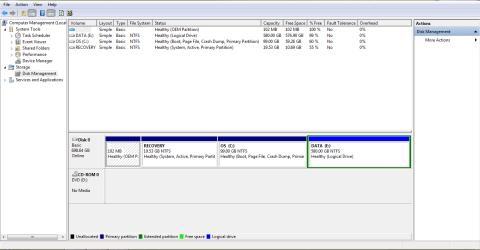
Hi friends, I finally did the partition on first try.. Thanks to all of you..
but I have some questions..

1. What's the difference between primary and logical drive?
2. In my computer management, the "DATA" have green box around it, is that normal?
3. Can I do this partition thing more then once? in case I need to add another partition. Will it affect the hard drive physically?

Thanks again guys, couldn't have done it without you..

cheers,
 

Attachments

  • After partition.PNG
    After partition.PNG
    22.9 KB · Views: 9

My Computer My Computer

At a glance

Windows 7 Home Premium 64-bit SP1
OS
Windows 7 Home Premium 64-bit SP1

My Computer My Computer

At a glance

W 7 64-bit UltimateIntel Q9550 Yorkfield8GB Dominator 8500C5DATI : XFX 5870
Computer Manufacturer/Model Number
* BFK Customs *
OS
W 7 64-bit Ultimate
CPU
Intel Q9550 Yorkfield
Motherboard
ASUS P5Q Pro
Memory
8GB Dominator 8500C5D
Graphics Card(s)
ATI : XFX 5870
Sound Card
Realtek HD Audio 7-1
Monitor(s) Displays
1x 47" LCD HDMI & 3x 26" LCD HDMI
Screen Resolution
1920x1080P & 1920x1200
Hard Drives
1x 80GB Intel X25-M G2 SSD : 1x 500GB & 1x 640GB WD Caviar Black(s)
PSU
Corsair 620HX
Case
Cooler Master RC-690
Cooling
Tuniq Tower 120, 2x 140mm and 3x 120mm case fans
Keyboard
Microsoft 500
Mouse
Razer Diamondback 3G
Internet Speed
14 Mb/s
Other Info
1x Koutech 3Gb/s SATA HDD Hot Swap Rack
Well done, kulerdenyu ! It looks great .

To discuss the difference between primary and logical volumes, this place is short enough. You may have a nice basic reading : Disk partitioning - Wikipedia, the free encyclopedia

That green box around data partition means it is an extended volume. Yes , it is not noly normal, but also natural for such partitions.

You can do this partitioning more than once, if you do the partitioning within that green box, and format it as logical .

We use basic disks in PCs. A basic disk is allowed to have four primary partitions at a maximum. An extended volume is alos treated as a primary partition. So , three primary and one extended (within which how many logicals you may create) is the same thing as four primaries.

If, by any chance the disk is partitioned as more than four primaries, it goes dynamic, and fails to get booted. It is too difficult to bring a dynamic disk back to basic, and in most of the cases all the data of the disk is to be sacrificed to do the conversion back .

So we suggest to make partitions logical, when there are already three primary partitions in a disk .
 

My Computer My Computer

At a glance

Microsoft Windows 10 Pro Insider Preview 64-bitIntel(R) Core(TM) i3-4130 CPU @ 3.40GHzCorsair Vengence 4GB x2 (8.00GB Dual-Channel ...2047MB GeForce GTS 450 (ZOTAC International)
Computer type
PC/Desktop
Computer Manufacturer/Model Number
Self Assembled
OS
Microsoft Windows 10 Pro Insider Preview 64-bit
CPU
Intel(R) Core(TM) i3-4130 CPU @ 3.40GHz
Motherboard
Gigabyte Technology Co., Ltd. B85M-D3H
Memory
Corsair Vengence 4GB x2 (8.00GB Dual-Channel DDR3 @ 798MHz)
Graphics Card(s)
2047MB GeForce GTS 450 (ZOTAC International)
Sound Card
Onboard (Realtek High Definition Audio)
Monitor(s) Displays
LG Flatron E2040T
Screen Resolution
1600x900
Hard Drives
Western Digital 1 TB
Seagate 500 GB
PSU
Corsair VS550
Case
Cooler Master K380
Cooling
Cooler Master Seidon 120V Plus
Keyboard
Logitech MK260r
Mouse
Logitech MK260r
Internet Speed
PMPL Broadband
Antivirus
Windows Defender + MBAM
Browser
Firefox
Other Info
Dell Studio 15" Laptop
Back
Top