Partition - Mark as Inactive

How to Mark a Partition as Inactive in Windows 7 and Vista


   Information
Marking a partition as active on a basic disk means that the computer will use the loader (an operating system tool) on that partition to start the operating system. Marking a partition as active if it doesn't contain the loader for an operating system may cause your computer to become unbootable.

This tutorial will show you how to mark a partition as inactive in Windows 7 and Vista in case you marked it as active by mistake.

   Tip
If you mark the wrong active partition as inactive by mistake and can no longer boot from it, then you can do a startup repair to fix it.


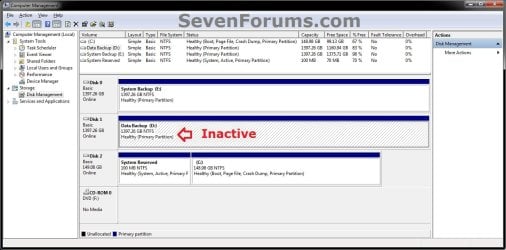
EXAMPLE: Partition Marked as Active and Inactive
NOTE: This is an example of my D: data partition shown as active by mistake in Disk Management (diskmgmt.msc). I used the steps in this tutorial to mark it as inactive since my System Reserved partition is my true active partition instead.
Active.jpg

Inactive.jpg


Here's How:
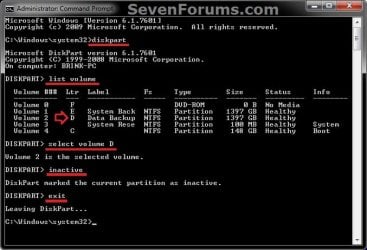
1. Open a elevated command prompt, or a command prompt at boot.

2. In the command prompt, type diskpart and press Enter. (see screenshot below step 6)

3. In the command prompt, type list volume and press Enter. (see screenshot below step 6)
NOTE: Make note of the volume number or letter that you wanted to mark as inactive. At boot, the drive letters may not be the same as they are in Windows.

4. In the command prompt, type select volume # or select volume letter and press Enter. (see screenshot below step 6)
NOTE: You would substitute # for the volume number listed, or letter for the volume/partition letter. For example, I want to mark my D: partition as inactive, so I would type either select volume 2 or select volume D and press Enter.

5. In the command prompt, type inactive and press Enter. (see screenshot below step 6)

6. In the command prompt, type exit and press Enter. (see screenshot below)
CMD.jpg
7. Close the elevated command prompt in Windows, or restart the computer if at boot.

That's it,
Shawn


Last edited:
Thanks

That was useful!
 

My Computer

Computer type
PC/Desktop
OS
Windows 7 Ultimate
Awesome again!
Another win provided by sevenforums.
Thanking you once again.
Regards,
Dave
 

My Computer

Computer type
PC/Desktop
Computer Manufacturer/Model Number
Custom built
OS
Windows 7 Pro 64bit
CPU
Intel C2Q 9550
Motherboard
EP45-DS4P
Memory
8G 2x4G PC6400 DDRII 800 OCZ
Graphics Card(s)
MSI GTX 680 2G (installed to PCIEX16_1)
Sound Card
onboard
Monitor(s) Displays
Yamakasi 30" 2560x1600 + Dell 2709 1600x1200 (LP setup)
Screen Resolution
1920x1080 + 1280x1024
Hard Drives
C: 180G Intel 530 SSD boot (Disc 0)
D: 80G Intel G2 SSD docs folder (Disc 1)
E: Samsung 1.5T HD154UI
F: Pioneer DVRW
G: Samsung 1.5T HD154UI

B: 1TB Hitachi Reflect drive (Orico bay with power on/off)
PSU
Antec Truepower New 650W
Case
Antec 200
Cooling
Zalman 9700
Keyboard
MS Arc
Mouse
G700
Internet Speed
ADSL 2+ (naked)
Other Info
USB 3.0 card
I'm glad it could help David. :)
 

My Computer

Computer type
PC/Desktop
Computer Manufacturer/Model Number
Self built custom
OS
64-bit Windows 11 Pro for Workstations
CPU
Intel i7-8700K OC'd to 5 GHz
Motherboard
ASUS ROG Maximus XI Formula Z390
Memory
64 GB (4x16GB) G.SKILL TridentZ RGB DDR4 3600 MHz
Graphics Card(s)
ASUS ROG-STRIX-GTX1080TI-O11G-GAMING
Sound Card
Integrated
Monitor(s) Displays
2 x Samsung Odyssey G7 27"
Screen Resolution
2560x1440
Hard Drives
1TB Samsung 990 PRO M.2,
4TB Samsung 990 PRO PRO M.2,
TerraMaster F8 SSD Plus NAS
PSU
Seasonic Prime Titanium 850W
Case
Thermaltake Core P3
Cooling
Corsair Hydro H115i
Keyboard
Logitech wireless K800
Mouse
Logitech MX Master 4
Internet Speed
2 Gb/s Download and 100 Mb/s Upload
Antivirus
Malwarebyte Anti-Malware Premium
Browser
Google Chrome
Other Info
Logitech Z625 speaker system,
Logitech BRIO 4K Pro webcam,
HP Color LaserJet Pro MFP M477fdn,
APC SMART-UPS RT 1000 XL - SURT1000XLI,
Galaxy S23 Plus phone
I'm just about ready to pull out what's left of my hair and then throw my PC through a closed window, because I cannot get Windows to recognize any hard drive to create an image. This includes drives that have never been used as a system drive. I've cleared and recreated partitions, I've tried both GPT and MBR, I've run "clean" in diskpart (no help), I've run "inactive" in diskpart (it tells me the partition is already inactive), and everything else I've found here, the Microsoft forum, and elsewhere. Nothing is making Windows find an external drive for creating a system image. The only thing it will turn up is my burner, and that won't do the trick for me.

I've also read that Partition Wizard can make this happen, but I can't see how. I have the latest version of that software.

I've had some serious frustrations lately with Windows, and I think this one tops them all.

I'll post some screen shots if I can remember my Photobucket login.

Please help?
 

My Computer

Computer type
PC/Desktop
Computer Manufacturer/Model Number
Generic (BIY)
OS
Windows 7 Pro 64-bit
CPU
Intel Core i5-3570K
Motherboard
Gigabyte GA-Z77-DS3H
Memory
Corsair 2x4gb
Graphics Card(s)
Intel HD Graphics 4000, on motherboard, 1gb
Sound Card
Realtek Audio on motherboard
Monitor(s) Displays
HP Pavillion 22bw
Screen Resolution
1920x1080
Hard Drives
Crucial MX200, Toshiba 3tb spinning (data) drive
Case
Corsair something-or-other
Cooling
CPU fan, 2 x case fans
Keyboard
Microsoft wired keyboard
Mouse
Logitech wireless
Antivirus
Avast free
Browser
IE11, Chrome
So it does not show up in Disk Management ?
 

My Computer

Computer type
PC/Desktop
Computer Manufacturer/Model Number
Skylake Special #666
OS
Windows 10 Pro x64
CPU
Intel Core i7 6700K
Motherboard
Asus Sabertooth Z170 Mark 1
Memory
GSkill TridentZ RGB 16GB 3600 16-16-16-36
Graphics Card(s)
EVGA GTX 980 Ti SC x2
Sound Card
Realtek High Definition
Monitor(s) Displays
AOC G2460PG
Screen Resolution
1920 x 1080 144Hz
Hard Drives
Samsung 860 Pro 256GB, Seagate Barracuda 4TB x2
PSU
EVGA 1000 P2, EVGA White Custom Braided Cables
Case
Corsair Vengeance C70 Gunmetal Black
Cooling
Corsair H100i v2, Corsair ML120 x2, Thermal Grizzly Kryonaut
Keyboard
Logitech G910 Orion Spectrum
Mouse
Logitech G700s
Internet Speed
Verizon Fios Quantum Gateway 75/75
Antivirus
Windows Defender, Malwarebytes Free 3.8.3
Browser
Chrome
Other Info
Corsair SP120 x4, LG Blu-ray Drive, Durabrand HT-395 100 Watt Dolby Digital Amp, Corsair H2100 Wireless 7.1 Headset
Hello Chris, :)

If you haven't already, you might test the hard drive with a program like SeaTools to make sure it's not failing or already dead.

SeaTools | Seagate
 

My Computer

Computer type
PC/Desktop
Computer Manufacturer/Model Number
Self built custom
OS
64-bit Windows 11 Pro for Workstations
CPU
Intel i7-8700K OC'd to 5 GHz
Motherboard
ASUS ROG Maximus XI Formula Z390
Memory
64 GB (4x16GB) G.SKILL TridentZ RGB DDR4 3600 MHz
Graphics Card(s)
ASUS ROG-STRIX-GTX1080TI-O11G-GAMING
Sound Card
Integrated
Monitor(s) Displays
2 x Samsung Odyssey G7 27"
Screen Resolution
2560x1440
Hard Drives
1TB Samsung 990 PRO M.2,
4TB Samsung 990 PRO PRO M.2,
TerraMaster F8 SSD Plus NAS
PSU
Seasonic Prime Titanium 850W
Case
Thermaltake Core P3
Cooling
Corsair Hydro H115i
Keyboard
Logitech wireless K800
Mouse
Logitech MX Master 4
Internet Speed
2 Gb/s Download and 100 Mb/s Upload
Antivirus
Malwarebyte Anti-Malware Premium
Browser
Google Chrome
Other Info
Logitech Z625 speaker system,
Logitech BRIO 4K Pro webcam,
HP Color LaserJet Pro MFP M477fdn,
APC SMART-UPS RT 1000 XL - SURT1000XLI,
Galaxy S23 Plus phone
So it does not show up in Disk Management ?

It shows up in Disk Management, and as long as there's a partition it shows up in Windows Explorer, but Windows backup will not report it as a destination for the image.
 

My Computer

Computer type
PC/Desktop
Computer Manufacturer/Model Number
Generic (BIY)
OS
Windows 7 Pro 64-bit
CPU
Intel Core i5-3570K
Motherboard
Gigabyte GA-Z77-DS3H
Memory
Corsair 2x4gb
Graphics Card(s)
Intel HD Graphics 4000, on motherboard, 1gb
Sound Card
Realtek Audio on motherboard
Monitor(s) Displays
HP Pavillion 22bw
Screen Resolution
1920x1080
Hard Drives
Crucial MX200, Toshiba 3tb spinning (data) drive
Case
Corsair something-or-other
Cooling
CPU fan, 2 x case fans
Keyboard
Microsoft wired keyboard
Mouse
Logitech wireless
Antivirus
Avast free
Browser
IE11, Chrome
Hello Chris, :)

If you haven't already, you might test the hard drive with a program like SeaTools to make sure it's not failing or already dead.

SeaTools | Seagate

That's a good idea, but I've tried this with three different drives, none of which has ever been a system drive, and they all fail to show up in Windows Backup.

I have a feeling I'll need to use a third-party program to create an image.
 

My Computer

Computer type
PC/Desktop
Computer Manufacturer/Model Number
Generic (BIY)
OS
Windows 7 Pro 64-bit
CPU
Intel Core i5-3570K
Motherboard
Gigabyte GA-Z77-DS3H
Memory
Corsair 2x4gb
Graphics Card(s)
Intel HD Graphics 4000, on motherboard, 1gb
Sound Card
Realtek Audio on motherboard
Monitor(s) Displays
HP Pavillion 22bw
Screen Resolution
1920x1080
Hard Drives
Crucial MX200, Toshiba 3tb spinning (data) drive
Case
Corsair something-or-other
Cooling
CPU fan, 2 x case fans
Keyboard
Microsoft wired keyboard
Mouse
Logitech wireless
Antivirus
Avast free
Browser
IE11, Chrome

My Computer

Computer type
PC/Desktop
Computer Manufacturer/Model Number
Self built custom
OS
64-bit Windows 11 Pro for Workstations
CPU
Intel i7-8700K OC'd to 5 GHz
Motherboard
ASUS ROG Maximus XI Formula Z390
Memory
64 GB (4x16GB) G.SKILL TridentZ RGB DDR4 3600 MHz
Graphics Card(s)
ASUS ROG-STRIX-GTX1080TI-O11G-GAMING
Sound Card
Integrated
Monitor(s) Displays
2 x Samsung Odyssey G7 27"
Screen Resolution
2560x1440
Hard Drives
1TB Samsung 990 PRO M.2,
4TB Samsung 990 PRO PRO M.2,
TerraMaster F8 SSD Plus NAS
PSU
Seasonic Prime Titanium 850W
Case
Thermaltake Core P3
Cooling
Corsair Hydro H115i
Keyboard
Logitech wireless K800
Mouse
Logitech MX Master 4
Internet Speed
2 Gb/s Download and 100 Mb/s Upload
Antivirus
Malwarebyte Anti-Malware Premium
Browser
Google Chrome
Other Info
Logitech Z625 speaker system,
Logitech BRIO 4K Pro webcam,
HP Color LaserJet Pro MFP M477fdn,
APC SMART-UPS RT 1000 XL - SURT1000XLI,
Galaxy S23 Plus phone

My Computer

Computer type
PC/Desktop
Computer Manufacturer/Model Number
Generic (BIY)
OS
Windows 7 Pro 64-bit
CPU
Intel Core i5-3570K
Motherboard
Gigabyte GA-Z77-DS3H
Memory
Corsair 2x4gb
Graphics Card(s)
Intel HD Graphics 4000, on motherboard, 1gb
Sound Card
Realtek Audio on motherboard
Monitor(s) Displays
HP Pavillion 22bw
Screen Resolution
1920x1080
Hard Drives
Crucial MX200, Toshiba 3tb spinning (data) drive
Case
Corsair something-or-other
Cooling
CPU fan, 2 x case fans
Keyboard
Microsoft wired keyboard
Mouse
Logitech wireless
Antivirus
Avast free
Browser
IE11, Chrome
Please let us know how it went. :)
 

My Computer

Computer type
PC/Desktop
Computer Manufacturer/Model Number
Self built custom
OS
64-bit Windows 11 Pro for Workstations
CPU
Intel i7-8700K OC'd to 5 GHz
Motherboard
ASUS ROG Maximus XI Formula Z390
Memory
64 GB (4x16GB) G.SKILL TridentZ RGB DDR4 3600 MHz
Graphics Card(s)
ASUS ROG-STRIX-GTX1080TI-O11G-GAMING
Sound Card
Integrated
Monitor(s) Displays
2 x Samsung Odyssey G7 27"
Screen Resolution
2560x1440
Hard Drives
1TB Samsung 990 PRO M.2,
4TB Samsung 990 PRO PRO M.2,
TerraMaster F8 SSD Plus NAS
PSU
Seasonic Prime Titanium 850W
Case
Thermaltake Core P3
Cooling
Corsair Hydro H115i
Keyboard
Logitech wireless K800
Mouse
Logitech MX Master 4
Internet Speed
2 Gb/s Download and 100 Mb/s Upload
Antivirus
Malwarebyte Anti-Malware Premium
Browser
Google Chrome
Other Info
Logitech Z625 speaker system,
Logitech BRIO 4K Pro webcam,
HP Color LaserJet Pro MFP M477fdn,
APC SMART-UPS RT 1000 XL - SURT1000XLI,
Galaxy S23 Plus phone
Please let us know how it went. :)

Creating the image was quick and easy. I used an external drive connected via eSATA, and Macrium Reflect created an image of my C drive in less than 15 minutes.

Restoring the image wasn't necessary, but I wanted to try it to be prepared, so I used my previous SSD which I had messed up somehow. On the first try it reported that restoration was complete, but Reflect showed a second boot partition (actually, a copy), and Disk Management and Partition Wizard both reported that the entire drive was unallocated.

That was odd, but I had started with an unallocated drive, and from what happened I guessed that there has to be a partition on the drive before an image can be restored to it, so I created a simple partition on the M4, and when I tried again it worked like a charm. I'm running off that restored drive as I write this.

Thanks for the recommendation!
 
Last edited:

My Computer

Computer type
PC/Desktop
Computer Manufacturer/Model Number
Generic (BIY)
OS
Windows 7 Pro 64-bit
CPU
Intel Core i5-3570K
Motherboard
Gigabyte GA-Z77-DS3H
Memory
Corsair 2x4gb
Graphics Card(s)
Intel HD Graphics 4000, on motherboard, 1gb
Sound Card
Realtek Audio on motherboard
Monitor(s) Displays
HP Pavillion 22bw
Screen Resolution
1920x1080
Hard Drives
Crucial MX200, Toshiba 3tb spinning (data) drive
Case
Corsair something-or-other
Cooling
CPU fan, 2 x case fans
Keyboard
Microsoft wired keyboard
Mouse
Logitech wireless
Antivirus
Avast free
Browser
IE11, Chrome
Great news Chris. :party:
 

My Computer

Computer type
PC/Desktop
Computer Manufacturer/Model Number
Self built custom
OS
64-bit Windows 11 Pro for Workstations
CPU
Intel i7-8700K OC'd to 5 GHz
Motherboard
ASUS ROG Maximus XI Formula Z390
Memory
64 GB (4x16GB) G.SKILL TridentZ RGB DDR4 3600 MHz
Graphics Card(s)
ASUS ROG-STRIX-GTX1080TI-O11G-GAMING
Sound Card
Integrated
Monitor(s) Displays
2 x Samsung Odyssey G7 27"
Screen Resolution
2560x1440
Hard Drives
1TB Samsung 990 PRO M.2,
4TB Samsung 990 PRO PRO M.2,
TerraMaster F8 SSD Plus NAS
PSU
Seasonic Prime Titanium 850W
Case
Thermaltake Core P3
Cooling
Corsair Hydro H115i
Keyboard
Logitech wireless K800
Mouse
Logitech MX Master 4
Internet Speed
2 Gb/s Download and 100 Mb/s Upload
Antivirus
Malwarebyte Anti-Malware Premium
Browser
Google Chrome
Other Info
Logitech Z625 speaker system,
Logitech BRIO 4K Pro webcam,
HP Color LaserJet Pro MFP M477fdn,
APC SMART-UPS RT 1000 XL - SURT1000XLI,
Galaxy S23 Plus phone
Back
Top