
Partition problem - Partition deleted or something?

Blazeme

New member
Local time
4:28 AM
Messages
8
Location
Montenegro
Before Win7 I had Win XP SP3.
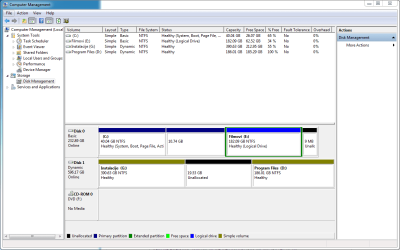
I did clean installation (deleted Program Files partition and C:\) partition, but somehow, my "Programming" partition got deleted as well.
It was 10 GB, and had some VERY important data on it.
When I go to Storage Manager, it's shown as part of C: partition, as you can see on image.
Disk Managment.PNG
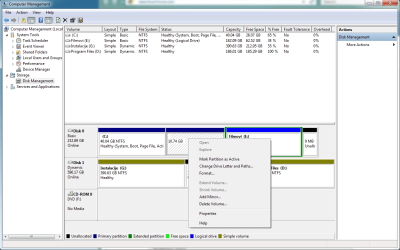
Now, when I try to right click it, this is how menu looks:
Disk Managment_menu.PNG
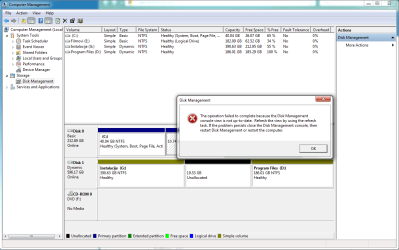
And, when I try to change it's drive letters and paths, it pops this error:
Disk Managment_error.PNG

I have Windows 7 Ultimate x64, build 7100 (RC).

Anyone knows how can I solve this problem?

Few notes:
1. I have 2 Hard Drives - 600 and 240 GB.
2. Unallocated space is for my new XP installation.
3. Partition E:\ is for movies, G:\ is for installations and .exe files, D:\ is "Program Files" partition.
 

My Computer

Computer Manufacturer/Model Number
Asus
OS
Windows 7 x64 RC (7100)
CPU
Intel Core 2 Duo E6420 @ 2133 MHz
Motherboard
Asus P5B (Intel P965 chipset)
Memory
2048 MB (2 x 1024 DDR2)
Graphics Card(s)
NVIDIA GeForce 8600 GT
Monitor(s) Displays
Samsung SyncMaster 206BW (20")
Screen Resolution
1680x1050 pixels at 60 Hz in True Colors
Hard Drives
Western Digital Hard Drive (WDC WD2500KS-00MJB0,250 GB)
Western Digital Hard Drive (WDC WD6400AAKS-65A7B2,640 GB)
PSU
I think like ~450 W
Case
Crappy one
Cooling
Air cooling
Keyboard
Genius Multimedia Keyboard
Mouse
Genius Optical Mouse
Internet Speed
ADSL 3Mbps/512Kbps
Other Info
Microphone: Genius;
Printer: HP LaserJet M1522nf;
Telephone: Nokia N95;
Multimedia / Flash: 1x1GB USB Flash, 1x2GB MP4 (TomCat)
Hi Blazeme welcome to the forums,

Have you tried setting the partition as active? You will need to set 'Mark partition as active' in order to allocate it a drive letter.
 

My Computer

Computer Manufacturer/Model Number
Compaq Desktop
OS
Windows 7 Ultimate x64
CPU
AMD Sempron Dual Core
Memory
3GB
Graphics Card(s)
NVIDIA GeForce 6150SE nForce 430
Screen Resolution
1024x768
Hard Drives
150GB Sata
Hi Blazeme welcome to the forums,
Thanks a lot & thnx for reply.

Have you tried setting the partition as active? You will need to set 'Mark partition as active' in order to allocate it a drive letter.
Hmm, actually, I did:
DM_make_it_activePNG.PNG
Now, I didn't clicked Yes cause of warning, and this is my only OS and etc and etc.
So, should I click yes there?

Just to make notice: I don't have OS on that partition. Nor on any else except C: (Win7 I'm running now).
 

My Computer

Computer Manufacturer/Model Number
Asus
OS
Windows 7 x64 RC (7100)
CPU
Intel Core 2 Duo E6420 @ 2133 MHz
Motherboard
Asus P5B (Intel P965 chipset)
Memory
2048 MB (2 x 1024 DDR2)
Graphics Card(s)
NVIDIA GeForce 8600 GT
Monitor(s) Displays
Samsung SyncMaster 206BW (20")
Screen Resolution
1680x1050 pixels at 60 Hz in True Colors
Hard Drives
Western Digital Hard Drive (WDC WD2500KS-00MJB0,250 GB)
Western Digital Hard Drive (WDC WD6400AAKS-65A7B2,640 GB)
PSU
I think like ~450 W
Case
Crappy one
Cooling
Air cooling
Keyboard
Genius Multimedia Keyboard
Mouse
Genius Optical Mouse
Internet Speed
ADSL 3Mbps/512Kbps
Other Info
Microphone: Genius;
Printer: HP LaserJet M1522nf;
Telephone: Nokia N95;
Multimedia / Flash: 1x1GB USB Flash, 1x2GB MP4 (TomCat)
I just want to clear something up (for my benefit LOL), it's the 10.7GB partition you wan access to isn't it?
 

My Computer

Computer Manufacturer/Model Number
Compaq Desktop
OS
Windows 7 Ultimate x64
CPU
AMD Sempron Dual Core
Memory
3GB
Graphics Card(s)
NVIDIA GeForce 6150SE nForce 430
Screen Resolution
1024x768
Hard Drives
150GB Sata
Hehe, yep, I only can't access that partition that I created long time ago, and it worked very well when I used to be on XP / Vista.

Edit - I just clicked format. It said that error occurred and that I should view system event log.
I've tried to find error concerning this, but I found nothing 0.0'
 

My Computer

Computer Manufacturer/Model Number
Asus
OS
Windows 7 x64 RC (7100)
CPU
Intel Core 2 Duo E6420 @ 2133 MHz
Motherboard
Asus P5B (Intel P965 chipset)
Memory
2048 MB (2 x 1024 DDR2)
Graphics Card(s)
NVIDIA GeForce 8600 GT
Monitor(s) Displays
Samsung SyncMaster 206BW (20")
Screen Resolution
1680x1050 pixels at 60 Hz in True Colors
Hard Drives
Western Digital Hard Drive (WDC WD2500KS-00MJB0,250 GB)
Western Digital Hard Drive (WDC WD6400AAKS-65A7B2,640 GB)
PSU
I think like ~450 W
Case
Crappy one
Cooling
Air cooling
Keyboard
Genius Multimedia Keyboard
Mouse
Genius Optical Mouse
Internet Speed
ADSL 3Mbps/512Kbps
Other Info
Microphone: Genius;
Printer: HP LaserJet M1522nf;
Telephone: Nokia N95;
Multimedia / Flash: 1x1GB USB Flash, 1x2GB MP4 (TomCat)
Your C: should be set as your primary partition which should have no effect on any other partitions you choose to activate thereafter. Give me a minute and i'll do some digging...
 

My Computer

Computer Manufacturer/Model Number
Compaq Desktop
OS
Windows 7 Ultimate x64
CPU
AMD Sempron Dual Core
Memory
3GB
Graphics Card(s)
NVIDIA GeForce 6150SE nForce 430
Screen Resolution
1024x768
Hard Drives
150GB Sata
Hmmm, sure thing, it is primary partition as far as I can see and I can't make it active (that option is disabled).
Again, thanks a lot for helping me out on this one :)

Btw, to quote myself cause I edited post:
Edit - I just clicked format. It said that error occurred and that I should view system event log.
I've tried to find error concerning this, but I found nothing 0.0'
 

My Computer

Computer Manufacturer/Model Number
Asus
OS
Windows 7 x64 RC (7100)
CPU
Intel Core 2 Duo E6420 @ 2133 MHz
Motherboard
Asus P5B (Intel P965 chipset)
Memory
2048 MB (2 x 1024 DDR2)
Graphics Card(s)
NVIDIA GeForce 8600 GT
Monitor(s) Displays
Samsung SyncMaster 206BW (20")
Screen Resolution
1680x1050 pixels at 60 Hz in True Colors
Hard Drives
Western Digital Hard Drive (WDC WD2500KS-00MJB0,250 GB)
Western Digital Hard Drive (WDC WD6400AAKS-65A7B2,640 GB)
PSU
I think like ~450 W
Case
Crappy one
Cooling
Air cooling
Keyboard
Genius Multimedia Keyboard
Mouse
Genius Optical Mouse
Internet Speed
ADSL 3Mbps/512Kbps
Other Info
Microphone: Genius;
Printer: HP LaserJet M1522nf;
Telephone: Nokia N95;
Multimedia / Flash: 1x1GB USB Flash, 1x2GB MP4 (TomCat)
As you've done a clean install i take it you have the Windows 7 boot DVD? If you do you could set the partition as active. This will not affect your files but if it does affect your boot then you can repair install. I can't see this happening though as you are just activating and extended partition (of sorts).

Also, you won't be able to format until it's active as far as i know.
 

My Computer

Computer Manufacturer/Model Number
Compaq Desktop
OS
Windows 7 Ultimate x64
CPU
AMD Sempron Dual Core
Memory
3GB
Graphics Card(s)
NVIDIA GeForce 6150SE nForce 430
Screen Resolution
1024x768
Hard Drives
150GB Sata
As you've done a clean install i take it you have the Windows 7 boot DVD? If you do you could set the partition as active.
Yes, I do have it. How am I supposed to do that via DVD? If you could just tell me in few steps.

Also, you won't be able to format until it's active as far as i know.
Ye, I see now.
Every other partition but this one I'm trying to access is activated.


Also, thing that I don't understand is that this partition doesn't have any drive letter, label or anything like this. And yet, it's not unallocated....
 

My Computer

Computer Manufacturer/Model Number
Asus
OS
Windows 7 x64 RC (7100)
CPU
Intel Core 2 Duo E6420 @ 2133 MHz
Motherboard
Asus P5B (Intel P965 chipset)
Memory
2048 MB (2 x 1024 DDR2)
Graphics Card(s)
NVIDIA GeForce 8600 GT
Monitor(s) Displays
Samsung SyncMaster 206BW (20")
Screen Resolution
1680x1050 pixels at 60 Hz in True Colors
Hard Drives
Western Digital Hard Drive (WDC WD2500KS-00MJB0,250 GB)
Western Digital Hard Drive (WDC WD6400AAKS-65A7B2,640 GB)
PSU
I think like ~450 W
Case
Crappy one
Cooling
Air cooling
Keyboard
Genius Multimedia Keyboard
Mouse
Genius Optical Mouse
Internet Speed
ADSL 3Mbps/512Kbps
Other Info
Microphone: Genius;
Printer: HP LaserJet M1522nf;
Telephone: Nokia N95;
Multimedia / Flash: 1x1GB USB Flash, 1x2GB MP4 (TomCat)
It is a very strange issue :p

You will need to restart your PC with the DVD in the drive. On the very first screen (POST) you should be able to press Del, F1 or F2 to access the BIOS settings. From here you can change 'Boot' priority to CD/DVD first (it's normally a list, you just have to move the CD/DVD device to the top).

Once done, when you save and exit, the PC will reboot. Look out for 'Press any key to boot from cd...' and press a key.

The next steps you well know.


Hope this helps :)
 

My Computer

Computer Manufacturer/Model Number
Compaq Desktop
OS
Windows 7 Ultimate x64
CPU
AMD Sempron Dual Core
Memory
3GB
Graphics Card(s)
NVIDIA GeForce 6150SE nForce 430
Screen Resolution
1024x768
Hard Drives
150GB Sata
Ohhhh that I knew that :)
I didn't understand you well (my english suxx :()
It is a very strange issue :P
The way I like it :)

Ok, I'm off to reboot it and try it out :P
Thanks a lot for all help, will report back with results :P
 

My Computer

Computer Manufacturer/Model Number
Asus
OS
Windows 7 x64 RC (7100)
CPU
Intel Core 2 Duo E6420 @ 2133 MHz
Motherboard
Asus P5B (Intel P965 chipset)
Memory
2048 MB (2 x 1024 DDR2)
Graphics Card(s)
NVIDIA GeForce 8600 GT
Monitor(s) Displays
Samsung SyncMaster 206BW (20")
Screen Resolution
1680x1050 pixels at 60 Hz in True Colors
Hard Drives
Western Digital Hard Drive (WDC WD2500KS-00MJB0,250 GB)
Western Digital Hard Drive (WDC WD6400AAKS-65A7B2,640 GB)
PSU
I think like ~450 W
Case
Crappy one
Cooling
Air cooling
Keyboard
Genius Multimedia Keyboard
Mouse
Genius Optical Mouse
Internet Speed
ADSL 3Mbps/512Kbps
Other Info
Microphone: Genius;
Printer: HP LaserJet M1522nf;
Telephone: Nokia N95;
Multimedia / Flash: 1x1GB USB Flash, 1x2GB MP4 (TomCat)
Back
Top