Partition the Hard Drive in a Windows 7 Install

How to Partition the Hard Drive in a Windows 7 Install


   Information
The purpose of this tutorial is to see what tools are available to partition the hard drive while installing Windows 7. Although not a complete partitioning utility, you can delete existing partitions, create new partitions, extend partitions into unallocated space, shrink existing partitions, and format.
   Tip
It is not necessary to create the Windows 7 partitions on a new (empty) hard drive or format the partitions before installing Windows 7 as the installer will do that automatically.


Here's How:
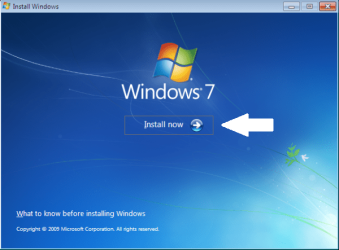
1. Boot your computer to the Windows 7 DVD. At this screen choose to install now.
partition_01.png
partition_02.png
2. Select to "Go online" for latest updates.
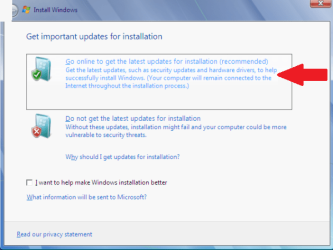
partition_03.png
partition_04.png
3. Select the Operating System you wish to install.
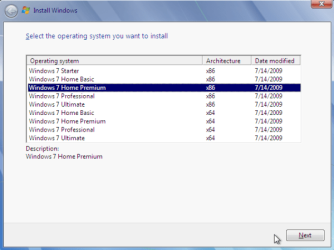
partition_05.png
4. Accept the license terms and click next.
partition_06.png
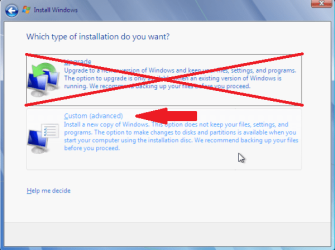
5. Select "Custom (advanced)".
partition_07.png
6. In this screen you see existing partitions (my test setup). Click "Drive options (advanced)".
partition_08.png
7. I used "Delete" to remove the existing partitions. Now select "New" to create new partitions in the Unallocated space.
partition_09.png
8. You can choose to use the entire empty space, or just a part of the space.
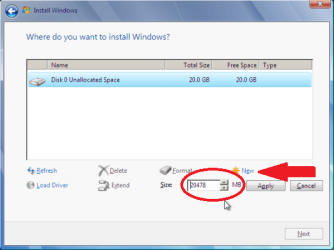
partition_10.png
9. In this screen, I have chosen to use half of the 20 GB available.
partition_11.png
10. Windows will, by default, create the "System Reserved" partition.
partition_12.png
11. In this screen you see the "Reserved Partition" of 100 MB. I recommend keeping this. Next, you have the options of creating a new partition in the unallocated space, extending the selected partition into the unallocated space, shrinking the selected partition, or deleting one or all existing partitions.
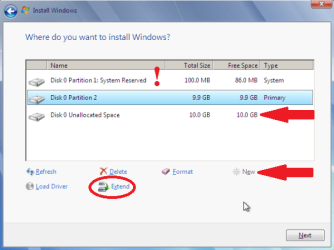
partition_13.png
12. I have chosen to extend the partition into all the unallocated space.
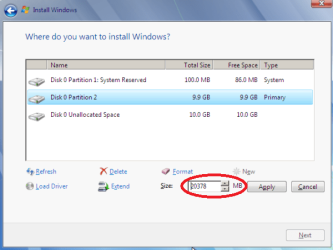
partition_14.png
Now you can complete your Windows 7 installation in the partitions you have created. You can also cancel the installation process here while leaving the newly created partitions intact. Useful if you intend to install a different Operating System into one of the newly created partitions.

Conclusion:

While the Windows 7 hard drive partition utility is limited, it offers a convenient way to install Windows 7 without filling the entire hard drive. The leftover space can then be used for other purposes.


Last edited by a moderator:
No option available to format hard drive with W 7

Hi there,

I just installed Windows 7 over my Vista and all those steps you listed were identical except steps 7 & 8. I did not have an option to format my hardrive and now that Windows 7 is installed, I am unable to custom reinstall it.

Can you please help.

Thanks.
 

My Computer My Computer

At a glance

Windows 7 Ultimate 32 bit
OS
Windows 7 Ultimate 32 bit
Not sure if anyone is responding to this thread, but have a question? On the 1st page of this tutorial it says in the tip:

~~~~~~~~~~~~~~~~~~~~~~~~~~~~~~~~~~~~~~~~~~~~~~~~~~~~~~~~~~~~~~~~~~~~~
tipsmall.png
Tip It is not necessary to create the Windows 7 partitions on a new (empty) hard drive or format the partitions before installing Windows 7 as the installer will do that automatically.
~~~~~~~~~~~~~~~~~~~~~~~~~~~~~~~~~~~~~~~~~~~~~~~~~~~~~~~~~~~~~~~~~~~~~

I currently have Vista 32 bit OS installed and will be clean installing a Win 7/64 Pro Upgrade version with the CD disk, onto a new (empty) hard drive. I have no knowledge of partitioning, but if the Windows 7 installer will do the partitioning automatically, then that's a time saver for me.

Question
: Based on the above "Tip", the Windows installer will do the partitioning automatically on the new HDD. And I won't have to do any manual partitioning myself, correct?

Thanks, Vista.
 

My Computer My Computer

At a glance

64 bit OS?Intel Core 13 8th Generation4GB DDR2, 2 Crucial memory upgrade sticks
Computer type
Laptop
Computer Manufacturer/Model Number
HP Windows 10
OS
64 bit OS?
CPU
Intel Core 13 8th Generation
Motherboard
Acer, Inc. Chapala [U2E1]
Memory
4GB DDR2, 2 Crucial memory upgrade sticks
Hard Drives
128GB SSD
Cooling
Ice
Mouse
Laptop finger pad and mouse
Internet Speed
Embarq
Antivirus
MalewareBytes
Browser
Firefox
Only if you want to, what size is the drive ?
 

My Computer My Computer

At a glance

Windows 10 Pro x64Intel Core i7 6700KGSkill TridentZ RGB 16GB 3600 16-16-16-36EVGA GTX 980 Ti SC x2
Computer type
PC/Desktop
Computer Manufacturer/Model Number
Skylake Special #666
OS
Windows 10 Pro x64
CPU
Intel Core i7 6700K
Motherboard
Asus Sabertooth Z170 Mark 1
Memory
GSkill TridentZ RGB 16GB 3600 16-16-16-36
Graphics Card(s)
EVGA GTX 980 Ti SC x2
Sound Card
Realtek High Definition
Monitor(s) Displays
AOC G2460PG
Screen Resolution
1920 x 1080 144Hz
Hard Drives
Samsung 860 Pro 256GB, Seagate Barracuda 4TB x2
PSU
EVGA 1000 P2, EVGA White Custom Braided Cables
Case
Corsair Vengeance C70 Gunmetal Black
Cooling
Corsair H100i v2, Corsair ML120 x2, Thermal Grizzly Kryonaut
Keyboard
Logitech G910 Orion Spectrum
Mouse
Logitech G700s
Internet Speed
Verizon Fios Quantum Gateway 75/75
Antivirus
Windows Defender, Malwarebytes Free 3.8.3
Browser
Chrome
Other Info
Corsair SP120 x4, LG Blu-ray Drive, Durabrand HT-395 100 Watt Dolby Digital Amp, Corsair H2100 Wireless 7.1 Headset
750GB SSHDD. My current drive has a (C:) drive for the system files, and a (D:) drive for the DATA.

I presume Windows installer will auto partition these two drives same as above, on the new HDD for me during the install process?

That is my question?

Thanks.
 

My Computer My Computer

At a glance

64 bit OS?Intel Core 13 8th Generation4GB DDR2, 2 Crucial memory upgrade sticks
Computer type
Laptop
Computer Manufacturer/Model Number
HP Windows 10
OS
64 bit OS?
CPU
Intel Core 13 8th Generation
Motherboard
Acer, Inc. Chapala [U2E1]
Memory
4GB DDR2, 2 Crucial memory upgrade sticks
Hard Drives
128GB SSD
Cooling
Ice
Mouse
Laptop finger pad and mouse
Internet Speed
Embarq
Antivirus
MalewareBytes
Browser
Firefox
Hello Vista32toWin7,

If you do a clean install and delete all partitions on the SSHDD until the SSHDD shows as unallocated space, then installation will create a 100 MB System Reserved partition, and a partition to the left if this for Windows 7.
http://www.sevenforums.com/tutorials/1649-clean-install-windows-7-a.html
Any other partitions you want could be added later after installation is finished if you like.
http://www.sevenforums.com/tutorials/2672-partition-volume-shrink.html

http://www.sevenforums.com/tutorials/2674-partition-volume-create-new.html
Hope this helps, :)
Shawn
 

My Computer My Computer

At a glance

64-bit Windows 11 Pro for WorkstationsIntel i7-8700K OC'd to 5 GHz64 GB (4x16GB) G.SKILL TridentZ RGB DDR4 3600...ASUS ROG-STRIX-GTX1080TI-O11G-GAMING
Computer type
PC/Desktop
Computer Manufacturer/Model Number
Self built custom
OS
64-bit Windows 11 Pro for Workstations
CPU
Intel i7-8700K OC'd to 5 GHz
Motherboard
ASUS ROG Maximus XI Formula Z390
Memory
64 GB (4x16GB) G.SKILL TridentZ RGB DDR4 3600 MHz
Graphics Card(s)
ASUS ROG-STRIX-GTX1080TI-O11G-GAMING
Sound Card
Integrated
Monitor(s) Displays
2 x Samsung Odyssey G7 27"
Screen Resolution
2560x1440
Hard Drives
1TB Samsung 990 PRO M.2,
4TB Samsung 990 PRO PRO M.2,
TerraMaster F8 SSD Plus NAS
PSU
Seasonic Prime Titanium 850W
Case
Thermaltake Core P3
Cooling
Corsair Hydro H115i
Keyboard
Logitech wireless K800
Mouse
Logitech MX Master 4
Internet Speed
2 Gb/s Download and 100 Mb/s Upload
Antivirus
Malwarebyte Anti-Malware Premium
Browser
Google Chrome
Other Info
Logitech Z625 speaker system,
Logitech BRIO 4K Pro webcam,
HP Color LaserJet Pro MFP M477fdn,
APC SMART-UPS RT 1000 XL - SURT1000XLI,
Galaxy S23 Plus phone
Thanks Brink. I appreciate the reply and links, but I'm linked out? :confused:

~~~~~~~~~~~~~~~~~~~~~~~~~~~~~~~~~~~~~~~~~~~~~~~~~~~~~~~~~~~~~~~~~~~~~
Tip It is not necessary to create the Windows 7 partitions on a new (empty) hard drive or format the partitions before installing Windows 7 as the installer will do that automatically.
~~~~~~~~~~~~~~~~~~~~~~~~~~~~~~~~~~~~~~~~~~~~~~~~~~~~~~~~~~~~~~~~~~~~~

I just want to know if the above tip means that I don't have to format/partition my new drive if the Windows installer will do it for me? Yes or no?

And give me what I have on my current drive, a (C:) drive and a (D:) drive?

~~~~~~~~~~~~~~~~~~~~~~~~~~~~~~~~~~~~~~~~~~~~~~~~~~~~~~~~~~~~~~~~~~~~~~

If you do a clean install and delete all partitions on the SSHDD until the SSHDD shows as unallocated space, then installation will create a 100 MB System Reserved partition, and a partition to the left if this for Windows 7.

R. I presume here you are saying that , not the [installer], should delete all partitions on the new HDD? I have no clue what, if any, partitions a new HDD would have? Or where I would find/see this info on my computer?

Then a 100 MB reserved partition will be created by the installer. Not sure what this small partition would be used for?

And a partition to the left of this for Windows 7. Where would I be seeing this?

As you can see I have little knowledge of partitioning/formatting, etc, and why I asked my simple y/n question initially and again lastly?

Thanks.
 

My Computer My Computer

At a glance

64 bit OS?Intel Core 13 8th Generation4GB DDR2, 2 Crucial memory upgrade sticks
Computer type
Laptop
Computer Manufacturer/Model Number
HP Windows 10
OS
64 bit OS?
CPU
Intel Core 13 8th Generation
Motherboard
Acer, Inc. Chapala [U2E1]
Memory
4GB DDR2, 2 Crucial memory upgrade sticks
Hard Drives
128GB SSD
Cooling
Ice
Mouse
Laptop finger pad and mouse
Internet Speed
Embarq
Antivirus
MalewareBytes
Browser
Firefox
There's to much information to post it all here again, but if you look at step 8 in the clean install tutorial below it and the links it will explain all of this better.
http://www.sevenforums.com/tutorials/1649-clean-install-windows-7-a.html
For not, a new HDD should already be unallocated, so you should be seeing the same as the screenshot under step 7, and can just click on Next at step 8. No need to worry about anything else. :)

2440d1231630464-clean-install-windows-7-step7.jpg
 

My Computer My Computer

At a glance

64-bit Windows 11 Pro for WorkstationsIntel i7-8700K OC'd to 5 GHz64 GB (4x16GB) G.SKILL TridentZ RGB DDR4 3600...ASUS ROG-STRIX-GTX1080TI-O11G-GAMING
Computer type
PC/Desktop
Computer Manufacturer/Model Number
Self built custom
OS
64-bit Windows 11 Pro for Workstations
CPU
Intel i7-8700K OC'd to 5 GHz
Motherboard
ASUS ROG Maximus XI Formula Z390
Memory
64 GB (4x16GB) G.SKILL TridentZ RGB DDR4 3600 MHz
Graphics Card(s)
ASUS ROG-STRIX-GTX1080TI-O11G-GAMING
Sound Card
Integrated
Monitor(s) Displays
2 x Samsung Odyssey G7 27"
Screen Resolution
2560x1440
Hard Drives
1TB Samsung 990 PRO M.2,
4TB Samsung 990 PRO PRO M.2,
TerraMaster F8 SSD Plus NAS
PSU
Seasonic Prime Titanium 850W
Case
Thermaltake Core P3
Cooling
Corsair Hydro H115i
Keyboard
Logitech wireless K800
Mouse
Logitech MX Master 4
Internet Speed
2 Gb/s Download and 100 Mb/s Upload
Antivirus
Malwarebyte Anti-Malware Premium
Browser
Google Chrome
Other Info
Logitech Z625 speaker system,
Logitech BRIO 4K Pro webcam,
HP Color LaserJet Pro MFP M477fdn,
APC SMART-UPS RT 1000 XL - SURT1000XLI,
Galaxy S23 Plus phone
Help?

Hello
Can't instal windows becouse selected disk is of the GPT partition style. How to change that or how to instal windows?
 

My Computer My Computer

At a glance

Windows 7 Home premium
Computer type
PC/Desktop
OS
Windows 7 Home premium

My Computer My Computer

At a glance

ME/XP/Vista/Win7
OS
ME/XP/Vista/Win7

My Computer My Computer

At a glance

64-bit Windows 11 Pro for WorkstationsIntel i7-8700K OC'd to 5 GHz64 GB (4x16GB) G.SKILL TridentZ RGB DDR4 3600...ASUS ROG-STRIX-GTX1080TI-O11G-GAMING
Computer type
PC/Desktop
Computer Manufacturer/Model Number
Self built custom
OS
64-bit Windows 11 Pro for Workstations
CPU
Intel i7-8700K OC'd to 5 GHz
Motherboard
ASUS ROG Maximus XI Formula Z390
Memory
64 GB (4x16GB) G.SKILL TridentZ RGB DDR4 3600 MHz
Graphics Card(s)
ASUS ROG-STRIX-GTX1080TI-O11G-GAMING
Sound Card
Integrated
Monitor(s) Displays
2 x Samsung Odyssey G7 27"
Screen Resolution
2560x1440
Hard Drives
1TB Samsung 990 PRO M.2,
4TB Samsung 990 PRO PRO M.2,
TerraMaster F8 SSD Plus NAS
PSU
Seasonic Prime Titanium 850W
Case
Thermaltake Core P3
Cooling
Corsair Hydro H115i
Keyboard
Logitech wireless K800
Mouse
Logitech MX Master 4
Internet Speed
2 Gb/s Download and 100 Mb/s Upload
Antivirus
Malwarebyte Anti-Malware Premium
Browser
Google Chrome
Other Info
Logitech Z625 speaker system,
Logitech BRIO 4K Pro webcam,
HP Color LaserJet Pro MFP M477fdn,
APC SMART-UPS RT 1000 XL - SURT1000XLI,
Galaxy S23 Plus phone
thanks for the help :D
 

My Computer My Computer

At a glance

Windows 7 Home premium
Computer type
PC/Desktop
OS
Windows 7 Home premium
You're most welcome Penki. Glad we could help. :)
 

My Computer My Computer

At a glance

64-bit Windows 11 Pro for WorkstationsIntel i7-8700K OC'd to 5 GHz64 GB (4x16GB) G.SKILL TridentZ RGB DDR4 3600...ASUS ROG-STRIX-GTX1080TI-O11G-GAMING
Computer type
PC/Desktop
Computer Manufacturer/Model Number
Self built custom
OS
64-bit Windows 11 Pro for Workstations
CPU
Intel i7-8700K OC'd to 5 GHz
Motherboard
ASUS ROG Maximus XI Formula Z390
Memory
64 GB (4x16GB) G.SKILL TridentZ RGB DDR4 3600 MHz
Graphics Card(s)
ASUS ROG-STRIX-GTX1080TI-O11G-GAMING
Sound Card
Integrated
Monitor(s) Displays
2 x Samsung Odyssey G7 27"
Screen Resolution
2560x1440
Hard Drives
1TB Samsung 990 PRO M.2,
4TB Samsung 990 PRO PRO M.2,
TerraMaster F8 SSD Plus NAS
PSU
Seasonic Prime Titanium 850W
Case
Thermaltake Core P3
Cooling
Corsair Hydro H115i
Keyboard
Logitech wireless K800
Mouse
Logitech MX Master 4
Internet Speed
2 Gb/s Download and 100 Mb/s Upload
Antivirus
Malwarebyte Anti-Malware Premium
Browser
Google Chrome
Other Info
Logitech Z625 speaker system,
Logitech BRIO 4K Pro webcam,
HP Color LaserJet Pro MFP M477fdn,
APC SMART-UPS RT 1000 XL - SURT1000XLI,
Galaxy S23 Plus phone
So I have been running 7 for the past 5 years on an old dell latitude with only 55GB memory. Never really had any problems with functionality or lag ups, but wanted to do a clean install. My original setup never had partitions and was wondering if 55GB was enough to have a separate partition for the OS and another for everything else? If so, how large would you recommend each partition to be (if 2 would suffice) as i feel somewhat comfortable seeing in the example he is using only 20GB?
 

My Computer My Computer

At a glance

Microsoft Windows 7 Professional 64-bit SP1Intel(R) Core(TM) i5 CPU M 520 @ 2.40GHz8.00 GBNVIDIA NVS 3100M
Computer type
PC/Desktop
OS
Microsoft Windows 7 Professional 64-bit SP1
CPU
Intel(R) Core(TM) i5 CPU M 520 @ 2.40GHz
Motherboard
Dell Inc. 0K42JR
Memory
8.00 GB
Graphics Card(s)
NVIDIA NVS 3100M
Sound Card
(1) NVIDIA High Definition Audio (2) IDT High Definition A
Monitor(s) Displays
1
Screen Resolution
1440 x 900 x 32 bits (4294967296 colors) @ 59 Hz
Hard Drives
Samsung SSD 840 PRO Series ATA Device
Hello Berkey,

It depends, but if you don't plan on installing much, then 55 GB should be fine for Windows. :)
 

My Computer My Computer

At a glance

64-bit Windows 11 Pro for WorkstationsIntel i7-8700K OC'd to 5 GHz64 GB (4x16GB) G.SKILL TridentZ RGB DDR4 3600...ASUS ROG-STRIX-GTX1080TI-O11G-GAMING
Computer type
PC/Desktop
Computer Manufacturer/Model Number
Self built custom
OS
64-bit Windows 11 Pro for Workstations
CPU
Intel i7-8700K OC'd to 5 GHz
Motherboard
ASUS ROG Maximus XI Formula Z390
Memory
64 GB (4x16GB) G.SKILL TridentZ RGB DDR4 3600 MHz
Graphics Card(s)
ASUS ROG-STRIX-GTX1080TI-O11G-GAMING
Sound Card
Integrated
Monitor(s) Displays
2 x Samsung Odyssey G7 27"
Screen Resolution
2560x1440
Hard Drives
1TB Samsung 990 PRO M.2,
4TB Samsung 990 PRO PRO M.2,
TerraMaster F8 SSD Plus NAS
PSU
Seasonic Prime Titanium 850W
Case
Thermaltake Core P3
Cooling
Corsair Hydro H115i
Keyboard
Logitech wireless K800
Mouse
Logitech MX Master 4
Internet Speed
2 Gb/s Download and 100 Mb/s Upload
Antivirus
Malwarebyte Anti-Malware Premium
Browser
Google Chrome
Other Info
Logitech Z625 speaker system,
Logitech BRIO 4K Pro webcam,
HP Color LaserJet Pro MFP M477fdn,
APC SMART-UPS RT 1000 XL - SURT1000XLI,
Galaxy S23 Plus phone
Hello Berkey,

It depends, but if you don't plan on installing much, then 55 GB should be fine for Windows. :)

I dont install much in the way of games and what not. My last real set up with and the bulk of most programs would include:

Chrome
Avast
Malwarebytes
Sandboxie
Winpatrol
CCenhancer
Zemana Antikeylogger
Microsoft Word and Excell (custom install as I don't use the other components of the suite)

toss in a few smaller programs for viewing comic books and an occasional viewer such as windirstat and that would be what the set up on this laptop looks like. I keep it rather bare bones and ususaly transfer most files of size to a external HDD. Only documents and the occasional pic/song stay on the hard drive long term.

I have no issue with the 55GB for running 7, but would splitting the 55Gb in half be wise for 2 partitions or should I just leave it all in 1 as it was in the past?
 

My Computer My Computer

At a glance

Microsoft Windows 7 Professional 64-bit SP1Intel(R) Core(TM) i5 CPU M 520 @ 2.40GHz8.00 GBNVIDIA NVS 3100M
Computer type
PC/Desktop
OS
Microsoft Windows 7 Professional 64-bit SP1
CPU
Intel(R) Core(TM) i5 CPU M 520 @ 2.40GHz
Motherboard
Dell Inc. 0K42JR
Memory
8.00 GB
Graphics Card(s)
NVIDIA NVS 3100M
Sound Card
(1) NVIDIA High Definition Audio (2) IDT High Definition A
Monitor(s) Displays
1
Screen Resolution
1440 x 900 x 32 bits (4294967296 colors) @ 59 Hz
Hard Drives
Samsung SSD 840 PRO Series ATA Device
I have about 55 applications installed on C, along with Windows 7 Home Premium, fully updated.

Occupied space is 32 GB. I use a single partition on the 80 GB drive. My data is on an entirely different drive.

I don't see any over-riding reason why you should use more than a single partition if all you have is 55 GB. What would be the point?

I assume you have plenty of storage space on some other drive for your personal files. Even if you don't have many personal files and intend to keep them on the same physical drive as the OS, I don't see any reason to split up 55 GB. If you had several hundred GB of space and wanted to keep say 70 for the OS and 250 for personal data, that would be another story. But if you split such a small space as 55 GB, it's just a matter of time before you need more space than you have as you don't know how fast each of the split partitions will grow.
 

My Computer My Computer

At a glance

Windows 7 Home Premium SP1, 64-bitIntel Skylake i5-6600K, not overclocked8 GB HyperX DDR4-2666 (2 x 4 GB)none; graphics are integrated on CPU
Computer type
PC/Desktop
Computer Manufacturer/Model Number
Ignatz Special; 4 speed manual gearbox; factory air conditioning; one of one
OS
Windows 7 Home Premium SP1, 64-bit
CPU
Intel Skylake i5-6600K, not overclocked
Motherboard
AsRock Z170M Extreme 4, micro ATX
Memory
8 GB HyperX DDR4-2666 (2 x 4 GB)
Graphics Card(s)
none; graphics are integrated on CPU
Sound Card
onboard: Realtek ALC1150; external: USB Behringer UF0-202
Monitor(s) Displays
Dell S2340M 23 inch IPS
Screen Resolution
1600 x 900
Hard Drives
System: Crucial MX100 series SSD, 128 GB;
Data: Samsung Spinpoint 103SJ, 1 TB;
Backup: WD Caviar Green WD30EZRX-00D8PB0, 3 TB
PSU
Rosewill SilentNight 500 watt fanless, semi-modular
Case
Antec Solo II
Cooling
Noctua NH-U12S; Noctua F12 intake, Noctua S12A exhaust
Keyboard
Microsoft 200 6JH-00001 USB
Mouse
Dell or Microsoft optical wired; USB
Antivirus
Microsoft Security Essentials and Malwarebytes Premium
Browser
Pale Moon
Other Info
All fans PWM; speeds at idle: CPU circa 500 rpm; intake circa 600 rpm; exhaust circa 600 rpm; CPU temps 27 idle and 47 C load in a warm room (27 C/81 F) when running Intel Extreme Tuning Utility stress test.
I have about 55 applications installed on C, along with Windows 7 Home Premium, fully updated.

Occupied space is 32 GB. I use a single partition on the 80 GB drive. My data is on an entirely different drive.

I don't see any over-riding reason why you should use more than a single partition if all you have is 55 GB. What would be the point?

I assume you have plenty of storage space on some other drive for your personal files. Even if you don't have many personal files and intend to keep them on the same physical drive as the OS, I don't see any reason to split up 55 GB. If you had several hundred GB of space and wanted to keep say 70 for the OS and 250 for personal data, that would be another story. But if you split such a small space as 55 GB, it's just a matter of time before you need more space than you have as you don't know how fast each of the split partitions will grow.

Thanks for the tip. i finished my reinstall with the single partition as the old saying "if it ain't fix don't break it" fits with my scenerio. Thanks again to you and brink
 

My Computer My Computer

At a glance

Microsoft Windows 7 Professional 64-bit SP1Intel(R) Core(TM) i5 CPU M 520 @ 2.40GHz8.00 GBNVIDIA NVS 3100M
Computer type
PC/Desktop
OS
Microsoft Windows 7 Professional 64-bit SP1
CPU
Intel(R) Core(TM) i5 CPU M 520 @ 2.40GHz
Motherboard
Dell Inc. 0K42JR
Memory
8.00 GB
Graphics Card(s)
NVIDIA NVS 3100M
Sound Card
(1) NVIDIA High Definition Audio (2) IDT High Definition A
Monitor(s) Displays
1
Screen Resolution
1440 x 900 x 32 bits (4294967296 colors) @ 59 Hz
Hard Drives
Samsung SSD 840 PRO Series ATA Device
Seriously Thank you :D

I have been searching for such a helpfull answer for days and now I found the best one
THANK YOU SO MUCH :D :party:
 

My Computer My Computer

At a glance

Windows 8
Computer type
PC/Desktop
Computer Manufacturer/Model Number
Compaq
OS
Windows 8
I did all this but wasnt able to install windows on any of that partitions:( "windows cannot be installed to this disk. The selected disk is of the GPT partition style".
 

My Computer My Computer

At a glance

windows 8.1 64x8gb
Computer type
Laptop
Computer Manufacturer/Model Number
asus notebook
OS
windows 8.1 64x
Memory
8gb
Hard Drives
some ssd hybrid

My Computer My Computer

At a glance

64-bit Windows 11 Pro for WorkstationsIntel i7-8700K OC'd to 5 GHz64 GB (4x16GB) G.SKILL TridentZ RGB DDR4 3600...ASUS ROG-STRIX-GTX1080TI-O11G-GAMING
Computer type
PC/Desktop
Computer Manufacturer/Model Number
Self built custom
OS
64-bit Windows 11 Pro for Workstations
CPU
Intel i7-8700K OC'd to 5 GHz
Motherboard
ASUS ROG Maximus XI Formula Z390
Memory
64 GB (4x16GB) G.SKILL TridentZ RGB DDR4 3600 MHz
Graphics Card(s)
ASUS ROG-STRIX-GTX1080TI-O11G-GAMING
Sound Card
Integrated
Monitor(s) Displays
2 x Samsung Odyssey G7 27"
Screen Resolution
2560x1440
Hard Drives
1TB Samsung 990 PRO M.2,
4TB Samsung 990 PRO PRO M.2,
TerraMaster F8 SSD Plus NAS
PSU
Seasonic Prime Titanium 850W
Case
Thermaltake Core P3
Cooling
Corsair Hydro H115i
Keyboard
Logitech wireless K800
Mouse
Logitech MX Master 4
Internet Speed
2 Gb/s Download and 100 Mb/s Upload
Antivirus
Malwarebyte Anti-Malware Premium
Browser
Google Chrome
Other Info
Logitech Z625 speaker system,
Logitech BRIO 4K Pro webcam,
HP Color LaserJet Pro MFP M477fdn,
APC SMART-UPS RT 1000 XL - SURT1000XLI,
Galaxy S23 Plus phone
Back
Top