Solved Partitioning, Windows 7 will not show 2nd partition in My Computer

Techmenot

New member
Local time
7:56 PM
Messages
15
Hi,

I sure hope someone will be able to help me on this.
I partitioned a 2Tb hardrive into 3 partitions but Windows 7(64bit) is hiding the 2nd primary partition, it is not showing up in the My Computer.

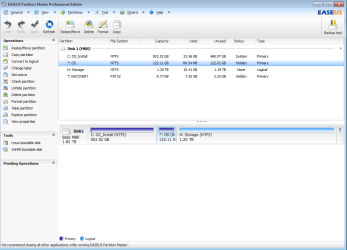
It shows as hidden in EaseUS and I can't change the drive name via Disk Management because the options are all grayed out except for the "Delete Volume" and no option to change drive letter in EaseUS..

I have formatted the drive and had deleted it too and create a new partition but still the same. All 3 partitions are NTFS and the 3rd one is logical.
I have made it unhidden by the Partition Manager and it shows up in My Computer until I reboot and it's hidden again.

I am hoping to create a dual boot system that's why I created 3 partitions (2 OSes and 1 storage).
Does anyone know what's wrong here?
Thanks for any input.
 

My Computer My Computer

At a glance

Windows 7 Home Premium 64bitIntel i7 26008 Gb RAM2 Gb
Computer Manufacturer/Model Number
Asus
OS
Windows 7 Home Premium 64bit
CPU
Intel i7 2600
Motherboard
Foxconn
Memory
8 Gb RAM
Graphics Card(s)
2 Gb
Sound Card
RealTek
Monitor(s) Displays
LG
Hard Drives
Generic
Case
Pryon

My Computer My Computer

At a glance

Windows 7 Ultimate SP1 64-BitIntel Core i7 870 @ 2.93GHz8Gb Dual-Channel DDR3 @ 664MHznVidia GeForce GTX 460 1024MB dedicated RAM
Computer Manufacturer/Model Number
HP Pavilion Elite 495UK
OS
Windows 7 Ultimate SP1 64-Bit
CPU
Intel Core i7 870 @ 2.93GHz
Motherboard
MSI 2A9C (CPU1)
Memory
8Gb Dual-Channel DDR3 @ 664MHz
Graphics Card(s)
nVidia GeForce GTX 460 1024MB dedicated RAM
Sound Card
Realtek HD Audio
Monitor(s) Displays
HP2310i
Screen Resolution
1920 x 1080
Hard Drives
1x1954GB Hitachi HDS22020ALA 330 (RAID), 1x1954GB Hitachi External for backup and storage
PSU
460W
Case
HP Elite
Cooling
Air cooled
Keyboard
Logitech K750 solar-powered keyboard
Mouse
Logitech Wireless M180 mouse
Internet Speed
2Mb
Other Info
Pure Avanti Flow Internet Radio with iPod Dock, 64Gb iPod, HP USB Speakers, Sony MDR-V500 Headphones, Sony Vaio F-Series Laptop
Here are the screenshots, thanks.
 

Attachments

  • Picture1.png
    Picture1.png
    129.6 KB · Views: 665
  • picture.png
    picture.png
    32.2 KB · Views: 230

My Computer My Computer

At a glance

Windows 7 Home Premium 64bitIntel i7 26008 Gb RAM2 Gb
Computer Manufacturer/Model Number
Asus
OS
Windows 7 Home Premium 64bit
CPU
Intel i7 2600
Motherboard
Foxconn
Memory
8 Gb RAM
Graphics Card(s)
2 Gb
Sound Card
RealTek
Monitor(s) Displays
LG
Hard Drives
Generic
Case
Pryon
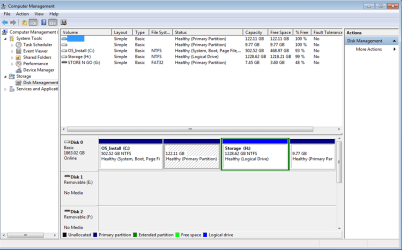
The partition mark "OS" 122.11 GB is the one that is not showing in My Computer.
The "STORE N GO"(G) on the left .png is a flashdrive that someone had left plugged in when the screenshot was taken..
 

My Computer My Computer

At a glance

Windows 7 Home Premium 64bitIntel i7 26008 Gb RAM2 Gb
Computer Manufacturer/Model Number
Asus
OS
Windows 7 Home Premium 64bit
CPU
Intel i7 2600
Motherboard
Foxconn
Memory
8 Gb RAM
Graphics Card(s)
2 Gb
Sound Card
RealTek
Monitor(s) Displays
LG
Hard Drives
Generic
Case
Pryon
Thanks for the screenshots, but we need to see which is the active partition.

Can you please expand Disk Management so that we can see which is the active partition and post another screenshot?
 

My Computer My Computer

At a glance

Windows 7 Ultimate SP1 64-BitIntel Core i7 870 @ 2.93GHz8Gb Dual-Channel DDR3 @ 664MHznVidia GeForce GTX 460 1024MB dedicated RAM
Computer Manufacturer/Model Number
HP Pavilion Elite 495UK
OS
Windows 7 Ultimate SP1 64-Bit
CPU
Intel Core i7 870 @ 2.93GHz
Motherboard
MSI 2A9C (CPU1)
Memory
8Gb Dual-Channel DDR3 @ 664MHz
Graphics Card(s)
nVidia GeForce GTX 460 1024MB dedicated RAM
Sound Card
Realtek HD Audio
Monitor(s) Displays
HP2310i
Screen Resolution
1920 x 1080
Hard Drives
1x1954GB Hitachi HDS22020ALA 330 (RAID), 1x1954GB Hitachi External for backup and storage
PSU
460W
Case
HP Elite
Cooling
Air cooled
Keyboard
Logitech K750 solar-powered keyboard
Mouse
Logitech Wireless M180 mouse
Internet Speed
2Mb
Other Info
Pure Avanti Flow Internet Radio with iPod Dock, 64Gb iPod, HP USB Speakers, Sony MDR-V500 Headphones, Sony Vaio F-Series Laptop
I'm sorry I don't know how to expand Disk Management, if you don't mind telling me how to do it would be great.

I thought the active partition is only the C:\ since that is where Windows 7 is and I didn't make the other drives active.
 

My Computer My Computer

At a glance

Windows 7 Home Premium 64bitIntel i7 26008 Gb RAM2 Gb
Computer Manufacturer/Model Number
Asus
OS
Windows 7 Home Premium 64bit
CPU
Intel i7 2600
Motherboard
Foxconn
Memory
8 Gb RAM
Graphics Card(s)
2 Gb
Sound Card
RealTek
Monitor(s) Displays
LG
Hard Drives
Generic
Case
Pryon
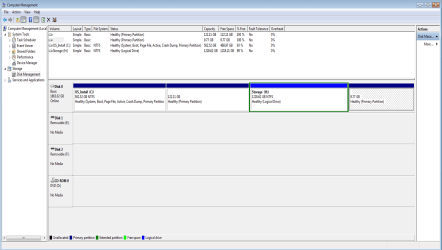
When I stretched the window bigger, it is the C:\ that shows:

Healthy (System, Boot, Page File, Active, Crash Dump, Primary Partition.


The drive with 122.11 GB shows Healthy (Primary Partition)

The Storage (H) shows Healthy (Logical Drive)

The 9.77 GB drive(which I didn't create) shows Healthy (Primary Partition)
 

My Computer My Computer

At a glance

Windows 7 Home Premium 64bitIntel i7 26008 Gb RAM2 Gb
Computer Manufacturer/Model Number
Asus
OS
Windows 7 Home Premium 64bit
CPU
Intel i7 2600
Motherboard
Foxconn
Memory
8 Gb RAM
Graphics Card(s)
2 Gb
Sound Card
RealTek
Monitor(s) Displays
LG
Hard Drives
Generic
Case
Pryon
Is this what you want to see, I thought was a specific "expand" button somewhere in Disk Management.
 

Attachments

  • Mandypic.png
    Mandypic.png
    86.2 KB · Views: 167

My Computer My Computer

At a glance

Windows 7 Home Premium 64bitIntel i7 26008 Gb RAM2 Gb
Computer Manufacturer/Model Number
Asus
OS
Windows 7 Home Premium 64bit
CPU
Intel i7 2600
Motherboard
Foxconn
Memory
8 Gb RAM
Graphics Card(s)
2 Gb
Sound Card
RealTek
Monitor(s) Displays
LG
Hard Drives
Generic
Case
Pryon
I'm not absolutely sure what has gone wrong here, but I'd be inclined to delete the three partitions after your OS drive and start again.

When you use Partition Wizard, how are you using it?

If you download PW to your hard drive and run it from there, experience has shown that doing things that way can lead to problems.

The best way is to download the Partition Wizard ISO, burn the ISO to a blank disc, and then boot into it to carry out your drive partition creation and resizing.

I'll be away from my computer for the rest of the day so I'm hoping someone else will jump in if you need more help.
 

My Computer My Computer

At a glance

Windows 7 Ultimate SP1 64-BitIntel Core i7 870 @ 2.93GHz8Gb Dual-Channel DDR3 @ 664MHznVidia GeForce GTX 460 1024MB dedicated RAM
Computer Manufacturer/Model Number
HP Pavilion Elite 495UK
OS
Windows 7 Ultimate SP1 64-Bit
CPU
Intel Core i7 870 @ 2.93GHz
Motherboard
MSI 2A9C (CPU1)
Memory
8Gb Dual-Channel DDR3 @ 664MHz
Graphics Card(s)
nVidia GeForce GTX 460 1024MB dedicated RAM
Sound Card
Realtek HD Audio
Monitor(s) Displays
HP2310i
Screen Resolution
1920 x 1080
Hard Drives
1x1954GB Hitachi HDS22020ALA 330 (RAID), 1x1954GB Hitachi External for backup and storage
PSU
460W
Case
HP Elite
Cooling
Air cooled
Keyboard
Logitech K750 solar-powered keyboard
Mouse
Logitech Wireless M180 mouse
Internet Speed
2Mb
Other Info
Pure Avanti Flow Internet Radio with iPod Dock, 64Gb iPod, HP USB Speakers, Sony MDR-V500 Headphones, Sony Vaio F-Series Laptop
If your talking about the 122 GB partition, and it gives you the option to delete it.
Do that and then format it and give it a letter. That should be all you have to do.
 

My Computer My Computer

At a glance

Windows 7 Ultimate 64BitC2D E82008GB PNY PC2-6400BFG 9600GT x 2
Computer Manufacturer/Model Number
Myself
OS
Windows 7 Ultimate 64Bit
CPU
C2D E8200
Motherboard
XFX 750i
Memory
8GB PNY PC2-6400
Graphics Card(s)
BFG 9600GT x 2
Sound Card
Stock XFX Optical
Monitor(s) Displays
Gateway 22" HD Display
Hard Drives
C: 1 TB G: 500 GB H: 500 GB
PSU
Ultra LSP 550 Pro Lifetime Series
Case
Xion2
Cooling
ThermalTake
The drive doesn't have a letter assigned to it, so it isn't usable or even able to be displayed in other areas of Windows.
 

My Computer My Computer

At a glance

Windows 7 Ultimate x64 SP1Intel Core i7-260012 GB Patriot Extreme DDR3-1333Nvidia GTX 470
OS
Windows 7 Ultimate x64 SP1
CPU
Intel Core i7-2600
Motherboard
Gigabyte GA-P67A-UD3P-B3
Memory
12 GB Patriot Extreme DDR3-1333
Graphics Card(s)
Nvidia GTX 470
Monitor(s) Displays
Dell UltraSharp 2209WA
Hard Drives
OCZ Agility3 240 GB, WD5001AALS, WD7501AALS
PSU
OCZ ModStream 700W
Case
CoolerMaster HAF 912 Advanced
Cooling
CoolerMaster Hyper 212 Plus
seavixen32,

Yes, I download the EaseUS Partition Manager straight to my C:\ Windows 7 and I shrink the C:\ and made 2 more partitions with the rest and that when only one partition shows up in My Computer.
I might have to do what you suggested, I ws hoping that I won't have to start all over again since I already have lots of files in the other 2 partitions. Only the one that is hidden has nothing in it.


Zomby88,

Yes I did that before and I did it again following your advice and it is still hidden.
I just don't understand why windows 7 keeps it hidden. Is it something to do with being a 64bit?

Thank you both for your input, much appreciated.
 

My Computer My Computer

At a glance

Windows 7 Home Premium 64bitIntel i7 26008 Gb RAM2 Gb
Computer Manufacturer/Model Number
Asus
OS
Windows 7 Home Premium 64bit
CPU
Intel i7 2600
Motherboard
Foxconn
Memory
8 Gb RAM
Graphics Card(s)
2 Gb
Sound Card
RealTek
Monitor(s) Displays
LG
Hard Drives
Generic
Case
Pryon
DeaconFrost,

I did assign a letter to it when it was created and I assigned (G), the drive letter is there when I unhide it.
Also, there is another hidden partition formatted in FAT and when I unhide both partitions the drive letter of the 122 GB drive was changde to I and the FAT partition had the G.
 

My Computer My Computer

At a glance

Windows 7 Home Premium 64bitIntel i7 26008 Gb RAM2 Gb
Computer Manufacturer/Model Number
Asus
OS
Windows 7 Home Premium 64bit
CPU
Intel i7 2600
Motherboard
Foxconn
Memory
8 Gb RAM
Graphics Card(s)
2 Gb
Sound Card
RealTek
Monitor(s) Displays
LG
Hard Drives
Generic
Case
Pryon
Assign it a letter in Disk Mgmt and it will be seen.

If this partition is where you want to install the Dual Boot, just boot the installer and install there and it will assign a drive letter.
 
gregrocker,

That was the first thing I thought of doing, but I can't assign a drive letter(again) because all options when I rightclick on the partition in Disk Management is grayed out except for the "Delete Volume" and "Help".

While via EaseUS, I also couldn't assign any drive letter because that option is not available. For me to do that I would need to delete the partition first(I have done that a few times already). The assigned drive letter is there if I unhide the drive but at reboot Windows hides it again.

What I have noticed is that if I make it into a logical drive it will show up in My Computer, I tried it just then to check if it makes a difference(and it did). So it seems it has something to do with it being a primary partition. Surely Windows 7 64bit does not have a limit of 2 primary partitions in one physical drive right?

Yes, this is the partition where I want to install the dual boot, I haven't tried just booting the installer because I thought I might encounter more problems so I wanted to fix this issue first.

Again, thank you all for all your input.
 

My Computer My Computer

At a glance

Windows 7 Home Premium 64bitIntel i7 26008 Gb RAM2 Gb
Computer Manufacturer/Model Number
Asus
OS
Windows 7 Home Premium 64bit
CPU
Intel i7 2600
Motherboard
Foxconn
Memory
8 Gb RAM
Graphics Card(s)
2 Gb
Sound Card
RealTek
Monitor(s) Displays
LG
Hard Drives
Generic
Case
Pryon
You can have a maximum of four primary partitions on a hard drive.

If you still need more partitions then you can create logical partitions within the fourth primary partition.

I still think if you delete the two partitions without a drive letter and the logical partion you'll then be able to create a new partition for your dual-boot system.

I think your problems stem from the fact you have a logical partition between two partitions that haven't been allocated a drive letter.

Currently, your logical partition is part of your first primary partition that doesn't have a drive letter and I'm sure that's what's confusing Windows.

If you delete those three partitions and start again, I'm sure that'll solve the issue.
 

My Computer My Computer

At a glance

Windows 7 Ultimate SP1 64-BitIntel Core i7 870 @ 2.93GHz8Gb Dual-Channel DDR3 @ 664MHznVidia GeForce GTX 460 1024MB dedicated RAM
Computer Manufacturer/Model Number
HP Pavilion Elite 495UK
OS
Windows 7 Ultimate SP1 64-Bit
CPU
Intel Core i7 870 @ 2.93GHz
Motherboard
MSI 2A9C (CPU1)
Memory
8Gb Dual-Channel DDR3 @ 664MHz
Graphics Card(s)
nVidia GeForce GTX 460 1024MB dedicated RAM
Sound Card
Realtek HD Audio
Monitor(s) Displays
HP2310i
Screen Resolution
1920 x 1080
Hard Drives
1x1954GB Hitachi HDS22020ALA 330 (RAID), 1x1954GB Hitachi External for backup and storage
PSU
460W
Case
HP Elite
Cooling
Air cooled
Keyboard
Logitech K750 solar-powered keyboard
Mouse
Logitech Wireless M180 mouse
Internet Speed
2Mb
Other Info
Pure Avanti Flow Internet Radio with iPod Dock, 64Gb iPod, HP USB Speakers, Sony MDR-V500 Headphones, Sony Vaio F-Series Laptop
Agree. Use Disk Management. It will offer Logical for the fourth partition. Accept it.
 
"I still think if you delete the two partitions without a drive letter and the logical partion you'll then be able to create a new partition for your dual-boot system."


I deleted the 2 partitions which didn't have a drive letter and also deleted the logical partition, created and formatted 2 new partitions but the 122 GB next to the Windows 7 will still not show up while the 1.2 Tb shows up.

Now I lost my recovery partition, but didn't matter if this issue has a solution. I haven't installed another OS to any of the 2 drives since with my searching I've also read those missing OS.
 

My Computer My Computer

At a glance

Windows 7 Home Premium 64bitIntel i7 26008 Gb RAM2 Gb
Computer Manufacturer/Model Number
Asus
OS
Windows 7 Home Premium 64bit
CPU
Intel i7 2600
Motherboard
Foxconn
Memory
8 Gb RAM
Graphics Card(s)
2 Gb
Sound Card
RealTek
Monitor(s) Displays
LG
Hard Drives
Generic
Case
Pryon
>>>"Use Disk Management. It will offer Logical for the fourth partition. Accept it. ."<<<


There are only 3 partitions in this PC:

1. C:\ where Windows 7 resides
2. the problematic partition (is hidden)
3. the other primary partition (is okay)

There was a 4th hidden partition that I did not create the "Recovery" partition which is now also been deleted.
 

My Computer My Computer

At a glance

Windows 7 Home Premium 64bitIntel i7 26008 Gb RAM2 Gb
Computer Manufacturer/Model Number
Asus
OS
Windows 7 Home Premium 64bit
CPU
Intel i7 2600
Motherboard
Foxconn
Memory
8 Gb RAM
Graphics Card(s)
2 Gb
Sound Card
RealTek
Monitor(s) Displays
LG
Hard Drives
Generic
Case
Pryon
Hi there
just right mouse click on these unlabelled partitions and choose change (or assign) drive letter

Hey presto the disk will mount and off you go using the assigned letter (say D or E or whatever)

I sometimes get this problem with external USB drives -- there's no letter assigned so windows explorer doesn't see them.


As soon as you assign a letter they work normally.


Note that this could also be a GPT disk drive in which case other methods need to be used -- I don't have experience of using GPT drives directly so I'll hand over to someone more experienced.

However I do know that a GPT drive also removes the restriction of 4 partitions per drive (max) and does away with the need for things like Logical Partitions which are always a pain.

With larger multi-TB drives appearing the 4 partition restriction was becoming a real pain so GPT removes this.

However I assume that all these newer larger 2 TB and above drives will use GBT rather than the MBR system on W7.

http://msdn.microsoft.com/en-us/windows/hardware/gg463524


Cheers
jimbo
 

My Computer My Computer

At a glance

Linux CENTOS 7 / various Windows OS'es and se...Intel i7 Intel i58GB, 16GBOn Motherboard
Computer type
PC/Desktop
Computer Manufacturer/Model Number
Custom built, several laptops HP/ASUS
OS
Linux CENTOS 7 / various Windows OS'es and servers
CPU
Intel i7 Intel i5
Memory
8GB, 16GB
Graphics Card(s)
On Motherboard
Sound Card
Realtek HD audio
Monitor(s) Displays
Apple Cinema display, Samsung LCD
Screen Resolution
1920 X 1080
Hard Drives
4 X 1TB SATA
Mouse
Toshiba wireless laser
Internet Speed
> 20MB up
Back
Top