
Solved Partitioning, Windows 7 will not show 2nd partition in My Computer

>>>"Use Disk Management. It will offer Logical for the fourth partition. Accept it. ."<<<


There are only 3 partitions in this PC:

1. C:\ where Windows 7 resides
2. the problematic partition (is hidden)
3. the other primary partition (is okay)

There was a 4th hidden partition that I did not create the "Recovery" partition which is now also been deleted.

Your first screenshot shows four partitions:


There is no Recovery partition showing in your Disk Mgmt screenshots as it would if you'd had one - the two non-OS primaries are empty. We would not have advised deleting it if so.

The problem remains there must be a drive letter assigned to the partition for it to be seen in Explorer. What exactly happens when you rightclick on it with Disk Mgmt to Assign/Change letter?

If this fails try free Partition Wizard installed version.

If this issue persists I would wipe the HD with Diskpart (to clean the boot sector of possible corruption) then clean reinstall following these steps to get a Perfect Reinstall.
SSD - HDD Optimize for Windows Reinstallation
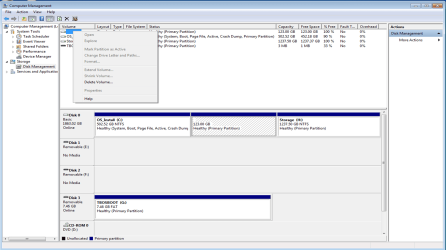
 
I just want you all to know that I really appreciate you sticking with me on this.

I only created 3 partitions in total, the other hidden partition 9.77 is the Recovery partition created by Windows and that one has been deleted also following
the suggestions given here.

I don't have other option in Disk Management besides "Delete Volume" as shown in the attachment.
And I have deleted, created and formatted that partition a few times in the last 3 days.

Can someone explain to me why this problem partition shows up in My Computer when I change it to logical? That to me looks like Windows 7 sees it as another Operating system that windows hides by default(from what I've found out while googling for solutions).

I don't really want to reformat the whole drive for now since this PC doesn't come with the discs for the pre-installed programs e.g. Microsoft Office Starter(they only give us the product key) but I may have to later on.

Thanks for hanging in there.
 

Attachments

  • Picture1.png
    Picture1.png
    106.4 KB · Views: 14

My Computer My Computer

At a glance

Windows 7 Home Premium 64bitIntel i7 26008 Gb RAM2 Gb
Computer Manufacturer/Model Number
Asus
OS
Windows 7 Home Premium 64bit
CPU
Intel i7 2600
Motherboard
Foxconn
Memory
8 Gb RAM
Graphics Card(s)
2 Gb
Sound Card
RealTek
Monitor(s) Displays
LG
Hard Drives
Generic
Case
Pryon
There is no Recovery Partition created by Windows, only at factory which should be labeled as such.

If Logical shows up in Explorer then I'd use your partition manager - I recommend Partition Wizard CD as it is most reliable - to delete and create it Logical which is ideal for data anyway. It should accept a letter if it's showing in Explorer.
 

My Computer My Computer

At a glance

Windows 7 Ultimate SP1 64-BitIntel Core i7 870 @ 2.93GHz8Gb Dual-Channel DDR3 @ 664MHznVidia GeForce GTX 460 1024MB dedicated RAM
Computer Manufacturer/Model Number
HP Pavilion Elite 495UK
OS
Windows 7 Ultimate SP1 64-Bit
CPU
Intel Core i7 870 @ 2.93GHz
Motherboard
MSI 2A9C (CPU1)
Memory
8Gb Dual-Channel DDR3 @ 664MHz
Graphics Card(s)
nVidia GeForce GTX 460 1024MB dedicated RAM
Sound Card
Realtek HD Audio
Monitor(s) Displays
HP2310i
Screen Resolution
1920 x 1080
Hard Drives
1x1954GB Hitachi HDS22020ALA 330 (RAID), 1x1954GB Hitachi External for backup and storage
PSU
460W
Case
HP Elite
Cooling
Air cooled
Keyboard
Logitech K750 solar-powered keyboard
Mouse
Logitech Wireless M180 mouse
Internet Speed
2Mb
Other Info
Pure Avanti Flow Internet Radio with iPod Dock, 64Gb iPod, HP USB Speakers, Sony MDR-V500 Headphones, Sony Vaio F-Series Laptop
I thought(from what I've heard) a third party tool is much better, but I'll give the Command prompt -Diskpart a go.
I'll also try Partition Wizard CD.

The reason I didn't choose logical is because I wanted to have dual-boot and it says somewhere that you shouldn't install an OS in a logical partition.
 

My Computer My Computer

At a glance

Windows 7 Home Premium 64bitIntel i7 26008 Gb RAM2 Gb
Computer Manufacturer/Model Number
Asus
OS
Windows 7 Home Premium 64bit
CPU
Intel i7 2600
Motherboard
Foxconn
Memory
8 Gb RAM
Graphics Card(s)
2 Gb
Sound Card
RealTek
Monitor(s) Displays
LG
Hard Drives
Generic
Case
Pryon
In Command prompt - Diskpart the problem partition doesn't even show up.. it is not listed as one of the partitions.
 

My Computer My Computer

At a glance

Windows 7 Home Premium 64bitIntel i7 26008 Gb RAM2 Gb
Computer Manufacturer/Model Number
Asus
OS
Windows 7 Home Premium 64bit
CPU
Intel i7 2600
Motherboard
Foxconn
Memory
8 Gb RAM
Graphics Card(s)
2 Gb
Sound Card
RealTek
Monitor(s) Displays
LG
Hard Drives
Generic
Case
Pryon
"Logical" partitions are just sections of a primary partition. So if you have a primary as the "last partition" you can always split it to logical partitions later. Some people say logical partitions don't have to be only in the last primary but that's the most compatible way going back quite awhile.

btw what's the other OS you're putting on?
 

My Computer My Computer

At a glance

Windows 7 32 bitAMD 5200+ dual core2 GBNVidia GeForce 6150SE 128 MB
Computer Manufacturer/Model Number
HP Media Center
OS
Windows 7 32 bit
CPU
AMD 5200+ dual core
Memory
2 GB
Graphics Card(s)
NVidia GeForce 6150SE 128 MB
Monitor(s) Displays
CRT
Screen Resolution
1280x1024
Hard Drives
500 GB Sata internal :

SIIG USB 3.0 docking stations w/WD Caviar Black 6 Gb/s drives
Keyboard
PS/2
Mouse
PS/2 Wheel Mouse
Other Info
SIIG USB 3.0 PCIexpress card.
The issue has been resolved using Boot-It BM.
Thanks everyone for your input.
 

My Computer My Computer

At a glance

Windows 7 Home Premium 64bitIntel i7 26008 Gb RAM2 Gb
Computer Manufacturer/Model Number
Asus
OS
Windows 7 Home Premium 64bit
CPU
Intel i7 2600
Motherboard
Foxconn
Memory
8 Gb RAM
Graphics Card(s)
2 Gb
Sound Card
RealTek
Monitor(s) Displays
LG
Hard Drives
Generic
Case
Pryon
Very pleased to hear you've solved your problem.

Thanks for the update.
 

My Computer My Computer

At a glance

Windows 7 Ultimate SP1 64-BitIntel Core i7 870 @ 2.93GHz8Gb Dual-Channel DDR3 @ 664MHznVidia GeForce GTX 460 1024MB dedicated RAM
Computer Manufacturer/Model Number
HP Pavilion Elite 495UK
OS
Windows 7 Ultimate SP1 64-Bit
CPU
Intel Core i7 870 @ 2.93GHz
Motherboard
MSI 2A9C (CPU1)
Memory
8Gb Dual-Channel DDR3 @ 664MHz
Graphics Card(s)
nVidia GeForce GTX 460 1024MB dedicated RAM
Sound Card
Realtek HD Audio
Monitor(s) Displays
HP2310i
Screen Resolution
1920 x 1080
Hard Drives
1x1954GB Hitachi HDS22020ALA 330 (RAID), 1x1954GB Hitachi External for backup and storage
PSU
460W
Case
HP Elite
Cooling
Air cooled
Keyboard
Logitech K750 solar-powered keyboard
Mouse
Logitech Wireless M180 mouse
Internet Speed
2Mb
Other Info
Pure Avanti Flow Internet Radio with iPod Dock, 64Gb iPod, HP USB Speakers, Sony MDR-V500 Headphones, Sony Vaio F-Series Laptop
Back
Top