
Partitioning Windows

mikeriso

New member
Local time
9:02 AM
Messages
3

I'm Trying to Clonemy existing primary C drive using Acronis 10. It gives me a messagethat either the target drive is smaller than the old drive or there is a partitionerror.

As you will learnfrom the attachment, the target drive is larger than the old drive so It must bea partition error.

Please disregard disk2, my D drive in the attachment. The conflict is between disk 1, the primary source C drive anddisk 3, the external destination drive.


FyI: the currentsource drive is already a cloned copy from disk 3, made several months ago whenI had a crash. I now want to update disk 3 with a currentclone of disk 1.

Please note: bothdisk contain hidden partitions of different capacity, 99% unused, with a fat 16file system.

I did not intentionallycreate these partitions. Can it be that these hidden partitions are what ispreventing Acronis to do a clone? ]And can I get rid ofthese hidden partitions and merge them into the primary? If so, what are thesteps?

I am not well versedwith partitioning and appreciate any and all help with this. Thanks, Mike


Attachments
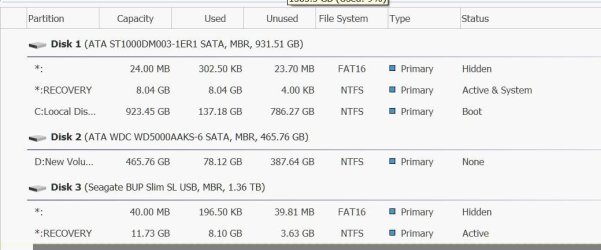
  • partition.jpg
    partition.jpg
    61.9 KB · Views: 2

My Computer

Computer type
PC/Desktop
Computer Manufacturer/Model Number
dell
OS
Windows 7 64 bit
Welcome to the forum. The simple answer should be to delete all partitions on the target drive leave it with no partitions and it should work
 

My Computer

Computer type
PC/Desktop
OS
win 8 32 bit
windows Partition 2

Thank you for your responce, Samuria. My concern is two-fold: If I delete everything on the target drive and something goes wrong with a new clone, I will not have any C drive backup. I am willing to risk that, but what about that 3rd hidden partition on the C drive which is 24 mb and 99.9% unused? That partition was created from a clone by the current target drive in the first place, so I will be carrying forward the wasted partition again in the new clone. I was hoping to do away and merge that hidden drive with the larger C drive partition.
Also, since Acronis states before making the data transfer that they will delete everything on the target drive first, It seems to me they would have done that to the hidden partition as well. It may be that the parttion error is in the source C drive, not the target. Sorry if I did not properly explain this before.
Any thoughts? Thanks again. Mike
 

My Computer

Computer type
PC/Desktop
Computer Manufacturer/Model Number
dell
OS
Windows 7 64 bit
Without lnowingwhats in the 24 meg paritions its hard to say but its safer to clone it as its so small it has no real effect on size
 

My Computer

Computer type
PC/Desktop
OS
win 8 32 bit
Thank you for the input.
 

My Computer

Computer type
PC/Desktop
Computer Manufacturer/Model Number
dell
OS
Windows 7 64 bit
Back
Top