Password protect network share folder?

SquirrelTakos

New member
Power User
Local time
12:10 AM
Messages
73
Location
MI, USA
I can't seem to find a sleek easy way of doing this that works with windows 7. I haven't been successful with finding anything that pertains to windows 7 since most guides online are outdated.

I just want to have a folder shared on my main desktop "DAN-PC"
let's just give it the name \\dan-pc\locked

I need to make it so I can access it from my laptop when I am on the network, but I don't want it to be accessible by anyone else. In fact I'd prefer it'd be hidden also. However, if there is a program or some workaround to get it password protected, that'd be wonderful. I thought I had the knowhow to do this, but I have been unsuccessful and I've been getting frustrated with this, since everything I try doesn't work out. Too many things have been changed on the sharing side of things on 7 for me to figure this out.

--So basically. DAN-MOBILE needs access to \\dan-pc\locked somehow. And if possible, the folder needs to be hidden, yet still obtainable through typing in the address in the address bar.


thanks
 

My Computer

OS
Windows 7 Pro 64 bit
CPU
AMD Phenom II X4 925
Motherboard
Gigabyte GA-870A-UD3
Memory
2 x 4gb DDR3 1333
Graphics Card(s)
Radeon 6950 2gb
Sound Card
Onboard
Monitor(s) Displays
Samsung BX2431 (x2)
Screen Resolution
1920-1080 (x2)
Hard Drives
120GB OCZ Vertex 2 &
750GB & 250gb Seagate &
1TB Samsung
PSU
Corsair 750TX
Case
Antec 900
Cooling
Cooler Master 212
Keyboard
Logitech Illuminated Keyboard
Mouse
Razer Deathadder
Internet Speed
12 Mb
Hidden would mean you put the $ at the end of the sharename.

In the Permissions tab, remove Everyone and add just the account you want to used to access that share. Give that account Full Control. See how you go.
 

My Computer

Computer Manufacturer/Model Number
Lenovo ThinkPad T60
OS
Windows 7 Ultimate 64Bit
CPU
GenuineIntel Intel(R) Core(TM) DuoCore T2400 @ 1.83GHz
Motherboard
Intel(R) 82801G (ICH7 Family)
Memory
2.00 GB
Graphics Card(s)
Mobile Intel(R) 945 Express Chipset
Sound Card
SoundMAX Integrated Digital HD Audio
Monitor(s) Displays
ThinkPad Display
Screen Resolution
1400x1050
Hard Drives
100Gb SATA
Keyboard
Standard Keyboard
Mouse
HID-compliant Mouse
Internet Speed
Cable Broadband - 54Mbps
Other Info
Intel(R) PRO/1000 PL Network Connection
11a/b/g Wireless LAN Mini PCI Express Adapter
Thank you, for the hidden part.

I'm not entirely sure how to add my laptop as a user on my desktop.

When I remove everyone, what name do I use to add my laptop? I don't have any other logins on my desktop other than "dan" and my computer name is dan-pc

My laptop has the same login name "dan" but my computer name is dan-mobile.

Do I add "dan-mobile" as a user on my desktop? I know this is sort of a stupid question, but I honestly don't do this often.
 

My Computer

OS
Windows 7 Pro 64 bit
CPU
AMD Phenom II X4 925
Motherboard
Gigabyte GA-870A-UD3
Memory
2 x 4gb DDR3 1333
Graphics Card(s)
Radeon 6950 2gb
Sound Card
Onboard
Monitor(s) Displays
Samsung BX2431 (x2)
Screen Resolution
1920-1080 (x2)
Hard Drives
120GB OCZ Vertex 2 &
750GB & 250gb Seagate &
1TB Samsung
PSU
Corsair 750TX
Case
Antec 900
Cooling
Cooler Master 212
Keyboard
Logitech Illuminated Keyboard
Mouse
Razer Deathadder
Internet Speed
12 Mb
You would put in the useraccount you use to log onto the desktop with. I assume you are using an account with admin right? This would be Dan ?

From your laptop, if you map to the sharename$, you would be prompted to enter id and password. This would the the id and password u used to log onto the desktop with, ie the account you have added.

For added surity, in the Security tab, add this same useraccount there also.

You don't need to add nothing else on the desktop share.
 

My Computer

Computer Manufacturer/Model Number
Lenovo ThinkPad T60
OS
Windows 7 Ultimate 64Bit
CPU
GenuineIntel Intel(R) Core(TM) DuoCore T2400 @ 1.83GHz
Motherboard
Intel(R) 82801G (ICH7 Family)
Memory
2.00 GB
Graphics Card(s)
Mobile Intel(R) 945 Express Chipset
Sound Card
SoundMAX Integrated Digital HD Audio
Monitor(s) Displays
ThinkPad Display
Screen Resolution
1400x1050
Hard Drives
100Gb SATA
Keyboard
Standard Keyboard
Mouse
HID-compliant Mouse
Internet Speed
Cable Broadband - 54Mbps
Other Info
Intel(R) PRO/1000 PL Network Connection
11a/b/g Wireless LAN Mini PCI Express Adapter
I somewhat understand, but when I try to access the folder, I'm not prompted with a login but a "windows cannot access \\dan-pc\sharename. contact your administrator to request access.

When you said to put the useraccount that i login to my desktop with, I didn't quite understand what you meant. Am I entering this in my users or using this on the prompt and which computer.

I apologize for not understanding this entirely.
 

My Computer

OS
Windows 7 Pro 64 bit
CPU
AMD Phenom II X4 925
Motherboard
Gigabyte GA-870A-UD3
Memory
2 x 4gb DDR3 1333
Graphics Card(s)
Radeon 6950 2gb
Sound Card
Onboard
Monitor(s) Displays
Samsung BX2431 (x2)
Screen Resolution
1920-1080 (x2)
Hard Drives
120GB OCZ Vertex 2 &
750GB & 250gb Seagate &
1TB Samsung
PSU
Corsair 750TX
Case
Antec 900
Cooling
Cooler Master 212
Keyboard
Logitech Illuminated Keyboard
Mouse
Razer Deathadder
Internet Speed
12 Mb
Are you able to ping dan-pc from the current machine? This is all important.

When you are physically at the desktop, what account do you use to log on with? This is the account you would add to the share permission and security. It is also this account that when you map to the share from the non-desktop machines, that you put in when asked to do so (little box that appears).

Try using the ip adress of dan-pc.

\\ipaddress\sharename$
 

My Computer

Computer Manufacturer/Model Number
Lenovo ThinkPad T60
OS
Windows 7 Ultimate 64Bit
CPU
GenuineIntel Intel(R) Core(TM) DuoCore T2400 @ 1.83GHz
Motherboard
Intel(R) 82801G (ICH7 Family)
Memory
2.00 GB
Graphics Card(s)
Mobile Intel(R) 945 Express Chipset
Sound Card
SoundMAX Integrated Digital HD Audio
Monitor(s) Displays
ThinkPad Display
Screen Resolution
1400x1050
Hard Drives
100Gb SATA
Keyboard
Standard Keyboard
Mouse
HID-compliant Mouse
Internet Speed
Cable Broadband - 54Mbps
Other Info
Intel(R) PRO/1000 PL Network Connection
11a/b/g Wireless LAN Mini PCI Express Adapter
I know they can ping each other and everything, I'm just using a vnc to control the desktop from up here. All the shares that are open to everyone work fine.

For whatever reason, typing in \\192.168.1.100\sharename$ lets me right in no questions asked

while going through \\dan-pc\sharename$ will just give me a window that says I am not allowed to access this folder even though it's the same folder I just accessed a second ago.

So technically, it works. I'm just not sure why not the easy way. I have the desktop on a static IP so I guess I can just keep this the same since it won't change. It just would have been nice to have the address the other way. I must be doing something wrong still.

The reason I was confused is that both my laptop and desktop have the same user name already, so I couldn't really add them on my user lists, since they have the same login. "dan"

Thank you for walking me through this however. :]
 

My Computer

OS
Windows 7 Pro 64 bit
CPU
AMD Phenom II X4 925
Motherboard
Gigabyte GA-870A-UD3
Memory
2 x 4gb DDR3 1333
Graphics Card(s)
Radeon 6950 2gb
Sound Card
Onboard
Monitor(s) Displays
Samsung BX2431 (x2)
Screen Resolution
1920-1080 (x2)
Hard Drives
120GB OCZ Vertex 2 &
750GB & 250gb Seagate &
1TB Samsung
PSU
Corsair 750TX
Case
Antec 900
Cooling
Cooler Master 212
Keyboard
Logitech Illuminated Keyboard
Mouse
Razer Deathadder
Internet Speed
12 Mb
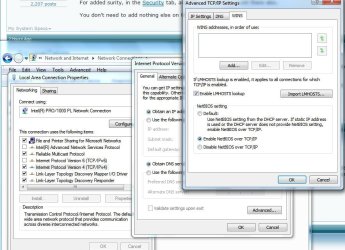
Check in your LAN Properties, under TCP/IPv4 that you have Enabled NetBios over TCP/IP.
Noname.jpg
 

My Computer

Computer Manufacturer/Model Number
Lenovo ThinkPad T60
OS
Windows 7 Ultimate 64Bit
CPU
GenuineIntel Intel(R) Core(TM) DuoCore T2400 @ 1.83GHz
Motherboard
Intel(R) 82801G (ICH7 Family)
Memory
2.00 GB
Graphics Card(s)
Mobile Intel(R) 945 Express Chipset
Sound Card
SoundMAX Integrated Digital HD Audio
Monitor(s) Displays
ThinkPad Display
Screen Resolution
1400x1050
Hard Drives
100Gb SATA
Keyboard
Standard Keyboard
Mouse
HID-compliant Mouse
Internet Speed
Cable Broadband - 54Mbps
Other Info
Intel(R) PRO/1000 PL Network Connection
11a/b/g Wireless LAN Mini PCI Express Adapter
I gathered this is solved given by the rep you gave?
 

My Computer

Computer Manufacturer/Model Number
Lenovo ThinkPad T60
OS
Windows 7 Ultimate 64Bit
CPU
GenuineIntel Intel(R) Core(TM) DuoCore T2400 @ 1.83GHz
Motherboard
Intel(R) 82801G (ICH7 Family)
Memory
2.00 GB
Graphics Card(s)
Mobile Intel(R) 945 Express Chipset
Sound Card
SoundMAX Integrated Digital HD Audio
Monitor(s) Displays
ThinkPad Display
Screen Resolution
1400x1050
Hard Drives
100Gb SATA
Keyboard
Standard Keyboard
Mouse
HID-compliant Mouse
Internet Speed
Cable Broadband - 54Mbps
Other Info
Intel(R) PRO/1000 PL Network Connection
11a/b/g Wireless LAN Mini PCI Express Adapter
Just sounds like a SID and/or NAT issue. Since you're using technically the "user name" the system will then authenticate to it's SID, it sees the different SID and views your user name as a spoof. Since you're unable to UNC into the "machine name", it sounds like a DNS or NAT issue. The Everyone group should remove this issue, however you've already said you don't with to allow everyone. Due to that fact, I would suggest using a different user name for folder access. This will prompt a UN/PW prompt, but unless you use the 'everyone' group it's setup to do this in a "workgroup" environment.
 

My Computer

OS
7 Pro
It's not what I originally planned to do, but the way I have it set up now works just fine and gets the job done. It's not super important so I don't want to beat myself up over it.

So yes, it's solved. Thank you guys.
 

My Computer

OS
Windows 7 Pro 64 bit
CPU
AMD Phenom II X4 925
Motherboard
Gigabyte GA-870A-UD3
Memory
2 x 4gb DDR3 1333
Graphics Card(s)
Radeon 6950 2gb
Sound Card
Onboard
Monitor(s) Displays
Samsung BX2431 (x2)
Screen Resolution
1920-1080 (x2)
Hard Drives
120GB OCZ Vertex 2 &
750GB & 250gb Seagate &
1TB Samsung
PSU
Corsair 750TX
Case
Antec 900
Cooling
Cooler Master 212
Keyboard
Logitech Illuminated Keyboard
Mouse
Razer Deathadder
Internet Speed
12 Mb
Back
Top