password protected network share

joshthegooglist

New member
Local time
5:16 PM
Messages
10
i have a server at my business running windows server 2000 (yes i know i should upgrade, but im making use of equipment we have) with a network share that requires a user name and password to access the share. Within the building there are about 50 computers with OS's ranging from windows 2000 to windows 7. Ive tried logging on with all the machines, but the windows 7 machines will not accept my credentials. under the unsername and password fields it shows the domain as the local computer name. What we have is a workgroup based setup, so aside from upgrading the server OS, is there anything i can do to access this share from the windows 7 machines?

Thanx
-JP
 

My Computer

OS
7 Home premium
i have a server at my business running windows server 2000 (yes i know i should upgrade, but im making use of equipment we have) with a network share that requires a user name and password to access the share. Within the building there are about 50 computers with OS's ranging from windows 2000 to windows 7. Ive tried logging on with all the machines, but the windows 7 machines will not accept my credentials. under the unsername and password fields it shows the domain as the local computer name. What we have is a workgroup based setup, so aside from upgrading the server OS, is there anything i can do to access this share from the windows 7 machines?

Thanx
-JP


Is it a full drive share ($C:\)?

Are you using homegroup on the win 7 machine, or more importantly are you using IPv6?


Ken J
 

My Computer

Computer Manufacturer/Model Number
HP Pavillion dv-7 1005 Tx
OS
Win 8 Release candidate 8400
CPU
[email protected]
Memory
4 gigs
Graphics Card(s)
Nvidia 9600M
Sound Card
HD built-in
Monitor(s) Displays
17" Wxga
Screen Resolution
1440x900
Cooling
none
Internet Speed
45Mb down 5Mb up
1) no
2) no
3) ipv6 is not disabled on the 7 machine if thats what u are asking
 

My Computer

OS
7 Home premium
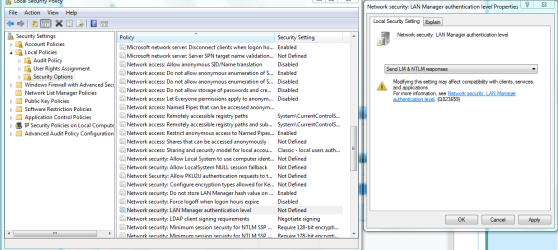
This requires that you change the lanman server parameters in order to get Windows 7 working with older servers. Do these adjustments on the Windows 7 machines that need to connect to the server.

Control Panel - Administrative Tools - Local Security Policy

Local Policies - Security Options

Network security: LAN Manager authentication level
Set to Send LM & NTLM responses only

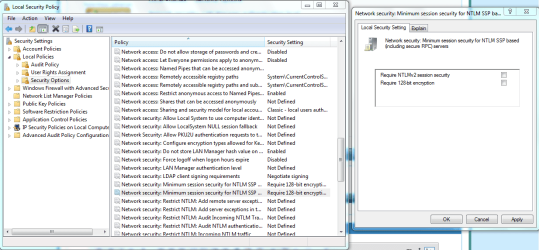
Set the Minimum session security for NTLM SSP
Disable Require 128-bit encryption

The screen shots below should be helpful.

Reboot all machines after making the adjustment.

This has nothing to do with IPv6. ;)

The Argument against Disabling IPv6
It is unfortunate that some organizations disable IPv6 on their computers running Windows Vista or Windows Server 2008, where it is installed and enabled by default. Many disable IPv6-based on the assumption that they are not running any applications or services that use it. Others might disable it because of a misperception that having both IPv4 and IPv6 enabled effectively doubles their DNS and Web traffic. This is not true.
From Microsoft's perspective, IPv6 is a mandatory part of the Windows operating system and it is enabled and included in standard Windows service and application testing during the operating system development process. Because Windows was designed specifically with IPv6 present, Microsoft does not perform any testing to determine the effects of disabling IPv6. If IPv6 is disabled on Windows Vista, Windows Server 2008, or later versions, some components will not function. Moreover, applications that you might not think are using IPv6—such as Remote Assistance, HomeGroup, DirectAccess, and Windows Mail—could be.
Therefore, Microsoft recommends that you leave IPv6 enabled, even if you do not have an IPv6-enabled network, either native or tunneled. By leaving IPv6 enabled, you do not disable IPv6-only applications and services (for example, HomeGroup in Windows 7 and DirectAccess in Windows 7 and Windows Server 2008 R2 are IPv6-only) and your hosts can take advantage of IPv6-enhanced connectivity.

Read more. http://technet.microsoft.com/en-us/magazine/2009.07.cableguy.aspx

 

Attachments

  • lanman server adjustment.PNG
    lanman server adjustment.PNG
    42.6 KB · Views: 6,090
  • REquire 128 bit encryption unchecked.PNG
    REquire 128 bit encryption unchecked.PNG
    46.6 KB · Views: 5,383
Last edited:

My Computer

Computer type
PC/Desktop
Computer Manufacturer/Model Number
Home built
OS
Windows 7 Ult, Windows 8.1 Pro,
CPU
Q9650-4.275GHz, E8600 4.5GHz, E6750-3.8GHz
Motherboard
Evga 780i FTW
Memory
G.Skill PC2 9600 1200Mhz 5 5 5 15 2T
Graphics Card(s)
GTX480
Sound Card
Asus Xonar D2
Monitor(s) Displays
HannsG
Screen Resolution
1680X1050
Hard Drives
GSkill Phoenix Pro 120GB SSD
PSU
ThermalTake Toughpower 1000Watt modular
Case
ThermalTake XaserV
Cooling
Xigmatek S1283
Keyboard
Logitech G15
Mouse
Logitech G9
Internet Speed
T1
The Argument against Disabling IPv6
It is unfortunate that some organizations disable IPv6 on their computers running Windows Vista or Windows Server 2008, where it is installed and enabled by default. Many disable IPv6-based on the assumption that they are not running any applications or services that use it. Others might disable it because of a misperception that having both IPv4 and IPv6 enabled effectively doubles their DNS and Web traffic. This is not true.
From Microsoft's perspective, IPv6 is a mandatory part of the Windows operating system and it is enabled and included in standard Windows service and application testing during the operating system development process. Because Windows was designed specifically with IPv6 present, Microsoft does not perform any testing to determine the effects of disabling IPv6. If IPv6 is disabled on Windows Vista, Windows Server 2008, or later versions, some components will not function. Moreover, applications that you might not think are using IPv6—such as Remote Assistance, HomeGroup, DirectAccess, and Windows Mail—could be.
Therefore, Microsoft recommends that you leave IPv6 enabled, even if you do not have an IPv6-enabled network, either native or tunneled. By leaving IPv6 enabled, you do not disable IPv6-only applications and services (for example, HomeGroup in Windows 7 and DirectAccess in Windows 7 and Windows Server 2008 R2 are IPv6-only) and your hosts can take advantage of IPv6-enhanced connectivity.

+1 :D
 

My Computer

Computer type
PC/Desktop
Computer Manufacturer/Model Number
Dell OP7010
OS
Windows 7 Enterprise (x64); Windows Server 2008 R2 (x64)
Memory
16GB
Monitor(s) Displays
4 Dell 24" LCD
Screen Resolution
1280x1024
Keyboard
Dell
Mouse
Dell Optical
Internet Speed
40meg

My Computer

Computer type
PC/Desktop
Computer Manufacturer/Model Number
Home built
OS
Windows 7 Ult, Windows 8.1 Pro,
CPU
Q9650-4.275GHz, E8600 4.5GHz, E6750-3.8GHz
Motherboard
Evga 780i FTW
Memory
G.Skill PC2 9600 1200Mhz 5 5 5 15 2T
Graphics Card(s)
GTX480
Sound Card
Asus Xonar D2
Monitor(s) Displays
HannsG
Screen Resolution
1680X1050
Hard Drives
GSkill Phoenix Pro 120GB SSD
PSU
ThermalTake Toughpower 1000Watt modular
Case
ThermalTake XaserV
Cooling
Xigmatek S1283
Keyboard
Logitech G15
Mouse
Logitech G9
Internet Speed
T1
The Argument against Disabling IPv6
It is unfortunate that some organizations disable IPv6 on their computers running Windows Vista or Windows Server 2008, where it is installed and enabled by default. Many disable IPv6-based on the assumption that they are not running any applications or services that use it. Others might disable it because of a misperception that having both IPv4 and IPv6 enabled effectively doubles their DNS and Web traffic. This is not true.
From Microsoft's perspective, IPv6 is a mandatory part of the Windows operating system and it is enabled and included in standard Windows service and application testing during the operating system development process. Because Windows was designed specifically with IPv6 present, Microsoft does not perform any testing to determine the effects of disabling IPv6. If IPv6 is disabled on Windows Vista, Windows Server 2008, or later versions, some components will not function. Moreover, applications that you might not think are using IPv6—such as Remote Assistance, HomeGroup, DirectAccess, and Windows Mail—could be.
Therefore, Microsoft recommends that you leave IPv6 enabled, even if you do not have an IPv6-enabled network, either native or tunneled. By leaving IPv6 enabled, you do not disable IPv6-only applications and services (for example, HomeGroup in Windows 7 and DirectAccess in Windows 7 and Windows Server 2008 R2 are IPv6-only) and your hosts can take advantage of IPv6-enhanced connectivity.

+1 :D

It just had to be said, there is more to the IPv6 protocol than meets the eye. ;)
 

My Computer

Computer type
PC/Desktop
Computer Manufacturer/Model Number
Home built
OS
Windows 7 Ult, Windows 8.1 Pro,
CPU
Q9650-4.275GHz, E8600 4.5GHz, E6750-3.8GHz
Motherboard
Evga 780i FTW
Memory
G.Skill PC2 9600 1200Mhz 5 5 5 15 2T
Graphics Card(s)
GTX480
Sound Card
Asus Xonar D2
Monitor(s) Displays
HannsG
Screen Resolution
1680X1050
Hard Drives
GSkill Phoenix Pro 120GB SSD
PSU
ThermalTake Toughpower 1000Watt modular
Case
ThermalTake XaserV
Cooling
Xigmatek S1283
Keyboard
Logitech G15
Mouse
Logitech G9
Internet Speed
T1
The Argument against Disabling IPv6
It is unfortunate that some organizations disable IPv6 on their computers running Windows Vista or Windows Server 2008, where it is installed and enabled by default. Many disable IPv6-based on the assumption that they are not running any applications or services that use it. Others might disable it because of a misperception that having both IPv4 and IPv6 enabled effectively doubles their DNS and Web traffic. This is not true.
From Microsoft's perspective, IPv6 is a mandatory part of the Windows operating system and it is enabled and included in standard Windows service and application testing during the operating system development process. Because Windows was designed specifically with IPv6 present, Microsoft does not perform any testing to determine the effects of disabling IPv6. If IPv6 is disabled on Windows Vista, Windows Server 2008, or later versions, some components will not function. Moreover, applications that you might not think are using IPv6—such as Remote Assistance, HomeGroup, DirectAccess, and Windows Mail—could be.
Therefore, Microsoft recommends that you leave IPv6 enabled, even if you do not have an IPv6-enabled network, either native or tunneled. By leaving IPv6 enabled, you do not disable IPv6-only applications and services (for example, HomeGroup in Windows 7 and DirectAccess in Windows 7 and Windows Server 2008 R2 are IPv6-only) and your hosts can take advantage of IPv6-enhanced connectivity.

+1 :D

It just had to be said, there is more to the IPv6 protocol than meets the eye. ;)

Again I completely agree. Thanks for your great posts.
 

My Computer

Computer type
PC/Desktop
Computer Manufacturer/Model Number
Dell OP7010
OS
Windows 7 Enterprise (x64); Windows Server 2008 R2 (x64)
Memory
16GB
Monitor(s) Displays
4 Dell 24" LCD
Screen Resolution
1280x1024
Keyboard
Dell
Mouse
Dell Optical
Internet Speed
40meg
Back
Top