Recently my grandfather died. We went and got all his financial documents and such, (trust information, his bank information, etc...) and they are now all on my laptop in one folder. (and backed up on my external HDD that is in the safe)
I share this laptop with my friend every now and then, and although I trust him completely not to harm my computer or steal, I would love the added benefit of protecting a certain folder.
I don't want to add a new user or anything like that, as I am sure that would both hurt his feelings, and insult him.
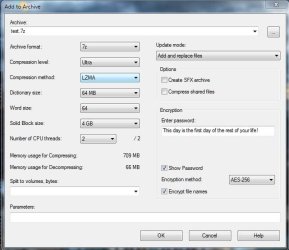
Is it possible to encrypt a specific folder or "briefcase"? I would much rather just add a password if possible. And somehow "lock" the file to the HDD so it can't be copied, or something along those lines...
I searched on our site for "password folder" and got no results.....thus this post.
Windows 7 Home Premium
Core i5-2410m (amazing btw)
5400rpm HDD.
I share this laptop with my friend every now and then, and although I trust him completely not to harm my computer or steal, I would love the added benefit of protecting a certain folder.
I don't want to add a new user or anything like that, as I am sure that would both hurt his feelings, and insult him.
Is it possible to encrypt a specific folder or "briefcase"? I would much rather just add a password if possible. And somehow "lock" the file to the HDD so it can't be copied, or something along those lines...
I searched on our site for "password folder" and got no results.....thus this post.
Windows 7 Home Premium
Core i5-2410m (amazing btw)
5400rpm HDD.
My Computer
- OS
- Windows 7 Ultimate x64 Steve Ballmer Edition
- CPU
- Core i7 920 @ 3.6GHz
- Motherboard
- EVGA X58 SLI Micro
- Memory
- 6Gb Kingston DDR3 1066MHz
- Graphics Card(s)
- MSI GTX460 1GB Cyclone
- Monitor(s) Displays
- LG W2361V
- Screen Resolution
- 1920 x 1080p
- Hard Drives
- 64GB Microcenter SSD (Adata S599)
1TB SeaGate Barracuda 7200
- PSU
- Corsair HX750
- Case
- Antec 1200
- Cooling
- Corsair H50
- Mouse
- Logitech M/X Revolution
- Internet Speed
- 2mb/s
- Other Info
- SSD Boot drive with MS Office