
PC freezing after short period

gbu

New member
Member
VIP
Local time
11:44 AM
Messages
144
The last 2 days i have noticed that after around 30mins or so i can no longer open files/internet/pics etc

Nothing can be opened but window tabs can be minimized and have full use of mouse and keyboard.

I cant open task manage when this happens and only a restart works.
This can only be done manually via the reset button on base unit and not via Windows restart function.

Ive run full AV scan with MSE and came back clean.

Not installed any programs within this time, the only thing that i can think of updating was Firefox 2 days ago.

many thanks for any help
 

My Computer My Computer

Computer type
PC/Desktop
OS
Windows 7 Ultimate x64 SP1
CPU
INTEL Core 2 Quad Q8400 2.66GHz 4Mb LGA775 FSB1333
Motherboard
Gigabyte GA-G41MT-S2PT
Memory
Crucial 8GB Kit (4GBx2), 240-pin DIMM, DDR3-1333 • 1.5V
Graphics Card(s)
ASUS EAH4350 Silent 1GB
Hard Drives
x2 640GB Western Digital WD6400AARS Caviar Green, SATA 3Gb/s, 5400rpm, 32MB Cache

SEAGATE ST500DM005 BARRACUDA SPINPOINT 500GB 3.5IN 7200RPM SATA HD502HJ IN OS Windows 7 Installed
PSU
Corsair CMPSU-600CX 600W
Case
Zalman Z9-Plus Mid Tower Case
Cooling
Arctic Cooling Freezer 7 Pro Rev2 Quiet CPU Cooler
If you created a System Restore point prior to updating Firefox, you could use that restore point to roll back your system.

If you don't already have it, and can get on the web (or otherwise place a downloaded installer on the problem computer), you should try a full scan with Malwarebytes after allowing it to update.
 

My Computer My Computer

Computer Manufacturer/Model Number
Asus CM1831 Tower
OS
Windows 7 Home Premium 64bit SP1
CPU
AMD FX 8120 3.10GHz
Memory
8GB
Browser
Google Chrome
Other Info
xplorer2; Office 2007
Ok not sure what's happened but after latest freeze and restart the pc won't go past the welcome screen it appears to boot ok then after it says welcome the screen goes black with only the mouse pointer showing

I've tried system restore in safe mode but I eat a message saying its turned off I have tried turning on through one of your guides via System Policy but it won't turn on.

At moment all I can access is safe mode and only Internet access is my phone right now

Any help greatly appreciated
 

My Computer My Computer

Computer type
PC/Desktop
OS
Windows 7 Ultimate x64 SP1
CPU
INTEL Core 2 Quad Q8400 2.66GHz 4Mb LGA775 FSB1333
Motherboard
Gigabyte GA-G41MT-S2PT
Memory
Crucial 8GB Kit (4GBx2), 240-pin DIMM, DDR3-1333 • 1.5V
Graphics Card(s)
ASUS EAH4350 Silent 1GB
Hard Drives
x2 640GB Western Digital WD6400AARS Caviar Green, SATA 3Gb/s, 5400rpm, 32MB Cache

SEAGATE ST500DM005 BARRACUDA SPINPOINT 500GB 3.5IN 7200RPM SATA HD502HJ IN OS Windows 7 Installed
PSU
Corsair CMPSU-600CX 600W
Case
Zalman Z9-Plus Mid Tower Case
Cooling
Arctic Cooling Freezer 7 Pro Rev2 Quiet CPU Cooler

My Computer My Computer

Computer type
PC/Desktop
Computer Manufacturer/Model Number
Skylake Special #666
OS
Windows 10 Pro x64
CPU
Intel Core i7 6700K
Motherboard
Asus Sabertooth Z170 Mark 1
Memory
GSkill TridentZ RGB 16GB 3600 16-16-16-36
Graphics Card(s)
EVGA GTX 980 Ti SC x2
Sound Card
Realtek High Definition
Monitor(s) Displays
AOC G2460PG
Screen Resolution
1920 x 1080 144Hz
Hard Drives
Samsung 860 Pro 256GB, Seagate Barracuda 4TB x2
PSU
EVGA 1000 P2, EVGA White Custom Braided Cables
Case
Corsair Vengeance C70 Gunmetal Black
Cooling
Corsair H100i v2, Corsair ML120 x2, Thermal Grizzly Kryonaut
Keyboard
Logitech G910 Orion Spectrum
Mouse
Logitech G700s
Internet Speed
Verizon Fios Quantum Gateway 75/75
Antivirus
Windows Defender, Malwarebytes Free 3.8.3
Browser
Chrome
Other Info
Corsair SP120 x4, LG Blu-ray Drive, Durabrand HT-395 100 Watt Dolby Digital Amp, Corsair H2100 Wireless 7.1 Headset
Wow really nooooooooo

No way of getting system restore turned on other then methods described in the link?
 

My Computer My Computer

Computer type
PC/Desktop
OS
Windows 7 Ultimate x64 SP1
CPU
INTEL Core 2 Quad Q8400 2.66GHz 4Mb LGA775 FSB1333
Motherboard
Gigabyte GA-G41MT-S2PT
Memory
Crucial 8GB Kit (4GBx2), 240-pin DIMM, DDR3-1333 • 1.5V
Graphics Card(s)
ASUS EAH4350 Silent 1GB
Hard Drives
x2 640GB Western Digital WD6400AARS Caviar Green, SATA 3Gb/s, 5400rpm, 32MB Cache

SEAGATE ST500DM005 BARRACUDA SPINPOINT 500GB 3.5IN 7200RPM SATA HD502HJ IN OS Windows 7 Installed
PSU
Corsair CMPSU-600CX 600W
Case
Zalman Z9-Plus Mid Tower Case
Cooling
Arctic Cooling Freezer 7 Pro Rev2 Quiet CPU Cooler
Boot into System Recovery Options to run a few Startup Repairs, which should offer to automate System Restore. If not run it from the Options list.

If this fails work through these steps for Troubleshooting Windows 7 Failure to Start.

You mentioned you'd run an AV scan but said it was Malwarebytes which is NOT an AV. So I would start with the WDO or one of the other bootable AV's provided in tutorial.

If you're running less than a perfect install now would be a good time to invest in one since you have the assistance of the top resource on the web for it. Look over these steps for Clean Reinstall - Factory OEM Windows 7 which assure a perfect install even for retail.
 
Ill check those links thank you

I did run AV with Microsoft Security Essentials
The reply I had was to run malware bytes but I only got round to installing it before I had to restart.
 

My Computer My Computer

Computer type
PC/Desktop
OS
Windows 7 Ultimate x64 SP1
CPU
INTEL Core 2 Quad Q8400 2.66GHz 4Mb LGA775 FSB1333
Motherboard
Gigabyte GA-G41MT-S2PT
Memory
Crucial 8GB Kit (4GBx2), 240-pin DIMM, DDR3-1333 • 1.5V
Graphics Card(s)
ASUS EAH4350 Silent 1GB
Hard Drives
x2 640GB Western Digital WD6400AARS Caviar Green, SATA 3Gb/s, 5400rpm, 32MB Cache

SEAGATE ST500DM005 BARRACUDA SPINPOINT 500GB 3.5IN 7200RPM SATA HD502HJ IN OS Windows 7 Installed
PSU
Corsair CMPSU-600CX 600W
Case
Zalman Z9-Plus Mid Tower Case
Cooling
Arctic Cooling Freezer 7 Pro Rev2 Quiet CPU Cooler
Ok I ran the Repair function from System Recovery Options it said there was no problems

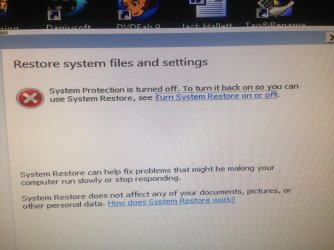
I then selected System Restore but was told System protection was not turned on and I could not go any further

In the process of running full scan with malwarebytes
 

My Computer My Computer

Computer type
PC/Desktop
OS
Windows 7 Ultimate x64 SP1
CPU
INTEL Core 2 Quad Q8400 2.66GHz 4Mb LGA775 FSB1333
Motherboard
Gigabyte GA-G41MT-S2PT
Memory
Crucial 8GB Kit (4GBx2), 240-pin DIMM, DDR3-1333 • 1.5V
Graphics Card(s)
ASUS EAH4350 Silent 1GB
Hard Drives
x2 640GB Western Digital WD6400AARS Caviar Green, SATA 3Gb/s, 5400rpm, 32MB Cache

SEAGATE ST500DM005 BARRACUDA SPINPOINT 500GB 3.5IN 7200RPM SATA HD502HJ IN OS Windows 7 Installed
PSU
Corsair CMPSU-600CX 600W
Case
Zalman Z9-Plus Mid Tower Case
Cooling
Arctic Cooling Freezer 7 Pro Rev2 Quiet CPU Cooler
2 full scans with MSE and Malwarebytes have come back clean.

I've attached pic I took of what comes up when I try to select system restore
Now when I click the link that says Turn system Restore on it the steps they suggest aren't there
 

Attachments

  • image.jpg
    image.jpg
    968.8 KB · Views: 2

My Computer My Computer

Computer type
PC/Desktop
OS
Windows 7 Ultimate x64 SP1
CPU
INTEL Core 2 Quad Q8400 2.66GHz 4Mb LGA775 FSB1333
Motherboard
Gigabyte GA-G41MT-S2PT
Memory
Crucial 8GB Kit (4GBx2), 240-pin DIMM, DDR3-1333 • 1.5V
Graphics Card(s)
ASUS EAH4350 Silent 1GB
Hard Drives
x2 640GB Western Digital WD6400AARS Caviar Green, SATA 3Gb/s, 5400rpm, 32MB Cache

SEAGATE ST500DM005 BARRACUDA SPINPOINT 500GB 3.5IN 7200RPM SATA HD502HJ IN OS Windows 7 Installed
PSU
Corsair CMPSU-600CX 600W
Case
Zalman Z9-Plus Mid Tower Case
Cooling
Arctic Cooling Freezer 7 Pro Rev2 Quiet CPU Cooler
Proceed with the steps including the hardware tests in the beginning note of Troubleshooting Windows 7 Failure to Start to confirm the hardware first.

You said you couldn't boot but now are working from the desktop. If so work through these Troubleshooting Steps for Windows 7

Both WD Data Lifeguard and Seagate Seatools HD tests as well as memtest RAM test are on Hiren’s BootCD 15.1 which ISO can be burned to CD using Windows Image Burner or written to flash stick using Universal USB Installer with Hirens in the dropdown menu.

If all of the steps fail then copy out your files and run Factory Recovery or get the superior Clean Reinstall.
 
Sorry continue with which steps?

Ok I see them now,

No I'm not working from desktop I can only access from safe mode.
 

My Computer My Computer

Computer type
PC/Desktop
OS
Windows 7 Ultimate x64 SP1
CPU
INTEL Core 2 Quad Q8400 2.66GHz 4Mb LGA775 FSB1333
Motherboard
Gigabyte GA-G41MT-S2PT
Memory
Crucial 8GB Kit (4GBx2), 240-pin DIMM, DDR3-1333 • 1.5V
Graphics Card(s)
ASUS EAH4350 Silent 1GB
Hard Drives
x2 640GB Western Digital WD6400AARS Caviar Green, SATA 3Gb/s, 5400rpm, 32MB Cache

SEAGATE ST500DM005 BARRACUDA SPINPOINT 500GB 3.5IN 7200RPM SATA HD502HJ IN OS Windows 7 Installed
PSU
Corsair CMPSU-600CX 600W
Case
Zalman Z9-Plus Mid Tower Case
Cooling
Arctic Cooling Freezer 7 Pro Rev2 Quiet CPU Cooler
Ok have gone through the list and msconfig seems to have allowed me to load up windows back to desktop.

I have disabled everything in startup and Services and got back on.

The intial problem of being froze out after a limited time still happens though but i guess im back to an operating PC to backup up data in case fresh install is needed.

I checked System restore and all past restore points have been removed, i have started itagain but i guess not much point as problem still exists.

I did notice that Java installed new update around the time of initial problem also.
 

My Computer My Computer

Computer type
PC/Desktop
OS
Windows 7 Ultimate x64 SP1
CPU
INTEL Core 2 Quad Q8400 2.66GHz 4Mb LGA775 FSB1333
Motherboard
Gigabyte GA-G41MT-S2PT
Memory
Crucial 8GB Kit (4GBx2), 240-pin DIMM, DDR3-1333 • 1.5V
Graphics Card(s)
ASUS EAH4350 Silent 1GB
Hard Drives
x2 640GB Western Digital WD6400AARS Caviar Green, SATA 3Gb/s, 5400rpm, 32MB Cache

SEAGATE ST500DM005 BARRACUDA SPINPOINT 500GB 3.5IN 7200RPM SATA HD502HJ IN OS Windows 7 Installed
PSU
Corsair CMPSU-600CX 600W
Case
Zalman Z9-Plus Mid Tower Case
Cooling
Arctic Cooling Freezer 7 Pro Rev2 Quiet CPU Cooler
Uninstall all Java and reboot. Run for awhile to test difference. Then install latest Java if needed.

Run SFC /SCANNOW Command.

Test your hardware to eliminate that as cause, then report back.
 
SFC /SCANNOW Command. reported errors but i cant open the log it saved, it says access denied?

Uninstalled java just waiting to see how it goes.

Backing up files in mean time just in case.

Everything is still unchecked in msconfig and services is that ok?
 

My Computer My Computer

Computer type
PC/Desktop
OS
Windows 7 Ultimate x64 SP1
CPU
INTEL Core 2 Quad Q8400 2.66GHz 4Mb LGA775 FSB1333
Motherboard
Gigabyte GA-G41MT-S2PT
Memory
Crucial 8GB Kit (4GBx2), 240-pin DIMM, DDR3-1333 • 1.5V
Graphics Card(s)
ASUS EAH4350 Silent 1GB
Hard Drives
x2 640GB Western Digital WD6400AARS Caviar Green, SATA 3Gb/s, 5400rpm, 32MB Cache

SEAGATE ST500DM005 BARRACUDA SPINPOINT 500GB 3.5IN 7200RPM SATA HD502HJ IN OS Windows 7 Installed
PSU
Corsair CMPSU-600CX 600W
Case
Zalman Z9-Plus Mid Tower Case
Cooling
Arctic Cooling Freezer 7 Pro Rev2 Quiet CPU Cooler
You could recheck everything, then check to hide all microsoft services, then uncheck each item 1 at a time to see it is causing the freezeup. If it continues to freezeup, I would not hesitate to do an install. It takes 15 minutes and you have the best help in the world here.:p
 

My Computer My Computer

Computer type
PC/Desktop
Computer Manufacturer/Model Number
Skylake Special #666
OS
Windows 10 Pro x64
CPU
Intel Core i7 6700K
Motherboard
Asus Sabertooth Z170 Mark 1
Memory
GSkill TridentZ RGB 16GB 3600 16-16-16-36
Graphics Card(s)
EVGA GTX 980 Ti SC x2
Sound Card
Realtek High Definition
Monitor(s) Displays
AOC G2460PG
Screen Resolution
1920 x 1080 144Hz
Hard Drives
Samsung 860 Pro 256GB, Seagate Barracuda 4TB x2
PSU
EVGA 1000 P2, EVGA White Custom Braided Cables
Case
Corsair Vengeance C70 Gunmetal Black
Cooling
Corsair H100i v2, Corsair ML120 x2, Thermal Grizzly Kryonaut
Keyboard
Logitech G910 Orion Spectrum
Mouse
Logitech G700s
Internet Speed
Verizon Fios Quantum Gateway 75/75
Antivirus
Windows Defender, Malwarebytes Free 3.8.3
Browser
Chrome
Other Info
Corsair SP120 x4, LG Blu-ray Drive, Durabrand HT-395 100 Watt Dolby Digital Amp, Corsair H2100 Wireless 7.1 Headset
You have damaged System Files. Run SFC again a few more times to see if it can repair them.

If not and performance continues to be affected run a Repair Install or invest now in the getting a perfect Clean Reinstall with our help.
 
I think clean re-install is the way to go and will most likely do so, but would like to get this back up and running properly or find out why this happened.
How can i view the log it created to see what files are damaged?

Ill run SFC again a few times and look at the Repair Install as well.

Outa interest do you guys the (best of the best) still do re-installs of Windows or because you know what your doing you dont need to ever do it?
 

My Computer My Computer

Computer type
PC/Desktop
OS
Windows 7 Ultimate x64 SP1
CPU
INTEL Core 2 Quad Q8400 2.66GHz 4Mb LGA775 FSB1333
Motherboard
Gigabyte GA-G41MT-S2PT
Memory
Crucial 8GB Kit (4GBx2), 240-pin DIMM, DDR3-1333 • 1.5V
Graphics Card(s)
ASUS EAH4350 Silent 1GB
Hard Drives
x2 640GB Western Digital WD6400AARS Caviar Green, SATA 3Gb/s, 5400rpm, 32MB Cache

SEAGATE ST500DM005 BARRACUDA SPINPOINT 500GB 3.5IN 7200RPM SATA HD502HJ IN OS Windows 7 Installed
PSU
Corsair CMPSU-600CX 600W
Case
Zalman Z9-Plus Mid Tower Case
Cooling
Arctic Cooling Freezer 7 Pro Rev2 Quiet CPU Cooler
After I`m happy with an install, after all updates and software is installed, I`ll make an image. Then periodically I`ll make more.

All my software and data is stored on other partitions or drives. So it`s very rare that I have to do a fresh install. I will do it out of shere boredom or to do experiments. I have a pc just for that purpose.
 

My Computer My Computer

Computer type
PC/Desktop
Computer Manufacturer/Model Number
Skylake Special #666
OS
Windows 10 Pro x64
CPU
Intel Core i7 6700K
Motherboard
Asus Sabertooth Z170 Mark 1
Memory
GSkill TridentZ RGB 16GB 3600 16-16-16-36
Graphics Card(s)
EVGA GTX 980 Ti SC x2
Sound Card
Realtek High Definition
Monitor(s) Displays
AOC G2460PG
Screen Resolution
1920 x 1080 144Hz
Hard Drives
Samsung 860 Pro 256GB, Seagate Barracuda 4TB x2
PSU
EVGA 1000 P2, EVGA White Custom Braided Cables
Case
Corsair Vengeance C70 Gunmetal Black
Cooling
Corsair H100i v2, Corsair ML120 x2, Thermal Grizzly Kryonaut
Keyboard
Logitech G910 Orion Spectrum
Mouse
Logitech G700s
Internet Speed
Verizon Fios Quantum Gateway 75/75
Antivirus
Windows Defender, Malwarebytes Free 3.8.3
Browser
Chrome
Other Info
Corsair SP120 x4, LG Blu-ray Drive, Durabrand HT-395 100 Watt Dolby Digital Amp, Corsair H2100 Wireless 7.1 Headset
Thanks good to know you guys still do from time to time :)

I think im going to do a fresh install, just gotta find the time to do so, maybe this weekend.

In the mean time i cant get MSE to run at all, i tried downloading version again but when trying to unpack and install it says 'File Corrupt'
Windows Defender however has found Trojan Dropper:Win32/sirefef.gen!C
Strange that neither MSE or Malwarebytes picked this up!
Do i just let Defender remove it?

Also working through the msconfig one at a time to test.

So far all been running for 12+ hours with no freezes, not sure if due to msonfig or java removed though.

Oh and what program do you use to create the image, i may give that try also once all back uo and running, would save a lot of hassle re-installing programs etc
 

My Computer My Computer

Computer type
PC/Desktop
OS
Windows 7 Ultimate x64 SP1
CPU
INTEL Core 2 Quad Q8400 2.66GHz 4Mb LGA775 FSB1333
Motherboard
Gigabyte GA-G41MT-S2PT
Memory
Crucial 8GB Kit (4GBx2), 240-pin DIMM, DDR3-1333 • 1.5V
Graphics Card(s)
ASUS EAH4350 Silent 1GB
Hard Drives
x2 640GB Western Digital WD6400AARS Caviar Green, SATA 3Gb/s, 5400rpm, 32MB Cache

SEAGATE ST500DM005 BARRACUDA SPINPOINT 500GB 3.5IN 7200RPM SATA HD502HJ IN OS Windows 7 Installed
PSU
Corsair CMPSU-600CX 600W
Case
Zalman Z9-Plus Mid Tower Case
Cooling
Arctic Cooling Freezer 7 Pro Rev2 Quiet CPU Cooler
Back
Top