
Pc only recognizes 8gb of 16 gb of ram

bigboi972

New member
Member
VIP
Local time
9:32 PM
Messages
319
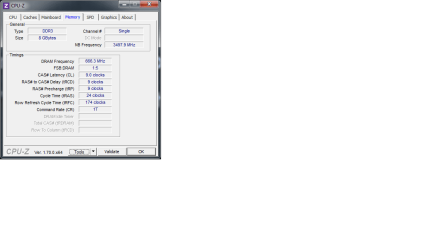
I have 16gb(two sticks) of ram installed on my system. My pc is only recognizing one stick of ram(8gb). I have re installed the memory several times to insure it is installed properly. I have also used CPU-Z in order to determine if the motherboard is reading both sticks of ram. I have included a photo of the results Untitled.png
 

My Computer My Computer

At a glance

Microsoft Windows 7 Professional 64-bitIntel Xeon E3 @ 3.30GHzIntel(R) Xeon(R) CPU E...16.00GB Single-Channel DDR3 @ 666MHz (9-9-9-24)ATI Radeon HD 7950
Computer type
PC/Desktop
OS
Microsoft Windows 7 Professional 64-bit
CPU
Intel Xeon E3 @ 3.30GHzIntel(R) Xeon(R) CPU E3-1230 v3 @ 3.3
Motherboard
MSI Z97 GAMING 5 (MS-7917)
Memory
16.00GB Single-Channel DDR3 @ 666MHz (9-9-9-24)
Graphics Card(s)
ATI Radeon HD 7950
Sound Card
(1) AMD High Definition Audio Device (2) USB Audio Device
Hard Drives
(1) Samsung SSD 840 EVO 120GB ATA Device
(2) TOSHIBA MK7559GSM ATA Device
Other Info
TRENDnet Wireless AC1200 Dual Band USB 3.0 Adapter, TEW-805UB
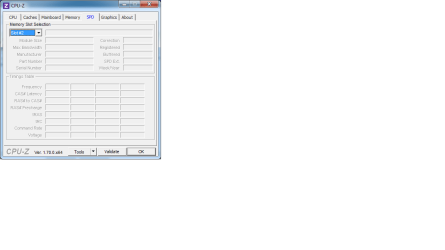
Can you make some snips of the SPD tab in CPU-Z for each different memory socket ? How many memory socket are on your MB ?
 

My Computer My Computer

At a glance

Win7 Enterprise, Win7 x86 (Ult 7600), Win7 x6...AMD fx8350 4ghz, AMD-32 2400mhz, AMD-64 3200m...2gb, 4gb on the Ult 7600, 4gb on Technet RTM,...Draw my own Graphics, several nVidia cards
Computer type
PC/Desktop
Computer Manufacturer/Model Number
Built them myself, Science Experiments !
OS
Win7 Enterprise, Win7 x86 (Ult 7600), Win7 x64 Ult 7600, TechNet RTM on AMD x64 (2.8Ghz)
CPU
AMD fx8350 4ghz, AMD-32 2400mhz, AMD-64 3200mhz, AMDx64 2.8G
Motherboard
SIS 755, ECS-K8M890M-M (Ult 7600), GigaByte & others
Memory
2gb, 4gb on the Ult 7600, 4gb on Technet RTM, 32gb on FX8350
Graphics Card(s)
Draw my own Graphics, several nVidia cards
Sound Card
on motherboard
Monitor(s) Displays
19" flat scr, 28" I-Inc widescr,22" Emprex Widescr, 23" Acer
Screen Resolution
1280 x 1024, 1440 x 900, 1920 x 1080
Hard Drives
6 pata Ide HD's & 2 Sata HD's
added 80gb external on Ult 7600 computer,
numerous extra 1tb, 2TB, 3Tb SATA HD's
A collection of ext HD Docks w/ HDs
PSU
430w, 550w, 600w, 700, 800, etc
Case
All Generic Full Towers
Cooling
Open Air & a few fans, some w/ colored LEDs
Keyboard
Compaq & Dell recycled from GoodWill
Mouse
Made in China Optical Wired Mouse
Internet Speed
Fast Cable InterNet
Antivirus
AVG Free on 24 different Desktops, NO Problems!
Browser
IE 8 is preferred, but use FireFox sometimes
Other Info
Linksys Routers, switches, & Hubs
Too Many USB Flash Drives to count, Biggest is 64GB !
Eight computers in my home network.
Sixteen computers at my business network.
Linked via TeamViewer !
Lots of old used spare computer parts everywhere!

My Computer My Computer

At a glance

Windows 10 Pro. 64/ version 1709 Windows 7 Pr...Intel i7-6800K @ 4.3Corsair Platinum 16 gig @2400EVGA GTX 1070 OC
Computer type
PC/Desktop
Computer Manufacturer/Model Number
Home made Desktop
OS
Windows 10 Pro. 64/ version 1709 Windows 7 Pro/64
CPU
Intel i7-6800K @ 4.3
Motherboard
ASUS X-99 Deluxe II
Memory
Corsair Platinum 16 gig @2400
Graphics Card(s)
EVGA GTX 1070 OC
Monitor(s) Displays
Asus 27" LED LCD/VE278Q
Screen Resolution
1920-1080 or 1280-720 HDMI
Hard Drives
INTEL SSD 730-240 Gb Sata 3.0/
PSU
EVGA Platium 1200W
Case
Phanteks Luxe Tempered Glass 8 fans/ one radiator
Cooling
XSPC/ Water Cooled CPU
Keyboard
Das 4 Professional
Mouse
Logitech M705/MX Anywhere 2-S
Internet Speed
100 mbits
Antivirus
Microsoft Security Essentials/ Malwarebytes Premium 3.0/ SAS
Browser
I.E. 11 default/Firefox/ ISP Time Warner Cable/Spectrum
Other Info
LG BluRay Burner/
Sound system-KLipsch-THX/
Icy Dock ssd Hot Swap bays.
The board supports 16GB of RAM.

Try to run each stick of RAM by itself to make sure one of them isn't faulty. Also, did you buy both sticks together or buy one to add to an existing one?
 

My Computer My Computer

At a glance

Win 7 Ultimate 64 bitIntel i7-3930KKingston HyperX Genesis 32GB Kit (8x4GB Modul...MSI R7850 Twin Frozr 2GD5/OC Radeon HD 7850 2...
Computer type
PC/Desktop
Computer Manufacturer/Model Number
Custom Build
OS
Win 7 Ultimate 64 bit
CPU
Intel i7-3930K
Motherboard
ASUS P9X79 WS
Memory
Kingston HyperX Genesis 32GB Kit (8x4GB Modules) 1600MHz DDR
Graphics Card(s)
MSI R7850 Twin Frozr 2GD5/OC Radeon HD 7850 2GB 256-bit GDDR
Sound Card
Asus Xonar Essence STX
Monitor(s) Displays
3x Asus VG248QE 24", Vizio 32" TV
Screen Resolution
1920 x 1080, ?
Hard Drives
Samsung 128GB 840 Pro SSD (1),
Samsung 4TB 850 EVO SSDs (4)
Samsung 4TB 850 EVO SSDs (16) external backup drives used in 2.5" hot swap bays in the computer.
PSU
Corsair HX750w
Case
Antec Two Hundred v2 (modified)
Cooling
Cooler Master GeminII S524 120mm (fan replaced with a 140mm)
Keyboard
Logitech G510s
Mouse
Logitech M525 (two in use)
Internet Speed
=< 32Mbps down, 8Mbps up
Antivirus
AVAST!, MBAM, SAS, Spybot S&D (all but MBAM free) Glary Util
Browser
IE11
Other Info
LSI 9211-8i HBA card (8 SATA III ports), 2.5" & 3.5" Hot Swap Bays, HooToo HT-CR001 PCI-E to USB 3.0 Internal Hub + 6 Slot Card Reader, and LG Model CH12LS28 BD-ROM Optical Drive. Also, ScanSnap S1500 ADF duplexing scanner, Canon 9000F flat bed scanner, Corsair SP2500 2.1 speakers, Samsung CLP 415nw laser color printer, Cyberpower PP2200SW UPS
Can you make some snips of the SPD tab in CPU-Z for each different memory socket ? How many memory socket are on your MB ?
here you go

[/ATTACH]
 

Attachments

  • Untitled.png
    Untitled.png
    11.7 KB · Views: 2

My Computer My Computer

At a glance

Microsoft Windows 7 Professional 64-bitIntel Xeon E3 @ 3.30GHzIntel(R) Xeon(R) CPU E...16.00GB Single-Channel DDR3 @ 666MHz (9-9-9-24)ATI Radeon HD 7950
Computer type
PC/Desktop
OS
Microsoft Windows 7 Professional 64-bit
CPU
Intel Xeon E3 @ 3.30GHzIntel(R) Xeon(R) CPU E3-1230 v3 @ 3.3
Motherboard
MSI Z97 GAMING 5 (MS-7917)
Memory
16.00GB Single-Channel DDR3 @ 666MHz (9-9-9-24)
Graphics Card(s)
ATI Radeon HD 7950
Sound Card
(1) AMD High Definition Audio Device (2) USB Audio Device
Hard Drives
(1) Samsung SSD 840 EVO 120GB ATA Device
(2) TOSHIBA MK7559GSM ATA Device
Other Info
TRENDnet Wireless AC1200 Dual Band USB 3.0 Adapter, TEW-805UB
The board supports 16GB of RAM.

Try to run each stick of RAM by itself to make sure one of them isn't faulty. Also, did you buy both sticks together or buy one to add to an existing one?

Yes, try one stick at a time, in slot #1 and make CPU-Z SPD tabs snips. Then
one stick at a time in slot #2, and make CPU-Z SPD tabs snips.
 

My Computer My Computer

At a glance

Win7 Enterprise, Win7 x86 (Ult 7600), Win7 x6...AMD fx8350 4ghz, AMD-32 2400mhz, AMD-64 3200m...2gb, 4gb on the Ult 7600, 4gb on Technet RTM,...Draw my own Graphics, several nVidia cards
Computer type
PC/Desktop
Computer Manufacturer/Model Number
Built them myself, Science Experiments !
OS
Win7 Enterprise, Win7 x86 (Ult 7600), Win7 x64 Ult 7600, TechNet RTM on AMD x64 (2.8Ghz)
CPU
AMD fx8350 4ghz, AMD-32 2400mhz, AMD-64 3200mhz, AMDx64 2.8G
Motherboard
SIS 755, ECS-K8M890M-M (Ult 7600), GigaByte & others
Memory
2gb, 4gb on the Ult 7600, 4gb on Technet RTM, 32gb on FX8350
Graphics Card(s)
Draw my own Graphics, several nVidia cards
Sound Card
on motherboard
Monitor(s) Displays
19" flat scr, 28" I-Inc widescr,22" Emprex Widescr, 23" Acer
Screen Resolution
1280 x 1024, 1440 x 900, 1920 x 1080
Hard Drives
6 pata Ide HD's & 2 Sata HD's
added 80gb external on Ult 7600 computer,
numerous extra 1tb, 2TB, 3Tb SATA HD's
A collection of ext HD Docks w/ HDs
PSU
430w, 550w, 600w, 700, 800, etc
Case
All Generic Full Towers
Cooling
Open Air & a few fans, some w/ colored LEDs
Keyboard
Compaq & Dell recycled from GoodWill
Mouse
Made in China Optical Wired Mouse
Internet Speed
Fast Cable InterNet
Antivirus
AVG Free on 24 different Desktops, NO Problems!
Browser
IE 8 is preferred, but use FireFox sometimes
Other Info
Linksys Routers, switches, & Hubs
Too Many USB Flash Drives to count, Biggest is 64GB !
Eight computers in my home network.
Sixteen computers at my business network.
Linked via TeamViewer !
Lots of old used spare computer parts everywhere!
The board supports 16GB of RAM.

Try to run each stick of RAM by itself to make sure one of them isn't faulty. Also, did you buy both sticks together or buy one to add to an existing one?

I purchased them together and ill try to run them one at a time
 

My Computer My Computer

At a glance

Microsoft Windows 7 Professional 64-bitIntel Xeon E3 @ 3.30GHzIntel(R) Xeon(R) CPU E...16.00GB Single-Channel DDR3 @ 666MHz (9-9-9-24)ATI Radeon HD 7950
Computer type
PC/Desktop
OS
Microsoft Windows 7 Professional 64-bit
CPU
Intel Xeon E3 @ 3.30GHzIntel(R) Xeon(R) CPU E3-1230 v3 @ 3.3
Motherboard
MSI Z97 GAMING 5 (MS-7917)
Memory
16.00GB Single-Channel DDR3 @ 666MHz (9-9-9-24)
Graphics Card(s)
ATI Radeon HD 7950
Sound Card
(1) AMD High Definition Audio Device (2) USB Audio Device
Hard Drives
(1) Samsung SSD 840 EVO 120GB ATA Device
(2) TOSHIBA MK7559GSM ATA Device
Other Info
TRENDnet Wireless AC1200 Dual Band USB 3.0 Adapter, TEW-805UB
I put each stick in slot one and booted one at a time and they both where detected when I booted the system with one stick in at a time. I did notice that if I had either stick of ram only in slot 2 my pc attempted to come on and showed nothing oin screen in terms of the bios boot menu. My lcd fan lit up and my cpu fan started spinning for maybe 2 seconds and stop and started again two seconds later. Not sure if that is important information.
 

My Computer My Computer

At a glance

Microsoft Windows 7 Professional 64-bitIntel Xeon E3 @ 3.30GHzIntel(R) Xeon(R) CPU E...16.00GB Single-Channel DDR3 @ 666MHz (9-9-9-24)ATI Radeon HD 7950
Computer type
PC/Desktop
OS
Microsoft Windows 7 Professional 64-bit
CPU
Intel Xeon E3 @ 3.30GHzIntel(R) Xeon(R) CPU E3-1230 v3 @ 3.3
Motherboard
MSI Z97 GAMING 5 (MS-7917)
Memory
16.00GB Single-Channel DDR3 @ 666MHz (9-9-9-24)
Graphics Card(s)
ATI Radeon HD 7950
Sound Card
(1) AMD High Definition Audio Device (2) USB Audio Device
Hard Drives
(1) Samsung SSD 840 EVO 120GB ATA Device
(2) TOSHIBA MK7559GSM ATA Device
Other Info
TRENDnet Wireless AC1200 Dual Band USB 3.0 Adapter, TEW-805UB
Did the computer make any beeping noises when you did that?
 

My Computer My Computer

At a glance

Win 7 Pro x64/Win 10 Pro x64 dual bootAMD FX 8350 Vishera @ 420016 GB Mushkin Blackline DDR3-2400 @ 1866 (9-1...XFX Radeon R9 280 Double D Black Edition
Computer type
PC/Desktop
Computer Manufacturer/Model Number
Mellon Labs (custom build)
OS
Win 7 Pro x64/Win 10 Pro x64 dual boot
CPU
AMD FX 8350 Vishera @ 4200
Motherboard
ASUS M5A97 R2.0
Memory
16 GB Mushkin Blackline DDR3-2400 @ 1866 (9-10-10-10-31)
Graphics Card(s)
XFX Radeon R9 280 Double D Black Edition
Sound Card
Realtek HD Audio on MB. Sounds great.
Monitor(s) Displays
Acer 24", Acer 22"
Screen Resolution
3840 x 1080
Hard Drives
1 x Mushkin Chronos 120 GB SSD (Win 10)
1 x Samsung 850 EVO 250 GB SSD (Win 7)
1 x WD 1TB SATA Blue
1 x WD 1TB SATA Green
PSU
Corsair TX-750
Case
CoolerMaster HAF 912+
Cooling
Coolermaster Seidon 240M Liquid AIO. 6 case fans
Keyboard
Logitech G710+
Mouse
Logitech G500s
Internet Speed
Much better since I got fiber, but still way overpriced.
Antivirus
MSE, Malware Bytes for scanning
Browser
Firefox
Other Info
Corsair VOID USB headphones.

A Mellon Labs X-1 - LCD Smartie driven system status display.

Brought to you by the letter E
Sounds like you may have a BAD slot #2 on the MB. Try inspecting it for any broken pieces, dirt or dust in slot, bent metal connections. Use a magnifying glass if you have one available.
 

My Computer My Computer

At a glance

Win7 Enterprise, Win7 x86 (Ult 7600), Win7 x6...AMD fx8350 4ghz, AMD-32 2400mhz, AMD-64 3200m...2gb, 4gb on the Ult 7600, 4gb on Technet RTM,...Draw my own Graphics, several nVidia cards
Computer type
PC/Desktop
Computer Manufacturer/Model Number
Built them myself, Science Experiments !
OS
Win7 Enterprise, Win7 x86 (Ult 7600), Win7 x64 Ult 7600, TechNet RTM on AMD x64 (2.8Ghz)
CPU
AMD fx8350 4ghz, AMD-32 2400mhz, AMD-64 3200mhz, AMDx64 2.8G
Motherboard
SIS 755, ECS-K8M890M-M (Ult 7600), GigaByte & others
Memory
2gb, 4gb on the Ult 7600, 4gb on Technet RTM, 32gb on FX8350
Graphics Card(s)
Draw my own Graphics, several nVidia cards
Sound Card
on motherboard
Monitor(s) Displays
19" flat scr, 28" I-Inc widescr,22" Emprex Widescr, 23" Acer
Screen Resolution
1280 x 1024, 1440 x 900, 1920 x 1080
Hard Drives
6 pata Ide HD's & 2 Sata HD's
added 80gb external on Ult 7600 computer,
numerous extra 1tb, 2TB, 3Tb SATA HD's
A collection of ext HD Docks w/ HDs
PSU
430w, 550w, 600w, 700, 800, etc
Case
All Generic Full Towers
Cooling
Open Air & a few fans, some w/ colored LEDs
Keyboard
Compaq & Dell recycled from GoodWill
Mouse
Made in China Optical Wired Mouse
Internet Speed
Fast Cable InterNet
Antivirus
AVG Free on 24 different Desktops, NO Problems!
Browser
IE 8 is preferred, but use FireFox sometimes
Other Info
Linksys Routers, switches, & Hubs
Too Many USB Flash Drives to count, Biggest is 64GB !
Eight computers in my home network.
Sixteen computers at my business network.
Linked via TeamViewer !
Lots of old used spare computer parts everywhere!
Must the second DIMM go into slot #2 ?
I had a PC where the second DIMM went into slot #3.
Don't ask me why.
 

My Computer My Computer

At a glance

Windows 10 x64i7-7700K16 GB 2400 MHzGTX 1060
Computer type
PC/Desktop
Computer Manufacturer/Model Number
Dell
OS
Windows 10 x64
CPU
i7-7700K
Memory
16 GB 2400 MHz
Graphics Card(s)
GTX 1060
Sound Card
Integrated, plus external Presonus Audiobox USB
Monitor(s) Displays
2x AOC 27"
Screen Resolution
1920x1080
Hard Drives
512 GB M.2 SSD
2 TB 7200 RPM disk
Internet Speed
110 Mbps
Browser
Firefox
Must the second DIMM go into slot #2 ?
I had a PC where the second DIMM went into slot #3.
Don't ask me why.

The OP's board has only two slots.
 

My Computer My Computer

At a glance

Win 7 Ultimate 64 bitIntel i7-3930KKingston HyperX Genesis 32GB Kit (8x4GB Modul...MSI R7850 Twin Frozr 2GD5/OC Radeon HD 7850 2...
Computer type
PC/Desktop
Computer Manufacturer/Model Number
Custom Build
OS
Win 7 Ultimate 64 bit
CPU
Intel i7-3930K
Motherboard
ASUS P9X79 WS
Memory
Kingston HyperX Genesis 32GB Kit (8x4GB Modules) 1600MHz DDR
Graphics Card(s)
MSI R7850 Twin Frozr 2GD5/OC Radeon HD 7850 2GB 256-bit GDDR
Sound Card
Asus Xonar Essence STX
Monitor(s) Displays
3x Asus VG248QE 24", Vizio 32" TV
Screen Resolution
1920 x 1080, ?
Hard Drives
Samsung 128GB 840 Pro SSD (1),
Samsung 4TB 850 EVO SSDs (4)
Samsung 4TB 850 EVO SSDs (16) external backup drives used in 2.5" hot swap bays in the computer.
PSU
Corsair HX750w
Case
Antec Two Hundred v2 (modified)
Cooling
Cooler Master GeminII S524 120mm (fan replaced with a 140mm)
Keyboard
Logitech G510s
Mouse
Logitech M525 (two in use)
Internet Speed
=< 32Mbps down, 8Mbps up
Antivirus
AVAST!, MBAM, SAS, Spybot S&D (all but MBAM free) Glary Util
Browser
IE11
Other Info
LSI 9211-8i HBA card (8 SATA III ports), 2.5" & 3.5" Hot Swap Bays, HooToo HT-CR001 PCI-E to USB 3.0 Internal Hub + 6 Slot Card Reader, and LG Model CH12LS28 BD-ROM Optical Drive. Also, ScanSnap S1500 ADF duplexing scanner, Canon 9000F flat bed scanner, Corsair SP2500 2.1 speakers, Samsung CLP 415nw laser color printer, Cyberpower PP2200SW UPS
bigboi972 let me see if I understand you correctly.

Both new ram modules work in one of the motherboard slots.
Neither new ram modules work in the other motherboard modules.
When installing both ram modules the system only shows one.

If this is true and the bios are set to default in my opinion your motherboard has a bad ram slot.
 

My Computer My Computer

At a glance

Windows 10 Pro. 64/ version 1709 Windows 7 Pr...Intel i7-6800K @ 4.3Corsair Platinum 16 gig @2400EVGA GTX 1070 OC
Computer type
PC/Desktop
Computer Manufacturer/Model Number
Home made Desktop
OS
Windows 10 Pro. 64/ version 1709 Windows 7 Pro/64
CPU
Intel i7-6800K @ 4.3
Motherboard
ASUS X-99 Deluxe II
Memory
Corsair Platinum 16 gig @2400
Graphics Card(s)
EVGA GTX 1070 OC
Monitor(s) Displays
Asus 27" LED LCD/VE278Q
Screen Resolution
1920-1080 or 1280-720 HDMI
Hard Drives
INTEL SSD 730-240 Gb Sata 3.0/
PSU
EVGA Platium 1200W
Case
Phanteks Luxe Tempered Glass 8 fans/ one radiator
Cooling
XSPC/ Water Cooled CPU
Keyboard
Das 4 Professional
Mouse
Logitech M705/MX Anywhere 2-S
Internet Speed
100 mbits
Antivirus
Microsoft Security Essentials/ Malwarebytes Premium 3.0/ SAS
Browser
I.E. 11 default/Firefox/ ISP Time Warner Cable/Spectrum
Other Info
LG BluRay Burner/
Sound system-KLipsch-THX/
Icy Dock ssd Hot Swap bays.
Check what version of BIOS you have on the CPU-Z Mainboard tab.

Version 1.40 description shows a "Memory Patch":
1. Improve system compatibility.
2. Patch Crucial DDR3-4G-1600 and APACER DDR3-1G-1333 memory.
3. BIOS [Case open] option default set to disabled.
4. Improve Windows compatibility.
On this ASRock support page: ASRock > H81M-HDS
 

My Computer My Computer

At a glance

Multi-Boot W7_Pro_x64 W8.1_Pro_x64 W10_Pro_x6...AMD Athlon II x4 6206GB GSkill DDR2 800AMD 4670 GPU + AMD 4200 IGP
Computer type
PC/Desktop
Computer Manufacturer/Model Number
home built
OS
Multi-Boot W7_Pro_x64 W8.1_Pro_x64 W10_Pro_x64 +Linux_VMs +Chromium_VM
CPU
AMD Athlon II x4 620
Motherboard
Gigabyte GA-MA785G-UD3H
Memory
6GB GSkill DDR2 800
Graphics Card(s)
AMD 4670 GPU + AMD 4200 IGP
Sound Card
on board Realtek ALC889A
Monitor(s) Displays
RCA 40" LCD TV, Insignia 32" LCD TV, HP 15" LCD monitor
Screen Resolution
1680 x 1050
Hard Drives
OCZ Vertex 3 120GB,
Samsung F3 1TB (3),
Several others - WD, Seagate, Hitachi, ...
PSU
Corsair 500 W
Case
Rosewill mid tower
Cooling
CM 90mm rifle
Keyboard
Gyration wireless, Logitech wireless, Dell USB wired
Mouse
Gyration wireless, Logitech wireless, V7 USB wired
Internet Speed
Spectrum - 100Mbps D / 10Mbps U
Antivirus
Avast, MBAM3, EMET, WinPatrol
Browser
Pale Moon, Firefox, IE
Other Info
2 multi-boot PC's
Mainly HTPC/Office/Gen purpose (no gaming).
Trendnet USB KVM.
LG DVD burner/Blue Ray Player.
Tray system for removable SATA backup drives.

Not currently OCd, under-volted.
I use Hybrid sleep, rarely re-boot or shutdown.

Hauppauge HD-PVR, Avermedia PCIe TV Tuner, Hauppauge PCI TV Tuner.
bigboi972 let me see if I understand you correctly.

Both new ram modules work in one of the motherboard slots.
Neither new ram modules work in the other motherboard modules.
When installing both ram modules the system only shows one.

If this is true and the bios are set to default in my opinion your motherboard has a bad ram slot.

precisely you are absolutely correct
 

My Computer My Computer

At a glance

Microsoft Windows 7 Professional 64-bitIntel Xeon E3 @ 3.30GHzIntel(R) Xeon(R) CPU E...16.00GB Single-Channel DDR3 @ 666MHz (9-9-9-24)ATI Radeon HD 7950
Computer type
PC/Desktop
OS
Microsoft Windows 7 Professional 64-bit
CPU
Intel Xeon E3 @ 3.30GHzIntel(R) Xeon(R) CPU E3-1230 v3 @ 3.3
Motherboard
MSI Z97 GAMING 5 (MS-7917)
Memory
16.00GB Single-Channel DDR3 @ 666MHz (9-9-9-24)
Graphics Card(s)
ATI Radeon HD 7950
Sound Card
(1) AMD High Definition Audio Device (2) USB Audio Device
Hard Drives
(1) Samsung SSD 840 EVO 120GB ATA Device
(2) TOSHIBA MK7559GSM ATA Device
Other Info
TRENDnet Wireless AC1200 Dual Band USB 3.0 Adapter, TEW-805UB
Check what version of BIOS you have on the CPU-Z Mainboard tab.

Version 1.40 description shows a "Memory Patch":
1. Improve system compatibility.
2. Patch Crucial DDR3-4G-1600 and APACER DDR3-1G-1333 memory.
3. BIOS [Case open] option default set to disabled.
4. Improve Windows compatibility.
On this ASRock support page: ASRock > H81M-HDS

I will look into this asap
 

My Computer My Computer

At a glance

Microsoft Windows 7 Professional 64-bitIntel Xeon E3 @ 3.30GHzIntel(R) Xeon(R) CPU E...16.00GB Single-Channel DDR3 @ 666MHz (9-9-9-24)ATI Radeon HD 7950
Computer type
PC/Desktop
OS
Microsoft Windows 7 Professional 64-bit
CPU
Intel Xeon E3 @ 3.30GHzIntel(R) Xeon(R) CPU E3-1230 v3 @ 3.3
Motherboard
MSI Z97 GAMING 5 (MS-7917)
Memory
16.00GB Single-Channel DDR3 @ 666MHz (9-9-9-24)
Graphics Card(s)
ATI Radeon HD 7950
Sound Card
(1) AMD High Definition Audio Device (2) USB Audio Device
Hard Drives
(1) Samsung SSD 840 EVO 120GB ATA Device
(2) TOSHIBA MK7559GSM ATA Device
Other Info
TRENDnet Wireless AC1200 Dual Band USB 3.0 Adapter, TEW-805UB
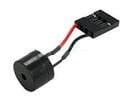
Did the computer make any beeping noises when you did that?

I did not notice it I doubt it considering the bios does not come up on screen . I built this pc their was a little speaker i never connected it which is possibly why I never heard as beep i posted a picture of it.images.jpg
 

My Computer My Computer

At a glance

Microsoft Windows 7 Professional 64-bitIntel Xeon E3 @ 3.30GHzIntel(R) Xeon(R) CPU E...16.00GB Single-Channel DDR3 @ 666MHz (9-9-9-24)ATI Radeon HD 7950
Computer type
PC/Desktop
OS
Microsoft Windows 7 Professional 64-bit
CPU
Intel Xeon E3 @ 3.30GHzIntel(R) Xeon(R) CPU E3-1230 v3 @ 3.3
Motherboard
MSI Z97 GAMING 5 (MS-7917)
Memory
16.00GB Single-Channel DDR3 @ 666MHz (9-9-9-24)
Graphics Card(s)
ATI Radeon HD 7950
Sound Card
(1) AMD High Definition Audio Device (2) USB Audio Device
Hard Drives
(1) Samsung SSD 840 EVO 120GB ATA Device
(2) TOSHIBA MK7559GSM ATA Device
Other Info
TRENDnet Wireless AC1200 Dual Band USB 3.0 Adapter, TEW-805UB
Good find David. That information should shine some light.

@bigboi972
Because I know you are going to keep your motherboard manual as long as you have that motherboard. A little one of my rules of the thumb.
Always write down the bios # down inside the front cover of the manual and the # of all bios you have used on that system. Just might come in handy.
 

My Computer My Computer

At a glance

Windows 10 Pro. 64/ version 1709 Windows 7 Pr...Intel i7-6800K @ 4.3Corsair Platinum 16 gig @2400EVGA GTX 1070 OC
Computer type
PC/Desktop
Computer Manufacturer/Model Number
Home made Desktop
OS
Windows 10 Pro. 64/ version 1709 Windows 7 Pro/64
CPU
Intel i7-6800K @ 4.3
Motherboard
ASUS X-99 Deluxe II
Memory
Corsair Platinum 16 gig @2400
Graphics Card(s)
EVGA GTX 1070 OC
Monitor(s) Displays
Asus 27" LED LCD/VE278Q
Screen Resolution
1920-1080 or 1280-720 HDMI
Hard Drives
INTEL SSD 730-240 Gb Sata 3.0/
PSU
EVGA Platium 1200W
Case
Phanteks Luxe Tempered Glass 8 fans/ one radiator
Cooling
XSPC/ Water Cooled CPU
Keyboard
Das 4 Professional
Mouse
Logitech M705/MX Anywhere 2-S
Internet Speed
100 mbits
Antivirus
Microsoft Security Essentials/ Malwarebytes Premium 3.0/ SAS
Browser
I.E. 11 default/Firefox/ ISP Time Warner Cable/Spectrum
Other Info
LG BluRay Burner/
Sound system-KLipsch-THX/
Icy Dock ssd Hot Swap bays.
Did the computer make any beeping noises when you did that?

I did not notice it I doubt it considering the bios does not come up on screen . I built this pc their was a little speaker i never connected it which is possibly why I never heard as beep i posted a picture of it.View attachment 328016

Correct, you won't hear the beep codes unless you connect that little speaker.
Is it easy to get to now so you can install it?
 

My Computer My Computer

At a glance

Multi-Boot W7_Pro_x64 W8.1_Pro_x64 W10_Pro_x6...AMD Athlon II x4 6206GB GSkill DDR2 800AMD 4670 GPU + AMD 4200 IGP
Computer type
PC/Desktop
Computer Manufacturer/Model Number
home built
OS
Multi-Boot W7_Pro_x64 W8.1_Pro_x64 W10_Pro_x64 +Linux_VMs +Chromium_VM
CPU
AMD Athlon II x4 620
Motherboard
Gigabyte GA-MA785G-UD3H
Memory
6GB GSkill DDR2 800
Graphics Card(s)
AMD 4670 GPU + AMD 4200 IGP
Sound Card
on board Realtek ALC889A
Monitor(s) Displays
RCA 40" LCD TV, Insignia 32" LCD TV, HP 15" LCD monitor
Screen Resolution
1680 x 1050
Hard Drives
OCZ Vertex 3 120GB,
Samsung F3 1TB (3),
Several others - WD, Seagate, Hitachi, ...
PSU
Corsair 500 W
Case
Rosewill mid tower
Cooling
CM 90mm rifle
Keyboard
Gyration wireless, Logitech wireless, Dell USB wired
Mouse
Gyration wireless, Logitech wireless, V7 USB wired
Internet Speed
Spectrum - 100Mbps D / 10Mbps U
Antivirus
Avast, MBAM3, EMET, WinPatrol
Browser
Pale Moon, Firefox, IE
Other Info
2 multi-boot PC's
Mainly HTPC/Office/Gen purpose (no gaming).
Trendnet USB KVM.
LG DVD burner/Blue Ray Player.
Tray system for removable SATA backup drives.

Not currently OCd, under-volted.
I use Hybrid sleep, rarely re-boot or shutdown.

Hauppauge HD-PVR, Avermedia PCIe TV Tuner, Hauppauge PCI TV Tuner.
Did the computer make any beeping noises when you did that?

I did not notice it I doubt it considering the bios does not come up on screen . I built this pc their was a little speaker i never connected it which is possibly why I never heard as beep i posted a picture of it.View attachment 328016

Correct, you won't hear the beep codes unless you connect that little speaker.
Is it easy to get to now so you can install it?
I am sure it is i will have to check my motherboard manual
 

My Computer My Computer

At a glance

Microsoft Windows 7 Professional 64-bitIntel Xeon E3 @ 3.30GHzIntel(R) Xeon(R) CPU E...16.00GB Single-Channel DDR3 @ 666MHz (9-9-9-24)ATI Radeon HD 7950
Computer type
PC/Desktop
OS
Microsoft Windows 7 Professional 64-bit
CPU
Intel Xeon E3 @ 3.30GHzIntel(R) Xeon(R) CPU E3-1230 v3 @ 3.3
Motherboard
MSI Z97 GAMING 5 (MS-7917)
Memory
16.00GB Single-Channel DDR3 @ 666MHz (9-9-9-24)
Graphics Card(s)
ATI Radeon HD 7950
Sound Card
(1) AMD High Definition Audio Device (2) USB Audio Device
Hard Drives
(1) Samsung SSD 840 EVO 120GB ATA Device
(2) TOSHIBA MK7559GSM ATA Device
Other Info
TRENDnet Wireless AC1200 Dual Band USB 3.0 Adapter, TEW-805UB
Back
Top