PC performance suddenly degraded - multiple issues

beranim

New member
Local time
7:16 PM
Messages
6
Location
England, UK
Hi,

I have been tearing my hair out over the last week or so, with my PC suddenly showing a noticeable drop in performance.

Operating System: Windows 7 Home Premium 64-bit
Packard Bell: ipower G5800
Processor: Intel(R) Core(TM) i7 CPU 870 @ 2.93GHz (8 CPUs), ~2.9GHz
Memory: 8192MB RAM

By an large it has been a pretty reliable piece of kit and I use it for
a) media streaming around the house (Plex for video and Sonos for audio)
b) online gaming *(Elder Scrolls online, Star Wars The Old Republic etc)
c) surfing
d) general light home use (office etc)

I have two NAS drives (WD "MyBookLiveDuo") which ran fine, but a few weeks ago they suddenly become inaccessible. No idea why, but seemed to resolve it by loading Windows updates. It was actually my wife that found that solution before I did, by doing that on her laptop.
Not long after that I began to sense a general degradation in performance but not too noticeable. It began to get more persistent problems (when playing online i started to get and distortion on sound). This wasn'yt just on line, I began to have local sound issues (through Itunes and Foobar). Then over this weekend, when I tried to use Sonos, i got "network connection speed insufficient to support playback buffering". The sonos devices are all wired rather than wireless. BTW the sonos devise playback 'internet based radio ok' ( a route which would cut the PC itself out).

My gut feeling is that this is a PC issue and not a network issue (but happy to be corrected). When I run a broadband speed test from the PC I get 10MB/s which suggest to me that the internal network must be that fast as well (again happy to be advised otherwise).

I have run sfc scannow and this came back showing no issues with the Windows 7 installation itself. I have downloaded Malwarebytes and run, removing any PUP (so looks clean to me). My virus checker (AVG) is also not reporting any issue.

Whilst looking in Task Manager there does seem to be a correlation in CPU usage when I get the 'genera' sound distortion on the PC (say listening to iTunes) and is easily replicated by simply browsing (I use Firefox as the browser).

I think I need a more systematic approach to solving this one, so welcome any help on diagnosing and resolving any underlying issues.

I suspect that there may be more than one issue, and might need to have more focused thread, but this is my starting position.

Thanks

Alan
 

My Computer

Computer type
PC/Desktop
Computer Manufacturer/Model Number
Packard Bell ipower G5800
OS
Windows 7 Home Premium 64-bit
CPU
Intel(R) Core(TM) i7 CPU 870 @ 2.93GHz (8 CPUs), ~2
Memory
8MB RAM
Graphics Card(s)
NVIDIA GeForce GT 330
Hard Drives
WDC WD15EADS-22P8B0 (C:/ and D:/ drives)
Antivirus
AVG Internet Security 2013
Browser
Firefox
Lots of views but no feedback, so a brief update what I have done in the meantime. Using the below article,

http://www.sevenforums.com/tutorial...ation-conflicts-performing-clean-startup.html

I followed the steps and the performance did improve when using a clean start up. However, after several hours I wasnt able to pin down to specific causes, but rather it seems that three main players seem to be actve when I replicated the fault.

AVGnsa, Firefox and NT System & Kernel. The first two I have tried running with avg disabled and firefox in safe mode, but still doesn't seem to have cleared the problem.

I have been collecting some screenshots along the way, but not sure that they are of much use. Hope that someone reading this might give me a gentle nudge into what information I should be looking into ...

Thanks
 

My Computer

Computer type
PC/Desktop
Computer Manufacturer/Model Number
Packard Bell ipower G5800
OS
Windows 7 Home Premium 64-bit
CPU
Intel(R) Core(TM) i7 CPU 870 @ 2.93GHz (8 CPUs), ~2
Memory
8MB RAM
Graphics Card(s)
NVIDIA GeForce GT 330
Hard Drives
WDC WD15EADS-22P8B0 (C:/ and D:/ drives)
Antivirus
AVG Internet Security 2013
Browser
Firefox
Hi and welcome to SevenForums,
You probably already found the problem which is AVG
Disabling usually is only sort term AVG actually needs to be completely uninstalled
And also using their uninstaller as well,
Download tools and utilities | AVG Worldwide

Then use Panda instead.
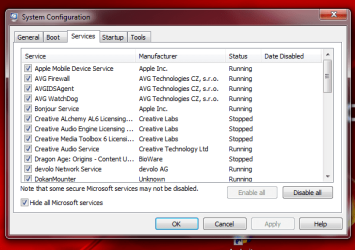
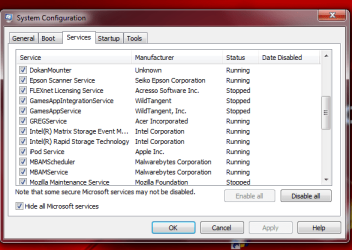
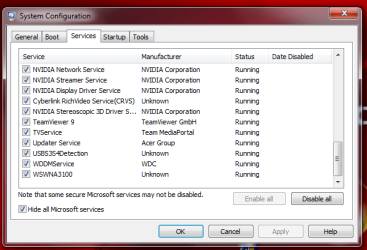
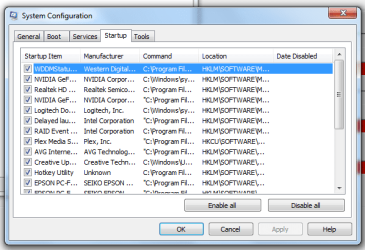
Post the msconfig startup and services screen shots,
Don't forget checking the box to hide all M$ services first.
 

My Computer

Computer type
PC/Desktop
Computer Manufacturer/Model Number
Custom assembled by me :}
OS
Win-7-Pro64bit 7-H-Prem-64bit
CPU
i7-5930K 2nd i9-9940x both water blocked VRM's too
Motherboard
ASUS SABERTOOTH X99 2nd ASUS x299 Apex
Memory
Trident-z 3200C14 2nd Trident-z 3600C16
Graphics Card(s)
EVGA 1080ti ftw3 2nd Titan Xp both water blocked
Sound Card
Built-in Realtek
Monitor(s) Displays
1-AOC G2460PG 24"G-Sync 144Hz/ 2nd 1-ASUS VG248QE 24" 144Hz
Screen Resolution
1920 x 1080 144Hz
Hard Drives
2-Samsung M.2 Evo & Evo Plus
2-Samsung 850 EVO 500GB SSD's/ 3-2.5 W.D. Black 1tb-&3-1tb/3-3.5 WD Black 1tb hdd's
PSU
EVGA SuperNOVA 1000-P2 2nd 1200-P2
Case
2-Corsair Obsidian Series 450D Black ATX Mid Tower
Cooling
Custom water loops
Keyboard
Logitech G710+/ 2nd Logitech G910
Mouse
2-RedDragon M901 Perdition 16400 dpi Gaming mouse = wired
Internet Speed
Comcast Ping 19ms 89.31mbps download speed 6.12mbps upload
Antivirus
Malwarebytes Pro/ Superantispyware Pro
Browser
FireFox & Pale moon
Other Info
2nd ASUS X299 Apex/Intel i9-9940x with Custom water loop/7H-Prem-x64/Corsair 450D case/Ram Trident-z 3600C16 4x8gb / Samsung970Evo plus 500gb SSD/Dual ssd EZ swap evo/PSU EVGA SuperNova 1200w-P2 80+Platinum/GPU Titan Xp /8-ML-140 on push-pull on 2-280GTX rads
Hi, thanks for you response.

I have uploaded images of msconfig (startups and services). I don't particularly have a slow bootup time, but happy to take any advice on things. Both appear to be bloated on the face of it (services particularly).

Re the AVG, I hear what you are saying, but haven't taken any steps to change anything yet, so still have AVG as I write this update.

Thanks again,

Alan
 

Attachments

My Computer

Computer type
PC/Desktop
Computer Manufacturer/Model Number
Packard Bell ipower G5800
OS
Windows 7 Home Premium 64-bit
CPU
Intel(R) Core(TM) i7 CPU 870 @ 2.93GHz (8 CPUs), ~2
Memory
8MB RAM
Graphics Card(s)
NVIDIA GeForce GT 330
Hard Drives
WDC WD15EADS-22P8B0 (C:/ and D:/ drives)
Antivirus
AVG Internet Security 2013
Browser
Firefox
Hi,
No need to .zip them just upload the individual images here :)
Use the paper clip symbol in the reply editor ;)
 

My Computer

Computer type
PC/Desktop
Computer Manufacturer/Model Number
Custom assembled by me :}
OS
Win-7-Pro64bit 7-H-Prem-64bit
CPU
i7-5930K 2nd i9-9940x both water blocked VRM's too
Motherboard
ASUS SABERTOOTH X99 2nd ASUS x299 Apex
Memory
Trident-z 3200C14 2nd Trident-z 3600C16
Graphics Card(s)
EVGA 1080ti ftw3 2nd Titan Xp both water blocked
Sound Card
Built-in Realtek
Monitor(s) Displays
1-AOC G2460PG 24"G-Sync 144Hz/ 2nd 1-ASUS VG248QE 24" 144Hz
Screen Resolution
1920 x 1080 144Hz
Hard Drives
2-Samsung M.2 Evo & Evo Plus
2-Samsung 850 EVO 500GB SSD's/ 3-2.5 W.D. Black 1tb-&3-1tb/3-3.5 WD Black 1tb hdd's
PSU
EVGA SuperNOVA 1000-P2 2nd 1200-P2
Case
2-Corsair Obsidian Series 450D Black ATX Mid Tower
Cooling
Custom water loops
Keyboard
Logitech G710+/ 2nd Logitech G910
Mouse
2-RedDragon M901 Perdition 16400 dpi Gaming mouse = wired
Internet Speed
Comcast Ping 19ms 89.31mbps download speed 6.12mbps upload
Antivirus
Malwarebytes Pro/ Superantispyware Pro
Browser
FireFox & Pale moon
Other Info
2nd ASUS X299 Apex/Intel i9-9940x with Custom water loop/7H-Prem-x64/Corsair 450D case/Ram Trident-z 3600C16 4x8gb / Samsung970Evo plus 500gb SSD/Dual ssd EZ swap evo/PSU EVGA SuperNova 1200w-P2 80+Platinum/GPU Titan Xp /8-ML-140 on push-pull on 2-280GTX rads
OK here are the startup shots, followed by services.

Updated, reloaded corrected startup screenshots (thanks for pointing the issue out- mitchell65)
 

Attachments

  • Capture 3.PNG
    Capture 3.PNG
    83.5 KB · Views: 9
  • Capture 4.PNG
    Capture 4.PNG
    75.1 KB · Views: 9
  • Capture 5.PNG
    Capture 5.PNG
    82.1 KB · Views: 9
  • Capture 6.PNG
    Capture 6.PNG
    72.5 KB · Views: 9
  • Capture 1a.PNG
    Capture 1a.PNG
    56 KB · Views: 9
  • Capture 2.PNG
    Capture 2.PNG
    83.8 KB · Views: 8
Last edited:

My Computer

Computer type
PC/Desktop
Computer Manufacturer/Model Number
Packard Bell ipower G5800
OS
Windows 7 Home Premium 64-bit
CPU
Intel(R) Core(TM) i7 CPU 870 @ 2.93GHz (8 CPUs), ~2
Memory
8MB RAM
Graphics Card(s)
NVIDIA GeForce GT 330
Hard Drives
WDC WD15EADS-22P8B0 (C:/ and D:/ drives)
Antivirus
AVG Internet Security 2013
Browser
Firefox
Looks like one of your Start Up images is missing. You have duplicated the second half of the window!
I would also strongly recommend that you get rid of AVG!!!
 

My Computer

Computer type
PC/Desktop
OS
Microsoft Windows 7 Home Premium 64-bit 7601 Multiprocessor Free Service Pack 1
CPU
Intel(R) Core(TM) i7-3770 CPU @ 3.40GHz
Motherboard
ASUSTeK COMPUTER INC. P8H77-M
Memory
8.00 GB
Graphics Card(s)
Intel(R) HD Graphics 4000
Sound Card
On Board
Monitor(s) Displays
Dell 24"
Screen Resolution
1920 x 1080
Hard Drives
(1) INTEL SSDSC2CT180A3 ATA Device (2) ST500DM002-1BD142 ATA Device (3) WDC WD3200AAKS-75L9A0 ATA Device (4) Generic- Compact Flash USB Device (5) Generic- MS/MS-Pro USB Device (6) Generic- SD/MMC USB Device (7) Generic- SM/xD-Picture USB
PSU
500w Corsair
Case
Cooler Master
Cooling
3 Fans
Keyboard
Logitech MK300
Mouse
Logitech WOM
Internet Speed
75Mb
Antivirus
Norton 360
Browser
Firefox, Opera, IE
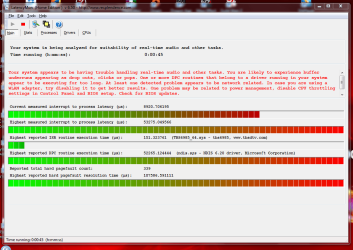
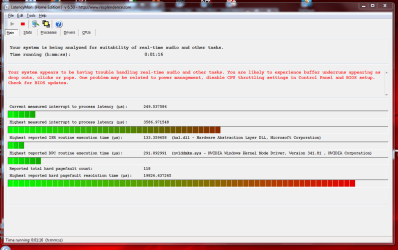
I continue investigations here, and are looking into ResMon there are signs of excessive Deferred Procedure Calls and Interrupt Service Routines (DCP) which may link to the excessif NT System & Kernel usage too. So I downloaded LatencyMon and wow, did that shed some light immediately (or is it a red herring?). (screen shots 1 and 2). I updated the driver (despite Windows telling me it was up to date)

AS can bee seen there is a lot of 'red' and ndis.sys looks like a good place to start. On my machine I have a Ethernet network card and no wireless devices, so all network activity should be 'wired'. I disabled the network card and checked out the effects in LatencyMon (screen shots 3 & 4). Still some red, but a significant enough change to suggest there is an issue in the ndis.sys (network card) worth investigating.

I am considering picking up a new network card to see if that does anything at all - but not optimistic that it will. Online postings suggest this has worked for some people but not enough for me to think this is the 'single fix'.

Anyone got any ideas about ndis.sys, how to check if its been corrupted? how to refresh?

Thanks
 

Attachments

  • Capture 1.PNG
    Capture 1.PNG
    167.8 KB · Views: 0
  • Capture 2.PNG
    Capture 2.PNG
    178.1 KB · Views: 1
  • Capture 3.PNG
    Capture 3.PNG
    172.1 KB · Views: 0
  • Capture 4.PNG
    Capture 4.PNG
    182.1 KB · Views: 0

My Computer

Computer type
PC/Desktop
Computer Manufacturer/Model Number
Packard Bell ipower G5800
OS
Windows 7 Home Premium 64-bit
CPU
Intel(R) Core(TM) i7 CPU 870 @ 2.93GHz (8 CPUs), ~2
Memory
8MB RAM
Graphics Card(s)
NVIDIA GeForce GT 330
Hard Drives
WDC WD15EADS-22P8B0 (C:/ and D:/ drives)
Antivirus
AVG Internet Security 2013
Browser
Firefox
Back
Top