PC Seeing Bluray Drive as a CD- Drive...

thebib62

New member
Local time
3:44 AM
Messages
1
Hey guys, having some trouble with my Bluray Drive, Windows keeps acting like it's a CD drive instead.

The Bluray drive I have installed is a LITE-ON IHBS112-04.(Newegg.com - LITE-ON Black 12X BD-R 2X BD-RE 16X DVD+R 12X DVD-RAM 8X BD-ROM SATA 12X Blu-ray Burner with Blu Ray 3D Feature IHBS112-04 - Blu-Ray Burners)

The weird thing about it, is that it seems to be an erratic problem.
When I reboot my PC, it shows up fine as a Bluray drive, then after some use it says it's a CD drive again.

I believe the problem maybe caused by Ashampoo Burning Studio 10, or iTunes. It seems to change to a CD drive once I launch those programs.

I've tried a guide where it told me to delete some registry files.
@
HKEY_LOCAL_MACHINE\SYSTEM\CurrentControlSet\Control\Class\{4D36E965-E325-11CE-BFC1-08002BE10318}
And to delete the 'Upper/LowerFilters' keys. It seemed to have worked, but alas, it didn't stay that way for long.

I even tried download firmware for it, and installing it, and rebooting, but no go...
 

My Computer My Computer

At a glance

Windows 7 Home x64
OS
Windows 7 Home x64
Hi thebib62,

Welcome to SevenForums.

After deliberating over this issue since this morning ( off and on , of course ) and doing a little bit of homework, I have this to say:

I was indeed curious since I do have an iBHS 112-2 Liteon BD writer. itunes v10 - yes, Ashampoo Burning Studio -10 - yes (though I had never used it before)

And I had never bothered to look into how the drive appears in My Computer. :)

Well,

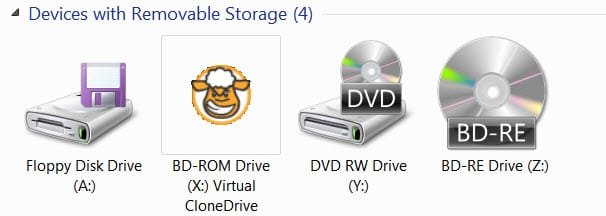
This is how the empty drive appears in (My) Computer.

1 My Computer.jpg

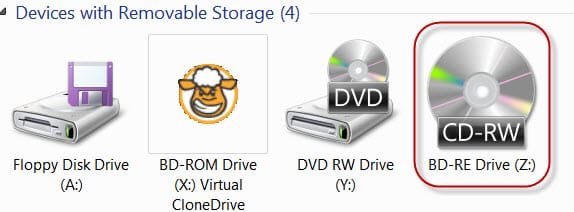
With a blank CDRW

2 Blank CDRW.jpg

and with a blank BD-RE

3a Blank BD-RE.jpg

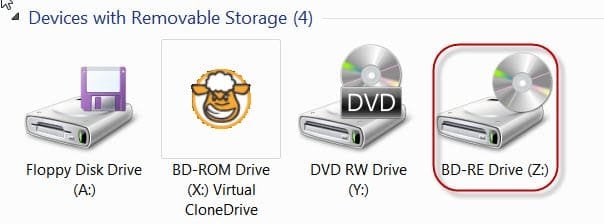
After burning a CD-RW with Ashampoo, like this.( the same view after burning a BD-RE)

3 after burning.jpg

Do note that only the icon has changed but it still reads BD-RE Drive (Z:) :)

This I would consider normal. This icon change will hold till you reboot whereupon it will change to its original avatar.

During this small experiment, Ashampoo failed to burn the BD-RE two out of three times :shock: and I had a tough time recovering the BD-RE (it was frustrating and took hours and hours going through the ordeal twice.) The drive will take an abnormally long time to recognise the disk as a BD-RE and all the burning software I tried to erase it will take more than 10 minutes to recognise the drive. With all permutations and combinations including the ASUS external BD writer, I managed to quick erase the discs.

Now the interesting part is during this ordeal - yes, I was jittery since a BD-RE which I purchased through ebay Global Easybuy was and still is very costly the loss of which was sure to bring blood in my eyes :) - was that I noticed the drive had turned to be CD Drive (I: or Z: :) - I for my external drive).

So I have to conclude that in the case where a drive has difficulty in reading the media for whatever reason it can show it as a CD drive. ( There may be other reasons too.)

I am open to any other views or ideas on the issue.

I am also inclined to think that Ashampoo burner + Liteon iHBS112 + Verbatim BD-RE do not go well together.

EDIT: OP is advised to download the the SmartPack Firmware update utility v1.22.0 from http://www.liteonodd.com/en/service-support/download/cat_view/44-/54- and update the firmware. Notwithstanding what I have stated, a firmware update may resolve the issue if it is due to some other reason. ( Even if he had updated the firmware already, better to check with this utility. It will also be useful for further updates.)

I also do not discount the possibility of a defective/dodgy chip in the electronics causing this problem. The OP may consider returning it to the vendor and getting a replacement if the return policy permits.

In atleast one case the user reinstalled Windows and the problem vanished. I have not come across any other tangible solution to this problem reported by many users.
 
Last edited:

My Computer My Computer

At a glance

Windows 7 Home Premium 32 bit
OS
Windows 7 Home Premium 32 bit
Back
Top