
Solved PC shows 2 "system" partitions/drives to install Windows 7. Help

Bewitcher

New member
Local time
11:31 AM
Messages
16
PC shows 2 "system" partitions/drives to install Windows 7. Help

Dear all,

When installing the windows 7 yeasterday I came across an interesting thing, i'll try to be brief:

At a step where you choose the drive to install the Windows to, and format it when needed, I saw 2 "system", as they were called there, partitions/drives:

One is my SSD, which is where I would install win7,
The second one is just a regular HDD, which by no means could appear as "system" drive.

Well I thought Ok, nvm, let me install just like I wanted - on my SSD and forget about this thing. So i did after formatting the SSD.

Everything went totally fine with the system install, drivers etc., EXCEPT:

It doesn't boot from SSD, ALTHOUGH I did go to BIOS and changed the priority.
And even after that he kind a misses ssd.

I really can feel the difference in the speed of system loading.

And in Disk utility it shows 2 primary disks. One of them as said above is my HDD.

I didnt do anything to the HDD...

What is wrong?? I really would appreciate the help!!!:(
 

My Computer My Computer

At a glance

Win7 x64 ultimate (2009 setup), iCore 5, gfor...
Computer type
PC/Desktop
Computer Manufacturer/Model Number
Asus
OS
Win7 x64 ultimate (2009 setup), iCore 5, gforece gtx 970
What is wrong is that you had 2 hard drives connected when you installed Windows.

Bad idea.

Windows put your boot files on the HDD, not on the SSD.

How do you solve it?

Disconnect the HDD and do it over.

There are other ways to correct the problem, but that's what I'd do unless I had already spent a lot of time configuring and installing applications.
 

My Computer My Computer

At a glance

Windows 7 Home Premium SP1, 64-bitIntel Skylake i5-6600K, not overclocked8 GB HyperX DDR4-2666 (2 x 4 GB)none; graphics are integrated on CPU
Computer type
PC/Desktop
Computer Manufacturer/Model Number
Ignatz Special; 4 speed manual gearbox; factory air conditioning; one of one
OS
Windows 7 Home Premium SP1, 64-bit
CPU
Intel Skylake i5-6600K, not overclocked
Motherboard
AsRock Z170M Extreme 4, micro ATX
Memory
8 GB HyperX DDR4-2666 (2 x 4 GB)
Graphics Card(s)
none; graphics are integrated on CPU
Sound Card
onboard: Realtek ALC1150; external: USB Behringer UF0-202
Monitor(s) Displays
Dell S2340M 23 inch IPS
Screen Resolution
1600 x 900
Hard Drives
System: Crucial MX100 series SSD, 128 GB;
Data: Samsung Spinpoint 103SJ, 1 TB;
Backup: WD Caviar Green WD30EZRX-00D8PB0, 3 TB
PSU
Rosewill SilentNight 500 watt fanless, semi-modular
Case
Antec Solo II
Cooling
Noctua NH-U12S; Noctua F12 intake, Noctua S12A exhaust
Keyboard
Microsoft 200 6JH-00001 USB
Mouse
Dell or Microsoft optical wired; USB
Antivirus
Microsoft Security Essentials and Malwarebytes Premium
Browser
Pale Moon
Other Info
All fans PWM; speeds at idle: CPU circa 500 rpm; intake circa 600 rpm; exhaust circa 600 rpm; CPU temps 27 idle and 47 C load in a warm room (27 C/81 F) when running Intel Extreme Tuning Utility stress test.
a screen shot of your disk management window may be helpful, if windows was originally installed on your HDD then you probably have an partition marked as active there which shouldn't be
 

My Computer My Computer

At a glance

Win7 Ultimate X64Intel i5 3570K8GB DDR3 1600Onboard
Computer type
PC/Desktop
Computer Manufacturer/Model Number
Pauly Special
OS
Win7 Ultimate X64
CPU
Intel i5 3570K
Motherboard
Gigabyte Z77X-DS3H
Memory
8GB DDR3 1600
Graphics Card(s)
Onboard
Sound Card
Onboard
Screen Resolution
1280x1024
Hard Drives
Samsung 840 Evo SSD (OS)
1TB Spinner (Data)
PSU
800W Arctic
Case
Cooler Master
Cooling
3x120mm Fans
Keyboard
MS Wireless
Mouse
MS Wireless
Internet Speed
20M
What is wrong is that you had 2 hard drives connected when you installed Windows.

Bad idea.

Windows put your boot files on the HDD, not on the SSD.

How do you solve it?

Disconnect the HDD and do it over.

There are other ways to correct the problem, but that's what I'd do unless I had already spent a lot of time configuring and installing applications.

Firstly thank you for a reply, since I was planning to get this problem solved today asap.:party:

Secondly, thank you for convincing that's not a big deal

Thirdly, "noooooooooooooooooooooooooooooooooo really? install all again?( all those drivers???"
Might startup repair 3 times-thing work?)
 

My Computer My Computer

At a glance

Win7 x64 ultimate (2009 setup), iCore 5, gfor...
Computer type
PC/Desktop
Computer Manufacturer/Model Number
Asus
OS
Win7 x64 ultimate (2009 setup), iCore 5, gforece gtx 970
a screen shot of your disk management window may be helpful, if windows was originally installed on your HDD then you probably have an partition marked as active there which shouldn't be

Ill get the screenshot asap i get home( im sorry to post my issue here unprepaired)
 

My Computer My Computer

At a glance

Win7 x64 ultimate (2009 setup), iCore 5, gfor...
Computer type
PC/Desktop
Computer Manufacturer/Model Number
Asus
OS
Win7 x64 ultimate (2009 setup), iCore 5, gforece gtx 970
If you have already spent time setting up your system then a full reinstall is not mandatory

It is advisable to have your boot drive connected to the lowest numbered sata port on the motherboard as this is where the machine will start looking for drives also if your hdd was previously running windows it will have an active partition on it so the windows installer will have seen an active partition on port Sata_0 (or Sata_1) and installed boot files there.
You do have the option to use startup repair (or other methods) to move your boot files to your SSD
Option 1 - Unplug all drives except SSD then run startup repair upto three times to recreate boot files on SSD
Option 2 - http://www.sevenforums.com/tutorials/209885-bootmgr-move-c-easybcd.html?filter

Be aware that if you unplug your HDD your system will be unbootable until boot files are repaired/reinstated or the HDD is plugged back in

After you have sorted your boot files problems be sure to check if you have an active partition on your HDD and if necessary mark as inactive

http://www.sevenforums.com/tutorials/274797-disk-management-post-screen-capture-image.html
 

My Computer My Computer

At a glance

Win7 Ultimate X64Intel i5 3570K8GB DDR3 1600Onboard
Computer type
PC/Desktop
Computer Manufacturer/Model Number
Pauly Special
OS
Win7 Ultimate X64
CPU
Intel i5 3570K
Motherboard
Gigabyte Z77X-DS3H
Memory
8GB DDR3 1600
Graphics Card(s)
Onboard
Sound Card
Onboard
Screen Resolution
1280x1024
Hard Drives
Samsung 840 Evo SSD (OS)
1TB Spinner (Data)
PSU
800W Arctic
Case
Cooler Master
Cooling
3x120mm Fans
Keyboard
MS Wireless
Mouse
MS Wireless
Internet Speed
20M
Yeah, go ahead and post that screen shot.

If it confirms my suspicions, you may be able to use "EasyBCD" to copy your boot files from wherever they are to C--which would make your SSD bootable.

Drivers?? Aren't you using the drivers supplied by the Windows 7 installation disc?

Or are you talking about having gone through Windows Update? I can understand why you wouldn't want to spend those hours again.
 

My Computer My Computer

At a glance

Windows 7 Home Premium SP1, 64-bitIntel Skylake i5-6600K, not overclocked8 GB HyperX DDR4-2666 (2 x 4 GB)none; graphics are integrated on CPU
Computer type
PC/Desktop
Computer Manufacturer/Model Number
Ignatz Special; 4 speed manual gearbox; factory air conditioning; one of one
OS
Windows 7 Home Premium SP1, 64-bit
CPU
Intel Skylake i5-6600K, not overclocked
Motherboard
AsRock Z170M Extreme 4, micro ATX
Memory
8 GB HyperX DDR4-2666 (2 x 4 GB)
Graphics Card(s)
none; graphics are integrated on CPU
Sound Card
onboard: Realtek ALC1150; external: USB Behringer UF0-202
Monitor(s) Displays
Dell S2340M 23 inch IPS
Screen Resolution
1600 x 900
Hard Drives
System: Crucial MX100 series SSD, 128 GB;
Data: Samsung Spinpoint 103SJ, 1 TB;
Backup: WD Caviar Green WD30EZRX-00D8PB0, 3 TB
PSU
Rosewill SilentNight 500 watt fanless, semi-modular
Case
Antec Solo II
Cooling
Noctua NH-U12S; Noctua F12 intake, Noctua S12A exhaust
Keyboard
Microsoft 200 6JH-00001 USB
Mouse
Dell or Microsoft optical wired; USB
Antivirus
Microsoft Security Essentials and Malwarebytes Premium
Browser
Pale Moon
Other Info
All fans PWM; speeds at idle: CPU circa 500 rpm; intake circa 600 rpm; exhaust circa 600 rpm; CPU temps 27 idle and 47 C load in a warm room (27 C/81 F) when running Intel Extreme Tuning Utility stress test.
Yeah, go ahead and post that screen shot.

If it confirms my suspicions, you may be able to use "EasyBCD" to copy your boot files from wherever they are to C--which would make your SSD bootable.

Drivers?? Aren't you using the drivers supplied by the Windows 7 installation disc?

Or are you talking about having gone through Windows Update? I can understand why you wouldn't want to spend those hours again.

Well, i was talking about specific drivers for my intel, nvidia, printer, office, windows update, small progs like skype, google chrome, java, finereader, other adobe stuff, - it's all fine, just requiring reboots, downloading, and again and again.

I prefer using original driver updates from websites - And indeed I have those separate updates, other things i need on a flash usb, some are portable, but the time to tweak + windows update = annoying)

:cool:
 

My Computer My Computer

At a glance

Win7 x64 ultimate (2009 setup), iCore 5, gfor...
Computer type
PC/Desktop
Computer Manufacturer/Model Number
Asus
OS
Win7 x64 ultimate (2009 setup), iCore 5, gforece gtx 970
If you have already spent time setting up your system then a full reinstall is not mandatory

It is advisable to have your boot drive connected to the lowest numbered sata port on the motherboard as this is where the machine will start looking for drives also if your hdd was previously running windows it will have an active partition on it so the windows installer will have seen an active partition on port Sata_0 (or Sata_1) and installed boot files there.
You do have the option to use startup repair (or other methods) to move your boot files to your SSD
Option 1 - Unplug all drives except SSD then run startup repair upto three times to recreate boot files on SSD
Option 2 - http://www.sevenforums.com/tutorials/209885-bootmgr-move-c-easybcd.html?filter

Be aware that if you unplug your HDD your system will be unbootable until boot files are repaired/reinstated or the HDD is plugged back in

After you have sorted your boot files problems be sure to check if you have an active partition on your HDD and if necessary mark as inactive

http://www.sevenforums.com/tutorials/274797-disk-management-post-screen-capture-image.html

Thank you indeed. I know what to do now with your help. Ill be home in apprx 6-7 hours and shall go thru these steps) have a nice day!)
 

My Computer My Computer

At a glance

Win7 x64 ultimate (2009 setup), iCore 5, gfor...
Computer type
PC/Desktop
Computer Manufacturer/Model Number
Asus
OS
Win7 x64 ultimate (2009 setup), iCore 5, gforece gtx 970
To use Option One above you'd first Mark SSD Win7 Partition Active,
then unplug all other drives to run Startup Repair - Run 3 Separate Times.

Option Two will mark Active for you, move the boot files without having to run the repairs. Just make sure you keep the SSD set first to boot in BIOS when you reconnect the hard drive and if necessary mark the HD Inactive so it is not bootable: Partition - Mark as Inactive - Windows 7 Forums

There may be other unknowns so please do post the screenshot of Disk Management - Post a Screen Capture Image
 
Dear All,

thanks for answers!


As i promised, here is the screenshot:

EBYM5xl.jpg

So there I see (im a noob) my SSD (60GB) with "boot" word, and A disk (just a simple hdd) with "System" word

AND

both active - )

here is another thingy:
UwxWO32.jpg
 
Last edited:

My Computer My Computer

At a glance

Win7 x64 ultimate (2009 setup), iCore 5, gfor...
Computer type
PC/Desktop
Computer Manufacturer/Model Number
Asus
OS
Win7 x64 ultimate (2009 setup), iCore 5, gforece gtx 970
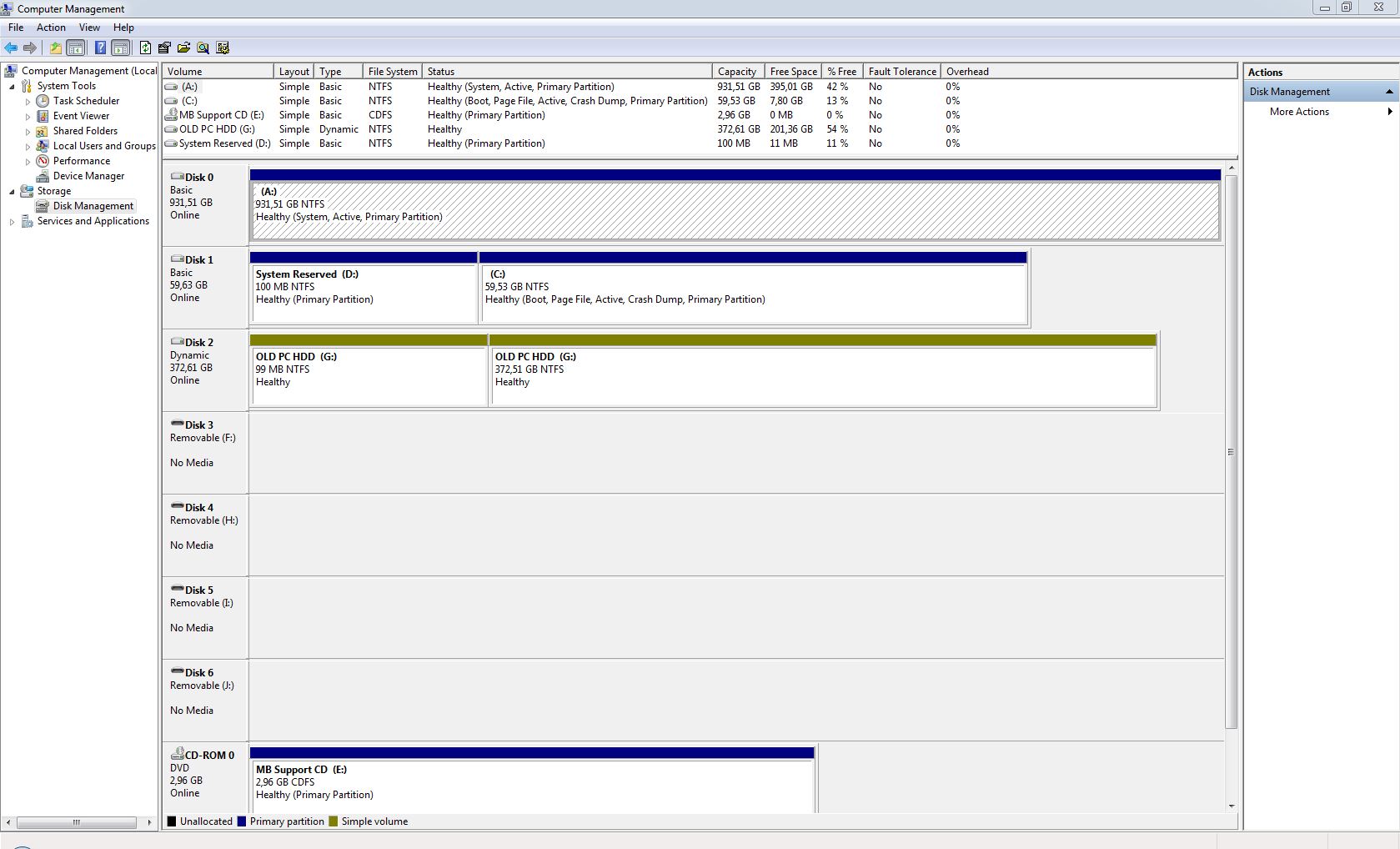
So there I see (im a noob) my SSD (60GB) with "boot" word, and A disk (just a simple hdd) with "System" word

AND

both active - )
 

My Computer My Computer

At a glance

Win7 x64 ultimate (2009 setup), iCore 5, gfor...
Computer type
PC/Desktop
Computer Manufacturer/Model Number
Asus
OS
Win7 x64 ultimate (2009 setup), iCore 5, gforece gtx 970
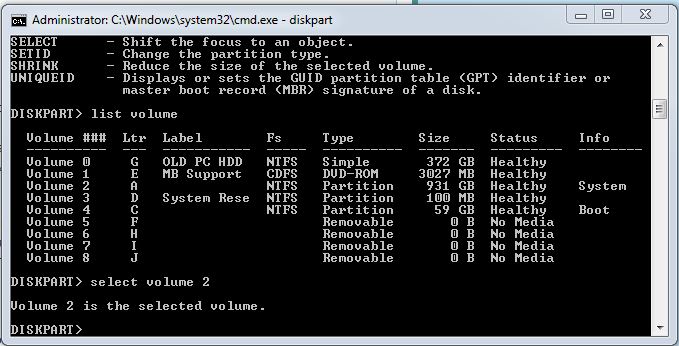
delete
 

My Computer My Computer

At a glance

Win7 x64 ultimate (2009 setup), iCore 5, gfor...
Computer type
PC/Desktop
Computer Manufacturer/Model Number
Asus
OS
Win7 x64 ultimate (2009 setup), iCore 5, gforece gtx 970
delete
 

My Computer My Computer

At a glance

Win7 x64 ultimate (2009 setup), iCore 5, gfor...
Computer type
PC/Desktop
Computer Manufacturer/Model Number
Asus
OS
Win7 x64 ultimate (2009 setup), iCore 5, gforece gtx 970
Mark Disk1 System Reserved Partition Active, power down to unplug all other hard drives, swap Disk0 cable to Win7 drive so it is in safest first position.

Boot into Win7 disk to run Startup Repair - Run 3 Separate Times until Win7 starts and System Reserved is marked System Active partition.

When you plug back in other drives make sure new WIn7 drive remains set first to boot in BIOS setup.

Then either move the data off to wipe former A drive with Diskpart Clean Command
to get it cleanest, then repartition in Disk Mgmt with a higher drive letter, or mark it Inactive so it can't interfere even though boot code will remain on it until it is wiped: Partition - Mark as Inactive - Windows 7 Forums
 
Mark Disk1 System Reserved Partition Active, power down to unplug all other hard drives, swap Disk0 cable to Win7 drive so it is in safest first position.

Boot into Win7 disk to run Startup Repair - Run 3 Separate Times until Win7 starts and System Reserved is marked System Active partition.

When you plug back in other drives make sure new WIn7 drive remains set first to boot in BIOS setup.

Then either move the data off to wipe former A drive with Diskpart Clean Command
to get it cleanest, then repartition in Disk Mgmt with a higher drive letter, or mark it Inactive so it can't interfere even though boot code will remain on it until it is wiped: Partition - Mark as Inactive - Windows 7 Forums


swap Disk0 cable to Win7 drive so it is in safest first position. - sorry for a stupid question - what exactly do u mean - get SSD higher, so to say, so that the pc catches him first?
 

My Computer My Computer

At a glance

Win7 x64 ultimate (2009 setup), iCore 5, gfor...
Computer type
PC/Desktop
Computer Manufacturer/Model Number
Asus
OS
Win7 x64 ultimate (2009 setup), iCore 5, gforece gtx 970
OS is best in first disk position so future repairs or reinstalls dont derail boot files to first Primary partition.

If a faster port is available for SSD then ignore that but be sure to unplug all other disks before future reinstalls.

Is the yellow striped Dynamic Disk more than one hard drives spanned together?
 
OS is best in first disk position so future repairs or reinstalls dont derail boot files to first Primary partition.

If a faster port is available for SSD then ignore that but be sure to unplug all other disks before future reinstalls.

Is the yellow striped Dynamic Disk more than one hard drives spanned together?

Hi!)

took me a while to do everything cuz I thought it would be wise to clean my pc)))

Please , could you have a quick look at what my disk manager shows now?

2m3fr4i.jpg
 

My Computer My Computer

At a glance

Win7 x64 ultimate (2009 setup), iCore 5, gfor...
Computer type
PC/Desktop
Computer Manufacturer/Model Number
Asus
OS
Win7 x64 ultimate (2009 setup), iCore 5, gforece gtx 970

My Computer My Computer

At a glance

Windows 10 Pro x64Intel Core i7 6700KGSkill TridentZ RGB 16GB 3600 16-16-16-36EVGA GTX 980 Ti SC x2
Computer type
PC/Desktop
Computer Manufacturer/Model Number
Skylake Special #666
OS
Windows 10 Pro x64
CPU
Intel Core i7 6700K
Motherboard
Asus Sabertooth Z170 Mark 1
Memory
GSkill TridentZ RGB 16GB 3600 16-16-16-36
Graphics Card(s)
EVGA GTX 980 Ti SC x2
Sound Card
Realtek High Definition
Monitor(s) Displays
AOC G2460PG
Screen Resolution
1920 x 1080 144Hz
Hard Drives
Samsung 860 Pro 256GB, Seagate Barracuda 4TB x2
PSU
EVGA 1000 P2, EVGA White Custom Braided Cables
Case
Corsair Vengeance C70 Gunmetal Black
Cooling
Corsair H100i v2, Corsair ML120 x2, Thermal Grizzly Kryonaut
Keyboard
Logitech G910 Orion Spectrum
Mouse
Logitech G700s
Internet Speed
Verizon Fios Quantum Gateway 75/75
Antivirus
Windows Defender, Malwarebytes Free 3.8.3
Browser
Chrome
Other Info
Corsair SP120 x4, LG Blu-ray Drive, Durabrand HT-395 100 Watt Dolby Digital Amp, Corsair H2100 Wireless 7.1 Headset
You must have not marked the new System Reserved partition Active because otherwise the System flag would be on that partition and not C. But having it on C is OK. I'd delete System Reserved in Disk Mgmt.

The OS drive obviously is not in Disk0 position, so if possible I'd swap cables with the old PC hard drive to see if that will move the new OS drive to Disk0. Make sure it remains set as first drive to boot in BIOS setup.

Also if you have room to move the data off the old OS hard drive, I would wipe it with Diskpart Clean Command and then repartition it in Disk Mgmt to get it cleanest, then move the data back on. Otherwise you should delete its old System Reserved partition, and convert the drive from Dynamic to Basic following only Option One (non-destructive conversion) in Convert a Dynamic Disk to a Basic Disk.

I'd also look over the steps, tools and methods in Clean Reinstall Windows 7 which compiles everything that works best in tens of thousands of installs we've directly helped with here, and which has been followed by 1.5 million consumers without a single complaint. If you do this you will learn a lot about your PC and Win7, and have the best install possible in the world today.
 
Back
Top