PC shows all empty USB ports

usbdrive

New member
Local time
2:15 AM
Messages
5
I already fixed this problem once but cannot find the solution this time, browsed for hours.

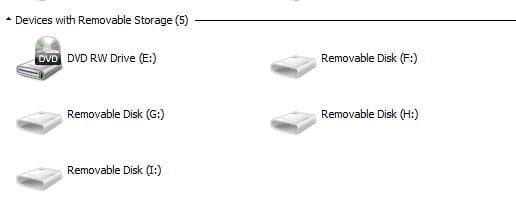
My PC shows all empty USB ports present even if nothing is connected to them. A letter is assigned to each of the port. How can I remove currently unused ports from showing in the Windows Explorer?

I have Win 64-bit home premium.

Thanks
 

My Computer

Computer type
PC/Desktop
OS
Windows 7 Home x64
Hi usbdrive,

Welcome to Seven Forums.

Try this.

Download v 0.8.1 of the drivecleanup.zip from Drive Tools for Windows.

Unzip it to a folder, say drivecleanup.

You will have two folders Win32 and x64 each containing DriveCleanup.exe for 32 bit and 64 bit respectively.

Remove all USB storage devices from your system (except your Keyboard and mouse) and reboot.

Right click on the DriveCleanup.exe and run as administrator. (Use the *.exe file appropriate for your bit version of Windows.).

After the clean up act, reboot and check whether your system is still asking for the non-existent drives.

( When you plug in your USB devices after this cleanup these will be installed afresh. What you have done is to remove all non-present devices and drive letters associated with them and start with a clean slate. Hopefully that should resolve the problem.)
 

My Computer

OS
Windows 7 Home Premium 32 bit
thank you jumanji,

yes, this is what I did last time as I remember this German website.

I did what you've suggested and it did not change anything. Still the same all drives are shown. Anything else I could try, please?
 

My Computer

Computer type
PC/Desktop
OS
Windows 7 Home x64
OK, Did you run it as administrator? It will wipe off the old records only when done so.

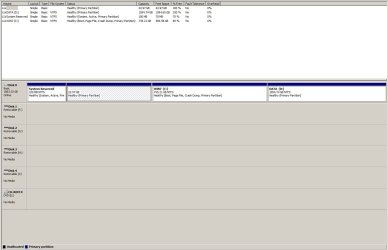
I would also request you to post the screenshot of the drive cleanup window after running a drive cleanup as also that of Windows Disk Management under this fault condition.
 
Last edited:

My Computer

OS
Windows 7 Home Premium 32 bit
I ran it few times now as administrator, rebooted computer few times too. No changes - see 2 pictures attached.
 

Attachments

  • drive cleanup screen.JPG
    drive cleanup screen.JPG
    29 KB · Views: 4
  • Drives.JPG
    Drives.JPG
    14.1 KB · Views: 23

My Computer

Computer type
PC/Desktop
OS
Windows 7 Home x64
I am using FreeSync and it is backing all up to a flash drive J. I did not unplug it when I ran drivecleanup first couple of times, but now I unplugged it too and it still shows what 2 pictures are showing above. Pictures are with all the flash drives removed - nothing except keyboard and mouth is connected to any USB port. Well, I have D-Link USB 3.0 multiplier connected. Will try to unplug it too now and run it again. I am not sure it matters.

Edited: so I did unplug everything from all USB drives, ran as Administrator again with the same exactly result. Need to try something else.
 

My Computer

Computer type
PC/Desktop
OS
Windows 7 Home x64
Backing up to a flash drive is never recommended.Better to backup to an external HDD.

And yes, you have to remove all USB connected devices (except mouse and KB) before running drive clean up. Even after that these drives show, well, I am running out of ideas.:)

Are you sure you do not have some sort of Card Reader still connected?

What does Device Manager show? Examine in detail and post.

Post a screenshot of Windows Disk Management ( not my computer) which may give some information. Hide the Console Tree and Action Pane using the buttons in the Tool/Menu Bar so that we get a full screen view.

http://www.sevenforums.com/tutorials/274797-disk-management-post-screen-capture-image.html

I don't know much about freesync or any other programs or USB 3 Multiplier which may perhaps lock the drive letters.
 

My Computer

OS
Windows 7 Home Premium 32 bit
just did it - disconnected everything except for the mouse and kb. i have probably 20 devices connected to my computer so now it will take me an hour to figure out what is what and connect it all back. anyway, i attached a screen - still the same result. i am not using that tool any more - need another solution.

thank you for your help. any other ideas?
 

Attachments

  • Capture.JPG
    Capture.JPG
    79.9 KB · Views: 4

My Computer

Computer type
PC/Desktop
OS
Windows 7 Home x64
Ghost USB's

I found this problem to be that drive letter have been added to each port. In disk management I removed the drive letter and then the ghost USB drive disappeared. :p
 

My Computer

Computer type
PC/Desktop
OS
Win 7 64
Back
Top