Solved PC usually hangs at Starting Windows

DaralenManta

New member
Local time
9:34 PM
Messages
7
Hello,

I wasn't sure where to post this so forgive me if this is the wrong place to start.

I recently installed a new secondary SSD in my Alienware desktop replacement. I've been running with two drives for a while, but just recently started using this latest drive. In my rig I run one drive as my work drive and the other as my personal drive. Both drives have a Windows 7 (Pro for work, Ultimate for personal) installation on them. I forgo the Windows boot menu and instead tell the PC which drive to boot from using the PC's boot menu. This has worked well for me in the past with other drives.

With my latest personal drive however, the PC seems to run well in all aspects except startup. About 70% of the time, the PC hangs at "Starting Windows." The little flower logo continues to animate, but the PC never actually finishes booting. I think I left it that way for a couple hours once and seem to remember the PC going to recovery mode of some kind, but I don't remember the details. Usually I just power the PC off with a hard shut down, then power it back on and try again. This usually prompts a "startup repair" menu which I ignore.

I've had no luck with the repair methods that I've tried so far which include:

System Restore - this issue started immediately after Windows is done installing, so not much to restore to.

chkdsk /r /f
Here are the edited results. Seems pretty innocuous.

CHKDSK is verifying files (stage 1 of 5)...
Cleaning up instance tags for file 0x46e55.
CHKDSK is verifying security descriptors (stage 3 of 5)...
323072 file SDs/SIDs processed. Cleaning up 445 unused index entries from index $SII of file 0x9.
Cleaning up 445 unused index entries from index $SDH of file 0x9.
Cleaning up 445 unused security descriptors.

sfc /scannow
No problems detected.

Startup Repair - Heres the only error I saw in the report:
Root cause found:
-----------------
Unspecified changes to system configuration might have caused the problem.

Repair action: System Restore
Result: Cancelled

Repair action: System files integrity check and repair
Result: Failed. Error code = 0x490
Time taken = 193332 ms

As far as I know, all the latest drivers and Windows Updates are installed.

I'm starting to suspect that there is a problem with the SSD itself (the Samsung listed in my system specs) as it has a clean Windows installation and during the initial install, I ran into this problem as well. I wiped the drive and started again and the issue returned.

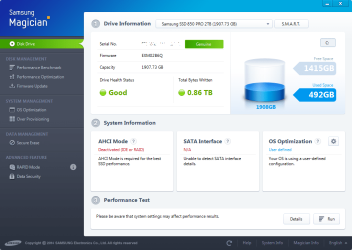
I have Samsung Magician 4.5 installed, but I don't see any tools on there to check the integrity of the drive. The screenshot I've attached is about all I can get out of it.

Any help would be appreciated.

-Daralen
 

Attachments
  • Samsung Magician 4.5.png
    Samsung Magician 4.5.png
    113.6 KB · Views: 0

My Computer

Computer type
Laptop
Computer Manufacturer/Model Number
Alienware M18x R1
OS
Windows 7 Ultimate x64
CPU
Intel Core i7-2920XM Extreme Edition
Motherboard
Intel HM67 (Cougar Point) [B3]
Memory
32GB DDR3
Graphics Card(s)
nVidia GeForce GTX 460M x 2 in SLI
Hard Drives
Intel SSDSC2BX800G4
Samsung SSD 850 PRO 2TB
Antivirus
Microsoft Security Essentials
Browser
Internet Explorer 11
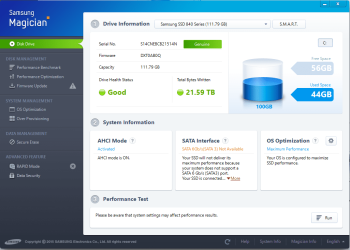
Have you clicked on the S.M.A.R.T. button?
 

My Computer

Computer type
PC/Desktop
Computer Manufacturer/Model Number
Custom Build
OS
Windows 10 Pro x64
CPU
Core2Quad Q9550 @2.83GHz (o/c @3.82GHz)
Motherboard
ASUS P5K Premium WiFi
Memory
8GB (4x2GB DDR2)
Graphics Card(s)
ASUS ROG STRIX GTX1050 Ti O4G Gaming
Sound Card
Creative Soundblaster X-Fi Platinum
Monitor(s) Displays
ACER ED273WIDX 27"
Screen Resolution
1920 x 1080
Hard Drives
SAMSUNG SSD 840 Series 120GB
SAMSUNG 500GB SATA 7200 rpm
2xWD Velociraptor 150GB 10000 rpm
PSU
600W
Case
CoolerMaster Centurion
Cooling
Cooler Master V8
Keyboard
VPRO V700
Mouse
Logitech G602
Antivirus
Norton IS
Browser
Firefox x64
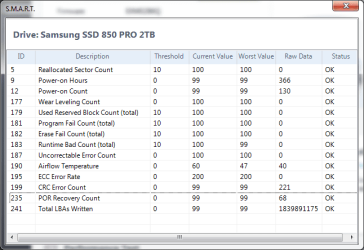
Yes. All the items on there say "OK." I can post details later if anyone wants em.
 

My Computer

Computer type
Laptop
Computer Manufacturer/Model Number
Alienware M18x R1
OS
Windows 7 Ultimate x64
CPU
Intel Core i7-2920XM Extreme Edition
Motherboard
Intel HM67 (Cougar Point) [B3]
Memory
32GB DDR3
Graphics Card(s)
nVidia GeForce GTX 460M x 2 in SLI
Hard Drives
Intel SSDSC2BX800G4
Samsung SSD 850 PRO 2TB
Antivirus
Microsoft Security Essentials
Browser
Internet Explorer 11
Also:
Why is the AHCI mode deactivated?
Why the SATA interface is listed as N/A?
 

Attachments

  • Capture.PNG
    Capture.PNG
    128.5 KB · Views: 0
  • Capture_1.PNG
    Capture_1.PNG
    124.9 KB · Views: 0

My Computer

Computer type
PC/Desktop
Computer Manufacturer/Model Number
Custom Build
OS
Windows 10 Pro x64
CPU
Core2Quad Q9550 @2.83GHz (o/c @3.82GHz)
Motherboard
ASUS P5K Premium WiFi
Memory
8GB (4x2GB DDR2)
Graphics Card(s)
ASUS ROG STRIX GTX1050 Ti O4G Gaming
Sound Card
Creative Soundblaster X-Fi Platinum
Monitor(s) Displays
ACER ED273WIDX 27"
Screen Resolution
1920 x 1080
Hard Drives
SAMSUNG SSD 840 Series 120GB
SAMSUNG 500GB SATA 7200 rpm
2xWD Velociraptor 150GB 10000 rpm
PSU
600W
Case
CoolerMaster Centurion
Cooling
Cooler Master V8
Keyboard
VPRO V700
Mouse
Logitech G602
Antivirus
Norton IS
Browser
Firefox x64
I would rerun chkdsk
But make sure that BOTH drives are checked, you only reported one set.
(unplug 1, then swop drives)

Roy
 

My Computer

Computer type
PC/Desktop
Computer Manufacturer/Model Number
medionl/Aspire 6930G/acer x55a
OS
W7 home premium 32bit/W7HP 64bit/w10 tp insider ring
CPU
E5300 dual core
Motherboard
medion MS7366
Memory
3gb
Graphics Card(s)
Nvidia Geforce 7100 Nforce 630i
Monitor(s) Displays
avixc
Internet Speed
n (isp resticted to 72)
Antivirus
mse/pands
Browser
palemoon
Other Info
Belkin Fd7050 n USB using Railink RT2870 drivers, more upto date

Attachments

  • SMART data.png
    SMART data.png
    41.8 KB · Views: 11

My Computer

Computer type
Laptop
Computer Manufacturer/Model Number
Alienware M18x R1
OS
Windows 7 Ultimate x64
CPU
Intel Core i7-2920XM Extreme Edition
Motherboard
Intel HM67 (Cougar Point) [B3]
Memory
32GB DDR3
Graphics Card(s)
nVidia GeForce GTX 460M x 2 in SLI
Hard Drives
Intel SSDSC2BX800G4
Samsung SSD 850 PRO 2TB
Antivirus
Microsoft Security Essentials
Browser
Internet Explorer 11
Also:
Why is the AHCI mode deactivated?
Why the SATA interface is listed as N/A?

The only drive option I have available in my BIOS is "SATA Operation."

The three choices are
ATA
AHCI
RAID

I currently have it set to RAID. I think it started out AHCI but a while back when I was trying to run Windows 8, the only way I could get it to work was by switching the SATA Operation option to RAID. I've been running with that since even though I'm not actually using RAID.

Setting it to AHCI means I'll have to start from scratch. I'd REALLY like to avoid having to do that unless we're certain it's what's causing the problem I'm having.
 

My Computer

Computer type
Laptop
Computer Manufacturer/Model Number
Alienware M18x R1
OS
Windows 7 Ultimate x64
CPU
Intel Core i7-2920XM Extreme Edition
Motherboard
Intel HM67 (Cougar Point) [B3]
Memory
32GB DDR3
Graphics Card(s)
nVidia GeForce GTX 460M x 2 in SLI
Hard Drives
Intel SSDSC2BX800G4
Samsung SSD 850 PRO 2TB
Antivirus
Microsoft Security Essentials
Browser
Internet Explorer 11
I would rerun chkdsk
But make sure that BOTH drives are checked, you only reported one set.
(unplug 1, then swop drives)

Roy

The two drives don't see each other in Windows. They're disabled in the Device Manager. The work drive (Intel) is working flawlessly.

You think I should run another chkdsk /r /f on the drive that's giving me trouble though?
 

My Computer

Computer type
Laptop
Computer Manufacturer/Model Number
Alienware M18x R1
OS
Windows 7 Ultimate x64
CPU
Intel Core i7-2920XM Extreme Edition
Motherboard
Intel HM67 (Cougar Point) [B3]
Memory
32GB DDR3
Graphics Card(s)
nVidia GeForce GTX 460M x 2 in SLI
Hard Drives
Intel SSDSC2BX800G4
Samsung SSD 850 PRO 2TB
Antivirus
Microsoft Security Essentials
Browser
Internet Explorer 11
You don't have to start over if you set SATA=AHCI on BIOS. Try it.
 

My Computers

System One System Two

  • Computer type
    PC/Desktop
    Computer Manufacturer/Model Number
    custom build
    OS
    Windows 7 HP 64
    CPU
    i5 6600K - 800MHz to 4200MHz
    Motherboard
    GA-Z170-HD3P
    Memory
    4+4G GSkill DDR4 3000
    Graphics Card(s)
    IG - Intel 530
    Monitor(s) Displays
    Samsung 226BW
    Screen Resolution
    1680x1050
    Hard Drives
    (1) -1 SM951 – 128GB M.2 AHCI PCIe SSD drive for Windows 7 and Lubuntu
    (2) -1 WD SATA 3 - 1T for Data
    (3) -1 WD SATA 3 - 1T for backup
    PSU
    Thermaltake 450W TR2 gold
    Keyboard
    Old and good Chicony mechanical keyboard
    Mouse
    Logitech mX performance - 9 buttons (had to disable some)
    Internet Speed
    500Mb/s
    Browser
    Firefox 64
    Other Info
    TinyWall firewall
  • Computer type
    Laptop
    System Manufacturer/Model Number
    Asus Q550LF
    OS
    Windows 7 Pro
    CPU
    i7-4500U 800MHz to 3.0GHz
    Motherboard
    Asus Q550LF
    Memory
    (4+4)G DDR3 1600
    Graphics Card(s)
    IG intel 4400 + NVIDIA GeForce GT 745M
    Sound Card
    Realtek
    Monitor(s) Displays
    LG Display LP156WF4-SPH1
    Screen Resolution
    1920 x 1080
    Hard Drives
    BX500 120G SSD for Windows and programs +
    1T HDD for data
    Internet Speed
    500 Mb/s
    Browser
    Firefox
    Other Info
    TinyWall firewall
Just backup your data and reinstall Ultimate, you`ll be done in less then 15 minutes, and updating Windows 7 is now a piece of cake.

You did right by keeping them separate and using the boot menu, that`s the best way to do it.

You must have installed in IDE mode, check your bios.

You can switch it to AHCI, but then windows won`t boot, the experts can tell you how to fix that.

But none of that will fix your startup issue.

Wow, you just started using it and it has 492 GB of used space already :eek:

Holy Halibut !!
 

My Computer

Computer type
PC/Desktop
Computer Manufacturer/Model Number
Skylake Special #666
OS
Windows 10 Pro x64
CPU
Intel Core i7 6700K
Motherboard
Asus Sabertooth Z170 Mark 1
Memory
GSkill TridentZ RGB 16GB 3600 16-16-16-36
Graphics Card(s)
EVGA GTX 980 Ti SC x2
Sound Card
Realtek High Definition
Monitor(s) Displays
AOC G2460PG
Screen Resolution
1920 x 1080 144Hz
Hard Drives
Samsung 860 Pro 256GB, Seagate Barracuda 4TB x2
PSU
EVGA 1000 P2, EVGA White Custom Braided Cables
Case
Corsair Vengeance C70 Gunmetal Black
Cooling
Corsair H100i v2, Corsair ML120 x2, Thermal Grizzly Kryonaut
Keyboard
Logitech G910 Orion Spectrum
Mouse
Logitech G700s
Internet Speed
Verizon Fios Quantum Gateway 75/75
Antivirus
Windows Defender, Malwarebytes Free 3.8.3
Browser
Chrome
Other Info
Corsair SP120 x4, LG Blu-ray Drive, Durabrand HT-395 100 Watt Dolby Digital Amp, Corsair H2100 Wireless 7.1 Headset
I tried setting it to AHCI and get BSOD when booting from my both drives.

The setting hasn't changed from RAID in over 2 years.

I've got a lot of games installed so that's why the space is being used quickly.

Anyone have any other ideas? I'm certainly willing to try switching to ACHI and then reinstalling Windows from scratch on both drives, but it's going to be a lot of work to back both of them up, get them fully updated and get both of them working the way I want them to again.

I don't want to go through all that though unless we're fairly certain it'll actually fix the issue.
 

My Computer

Computer type
Laptop
Computer Manufacturer/Model Number
Alienware M18x R1
OS
Windows 7 Ultimate x64
CPU
Intel Core i7-2920XM Extreme Edition
Motherboard
Intel HM67 (Cougar Point) [B3]
Memory
32GB DDR3
Graphics Card(s)
nVidia GeForce GTX 460M x 2 in SLI
Hard Drives
Intel SSDSC2BX800G4
Samsung SSD 850 PRO 2TB
Antivirus
Microsoft Security Essentials
Browser
Internet Explorer 11
I figured you would have an issue with that.

Now your work install probably won`t boot either.

This may help.

AHCI : Enable in Windows 7 / Vista

But if you think the drive is bad, then there`s only 1 thing to do :)
 

My Computer

Computer type
PC/Desktop
Computer Manufacturer/Model Number
Skylake Special #666
OS
Windows 10 Pro x64
CPU
Intel Core i7 6700K
Motherboard
Asus Sabertooth Z170 Mark 1
Memory
GSkill TridentZ RGB 16GB 3600 16-16-16-36
Graphics Card(s)
EVGA GTX 980 Ti SC x2
Sound Card
Realtek High Definition
Monitor(s) Displays
AOC G2460PG
Screen Resolution
1920 x 1080 144Hz
Hard Drives
Samsung 860 Pro 256GB, Seagate Barracuda 4TB x2
PSU
EVGA 1000 P2, EVGA White Custom Braided Cables
Case
Corsair Vengeance C70 Gunmetal Black
Cooling
Corsair H100i v2, Corsair ML120 x2, Thermal Grizzly Kryonaut
Keyboard
Logitech G910 Orion Spectrum
Mouse
Logitech G700s
Internet Speed
Verizon Fios Quantum Gateway 75/75
Antivirus
Windows Defender, Malwarebytes Free 3.8.3
Browser
Chrome
Other Info
Corsair SP120 x4, LG Blu-ray Drive, Durabrand HT-395 100 Watt Dolby Digital Amp, Corsair H2100 Wireless 7.1 Headset
So I made those registry changes, then power-cycled and changed my SATA settings from RAID to AHCI again. Unfortunately I was still getting BSODs.

Reading through that and the "Information" at the bottom prompted me to check my storage controller driver though and sure enough, it was 8 something and the latest is 12 something.

Intel(R) Mobile Express Chipset SATA RAID Controller

After updating the driver, my personal drive boots just fine after multiple tests. :D

Out of curiosity, I tried booting in AHCI again after the driver update and once again received BSODs. I wonder if I can find the name of the storage controller that would be installed if I had AHCI enabled from install and then install that controller as well...
I think it might be helpful to try to use AHCI still as it looks like it will enable some features on my SSDs. I'll keep poking at it, but in the meantime I'll call this issue resolved.

Thanks for the help.
 

My Computer

Computer type
Laptop
Computer Manufacturer/Model Number
Alienware M18x R1
OS
Windows 7 Ultimate x64
CPU
Intel Core i7-2920XM Extreme Edition
Motherboard
Intel HM67 (Cougar Point) [B3]
Memory
32GB DDR3
Graphics Card(s)
nVidia GeForce GTX 460M x 2 in SLI
Hard Drives
Intel SSDSC2BX800G4
Samsung SSD 850 PRO 2TB
Antivirus
Microsoft Security Essentials
Browser
Internet Explorer 11
Back
Top