
Solved PC will be turned off in safe mode

Franky

New member
Member
VIP
Local time
8:57 PM
Messages
472
Location
Kurdistan
Hi all,

I wanted to scan a Dell inspiron N5010 laptop in safe mode. When I took it to the safe mode environment and ran the AV to scan, after some while the PC went out!
The power options menu options (when plug is in) are as follows:

Screensaver after 4 mins.
Dim to display after 10 mins.
Turn off display after 15 mins.
Hard disk, sleep and hibernate are all off (set to never).

I tested the machine without scanning it, i.e, went to the safe mode and waited to see what occurs after time elapsing.
By observations so far (because I can apply more tests to determine that where the problem exactly is), the problem is when the machine is in safe mode and is doing something (in current case, scanning).
What do you think? Why it goes out in this situation please?

Thanks in advance.
 

Attachments
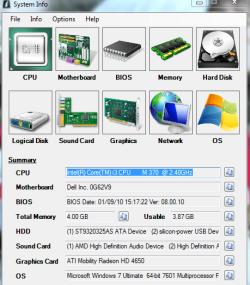
  • Capture.PNG
    Capture.PNG
    37 KB · Views: 22

My Computer My Computer

At a glance

windows 7 32-bitIntel(R) Core(TM) i3-2120 CPU @ 3.30GHz4.00 GBNVIDIA GeForce GTS 450
Computer type
PC/Desktop
OS
windows 7 32-bit
CPU
Intel(R) Core(TM) i3-2120 CPU @ 3.30GHz
Motherboard
Gigabyte Technology Co., Ltd. P61A-D3
Memory
4.00 GB
Graphics Card(s)
NVIDIA GeForce GTS 450
Sound Card
(1) NVIDIA High Definition Audio (2) NVIDIA Virtual Audio
Monitor(s) Displays
Samsung
Hard Drives
ST500DM002-1BC142 ATA Device
Internet Speed
1 Mbps
Antivirus
KIS 2013
Browser
chrome
can you confirm that scanning completes with no errors in normal mode?
 

My Computer My Computer

At a glance

windows 7 ultimate x64
Computer type
PC/Desktop
OS
windows 7 ultimate x64
In safe mode I disabled Dim to display and also turn off display (the screen saver can't be changed because it's not accessible in safe mode). What occurs is this, machine goes off, that is, it'll be turned off after few minutes without any sound/message or something like this.

Now I've come out from safe mode and in normal mode and normal Power Options (10 min dim to display and 15 min for turning off the display) I'm scanning the PC.
I post the result again as soon as possible.
 

My Computer My Computer

At a glance

windows 7 32-bitIntel(R) Core(TM) i3-2120 CPU @ 3.30GHz4.00 GBNVIDIA GeForce GTS 450
Computer type
PC/Desktop
OS
windows 7 32-bit
CPU
Intel(R) Core(TM) i3-2120 CPU @ 3.30GHz
Motherboard
Gigabyte Technology Co., Ltd. P61A-D3
Memory
4.00 GB
Graphics Card(s)
NVIDIA GeForce GTS 450
Sound Card
(1) NVIDIA High Definition Audio (2) NVIDIA Virtual Audio
Monitor(s) Displays
Samsung
Hard Drives
ST500DM002-1BC142 ATA Device
Internet Speed
1 Mbps
Antivirus
KIS 2013
Browser
chrome
In normal mode, after passing about 24 mins it turned off! Without even any sound of message. The laptop has the problem of heating, that is, it heats and sends out the very heating air from it's vents always. I don't know the problem is that heat or some thing else.
 

My Computer My Computer

At a glance

windows 7 32-bitIntel(R) Core(TM) i3-2120 CPU @ 3.30GHz4.00 GBNVIDIA GeForce GTS 450
Computer type
PC/Desktop
OS
windows 7 32-bit
CPU
Intel(R) Core(TM) i3-2120 CPU @ 3.30GHz
Motherboard
Gigabyte Technology Co., Ltd. P61A-D3
Memory
4.00 GB
Graphics Card(s)
NVIDIA GeForce GTS 450
Sound Card
(1) NVIDIA High Definition Audio (2) NVIDIA Virtual Audio
Monitor(s) Displays
Samsung
Hard Drives
ST500DM002-1BC142 ATA Device
Internet Speed
1 Mbps
Antivirus
KIS 2013
Browser
chrome
test.
 

My Computer My Computer

At a glance

Windows 7 Professional 64 bit Service Pack 1Intel Core 2 Quad CPU6 GBATI Radeon HD 3600 Series
Computer Manufacturer/Model Number
Dell Studio 540
OS
Windows 7 Professional 64 bit Service Pack 1
CPU
Intel Core 2 Quad CPU
Motherboard
ECS Iris8
Memory
6 GB
Graphics Card(s)
ATI Radeon HD 3600 Series
Sound Card
AMD
Monitor(s) Displays
Samsung Syncmaster 2220WM
Hard Drives
Hitachi 400 GB
Unknown Brand 500 GB
FreeAgent Backup Drive 500 GB
I tested it also in normal mode (as I said it in my previous post) and it went out again. What other test do you mean please?
 

My Computer My Computer

At a glance

windows 7 32-bitIntel(R) Core(TM) i3-2120 CPU @ 3.30GHz4.00 GBNVIDIA GeForce GTS 450
Computer type
PC/Desktop
OS
windows 7 32-bit
CPU
Intel(R) Core(TM) i3-2120 CPU @ 3.30GHz
Motherboard
Gigabyte Technology Co., Ltd. P61A-D3
Memory
4.00 GB
Graphics Card(s)
NVIDIA GeForce GTS 450
Sound Card
(1) NVIDIA High Definition Audio (2) NVIDIA Virtual Audio
Monitor(s) Displays
Samsung
Hard Drives
ST500DM002-1BC142 ATA Device
Internet Speed
1 Mbps
Antivirus
KIS 2013
Browser
chrome
First, thanks for the replies.

I thought about testing the laptop apart from its Windows 7 operating system to recognize whether the problem has to do the hardware or the OS. So I put one USB stick containing Windows Defender Offline tool, and booted the laptop from that USB stick. After booting from it, I updated the tool and on that environment started to scan the entire computer using it.
Now the elapsed time from beginning of scan is 55 minutes and the PC is still on!! And the tool is still scanning and no malware has been detected till now.
What does that mean?
In my opinion, it indicates that, although laptop heats much but the problem of shutting it by itself is not related to heating completely because in current situation the PC is scanning, warm air is sending out and everything is like before, but it doesn't go out and still is on!
So I think the problem has to do the OS, Windows 7 x64 here.
 

My Computer My Computer

At a glance

windows 7 32-bitIntel(R) Core(TM) i3-2120 CPU @ 3.30GHz4.00 GBNVIDIA GeForce GTS 450
Computer type
PC/Desktop
OS
windows 7 32-bit
CPU
Intel(R) Core(TM) i3-2120 CPU @ 3.30GHz
Motherboard
Gigabyte Technology Co., Ltd. P61A-D3
Memory
4.00 GB
Graphics Card(s)
NVIDIA GeForce GTS 450
Sound Card
(1) NVIDIA High Definition Audio (2) NVIDIA Virtual Audio
Monitor(s) Displays
Samsung
Hard Drives
ST500DM002-1BC142 ATA Device
Internet Speed
1 Mbps
Antivirus
KIS 2013
Browser
chrome
I saw the following writing somewhere, but since I tested the machine when it had booted from something other than Windows OS (here, windows defender offline tool) and it had remained on, so I concluded that the problem is not around the dusts and dirty on the inside pieces and the hot air, in opposition with this:

If the hot air is obstructed from reaching the outside world, a heat built-up occurs and the laptop takes the safety precaution of turning itself off, rather than allowing permanent damage to occur.


I thought that if the dust and dirty things are the cause of turning the machine off by itself so in any situation this operation should happen, whether in Windows OS or outside of it, because in any cases those dusts and dirty are remained inside the PC.

So my mind went toward a problem in the OS (the machine was on and didn't has any problem outside the Windows OS) and asked about checking the OS to find the error source.
Once I cleaned the laptop by an air compressor. Since I couldn't open the laptop so I blew the air through any vent appearing from outside. When I'd send the air from one side, the dirty air was coming out from other hand side's vents. And after that when I turned the machine on (on Windows) and tested it again, the problem seemed to be vanished!

As a conclusion, I think, the thing that compel the machine to be turned off when it's too hot is inside the Windows OS, apparently.

I wrote this explanation so that if someone else faces such problem knows that that feature (turning off) is inside the OS and the first thing to do is cleaning the PC from anywhere he/she can reach.

Thanks.
 

My Computer My Computer

At a glance

windows 7 32-bitIntel(R) Core(TM) i3-2120 CPU @ 3.30GHz4.00 GBNVIDIA GeForce GTS 450
Computer type
PC/Desktop
OS
windows 7 32-bit
CPU
Intel(R) Core(TM) i3-2120 CPU @ 3.30GHz
Motherboard
Gigabyte Technology Co., Ltd. P61A-D3
Memory
4.00 GB
Graphics Card(s)
NVIDIA GeForce GTS 450
Sound Card
(1) NVIDIA High Definition Audio (2) NVIDIA Virtual Audio
Monitor(s) Displays
Samsung
Hard Drives
ST500DM002-1BC142 ATA Device
Internet Speed
1 Mbps
Antivirus
KIS 2013
Browser
chrome
Back
Top