PC will only boot to safe mode.

Pheonix69

New member
Local time
4:47 AM
Messages
8
Location
Oldham, Lancashire, GB
Hi all
would you believe it, this happened the day after joining this site.
my PC boots through normal post screen up to checking NVRam, then starts to load essential drivers for safe mode. In safe mode the desktop Icons are very limited(as you would expect) so went to all programs to find Mbam to check for viruses. found that Mbam,and Norton 360, will not run, and System restore has no restore points.
A reset gives me the the usual options screen but choosing 'start normally' only brings me back to safe mode.
Has any one out there seen this before. I would appreciate any help or hints.
Thanks:shock:
 

My Computer

Computer Manufacturer/Model Number
Self build
OS
windows 7 professional 64 bit
CPU
AMD FX6100 Bulldozer
Motherboard
Asus M5A88-M Evo
Memory
Crucial Vengeance CML16GX3M4A1600 (16gb)
Graphics Card(s)
Asus ENGT520Silent/D1/1GD3
Sound Card
Non Fitted
Monitor(s) Displays
Samsung S23A300B 23" LED
Hard Drives
boot (C) SSD Crucial CT128M4 (128gb)
(E) Seagate Barracuda 2gb 7200rpm
PSU
Corsair CMPSU-850HX
Case
Aerocool PGS Q-Series Qs-200
Cooling
4x Akasa AK-FN07 Apache. Ctrld by NXZT Sentry2
Hi Pheonix69, Welcome to SF
Looks like you picked a good time to sign up

Good news is if machine will run in safe mode then generally its only a software issue (driver etc normally)
Have you changed anything lately, hardware ?
Installed any new programs ?

First step would be a system restore, roll back to the most recent restore when machine was working ok that should undo whatever is causing the problem
Post back if that doesnt work (or you dont want to) and we can try something else
 

My Computer

Computer type
PC/Desktop
Computer Manufacturer/Model Number
Pauly Special
OS
Win7 Ultimate X64
CPU
Intel i5 3570K
Motherboard
Gigabyte Z77X-DS3H
Memory
8GB DDR3 1600
Graphics Card(s)
Onboard
Sound Card
Onboard
Screen Resolution
1280x1024
Hard Drives
Samsung 840 Evo SSD (OS)
1TB Spinner (Data)
PSU
800W Arctic
Case
Cooler Master
Cooling
3x120mm Fans
Keyboard
MS Wireless
Mouse
MS Wireless
Internet Speed
20M
Hi Pauly
Thanks for help, but no, I have not changed a thing. I just switched on and bingo.. into safe mode. I just managed to find a backdoor into restore, don't ask me how. Although the restore page did say that both drives were ready to restore, I did notice that the tick box against my 'C' drive (which has windows on it) was shaded, whereas the box against my 'E' drive was a good solid tick. It went through the restore and now have virtually all the icons associated with my account back on screen with a panel saying system restored successfully to 6/12/2012 but it is still in safe mode. I do a restart and I am back into safe mode at what appears to be a limited account again.
Going Back through this same proceedure to the 'confirm disks to restore' page, (incidentally with a yellow exclamation triangle against a line saying"you must always restore the drive that contains windows. Restoring other drives is optional) I find that I can select and deselect the 'E' drive but not my 'C' (windows SSD drive where the tick is greyed out) do you think there could be a problem with this SSD drive?
hope all this info helps, best regards, Peter

Hi Pauly
Here's more, Just done a chkdsk on 'C' and windows found no problems!
 
Last edited:

My Computer

Computer Manufacturer/Model Number
Self build
OS
windows 7 professional 64 bit
CPU
AMD FX6100 Bulldozer
Motherboard
Asus M5A88-M Evo
Memory
Crucial Vengeance CML16GX3M4A1600 (16gb)
Graphics Card(s)
Asus ENGT520Silent/D1/1GD3
Sound Card
Non Fitted
Monitor(s) Displays
Samsung S23A300B 23" LED
Hard Drives
boot (C) SSD Crucial CT128M4 (128gb)
(E) Seagate Barracuda 2gb 7200rpm
PSU
Corsair CMPSU-850HX
Case
Aerocool PGS Q-Series Qs-200
Cooling
4x Akasa AK-FN07 Apache. Ctrld by NXZT Sentry2
C drive is greyed out because thats where your OS is and is what you are trying to restore, thats normal not a problem with drive
 

My Computer

Computer type
PC/Desktop
Computer Manufacturer/Model Number
Pauly Special
OS
Win7 Ultimate X64
CPU
Intel i5 3570K
Motherboard
Gigabyte Z77X-DS3H
Memory
8GB DDR3 1600
Graphics Card(s)
Onboard
Sound Card
Onboard
Screen Resolution
1280x1024
Hard Drives
Samsung 840 Evo SSD (OS)
1TB Spinner (Data)
PSU
800W Arctic
Case
Cooler Master
Cooling
3x120mm Fans
Keyboard
MS Wireless
Mouse
MS Wireless
Internet Speed
20M
OK next thing im thinking would be start up repair, this may need to run to completion upto 3 times to fix errors may be worth a try

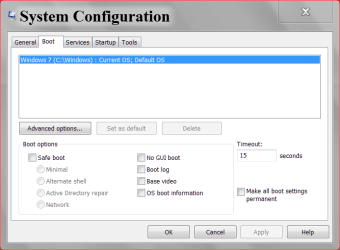
Or a method i have found handy in the past is to access MS Config then you can choose what services/programs/drivers you want to run on boot. As safemode is working it may be something 3rd party so you can go to services tab, tick hide all MS services and disable whats left
Disable some or all programs under startup tab and tick diagnostic or selective startup on the main tab, if that works then you can turn back on bit by bit til you find the culprit. Its a good way to get an idea of whats going on without actually changing anything permanently
 

My Computer

Computer type
PC/Desktop
Computer Manufacturer/Model Number
Pauly Special
OS
Win7 Ultimate X64
CPU
Intel i5 3570K
Motherboard
Gigabyte Z77X-DS3H
Memory
8GB DDR3 1600
Graphics Card(s)
Onboard
Sound Card
Onboard
Screen Resolution
1280x1024
Hard Drives
Samsung 840 Evo SSD (OS)
1TB Spinner (Data)
PSU
800W Arctic
Case
Cooler Master
Cooling
3x120mm Fans
Keyboard
MS Wireless
Mouse
MS Wireless
Internet Speed
20M
Hi Pheonix and welcome to the Forum. You mentioned in your first post that "Mbam and Norton 360 would not run and that restore points were not available"
To me, this sound suspicially like Malware or a Virus - typical behavour for these infections.
You might try navigating to the actual Mbam executable and renaming it say "test.exe" and see if it will run. Do the same with Norton 360.
let us know.
Cheers
JohnnyA
 

My Computer

Computer Manufacturer/Model Number
Toshiba C650
OS
Windows Home Premium 64bit
CPU
T61-- 2.0ghz
Motherboard
Toshiba
Memory
4 GB
Graphics Card(s)
On board
Sound Card
On board
Monitor(s) Displays
15.6"
Hard Drives
500 GB
Another possibility is that there are some startup progrmas that create a conflict. Disable temporarily all startups (with msconfig) and see whether that helps.

The next possibility is drivers. Some driver may have been corrupted and cannot be executed. This is a tough one because we do not know which driver is at fault. In safe mode you typically run on generic drivers. That's why it boots. If you have a chance to look into Event Viewer, you may find some info.
 

My Computer

Computer Manufacturer/Model Number
HP, Dell, Gateway, Toshiba - 4 laptops and 2 desktops
OS
Vista, Windows7, Mint Mate, Zorin, Windows 8
CPU
from 1.6GHz Duo to i7
Monitor(s) Displays
2x HP w2207
Hard Drives
5x HDD, 7x SSD, 12x Externals
Keyboard
with trackball - no mices
Mouse
Trackball mice
Internet Speed
DSL 6000
Go to msconfig/boot and uncheck safe boot.

msconfig safe boot.PNG
 

My Computer

Computer type
PC/Desktop
Computer Manufacturer/Model Number
Home made Desktop
OS
Windows 10 Pro. 64/ version 1709 Windows 7 Pro/64
CPU
Intel i7-6800K @ 4.3
Motherboard
ASUS X-99 Deluxe II
Memory
Corsair Platinum 16 gig @2400
Graphics Card(s)
EVGA GTX 1070 OC
Monitor(s) Displays
Asus 27" LED LCD/VE278Q
Screen Resolution
1920-1080 or 1280-720 HDMI
Hard Drives
INTEL SSD 730-240 Gb Sata 3.0/
PSU
EVGA Platium 1200W
Case
Phanteks Luxe Tempered Glass 8 fans/ one radiator
Cooling
XSPC/ Water Cooled CPU
Keyboard
Das 4 Professional
Mouse
Logitech M705/MX Anywhere 2-S
Internet Speed
100 mbits
Antivirus
Microsoft Security Essentials/ Malwarebytes Premium 3.0/ SAS
Browser
I.E. 11 default/Firefox/ ISP Time Warner Cable/Spectrum
Other Info
LG BluRay Burner/
Sound system-KLipsch-THX/
Icy Dock ssd Hot Swap bays.
  • Like
Reactions: whs
Hi Thankyou everyone for your invaluable support. I had already sorted the problem before reading these posts by going into msconfig and deselecting 'safe boot'. I think that I had caused the original problem by messing around with the user accounts! So I am now back to trying to sort out the original cause of all this...here goes... In user accounts there are only three users, me as administrator, CompAdmin(administrator) and guest, non have passwords set.
When I boot up into the log on screen I get a message saying the username or password is incorrect. I click on 'ok' and I now see that there is a yellow daisy picture and user name 'Emily' that I have previously deleted and does not show in user accounts. If I attempt to logon by just tapping the arrow (as I would because no passwords are set), it returns the password incorrect msg. All attempts to log on with known, recently used passwords fails. The only way that I can log into my account is by 'switch user'. On this screen my logon picture and name, Guest account and 'CompAdmin' account are missing and the only logon options are 'Emily'' and 'Other user'. Selecting 'other user' and putting in 'peter' as username(which is me as computer administrator)and clicking the arrow (no password set) gets me into my desktop. Clicking start shows my logon name and picture in top right of pane as it should.
I am now totaly confused??
Any of you clever guys out there got any ideas?
 

My Computer

Computer Manufacturer/Model Number
Self build
OS
windows 7 professional 64 bit
CPU
AMD FX6100 Bulldozer
Motherboard
Asus M5A88-M Evo
Memory
Crucial Vengeance CML16GX3M4A1600 (16gb)
Graphics Card(s)
Asus ENGT520Silent/D1/1GD3
Sound Card
Non Fitted
Monitor(s) Displays
Samsung S23A300B 23" LED
Hard Drives
boot (C) SSD Crucial CT128M4 (128gb)
(E) Seagate Barracuda 2gb 7200rpm
PSU
Corsair CMPSU-850HX
Case
Aerocool PGS Q-Series Qs-200
Cooling
4x Akasa AK-FN07 Apache. Ctrld by NXZT Sentry2

My Computer

Computer Manufacturer/Model Number
Self build
OS
windows 7 professional 64 bit
CPU
AMD FX6100 Bulldozer
Motherboard
Asus M5A88-M Evo
Memory
Crucial Vengeance CML16GX3M4A1600 (16gb)
Graphics Card(s)
Asus ENGT520Silent/D1/1GD3
Sound Card
Non Fitted
Monitor(s) Displays
Samsung S23A300B 23" LED
Hard Drives
boot (C) SSD Crucial CT128M4 (128gb)
(E) Seagate Barracuda 2gb 7200rpm
PSU
Corsair CMPSU-850HX
Case
Aerocool PGS Q-Series Qs-200
Cooling
4x Akasa AK-FN07 Apache. Ctrld by NXZT Sentry2

My Computer

Computer type
PC/Desktop
Computer Manufacturer/Model Number
Home made Desktop
OS
Windows 10 Pro. 64/ version 1709 Windows 7 Pro/64
CPU
Intel i7-6800K @ 4.3
Motherboard
ASUS X-99 Deluxe II
Memory
Corsair Platinum 16 gig @2400
Graphics Card(s)
EVGA GTX 1070 OC
Monitor(s) Displays
Asus 27" LED LCD/VE278Q
Screen Resolution
1920-1080 or 1280-720 HDMI
Hard Drives
INTEL SSD 730-240 Gb Sata 3.0/
PSU
EVGA Platium 1200W
Case
Phanteks Luxe Tempered Glass 8 fans/ one radiator
Cooling
XSPC/ Water Cooled CPU
Keyboard
Das 4 Professional
Mouse
Logitech M705/MX Anywhere 2-S
Internet Speed
100 mbits
Antivirus
Microsoft Security Essentials/ Malwarebytes Premium 3.0/ SAS
Browser
I.E. 11 default/Firefox/ ISP Time Warner Cable/Spectrum
Other Info
LG BluRay Burner/
Sound system-KLipsch-THX/
Icy Dock ssd Hot Swap bays.
Agreed ^^ system restore would be an easy fix if you can get machine back to before problems started, if not there is a guide in the tutorial section to get around forgotten passwords if you need to get into those accounts (although it may not help if the accounts are corrupted)

If you can get in as peter (admin) that should allow you to change other accounts and delete unwanted ones
 

My Computer

Computer type
PC/Desktop
Computer Manufacturer/Model Number
Pauly Special
OS
Win7 Ultimate X64
CPU
Intel i5 3570K
Motherboard
Gigabyte Z77X-DS3H
Memory
8GB DDR3 1600
Graphics Card(s)
Onboard
Sound Card
Onboard
Screen Resolution
1280x1024
Hard Drives
Samsung 840 Evo SSD (OS)
1TB Spinner (Data)
PSU
800W Arctic
Case
Cooler Master
Cooling
3x120mm Fans
Keyboard
MS Wireless
Mouse
MS Wireless
Internet Speed
20M
It sounds like accumulated corruption which is best resolved by a Clean Reinstall - Factory OEM Windows 7 - .steps are the same for retail.

This is actually better than getting a new PC since most are larded with corrupting bloatware and duplicate utilties.

You can also save a backup image of your perfect reinstall and never have to do it again.
 
Back
Top