Solved PDF File Desktop Icons Show Image . . How Do I Stop This

poolmon

New member
Power User
VIP
Local time
9:12 PM
Messages
172
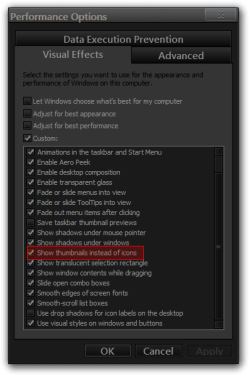
The PDF files that I store on my Desktop show an image of page 1 of the particular PDF file, rather than the standard PDF red/grey generic file icon. Is there any way to stop this and to revert back to the generic red/grey PDF Icon using Adobe Acrobat Reader?
 

My Computer My Computer

At a glance

win 7
OS
win 7
Hi there ... This has to do with the Preview Handler ..I can remember having this issue some time ago ..You should update your Adobe Reader see if that fixes the issue .. If not maybe a Repair may help .. This seems to only happen mostly on Windows 64 bit OS or an upgrade to it ...
 

My Computer My Computer

At a glance

windows 7 home 64bitINTEL-CORE I716GB
Computer Manufacturer/Model Number
W530-3630QM1
OS
windows 7 home 64bit
CPU
INTEL-CORE I7
Memory
16GB
Hard Drives
750GB
Browser
Chrome
I have the latest Adobe Reader update and all Win 7 64 bit updates. All else works fine. I was hoping there was some setting (that I can't find) in Adobe's numerous preferences that would remedy this.
 

My Computer My Computer

At a glance

win 7
OS
win 7

My Computer My Computer

At a glance

windows 7 home 64bitINTEL-CORE I716GB
Computer Manufacturer/Model Number
W530-3630QM1
OS
windows 7 home 64bit
CPU
INTEL-CORE I7
Memory
16GB
Hard Drives
750GB
Browser
Chrome
Hi there .. It used to be the other way Adobe would only show as standard .. Then people complained about that so they changed it ... Read the Link below its very interesting ...

Adobe Community: PDF Desktop Icons - Content Icon Vs. Standard PDF Icon

Thanks for the info.
I was hoping there was a way to toggle the preview feature on/off in Acrobat's Preferences, but it appears there is not after reading all the materials and available Preference settings. Guess I will just have to live with the preview which is so small as to not be legible.
 

My Computer My Computer

At a glance

win 7
OS
win 7
Hi there .. Either that or you could change to another Reader ..
 

My Computer My Computer

At a glance

windows 7 home 64bitINTEL-CORE I716GB
Computer Manufacturer/Model Number
W530-3630QM1
OS
windows 7 home 64bit
CPU
INTEL-CORE I7
Memory
16GB
Hard Drives
750GB
Browser
Chrome

My Computer My Computer

At a glance

Win 7 Pro x64 / Win 10 ProIntel(R) Core(TM) i7-3630QM CPU @ 2.40GHz12 GB(1) Intel(R) HD Graphics 4000 (2) NVIDIA GeFo...
Computer type
Laptop
Computer Manufacturer/Model Number
Sager NP9170
OS
Win 7 Pro x64 / Win 10 Pro
CPU
Intel(R) Core(TM) i7-3630QM CPU @ 2.40GHz
Motherboard
CLEVO P170EM
Memory
12 GB
Graphics Card(s)
(1) Intel(R) HD Graphics 4000 (2) NVIDIA GeForce GTX 675M
Sound Card
(1) Realtek High Definition Audio (2) Intel(R) Display Aud
Monitor(s) Displays
17.3
Screen Resolution
1920x1080
Hard Drives
(1) Samsung 860 EVO 500GB(OS) (1) Samsung 860 EVO 500GB(Data)
Keyboard
Backlite
Antivirus
MSE, Malwarebytes Pro
Browser
Firefox
Other Info
DESKTOP: Custom-built.
OS: Win 10 Pro x64.
CASE: Rosewill R5.
CPU: Intel I5 4670K CPU @ 3.40GHz.
CPU COOLER: Cool Master Hyper 212 EVO.
MOTHERBOARD: Asus Z87-A.
MEMORY: Kingston HyperX 2x4 GB.
GPU: Nvidia Geforce 650 TI.
PSU: Corsair TX750.
DRIVES: (1) Samsung 840 120 GB SSD (2) Western Digital blue 500 GB 7200 RPM.
Thanks for the additional options.
I would like to keep Acrobat for PDFs, as well as Thumbnails for the non-Acrobat Icons. However, it is good to know these options and how to tweak my Windows System in case I change my mind.
 

My Computer My Computer

At a glance

win 7
OS
win 7
Go to Adobe Preferences

Open Adobe
Open Preferences
Go to General
Scroll down
Uncheck Box: Enable PDF Thumbnail preview in Windows Explorer
Scroll down to bottom right hand corner Click radio button OK
 

Attachments

My Computer My Computer

At a glance

WIN 10 64 HOMEIntel I7-7700 3.60GHz32.0 GBGeForce GTX 1060 3.0 GB
Computer type
PC/Desktop
Computer Manufacturer/Model Number
built myself
OS
WIN 10 64 HOME
CPU
Intel I7-7700 3.60GHz
Motherboard
ROG MAXIMUS IX HERO
Memory
32.0 GB
Graphics Card(s)
GeForce GTX 1060 3.0 GB
Hard Drives
Intel Optane + 932GBHDD
Antivirus
Avast
Browser
Chrome 64
Back
Top