Pdf plugin not working (IE8 W7 x-64)

jimbo45

New member
Guru
Gold Member
VIP
Local time
2:53 PM
Messages
5,941
Location
Hafnarfjörður IS
Hi all

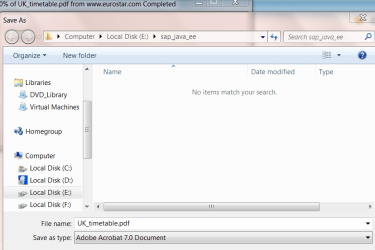
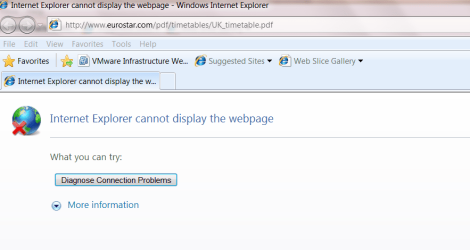
I can't get the pdf plugin to work on IE8 - I can usually DOWNLOAD the document via save target as ..... but if I try and connect directly to the link I just get Internet explorer cannot display this page.

For example try this link with IE8

http://www.eurostar.com/pdf/timetables/UK_timetable.pdf

example screenshots shown

It's not a showstopper but annoying


Cheers
jimbo
 

Attachments
  • eurostar.png
    eurostar.png
    26.5 KB · Views: 45
  • eurostar1.png
    eurostar1.png
    31.8 KB · Views: 49

My Computer My Computer

Computer type
PC/Desktop
Computer Manufacturer/Model Number
Custom built, several laptops HP/ASUS
OS
Linux CENTOS 7 / various Windows OS'es and servers
CPU
Intel i7 Intel i5
Memory
8GB, 16GB
Graphics Card(s)
On Motherboard
Sound Card
Realtek HD audio
Monitor(s) Displays
Apple Cinema display, Samsung LCD
Screen Resolution
1920 X 1080
Hard Drives
4 X 1TB SATA
Mouse
Toshiba wireless laser
Internet Speed
> 20MB up
23uvbt2.png


This is what i get using IE8

Ultimate x64
 

My Computer My Computer

Computer Manufacturer/Model Number
Blue Shards 1.0
OS
Windows 7 Ultimate 64bit
CPU
AMD Phenom II 555 Black Edition Quad Core OC'd to 4.0GHz
Motherboard
ASUS M4A88T-M
Memory
G Skill RipJaw 1333MHz 4GB
Graphics Card(s)
ATI raideon 4250 HD/XFX ATI Radeon 1GB HD4650
Sound Card
Realteck HD Audio
Monitor(s) Displays
2x 22" Widescreen HD Monitors
Hard Drives
500GB Sata 7500RPM
80GB IDE
PSU
850W OCUK Modular
Case
Antec Dark Fleet DF-30
Cooling
Titan Fenrir Pro (CPU)
Keyboard
Logitech Wireless
Mouse
Logitech Wireless
Internet Speed
24Meg
Other Info
Getting soon-
2TB 7200RPM HDD
+8GB RAM
30GB SSD
HD6950/70
Hi there

it should work like this

(IE8 on Windows XP) - same version of IE8 but the pdf opens directly in the browser.

Right mouse click will give you the option to download but if you don't want to download the document but just read it then the pdf plugin should work like it does in XP


Enc screenshot

Cheers
jimbo
 

Attachments

  • eurostar3.jpg
    eurostar3.jpg
    230.8 KB · Views: 148

My Computer My Computer

Computer type
PC/Desktop
Computer Manufacturer/Model Number
Custom built, several laptops HP/ASUS
OS
Linux CENTOS 7 / various Windows OS'es and servers
CPU
Intel i7 Intel i5
Memory
8GB, 16GB
Graphics Card(s)
On Motherboard
Sound Card
Realtek HD audio
Monitor(s) Displays
Apple Cinema display, Samsung LCD
Screen Resolution
1920 X 1080
Hard Drives
4 X 1TB SATA
Mouse
Toshiba wireless laser
Internet Speed
> 20MB up
Hi there

it should work like this

(IE8 on Windows XP) - same version of IE8 but the pdf opens directly in the browser.

Right mouse click will give you the option to download but if you don't want to download the document but just read it then the pdf plugin should work like it does in XP


Enc screenshot

Cheers
jimbo

Oh sorry,i misunderstood.

I downloaded adobe reader from their site Adobe - Adobe Reader download - All versions

Installed and rebooted Explorer,i can now see the document as per your second image.

Hope that helps

Dan
 

My Computer My Computer

Computer Manufacturer/Model Number
Blue Shards 1.0
OS
Windows 7 Ultimate 64bit
CPU
AMD Phenom II 555 Black Edition Quad Core OC'd to 4.0GHz
Motherboard
ASUS M4A88T-M
Memory
G Skill RipJaw 1333MHz 4GB
Graphics Card(s)
ATI raideon 4250 HD/XFX ATI Radeon 1GB HD4650
Sound Card
Realteck HD Audio
Monitor(s) Displays
2x 22" Widescreen HD Monitors
Hard Drives
500GB Sata 7500RPM
80GB IDE
PSU
850W OCUK Modular
Case
Antec Dark Fleet DF-30
Cooling
Titan Fenrir Pro (CPU)
Keyboard
Logitech Wireless
Mouse
Logitech Wireless
Internet Speed
24Meg
Other Info
Getting soon-
2TB 7200RPM HDD
+8GB RAM
30GB SSD
HD6950/70
Hi there
That fixed it -- thanks

I actually have the full Adobe Acrobat installed on W7 x-64 (not XP) so I didn't bother with downloading the reader.

Looks like the plugin only works for the acrobat reader and not acrobat itself.

Anyway thanks.

Now it's my bedtime

so

sofa heilbrigður og takk


cheers
jimbo
 

My Computer My Computer

Computer type
PC/Desktop
Computer Manufacturer/Model Number
Custom built, several laptops HP/ASUS
OS
Linux CENTOS 7 / various Windows OS'es and servers
CPU
Intel i7 Intel i5
Memory
8GB, 16GB
Graphics Card(s)
On Motherboard
Sound Card
Realtek HD audio
Monitor(s) Displays
Apple Cinema display, Samsung LCD
Screen Resolution
1920 X 1080
Hard Drives
4 X 1TB SATA
Mouse
Toshiba wireless laser
Internet Speed
> 20MB up
Hi there
That fixed it -- thanks

I actually have the full Adobe Acrobat installed on W7 x-64 (not XP) so I ddn't bother with downloading the reader.

Looks like the plugin only works for the acrobat reader and not acrobat itself.

Anyway thanks.

Now it's my bedtime

so

sofa heilbrigður og takk

cheers
jimbo

No problem,glad to help

Dan:)
 

My Computer My Computer

Computer Manufacturer/Model Number
Blue Shards 1.0
OS
Windows 7 Ultimate 64bit
CPU
AMD Phenom II 555 Black Edition Quad Core OC'd to 4.0GHz
Motherboard
ASUS M4A88T-M
Memory
G Skill RipJaw 1333MHz 4GB
Graphics Card(s)
ATI raideon 4250 HD/XFX ATI Radeon 1GB HD4650
Sound Card
Realteck HD Audio
Monitor(s) Displays
2x 22" Widescreen HD Monitors
Hard Drives
500GB Sata 7500RPM
80GB IDE
PSU
850W OCUK Modular
Case
Antec Dark Fleet DF-30
Cooling
Titan Fenrir Pro (CPU)
Keyboard
Logitech Wireless
Mouse
Logitech Wireless
Internet Speed
24Meg
Other Info
Getting soon-
2TB 7200RPM HDD
+8GB RAM
30GB SSD
HD6950/70
I had to uninstall Reader 9.2 then reboot and install the program again, reboot. Then it worked fine again.
 

My Computer My Computer

Computer Manufacturer/Model Number
Dell XPS 400
OS
Windows 7
CPU
Dual 2.60 GHz Intel Pentium
Memory
2 Gig
Graphics Card(s)
256 mb Nvidia GeForce 6800
Back
Top