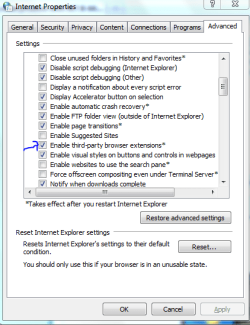
Hi all
So far I,ve enjoyed using W7 X-64 but there's one application that consistently (and randomly) fails for what I can see is no apparent reason.
The message IE8 has unexpectedly stopped working.
You then restart IE8 and it will sometimes but not always restore your last session.
I use almost NO plugins apart from the adobe flash - this installs on the 32 bit version of IE8 but not the 64 bit version.
(You can tell if flash is working / installed or not) by simply loading the BBC's home page (BBC - Homepage) and seeing if there is a little square analog clock application running at the right hand top of the screen - this won't appear if you start the 64 bit version of IE8).
I "tolerated" the occasional failure of the pre-RTM versions of W7 but I would have expected it to be fixed in the RTM.
Handling badly written / dubious code from zillions of websites can be tough on a browser but IMO the browser should be robust enough to just ignore or issue a message when it has problems accessing a particular site.
So W7 X-64 RTM in general very positive but not too happy with some aspects of IE8.
(Firefox hasn't yet crashed on my system - but for work compatability I'm often forced to use IE8 ----- so don't reply "why not use another browser please ).
).
Cheers
jimbo
So far I,ve enjoyed using W7 X-64 but there's one application that consistently (and randomly) fails for what I can see is no apparent reason.
The message IE8 has unexpectedly stopped working.
You then restart IE8 and it will sometimes but not always restore your last session.
I use almost NO plugins apart from the adobe flash - this installs on the 32 bit version of IE8 but not the 64 bit version.
(You can tell if flash is working / installed or not) by simply loading the BBC's home page (BBC - Homepage) and seeing if there is a little square analog clock application running at the right hand top of the screen - this won't appear if you start the 64 bit version of IE8).
I "tolerated" the occasional failure of the pre-RTM versions of W7 but I would have expected it to be fixed in the RTM.
Handling badly written / dubious code from zillions of websites can be tough on a browser but IMO the browser should be robust enough to just ignore or issue a message when it has problems accessing a particular site.
So W7 X-64 RTM in general very positive but not too happy with some aspects of IE8.
(Firefox hasn't yet crashed on my system - but for work compatability I'm often forced to use IE8 ----- so don't reply "why not use another browser please
).Cheers
jimbo
My Computer
At a glance
Linux CENTOS 7 / various Windows OS'es and se...Intel i7 Intel i58GB, 16GBOn Motherboard
- Computer type
- PC/Desktop
- Computer Manufacturer/Model Number
- Custom built, several laptops HP/ASUS
- OS
- Linux CENTOS 7 / various Windows OS'es and servers
- CPU
- Intel i7 Intel i5
- Memory
- 8GB, 16GB
- Graphics Card(s)
- On Motherboard
- Sound Card
- Realtek HD audio
- Monitor(s) Displays
- Apple Cinema display, Samsung LCD
- Screen Resolution
- 1920 X 1080
- Hard Drives
- 4 X 1TB SATA
- Mouse
- Toshiba wireless laser
- Internet Speed
- > 20MB up