Peer-peer ethernet wire sharing internet wont work

Rush44

New member
Local time
4:11 PM
Messages
5
Hey,
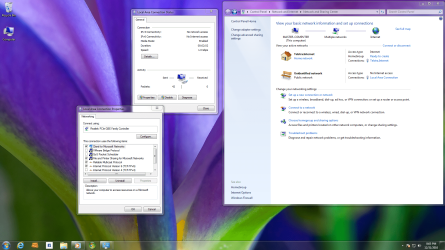
i have 2 window 7 computers and i wish to share the internet with my other one via an Ethernet wire, ive searched the web and ive found nothing!:cry:
ive tryed to get the sharing tab in my local networks properties, but its not nere!

see the attachment to get a better idea

i would be really greatful if some one could help me fix the proplem:)
thanks
 

Attachments

  • network problem.png
    network problem.png
    416.5 KB · Views: 82

My Computer My Computer

OS
Windows 7 Professional x64-bit
Check the IPV4 box...
 

My Computer My Computer

Computer type
Laptop
Computer Manufacturer/Model Number
HP 17-ak0xx, dv7 3173nr
OS
Win7 Home Premium x64 W10Pro&Home
CPU
A12 9720p 4+8 TurionII M520
Motherboard
HP 3839
Memory
6GB 8GB
Graphics Card(s)
R7
Monitor(s) Displays
24" sa550
Screen Resolution
1600x900 1920x1080
Mouse
Logitechx2
Internet Speed
120Mb/s down 12up
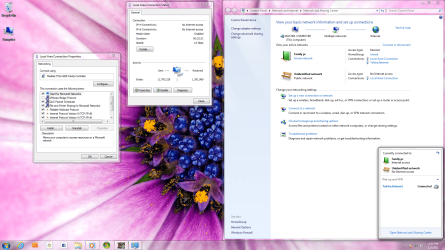
i just ticked the IPV4 protocal box and its still not working
 

My Computer My Computer

OS
Windows 7 Professional x64-bit
check that IPV4 is set in properties to 'Obtain IP and DNS Automatically, then add the gateway (router address) in the advanced section. Reboot, then show screenshot of wireless status...
 

My Computer My Computer

Computer type
Laptop
Computer Manufacturer/Model Number
HP 17-ak0xx, dv7 3173nr
OS
Win7 Home Premium x64 W10Pro&Home
CPU
A12 9720p 4+8 TurionII M520
Motherboard
HP 3839
Memory
6GB 8GB
Graphics Card(s)
R7
Monitor(s) Displays
24" sa550
Screen Resolution
1600x900 1920x1080
Mouse
Logitechx2
Internet Speed
120Mb/s down 12up
i got my Home group working thanks :) but the internet sharing tab is still not there
 

Attachments

  • network problem.png
    network problem.png
    467.2 KB · Views: 76

My Computer My Computer

OS
Windows 7 Professional x64-bit
Are you trying to share your internet connection from router to computer from that computer to the other one?
 

My Computer My Computer

Computer Manufacturer/Model Number
Custom
OS
Windows 7 Ultimate x64
CPU
AMD Phenom x4 965 BE
Motherboard
MSI 790FX GD70 Not Wiki
Memory
4gb Gskill
Graphics Card(s)
HD 4850
Sound Card
Onboard Realtek
Monitor(s) Displays
Asus VW246H
Screen Resolution
1920x1080 Native
Hard Drives
2 Seagate Drives Raid 0
PSU
650Watt Corsair
Case
CoolerMaster
Cooling
Air Cooling Stock Heatsink and Fan
Keyboard
Logitech Cordless Duo
Mouse
Logitech Cordless Duo
Internet Speed
24000 KBPS
no its a wireless modem in sted of a router
 

My Computer My Computer

OS
Windows 7 Professional x64-bit
so you have a wireless router or modem connected to 1 computer and would like to share that internet from 1 computer directly to another via Ethernet?
 

My Computer My Computer

Computer Manufacturer/Model Number
Custom
OS
Windows 7 Ultimate x64
CPU
AMD Phenom x4 965 BE
Motherboard
MSI 790FX GD70 Not Wiki
Memory
4gb Gskill
Graphics Card(s)
HD 4850
Sound Card
Onboard Realtek
Monitor(s) Displays
Asus VW246H
Screen Resolution
1920x1080 Native
Hard Drives
2 Seagate Drives Raid 0
PSU
650Watt Corsair
Case
CoolerMaster
Cooling
Air Cooling Stock Heatsink and Fan
Keyboard
Logitech Cordless Duo
Mouse
Logitech Cordless Duo
Internet Speed
24000 KBPS
yep that it
 

My Computer My Computer

OS
Windows 7 Professional x64-bit
yep that it

IMHO: Quick note bad idea. This always seems to create more problems than it is worth. If you have wireless just add a wireless card to the second computer you will be much happier because it will work better and super simple to setup.

If you don’t have wireless add a hard wire for the second computer to the router to the internet. -WS
 

My Computer My Computer

Computer type
PC/Desktop
Computer Manufacturer/Model Number
Dell OP7010
OS
Windows 7 Enterprise (x64); Windows Server 2008 R2 (x64)
Memory
16GB
Monitor(s) Displays
4 Dell 24" LCD
Screen Resolution
1280x1024
Keyboard
Dell
Mouse
Dell Optical
Internet Speed
40meg
yep that it

IMHO: Quick note bad idea. This always seems to create more problems than it is worth. If you have wireless just add a wireless card to the second computer you will be much happier because it will work better and super simple to setup.

If you don’t have wireless add a hard wire for the second computer to the router to the internet. -WS


I agree wireless to then wires is very unreliable and overall not the best idea, however if thats what you want to do you must go to your start menu type in view network connections. Then you will right click go to properties and the share tab to enable sharing of the connection.
 

My Computer My Computer

Computer Manufacturer/Model Number
Custom
OS
Windows 7 Ultimate x64
CPU
AMD Phenom x4 965 BE
Motherboard
MSI 790FX GD70 Not Wiki
Memory
4gb Gskill
Graphics Card(s)
HD 4850
Sound Card
Onboard Realtek
Monitor(s) Displays
Asus VW246H
Screen Resolution
1920x1080 Native
Hard Drives
2 Seagate Drives Raid 0
PSU
650Watt Corsair
Case
CoolerMaster
Cooling
Air Cooling Stock Heatsink and Fan
Keyboard
Logitech Cordless Duo
Mouse
Logitech Cordless Duo
Internet Speed
24000 KBPS
Back
Top