perfmon /report

seth500

BSOD Team Player
Guru
Local time
3:23 PM
Messages
968
Location
L.A.
When I try to generate the report it's telling me the interface is unknown! :sarc: Any ideas? Thanks
 

My Computer

Computer Manufacturer/Model Number
Alienware
OS
Windows 7 Ultimate x64
CPU
I7
Motherboard
GA-X58-USB3
Memory
6 x 1.5V DDR3 DIMM sockets supporting up to 24 GB of system
Graphics Card(s)
GeForce GTX 580
Sound Card
Realtek ALC892 codec 2/4/5.1/7.1-channel
Monitor(s) Displays
NEC Display Solutions E321 Black 32"
Screen Resolution
1366 x 768
Hard Drives
OCZ Colossus LT Series OCZSSD2-1CLSLT1T 3.5" 1TB SATA II MLC Internal Solid State Drive
PSU
XFX Black Edition XPS-850W-BES 850W ATX12V
Case
Antec
Cooling
Zalman
Keyboard
Microsoft
Mouse
Microsoft
When I try to generate the report it's telling me the interface is unknown! :sarc: Any ideas? Thanks
Can you please describe in more detail exactly what steps you're going through to try and produce a report?

Maybe a screenshot or two to show where you are when finally push the last button that results in your "interface is unknown"?
 

My Computer

Computer type
PC/Desktop
Computer Manufacturer/Model Number
Home-built, two systems (1) and (2)
OS
Windows 7 Pro x64 (1), Win7 Pro X64 (2)
CPU
i5-3350p 3.1Ghz/6MB-cache (1); E8400 3.0Ghz/6MB-cache (2)
Motherboard
ASUS P8Z77-V Pro (1); ASUS P5Q3 (2)
Memory
8GB PC3-12800 DDR3 (1); 4GB PC3-10600 DDR3 (2)
Graphics Card(s)
ATI HD7750 (1), (see TV cards); ATI R7 250 (2)
Sound Card
Realtek ALC892 HD Audio (1); Realtek ALC1200 HD Audio (2)
Monitor(s) Displays
Eizo HD2441W LCD, Eizo S2433W (1); Eizo 24" S2433W (2)
Screen Resolution
1920x1200, 1920x1200 (1); 1920x1200 (2)
Hard Drives
(1) 1TB SATA-II (7200RPM), 2x2TB SATA-III (7200RPM), 250GB SATA-III (10000RPM) for OS; 2x2TB external USB 3.0

(2) 320GB SATA-II (7200RPM), 750GB SATA-II (7200RPM), 150GB SATA-II (10000RPM) for OS; 2TB external USB 3.0
PSU
Nesteq ECS-6001 600W (1); Nesteq ECS-5001 500W (2)
Case
Acousti-Case 360 (1) and (2)
Cooling
Noctua NH-U12P SE2 for CPU, 2x120mm case fans (1) and (2)
Keyboard
IBM PS/2 (1) and (2)
Mouse
Logitech MX Revolution wireless (1); Microsoft wired (2)
Internet Speed
100mbps down / 10mbps up
Antivirus
Microsoft Security Essentials; Malwarebyte Anti-Malware Pro
Browser
Firefox
Other Info
Ceton InfiniTV 4-tuner cablecard-enabled TV card as well as Hauppauge HVR-2250 OTA/ATSC 2-tuner TV card in (1), running under Win7 WMC
When I try to generate the report it's telling me the interface is unknown! :sarc: Any ideas? Thanks
Can you please describe in more detail exactly what steps you're going through to try and produce a report?

Maybe a screenshot or two to show where you are when finally push the last button that results in your "interface is unknown"?

Typing perfmon /report in search box then hit enter. Thats it and it comes up with this:

[IMG=http://img600.imageshack.us/img600/1072/730201165759pm.png][/IMG]


My Computer

Computer Manufacturer/Model Number
Alienware
OS
Windows 7 Ultimate x64
CPU
I7
Motherboard
GA-X58-USB3
Memory
6 x 1.5V DDR3 DIMM sockets supporting up to 24 GB of system
Graphics Card(s)
GeForce GTX 580
Sound Card
Realtek ALC892 codec 2/4/5.1/7.1-channel
Monitor(s) Displays
NEC Display Solutions E321 Black 32"
Screen Resolution
1366 x 768
Hard Drives
OCZ Colossus LT Series OCZSSD2-1CLSLT1T 3.5" 1TB SATA II MLC Internal Solid State Drive
PSU
XFX Black Edition XPS-850W-BES 850W ATX12V
Case
Antec
Cooling
Zalman
Keyboard
Microsoft
Mouse
Microsoft
Don't have any ideas just yet.

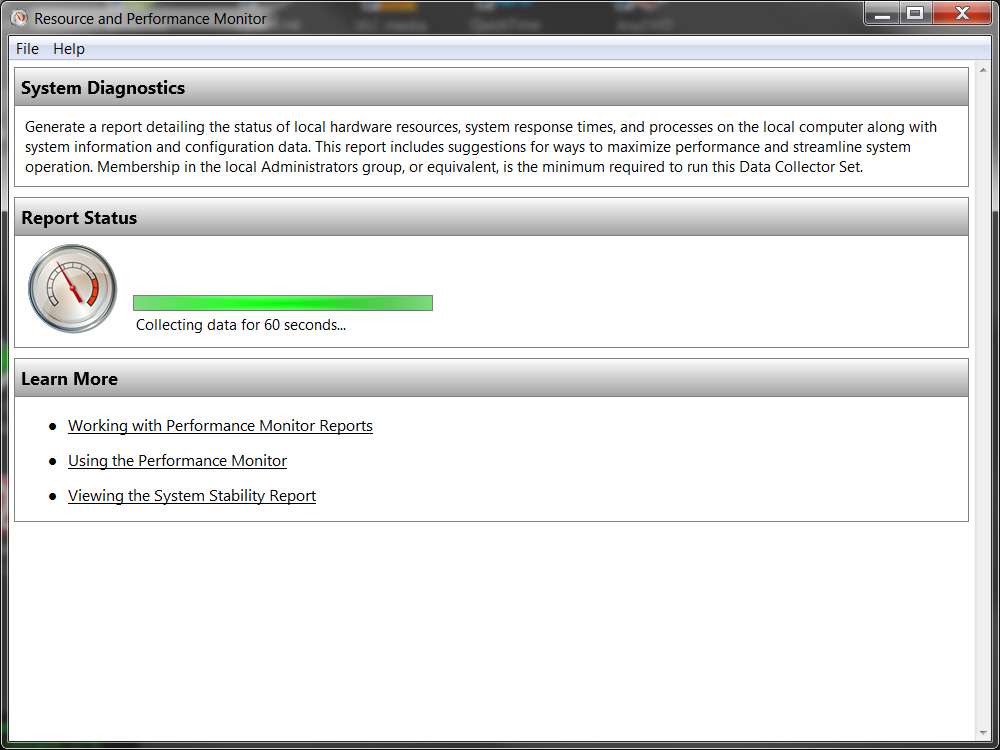
But just so that it's clear what the expected output looks like, on my own Win7 Pro x64 SP1 system when I enter "perfmon /report" in the Search area I get this screen first:

perfmon1.jpg


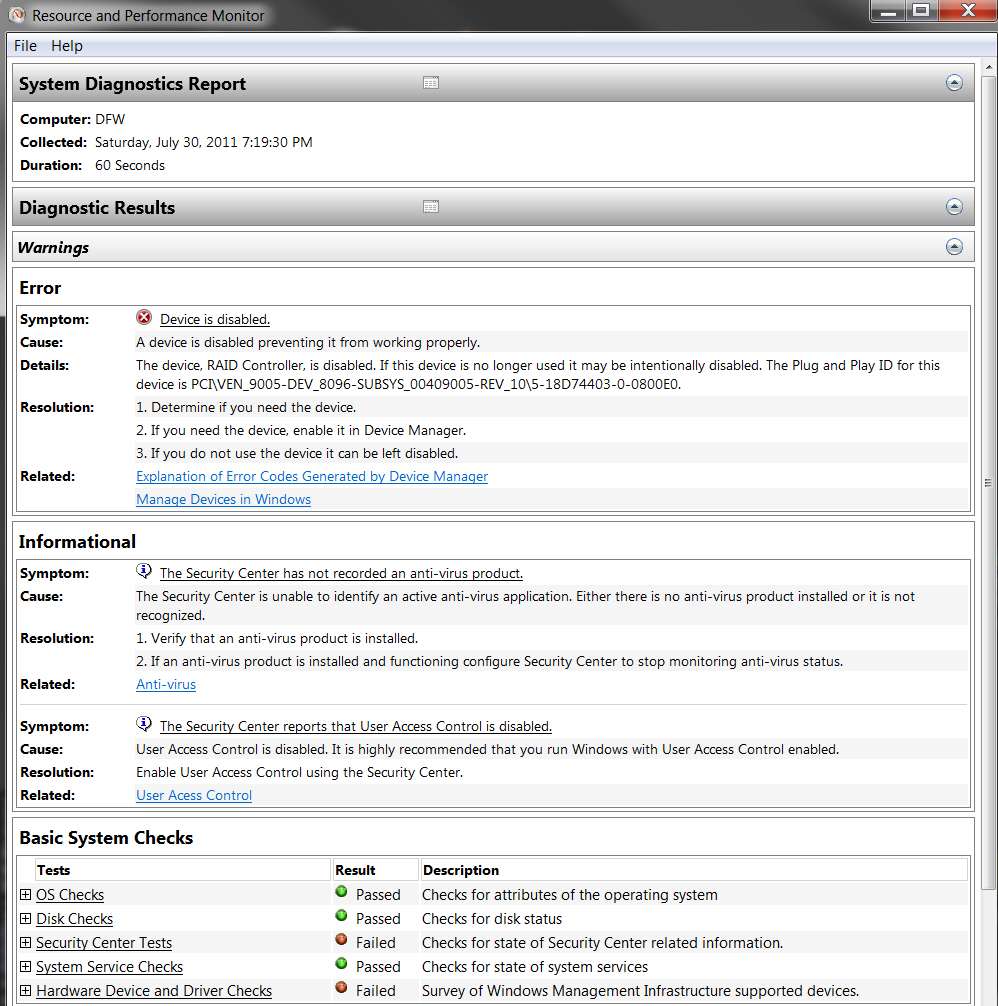
After a minute or two of gathering data, I then get the "report" output. Top half looks like this:

perfmon2.jpg


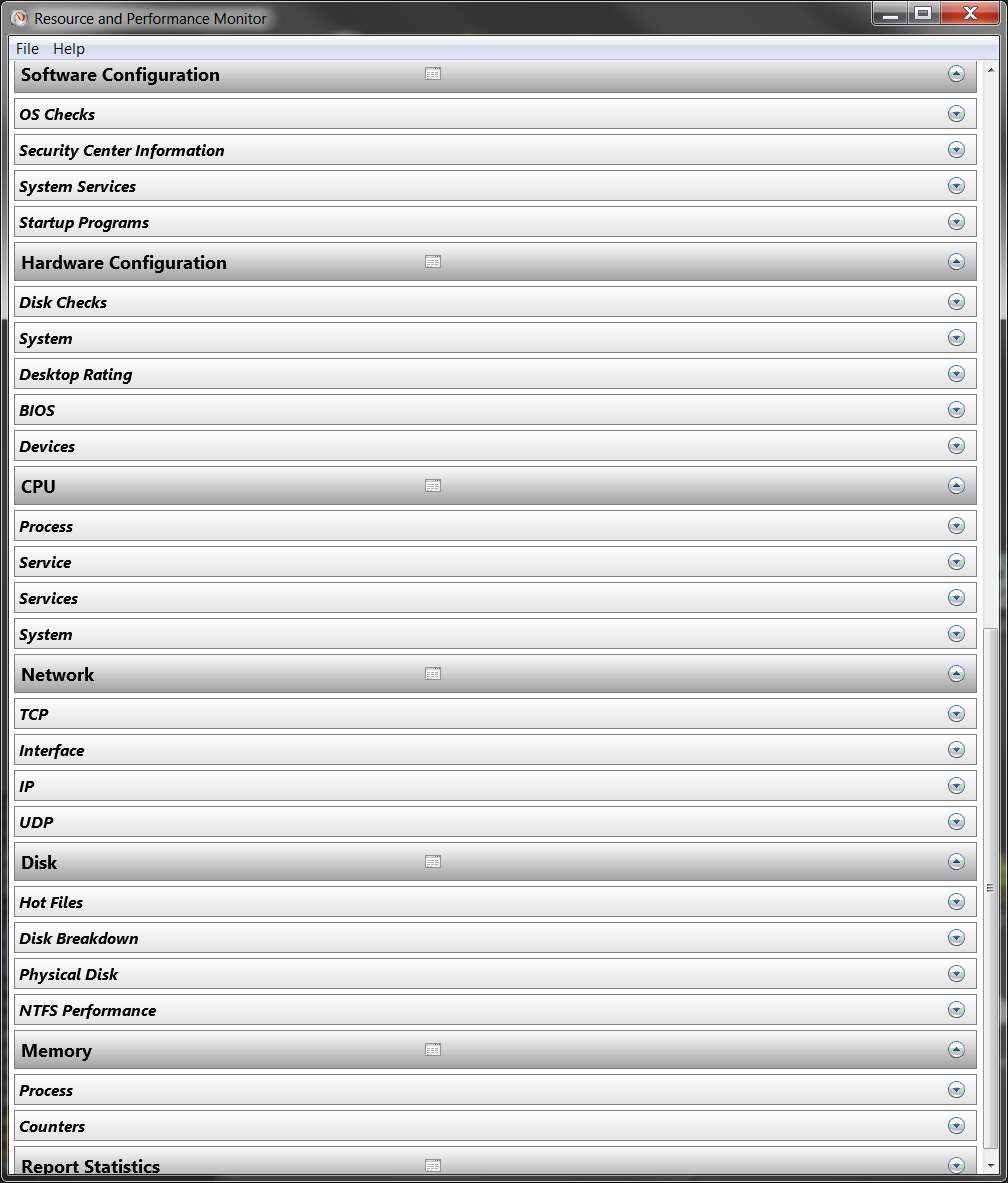
and the bottom part looks like this (I could expand each reporting group if I wanted to):

perfmon3.jpg


Just in passing, I expect it will produce exactly the same result, but you can also request the identical output directly from Control Panel:

Control Panel -> All Control Panel Items -> Performance Information and Tools -> Advanced Tools, and then push the "Generate a system health report" link at the bottom of the page.
 

My Computer

Computer type
PC/Desktop
Computer Manufacturer/Model Number
Home-built, two systems (1) and (2)
OS
Windows 7 Pro x64 (1), Win7 Pro X64 (2)
CPU
i5-3350p 3.1Ghz/6MB-cache (1); E8400 3.0Ghz/6MB-cache (2)
Motherboard
ASUS P8Z77-V Pro (1); ASUS P5Q3 (2)
Memory
8GB PC3-12800 DDR3 (1); 4GB PC3-10600 DDR3 (2)
Graphics Card(s)
ATI HD7750 (1), (see TV cards); ATI R7 250 (2)
Sound Card
Realtek ALC892 HD Audio (1); Realtek ALC1200 HD Audio (2)
Monitor(s) Displays
Eizo HD2441W LCD, Eizo S2433W (1); Eizo 24" S2433W (2)
Screen Resolution
1920x1200, 1920x1200 (1); 1920x1200 (2)
Hard Drives
(1) 1TB SATA-II (7200RPM), 2x2TB SATA-III (7200RPM), 250GB SATA-III (10000RPM) for OS; 2x2TB external USB 3.0

(2) 320GB SATA-II (7200RPM), 750GB SATA-II (7200RPM), 150GB SATA-II (10000RPM) for OS; 2TB external USB 3.0
PSU
Nesteq ECS-6001 600W (1); Nesteq ECS-5001 500W (2)
Case
Acousti-Case 360 (1) and (2)
Cooling
Noctua NH-U12P SE2 for CPU, 2x120mm case fans (1) and (2)
Keyboard
IBM PS/2 (1) and (2)
Mouse
Logitech MX Revolution wireless (1); Microsoft wired (2)
Internet Speed
100mbps down / 10mbps up
Antivirus
Microsoft Security Essentials; Malwarebyte Anti-Malware Pro
Browser
Firefox
Other Info
Ceton InfiniTV 4-tuner cablecard-enabled TV card as well as Hauppauge HVR-2250 OTA/ATSC 2-tuner TV card in (1), running under Win7 WMC
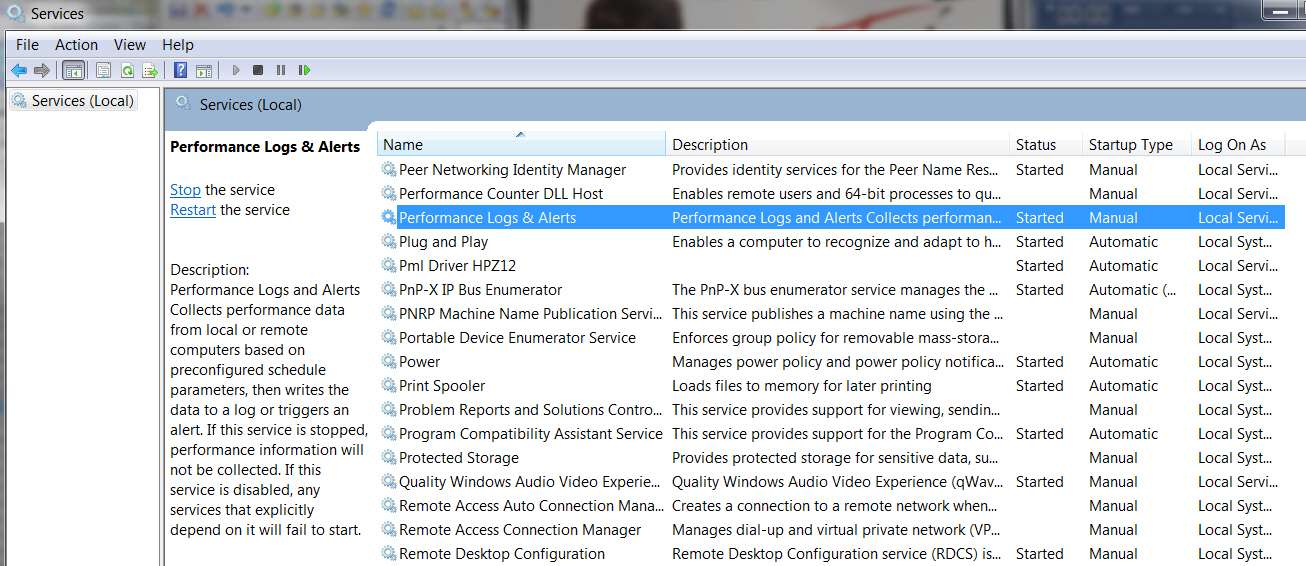
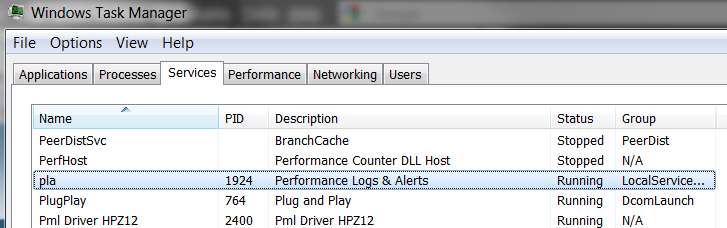
I'm not sure this "Performance Logs & Alerts" service is involved, but just in case I'm pointing it out... in case it is not "started" on your system.

services2.jpg


services1.jpg
 

My Computer

Computer type
PC/Desktop
Computer Manufacturer/Model Number
Home-built, two systems (1) and (2)
OS
Windows 7 Pro x64 (1), Win7 Pro X64 (2)
CPU
i5-3350p 3.1Ghz/6MB-cache (1); E8400 3.0Ghz/6MB-cache (2)
Motherboard
ASUS P8Z77-V Pro (1); ASUS P5Q3 (2)
Memory
8GB PC3-12800 DDR3 (1); 4GB PC3-10600 DDR3 (2)
Graphics Card(s)
ATI HD7750 (1), (see TV cards); ATI R7 250 (2)
Sound Card
Realtek ALC892 HD Audio (1); Realtek ALC1200 HD Audio (2)
Monitor(s) Displays
Eizo HD2441W LCD, Eizo S2433W (1); Eizo 24" S2433W (2)
Screen Resolution
1920x1200, 1920x1200 (1); 1920x1200 (2)
Hard Drives
(1) 1TB SATA-II (7200RPM), 2x2TB SATA-III (7200RPM), 250GB SATA-III (10000RPM) for OS; 2x2TB external USB 3.0

(2) 320GB SATA-II (7200RPM), 750GB SATA-II (7200RPM), 150GB SATA-II (10000RPM) for OS; 2TB external USB 3.0
PSU
Nesteq ECS-6001 600W (1); Nesteq ECS-5001 500W (2)
Case
Acousti-Case 360 (1) and (2)
Cooling
Noctua NH-U12P SE2 for CPU, 2x120mm case fans (1) and (2)
Keyboard
IBM PS/2 (1) and (2)
Mouse
Logitech MX Revolution wireless (1); Microsoft wired (2)
Internet Speed
100mbps down / 10mbps up
Antivirus
Microsoft Security Essentials; Malwarebyte Anti-Malware Pro
Browser
Firefox
Other Info
Ceton InfiniTV 4-tuner cablecard-enabled TV card as well as Hauppauge HVR-2250 OTA/ATSC 2-tuner TV card in (1), running under Win7 WMC
I'm not sure this "Performance Logs & Alerts" service is involved, but just in case I'm pointing it out... in case it is not "started" on your system.

services2.jpg


services1.jpg

Thanks dsperber for all your help, I went to Black Vipers site and was looking at all the default values for Windows 7 x64 services and found that quite a few of mine weren't starting, getting an error 4201 on most of them. After trying several things including resetting the Winmgmt repository and having no luck with the error, I finally understand what I did during install of the operating system..I grabbed my modded dvd of windows 7 instead of my full version of sp1 slip-streamed. I have since reinstalled the system since trying to correct those issues weren't panning out and it wasn't worth the time trying to figure it all out. To make a long story short all issues have been resolved and the system works flawlessly, not really worth having event logs and stuff not working especially when I rely on them so much with older hardware and such..Thanks again Seth
 

My Computer

Computer Manufacturer/Model Number
Alienware
OS
Windows 7 Ultimate x64
CPU
I7
Motherboard
GA-X58-USB3
Memory
6 x 1.5V DDR3 DIMM sockets supporting up to 24 GB of system
Graphics Card(s)
GeForce GTX 580
Sound Card
Realtek ALC892 codec 2/4/5.1/7.1-channel
Monitor(s) Displays
NEC Display Solutions E321 Black 32"
Screen Resolution
1366 x 768
Hard Drives
OCZ Colossus LT Series OCZSSD2-1CLSLT1T 3.5" 1TB SATA II MLC Internal Solid State Drive
PSU
XFX Black Edition XPS-850W-BES 850W ATX12V
Case
Antec
Cooling
Zalman
Keyboard
Microsoft
Mouse
Microsoft
Back
Top