
Performing 1st Image Backup

copiman

New member
Power User
VIP
Local time
6:10 AM
Messages
261
I need to practice creating an image backup and restoring it back to the laptop. If I mess it up that's OK. Nothing on the laptop that I must have. I will later do an image backup on a PC prior to doing a repair install. This one I can't mess up or I'm dead. Anyway, I have questions. I have read both the tutorials on this site and will use them for a guide as I attempt them. I have done this with CDs in the past but never with an external drive. I have a 3T (WD My Book) external HDD connected USB.

The image will be restored to the drive it came from.

This is what I think, not what I know:
I need to create a partition on my external HDD that is the size of the hard drive I will be creating the image from.

Next step would be to follow tutorials on creating and recovering.


Any other words of advice prior to me going where I have not gone before?
 

My Computer

Computer type
PC/Desktop
Computer Manufacturer/Model Number
All
OS
Windows 7 Home Premium
Other Info
I work on many PCs/Laptops for people to get hands on experience. I am a student at a technical college learning about computers and networks.

My Computer

Computer Manufacturer/Model Number
HP, Dell, Gateway, Toshiba - 4 laptops and 2 desktops
OS
Vista, Windows7, Mint Mate, Zorin, Windows 8
CPU
from 1.6GHz Duo to i7
Monitor(s) Displays
2x HP w2207
Hard Drives
5x HDD, 7x SSD, 12x Externals
Keyboard
with trackball - no mices
Mouse
Trackball mice
Internet Speed
DSL 6000
This is what I think, not what I know:
I need to create a partition on my external HDD that is the size of the hard drive I will be creating the image from.

No.

I wouldn't use Windows built-in imaging capability.

Good idea that you are practicing. Do it several times if need be so that you are familiar with the menu choices that pop up.

The external drive must have at least one partition to be usable at all--just like any other drive. You don't need to create any special partition just because you are going to store an image on the external.

You need enough space on the external drive to store the image file. That's all. It's just a file. You can store it in with pictures of your cat if you want to--in the same folder on the same partition. I'd store it in a folder named "images".

How much space do you need? If you are using Macrium, you'd need roughly half the occupied space of the partitions that you are imaging. If you are imaging C and C is a 500 GB partition with 100 occupied, you'd need roughly 50 GB of free space on the external to store the image file. Maybe 40, maybe 60.

You need to CONFIRM that the restore/recovery media you make will in fact boot your PC. Don't assume it will. Find out.

I'd avoid incremental images--just make full images periodically.

I'd never assume imaging will work as expected. Know what you will do if it fails completely.

I'd probably use another backup method for personal data as opposed to Windows itself.

Make sure you make an image file of ALL necessary partitions. On a typical system, an image of C alone would not be enough to restore Windows. You need to also image any partition marked as "system". That might be a "System Reserved" partition or some other, depending on the whims of whoever manufactured the PC.

If it turns out you need to image more than 1 partition, you can make a single image file of all necessary partitions or you can make individual image files, each representing a single partition. Your choice.
 

My Computer

Computer type
PC/Desktop
Computer Manufacturer/Model Number
Ignatz Special; 4 speed manual gearbox; factory air conditioning; one of one
OS
Windows 7 Home Premium SP1, 64-bit
CPU
Intel Skylake i5-6600K, not overclocked
Motherboard
AsRock Z170M Extreme 4, micro ATX
Memory
8 GB HyperX DDR4-2666 (2 x 4 GB)
Graphics Card(s)
none; graphics are integrated on CPU
Sound Card
onboard: Realtek ALC1150; external: USB Behringer UF0-202
Monitor(s) Displays
Dell S2340M 23 inch IPS
Screen Resolution
1600 x 900
Hard Drives
System: Crucial MX100 series SSD, 128 GB;
Data: Samsung Spinpoint 103SJ, 1 TB;
Backup: WD Caviar Green WD30EZRX-00D8PB0, 3 TB
PSU
Rosewill SilentNight 500 watt fanless, semi-modular
Case
Antec Solo II
Cooling
Noctua NH-U12S; Noctua F12 intake, Noctua S12A exhaust
Keyboard
Microsoft 200 6JH-00001 USB
Mouse
Dell or Microsoft optical wired; USB
Antivirus
Microsoft Security Essentials and Malwarebytes Premium
Browser
Pale Moon
Other Info
All fans PWM; speeds at idle: CPU circa 500 rpm; intake circa 600 rpm; exhaust circa 600 rpm; CPU temps 27 idle and 47 C load in a warm room (27 C/81 F) when running Intel Extreme Tuning Utility stress test.
Thanks to both of you. I will do this a little later today. I will also use Macrium. Will report back results.
 

My Computer

Computer type
PC/Desktop
Computer Manufacturer/Model Number
All
OS
Windows 7 Home Premium
Other Info
I work on many PCs/Laptops for people to get hands on experience. I am a student at a technical college learning about computers and networks.
You don't need to create any particular size partition to put your image on. I have a Macrium Image done automatically every week. The images just go one behind the other on one partition of a separate hard drive. For better organization you should have you Win 7 and programs on one partition and you documents, pictures, etc on a separate partition. This way you can restore your OS if you need and not mess up your Documents, etc.
 

My Computer

Computer type
PC/Desktop
Computer Manufacturer/Model Number
Custom Build
OS
Windows 7 Home Premium 32-Bit - Build 7600 SP1
CPU
Intel Core i3-2120 3.30Ghz
Motherboard
Asus P8Z68-V LX Intel Z68 Socket H2 ATX
Memory
Kingston 4 GB DDR3 1333 mhz
Graphics Card(s)
AMD Radeon HD6670
Sound Card
Sound Blaster Audigy SE 24-Bit
Monitor(s) Displays
Asus VE228
Screen Resolution
1440 X 900
Hard Drives
OCZ Vertex 3 120 GB Sata 3 SSD ==
Kingston SH103/S3 120 G Hyper X 120 GB SSD ==
Western Digital 500 GB Caviar Green 7200 RPM ==
PSU
Corsair CX600M == 600 Watt
Case
NZXT Apollo - Silver with Clear Side Panel
Cooling
Three 120 mm Fans
Keyboard
Microsoft Natural 4000
Mouse
Microsoft Custom Optical 3000
Internet Speed
AT&T Fiber Optic Wireless Network
Antivirus
Microsoft Security Essentials
Browser
Chrome
Other Info
120 mm Blue LED Fan -- Three Blue LED Lazer Light Sticks
Many ways and opinions on what to use and why. Use what works and can be verified it works.
I use Acronis True Image WD Free and create a full system image every week. I store 6 images
on an external drive and just use the oldest one, delete it and put another system image on that folder.
I've used Macrium but very happy with Acronis. I play with my system all the time and if it can be
screwed up, I can do it. But I can restore latest image in 30 minutes and back in business.
I have tested about 7 clone/imaging programs, there are many more, but this works for me.
Good luck. :cool:
 

My Computer

Computer type
Laptop
OS
Windows 7
Thanks again for everyone's input. I was able to use Macrium to create a system image. Removed a couple of programs (Adobe Reader and Google Chrome) from the laptop. Reinstalled the image and Adobe and Chrome was there. I have the boot CD created with Macrium and it will boot the laptop.

I would like to simulate a hard drive replacement. Could I create an image, reformat the laptop HDD, boot from the CD made in Macrium, and reinstall the image?
 

My Computer

Computer type
PC/Desktop
Computer Manufacturer/Model Number
All
OS
Windows 7 Home Premium
Other Info
I work on many PCs/Laptops for people to get hands on experience. I am a student at a technical college learning about computers and networks.
Yes, however, the restore process probably will be a little more geekier than a normal restore. With the normal target "road-signs" gone, you will have to "tell" Macrium which image to restore where. I have not done that type of restore in awhile, so, I cannot remember the keystrokes right now.
 

My Computer

Computer type
PC/Desktop
Computer Manufacturer/Model Number
Antec desktop; Acer Aspire laptops
OS
Windows 7 Professional 64-bit
CPU
Desktop i5; Acers i5 & i7
Memory
desktop 16GB; 1 Acer 8GB & 1 Acer 16GB
Hard Drives
1TB split into 2 equal partitions [OS and data] usable by RJS
Internet Speed
AT&T DSL
Browser
FF, GChrome, msIE
Other Info
Windows 7 Firewall, Emsisoft AM/AV, MSE [scan-only], SpywareBlaster, Ruiware/BillP combine
Thanks again for everyone's input. I was able to use Macrium to create a system image. Removed a couple of programs (Adobe Reader and Google Chrome) from the laptop. Reinstalled the image and Adobe and Chrome was there. I have the boot CD created with Macrium and it will boot the laptop.

I would like to simulate a hard drive replacement. Could I create an image, reformat the laptop HDD, boot from the CD made in Macrium, and reinstall the image?

When I got my SSD, I installed the image from my HDD, as you are going to do in your test. I do not recall any strange things that happened. It just went as any other Restore Image would do. It is good that you are keeping an image. The day will come when your HDD will die and you will be glad you have the image.
 

My Computer

Computer type
PC/Desktop
Computer Manufacturer/Model Number
Custom Build
OS
Windows 7 Home Premium 32-Bit - Build 7600 SP1
CPU
Intel Core i3-2120 3.30Ghz
Motherboard
Asus P8Z68-V LX Intel Z68 Socket H2 ATX
Memory
Kingston 4 GB DDR3 1333 mhz
Graphics Card(s)
AMD Radeon HD6670
Sound Card
Sound Blaster Audigy SE 24-Bit
Monitor(s) Displays
Asus VE228
Screen Resolution
1440 X 900
Hard Drives
OCZ Vertex 3 120 GB Sata 3 SSD ==
Kingston SH103/S3 120 G Hyper X 120 GB SSD ==
Western Digital 500 GB Caviar Green 7200 RPM ==
PSU
Corsair CX600M == 600 Watt
Case
NZXT Apollo - Silver with Clear Side Panel
Cooling
Three 120 mm Fans
Keyboard
Microsoft Natural 4000
Mouse
Microsoft Custom Optical 3000
Internet Speed
AT&T Fiber Optic Wireless Network
Antivirus
Microsoft Security Essentials
Browser
Chrome
Other Info
120 mm Blue LED Fan -- Three Blue LED Lazer Light Sticks
I would like to simulate a hard drive replacement. Could I create an image, reformat the laptop HDD, boot from the CD made in Macrium, and reinstall the image?
Sure you can. I do it all the time. It is easier for me to just restore a very recent image than wasting
a lot of time trying to figure out what I did to screw everything up (and I'm good at troubleshooting)
but I just don't have the patience anymore. When I updated to W10, twice, My patience ran out before
I could get a comfortable understanding of what the heck I was doing. Hence, I restored W7 and
continued on with my life no worse for wear.
Just do it!!! (Nike commercial, I think) :cool:
 

My Computer

Computer type
Laptop
OS
Windows 7
Thanks again to all for sharing your wisdom. I was able to create an image on the external HDD. Made one single partition and reformatted the laptop HDD. Restored image to laptop. Worked great. Now I will do it a couple more times. Got a little confused on the restore so I need to practice.

Question: What is the best way to remove everything from a HDD? I just reformatted it. Should I use some other tool? Just trying to understand whats best.
 

My Computer

Computer type
PC/Desktop
Computer Manufacturer/Model Number
All
OS
Windows 7 Home Premium
Other Info
I work on many PCs/Laptops for people to get hands on experience. I am a student at a technical college learning about computers and networks.
Thanks again to all for sharing your wisdom. I was able to create an image on the external HDD. Made one single partition and reformatted the laptop HDD. Restored image to laptop. Worked great. Now I will do it a couple more times. Got a little confused on the restore so I need to practice.

Question: What is the best way to remove everything from a HDD? I just reformatted it. Should I use some other tool? Just trying to understand whats best.

Formatting it will get rid of anything unless someone with special software wanted to find something. That is not something that normally happens. Just for reference, you might read this. How to securely erase your hard drive | PCWorld
 

My Computer

Computer type
PC/Desktop
Computer Manufacturer/Model Number
Custom Build
OS
Windows 7 Home Premium 32-Bit - Build 7600 SP1
CPU
Intel Core i3-2120 3.30Ghz
Motherboard
Asus P8Z68-V LX Intel Z68 Socket H2 ATX
Memory
Kingston 4 GB DDR3 1333 mhz
Graphics Card(s)
AMD Radeon HD6670
Sound Card
Sound Blaster Audigy SE 24-Bit
Monitor(s) Displays
Asus VE228
Screen Resolution
1440 X 900
Hard Drives
OCZ Vertex 3 120 GB Sata 3 SSD ==
Kingston SH103/S3 120 G Hyper X 120 GB SSD ==
Western Digital 500 GB Caviar Green 7200 RPM ==
PSU
Corsair CX600M == 600 Watt
Case
NZXT Apollo - Silver with Clear Side Panel
Cooling
Three 120 mm Fans
Keyboard
Microsoft Natural 4000
Mouse
Microsoft Custom Optical 3000
Internet Speed
AT&T Fiber Optic Wireless Network
Antivirus
Microsoft Security Essentials
Browser
Chrome
Other Info
120 mm Blue LED Fan -- Three Blue LED Lazer Light Sticks
Thanks again to all for sharing your wisdom. I was able to create an image on the external HDD. Made one single partition and reformatted the laptop HDD.

I don't think you have to reformat the target drive or make a partition on it.

That should be done automatically by Macrium as part of the restoration process.

Try it both ways and see if you have similar success either way.
 

My Computer

Computer type
PC/Desktop
Computer Manufacturer/Model Number
Ignatz Special; 4 speed manual gearbox; factory air conditioning; one of one
OS
Windows 7 Home Premium SP1, 64-bit
CPU
Intel Skylake i5-6600K, not overclocked
Motherboard
AsRock Z170M Extreme 4, micro ATX
Memory
8 GB HyperX DDR4-2666 (2 x 4 GB)
Graphics Card(s)
none; graphics are integrated on CPU
Sound Card
onboard: Realtek ALC1150; external: USB Behringer UF0-202
Monitor(s) Displays
Dell S2340M 23 inch IPS
Screen Resolution
1600 x 900
Hard Drives
System: Crucial MX100 series SSD, 128 GB;
Data: Samsung Spinpoint 103SJ, 1 TB;
Backup: WD Caviar Green WD30EZRX-00D8PB0, 3 TB
PSU
Rosewill SilentNight 500 watt fanless, semi-modular
Case
Antec Solo II
Cooling
Noctua NH-U12S; Noctua F12 intake, Noctua S12A exhaust
Keyboard
Microsoft 200 6JH-00001 USB
Mouse
Dell or Microsoft optical wired; USB
Antivirus
Microsoft Security Essentials and Malwarebytes Premium
Browser
Pale Moon
Other Info
All fans PWM; speeds at idle: CPU circa 500 rpm; intake circa 600 rpm; exhaust circa 600 rpm; CPU temps 27 idle and 47 C load in a warm room (27 C/81 F) when running Intel Extreme Tuning Utility stress test.
A secure erase does what it says - it securely erases the data from your disk. But for a household PC that is an overkill. Nobody is going to come into your house with special tools trying to retrieve your old data.
 
Last edited:

My Computer

Computer Manufacturer/Model Number
HP, Dell, Gateway, Toshiba - 4 laptops and 2 desktops
OS
Vista, Windows7, Mint Mate, Zorin, Windows 8
CPU
from 1.6GHz Duo to i7
Monitor(s) Displays
2x HP w2207
Hard Drives
5x HDD, 7x SSD, 12x Externals
Keyboard
with trackball - no mices
Mouse
Trackball mice
Internet Speed
DSL 6000
Thanks again to all for sharing your wisdom. I was able to create an image on the external HDD. Made one single partition and reformatted the laptop HDD. Restored image to laptop. Worked great. Now I will do it a couple more times. Got a little confused on the restore so I need to practice.

Question: What is the best way to remove everything from a HDD? I just reformatted it. Should I use some other tool? Just trying to understand whats best.

Formatting it will get rid of anything unless someone with special software wanted to find something. That is not something that normally happens. Just for reference, you might read this. How to securely erase your hard drive | PCWorld


Thanks. I understand now.
 

My Computer

Computer type
PC/Desktop
Computer Manufacturer/Model Number
All
OS
Windows 7 Home Premium
Other Info
I work on many PCs/Laptops for people to get hands on experience. I am a student at a technical college learning about computers and networks.
Thanks again to all for sharing your wisdom. I was able to create an image on the external HDD. Made one single partition and reformatted the laptop HDD.

I don't think you have to reformat the target drive or make a partition on it.

That should be done automatically by Macrium as part of the restoration process.

Try it both ways and see if you have similar success either way.

I created an image. Removed a couple of programs on the laptop. Restored the image and the partitions were just like they were prior to doing the image. I did nothing to the laptop drive.

I also created an image, reformatted the laptop drive, made it one partition, and then restored the image. The laptop drive was partitioned just like it was prior to doing the image. I had three partitions prior to image and i have 3 partitions after restore.

So its safe to say that using Macrium, all you need to do is create image and restore it. I sure do like the KISS methods.
 

My Computer

Computer type
PC/Desktop
Computer Manufacturer/Model Number
All
OS
Windows 7 Home Premium
Other Info
I work on many PCs/Laptops for people to get hands on experience. I am a student at a technical college learning about computers and networks.
Hi :) all members of this thread, and thanks for good and clear explication !
I am gonna try this today, also first time ;)
 

My Computer

Computer type
Laptop
Computer Manufacturer/Model Number
HP Presario CQ70
OS
windows 7 professional 64 bit
CPU
CPU Genuine Intel (R) CPU [email protected]
Motherboard
APCI x 64 - based PC
Memory
RAM 3 GB
Graphics Card(s)
Toshiba MK2555 GSX ATA
Sound Card
Conexant High Def Smart Audio 221,
Monitor(s) Displays
monitor Generic PnP.
Screen Resolution
?
Hard Drives
HDAUDIO Soft Data Fax Modern with smart CP
PSU
?
Keyboard
Standard PS/2 keyboard
Mouse
PS/2 Compatible mouse
Antivirus
Hyjackthis and Superanti spyware, Mamb Ccleaner
Browser
Google Chrome
Hello :), completely new with this.

A friend gave me this Toshiba "thing".

I looked it up and found a picture of it : Toshiba external hard drive doubles as an online file server | PCWorld.

So it is a portable hard drive and I can use it to do the " Image Backup" of my laptop 's HDD.

I read about what a HDD is : it stores my data in a non-volatile storage and has a head on an arm that accesses the data while the platters ( magnetic coated ) are spinning in the hard drive enclosure.

Next step .....
 

My Computer

Computer type
Laptop
Computer Manufacturer/Model Number
HP Presario CQ70
OS
windows 7 professional 64 bit
CPU
CPU Genuine Intel (R) CPU [email protected]
Motherboard
APCI x 64 - based PC
Memory
RAM 3 GB
Graphics Card(s)
Toshiba MK2555 GSX ATA
Sound Card
Conexant High Def Smart Audio 221,
Monitor(s) Displays
monitor Generic PnP.
Screen Resolution
?
Hard Drives
HDAUDIO Soft Data Fax Modern with smart CP
PSU
?
Keyboard
Standard PS/2 keyboard
Mouse
PS/2 Compatible mouse
Antivirus
Hyjackthis and Superanti spyware, Mamb Ccleaner
Browser
Google Chrome
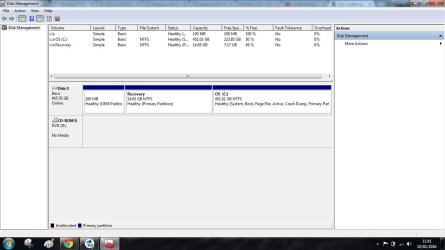
This is my disk management, where do I have to "right click" to create a new Partition.

I know that after that I have to click New Simple Volume and so on, but I don't know ( in my scenario ) where to click to start
diskmanagement Untitled.jpg
 

My Computer

Computer type
Laptop
Computer Manufacturer/Model Number
HP Presario CQ70
OS
windows 7 professional 64 bit
CPU
CPU Genuine Intel (R) CPU [email protected]
Motherboard
APCI x 64 - based PC
Memory
RAM 3 GB
Graphics Card(s)
Toshiba MK2555 GSX ATA
Sound Card
Conexant High Def Smart Audio 221,
Monitor(s) Displays
monitor Generic PnP.
Screen Resolution
?
Hard Drives
HDAUDIO Soft Data Fax Modern with smart CP
PSU
?
Keyboard
Standard PS/2 keyboard
Mouse
PS/2 Compatible mouse
Antivirus
Hyjackthis and Superanti spyware, Mamb Ccleaner
Browser
Google Chrome
Thelma -- You do not want to do anything to your PC's HD for the Macrium Image. The image is stored on the external HD. Just plug it into the USB port. Give us a Disk Management screen capture with the external plugged in.
 

My Computer

Computer type
PC/Desktop
Computer Manufacturer/Model Number
Custom Build
OS
Windows 7 Home Premium 32-Bit - Build 7600 SP1
CPU
Intel Core i3-2120 3.30Ghz
Motherboard
Asus P8Z68-V LX Intel Z68 Socket H2 ATX
Memory
Kingston 4 GB DDR3 1333 mhz
Graphics Card(s)
AMD Radeon HD6670
Sound Card
Sound Blaster Audigy SE 24-Bit
Monitor(s) Displays
Asus VE228
Screen Resolution
1440 X 900
Hard Drives
OCZ Vertex 3 120 GB Sata 3 SSD ==
Kingston SH103/S3 120 G Hyper X 120 GB SSD ==
Western Digital 500 GB Caviar Green 7200 RPM ==
PSU
Corsair CX600M == 600 Watt
Case
NZXT Apollo - Silver with Clear Side Panel
Cooling
Three 120 mm Fans
Keyboard
Microsoft Natural 4000
Mouse
Microsoft Custom Optical 3000
Internet Speed
AT&T Fiber Optic Wireless Network
Antivirus
Microsoft Security Essentials
Browser
Chrome
Other Info
120 mm Blue LED Fan -- Three Blue LED Lazer Light Sticks
Back
Top