Performing 1st Image Backup

Hey Thelma,

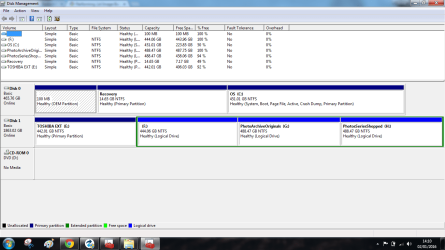
The pic you posted looks like the disk management of you computer. If you just want to do an image of your computer, you will not need to do anything in disk management of your computer. You will use Macrium to create an image and store it on your external drive. You will then use that image to re-image your computer. Kind of like if your hard drive failed and you had to replace it, an image would be used to put your computer back to where it was when you made the image. Is this what you are wanting to do?

Post #2 has a video and how to stuff for doing this. I recommend anyone trying this for the first time to review the instructions and video before attempting to do the image. Of course for me I need to read/watch it a couple of times minimum. But that's just me.

If your external hard drive has but one large partition and nothing on it, you will not have to partition anything on the external hard drive. You may want to later but for practice purposes of creating an image and restoring it you don't have to. Post #3 above talks about space needed. I did not partition my external drive. I just created the image to it.

Hope this helps. I know its new to you as it was for me, but its not that bad. And your right, these folks on this site gave clear instructions. They always do. Let me know if there is any questions. I will help as best I can.

By the way, I am about to do one. Then do a repair install on the PC. This way if I botch the repair install, I will be able to use the image to return the PC to the state it was in prior to the repair install. You can also use images as backups. Post #3 mentioned that.

Don't forget to make the boot disk. You will need it to put the image back onto the computer.
 

My Computer

Computer type
PC/Desktop
Computer Manufacturer/Model Number
All
OS
Windows 7 Home Premium
Other Info
I work on many PCs/Laptops for people to get hands on experience. I am a student at a technical college learning about computers and networks.
Yes Bigmck, and thanks for your help here :).

That makes sensediskmamagement with toshiba Untitled.png, and now I see the image I expected from the tutorials of Brink. There is some stuff on this Toshiba, I don't know what.
I know a lost of pictures backed up from this laptop.
That's my big interest photography.
 

My Computer

Computer type
Laptop
Computer Manufacturer/Model Number
HP Presario CQ70
OS
windows 7 professional 64 bit
CPU
CPU Genuine Intel (R) CPU [email protected]
Motherboard
APCI x 64 - based PC
Memory
RAM 3 GB
Graphics Card(s)
Toshiba MK2555 GSX ATA
Sound Card
Conexant High Def Smart Audio 221,
Monitor(s) Displays
monitor Generic PnP.
Screen Resolution
?
Hard Drives
HDAUDIO Soft Data Fax Modern with smart CP
PSU
?
Keyboard
Standard PS/2 keyboard
Mouse
PS/2 Compatible mouse
Antivirus
Hyjackthis and Superanti spyware, Mamb Ccleaner
Browser
Google Chrome
The F: drive on your external drive is where I would save the image to. You have plenty of space and no data on it.
 

My Computer

Computer type
PC/Desktop
Computer Manufacturer/Model Number
All
OS
Windows 7 Home Premium
Other Info
I work on many PCs/Laptops for people to get hands on experience. I am a student at a technical college learning about computers and networks.
Thanks, Copiman, :) for your help.

Yes, I just ( for the moment want to do an image of my computer.

I started wrong and read through the whole thread last night at least 4 times, I am not technical at all :o

Been watching the video on post 2 again and I have downloaded the newest version of Macrium.

I do understand that if you do an image you start with sort of copying your C; drive and end op with an external C:drive that you can use later if something goes wrong on your computer.

I also understand that if you restore, that you start with the image ( made with Macri um ) on your external hard drive and download that on your computer to end up with a new ( sort of ) c: drive the way it was before the problems.

Wh at I don't understand is why I need a CD or DVD ?
 

My Computer

Computer type
Laptop
Computer Manufacturer/Model Number
HP Presario CQ70
OS
windows 7 professional 64 bit
CPU
CPU Genuine Intel (R) CPU [email protected]
Motherboard
APCI x 64 - based PC
Memory
RAM 3 GB
Graphics Card(s)
Toshiba MK2555 GSX ATA
Sound Card
Conexant High Def Smart Audio 221,
Monitor(s) Displays
monitor Generic PnP.
Screen Resolution
?
Hard Drives
HDAUDIO Soft Data Fax Modern with smart CP
PSU
?
Keyboard
Standard PS/2 keyboard
Mouse
PS/2 Compatible mouse
Antivirus
Hyjackthis and Superanti spyware, Mamb Ccleaner
Browser
Google Chrome
You need the CD for recovery purposes. Imagine your PC goes on the blink and cannot be started any more. It is then when you want to make use of your image.

At that time you load (boot) the PC from that CD and pull the image in. That will give you an operational system.
 

My Computer

Computer Manufacturer/Model Number
HP, Dell, Gateway, Toshiba - 4 laptops and 2 desktops
OS
Vista, Windows7, Mint Mate, Zorin, Windows 8
CPU
from 1.6GHz Duo to i7
Monitor(s) Displays
2x HP w2207
Hard Drives
5x HDD, 7x SSD, 12x Externals
Keyboard
with trackball - no mices
Mouse
Trackball mice
Internet Speed
DSL 6000
The cd/dvd is a rescue cd/dvd. You would need it to boot your computer. Lets say you had to replace your hard drive. Once you replaced your hard drive (hard drive is blank) you would insert the rescue cd/dvd and boot from it. Once it boots you would then be able to access your image and restore it to your computer.

If you are just practicing, say creating an image and restoring it on the same computer, you don't necessarily need to use it. But if it were me I would create one just to be safe. If for any reason your computer crashes you will be prepared to recover. Only takes a few minutes to create the rescue media. I strongly recommend it.

If you are going to image your computer, I recommend you image the entire computer. To do so you would check all 3 partitions only on the top of the pic you posted (Disk 0). Deselect any partitions on (Disk 1). Disk 1 is your external.
 

My Computer

Computer type
PC/Desktop
Computer Manufacturer/Model Number
All
OS
Windows 7 Home Premium
Other Info
I work on many PCs/Laptops for people to get hands on experience. I am a student at a technical college learning about computers and networks.
I have so often tried to make a Rescue cd/DVD, it never works :o.

I think there's something wrong with the cd/dvd/ player:(

Well, I will try again NOW :)
 

My Computer

Computer type
Laptop
Computer Manufacturer/Model Number
HP Presario CQ70
OS
windows 7 professional 64 bit
CPU
CPU Genuine Intel (R) CPU [email protected]
Motherboard
APCI x 64 - based PC
Memory
RAM 3 GB
Graphics Card(s)
Toshiba MK2555 GSX ATA
Sound Card
Conexant High Def Smart Audio 221,
Monitor(s) Displays
monitor Generic PnP.
Screen Resolution
?
Hard Drives
HDAUDIO Soft Data Fax Modern with smart CP
PSU
?
Keyboard
Standard PS/2 keyboard
Mouse
PS/2 Compatible mouse
Antivirus
Hyjackthis and Superanti spyware, Mamb Ccleaner
Browser
Google Chrome
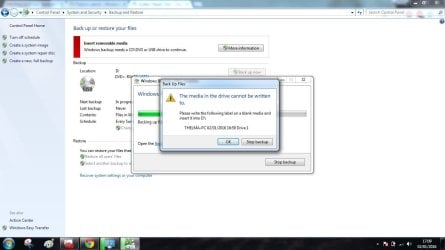
This id what always happens .

The disk is in the compartment.
back up to disk Untitled.jpg
 

My Computer

Computer type
Laptop
Computer Manufacturer/Model Number
HP Presario CQ70
OS
windows 7 professional 64 bit
CPU
CPU Genuine Intel (R) CPU [email protected]
Motherboard
APCI x 64 - based PC
Memory
RAM 3 GB
Graphics Card(s)
Toshiba MK2555 GSX ATA
Sound Card
Conexant High Def Smart Audio 221,
Monitor(s) Displays
monitor Generic PnP.
Screen Resolution
?
Hard Drives
HDAUDIO Soft Data Fax Modern with smart CP
PSU
?
Keyboard
Standard PS/2 keyboard
Mouse
PS/2 Compatible mouse
Antivirus
Hyjackthis and Superanti spyware, Mamb Ccleaner
Browser
Google Chrome
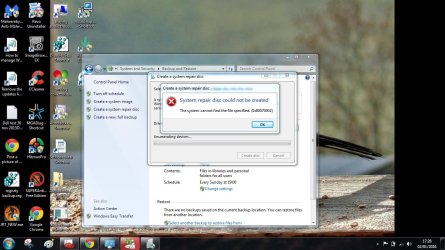
Just tried again system repair disk could not becreated Untitled.jpg
 

My Computer

Computer type
Laptop
Computer Manufacturer/Model Number
HP Presario CQ70
OS
windows 7 professional 64 bit
CPU
CPU Genuine Intel (R) CPU [email protected]
Motherboard
APCI x 64 - based PC
Memory
RAM 3 GB
Graphics Card(s)
Toshiba MK2555 GSX ATA
Sound Card
Conexant High Def Smart Audio 221,
Monitor(s) Displays
monitor Generic PnP.
Screen Resolution
?
Hard Drives
HDAUDIO Soft Data Fax Modern with smart CP
PSU
?
Keyboard
Standard PS/2 keyboard
Mouse
PS/2 Compatible mouse
Antivirus
Hyjackthis and Superanti spyware, Mamb Ccleaner
Browser
Google Chrome
Looks like your using the right dvd media. That is good. I think you may not be using the right method though. When you open Macrium did/does it prompt you to make a rescue media? If so, place the dvd in the dvd tray and then continue. If not you can select the icon in the top left corner (looks like a disk with an arrow in it) under the word file. Give that a try. That's it. You don't use backup to create dvd rescue disk.

One thing I forgot to ask. Did you download and install Macrium on your computer?
 

My Computer

Computer type
PC/Desktop
Computer Manufacturer/Model Number
All
OS
Windows 7 Home Premium
Other Info
I work on many PCs/Laptops for people to get hands on experience. I am a student at a technical college learning about computers and networks.
I just found a thread that says try in safe mode so I will do that now.
 

My Computer

Computer type
Laptop
Computer Manufacturer/Model Number
HP Presario CQ70
OS
windows 7 professional 64 bit
CPU
CPU Genuine Intel (R) CPU [email protected]
Motherboard
APCI x 64 - based PC
Memory
RAM 3 GB
Graphics Card(s)
Toshiba MK2555 GSX ATA
Sound Card
Conexant High Def Smart Audio 221,
Monitor(s) Displays
monitor Generic PnP.
Screen Resolution
?
Hard Drives
HDAUDIO Soft Data Fax Modern with smart CP
PSU
?
Keyboard
Standard PS/2 keyboard
Mouse
PS/2 Compatible mouse
Antivirus
Hyjackthis and Superanti spyware, Mamb Ccleaner
Browser
Google Chrome
Hi Copiman ( we posted at the same time ) Yes I have downloaded the very last version and have even registered :)

Thought that would not harm.
 

My Computer

Computer type
Laptop
Computer Manufacturer/Model Number
HP Presario CQ70
OS
windows 7 professional 64 bit
CPU
CPU Genuine Intel (R) CPU [email protected]
Motherboard
APCI x 64 - based PC
Memory
RAM 3 GB
Graphics Card(s)
Toshiba MK2555 GSX ATA
Sound Card
Conexant High Def Smart Audio 221,
Monitor(s) Displays
monitor Generic PnP.
Screen Resolution
?
Hard Drives
HDAUDIO Soft Data Fax Modern with smart CP
PSU
?
Keyboard
Standard PS/2 keyboard
Mouse
PS/2 Compatible mouse
Antivirus
Hyjackthis and Superanti spyware, Mamb Ccleaner
Browser
Google Chrome
Not sure about safemode. You should only have to open Macrium and create the cd/dvd from there.

select the icon in the top left corner (looks like a disk with an arrow in it) under the word file. Give that a try. That's it. You don't use backup to create dvd rescue disk.
 

My Computer

Computer type
PC/Desktop
Computer Manufacturer/Model Number
All
OS
Windows 7 Home Premium
Other Info
I work on many PCs/Laptops for people to get hands on experience. I am a student at a technical college learning about computers and networks.
Hey it worked with Macri um :D and I used a USB stick instead ;)

I have to leave now, unfortunately but will continue later ( if still sober enough :rolleyes: )

Otherwise tomorrow.

Great stuff, THANKS ALL FOR HELP:thumbsup:
 

My Computer

Computer type
Laptop
Computer Manufacturer/Model Number
HP Presario CQ70
OS
windows 7 professional 64 bit
CPU
CPU Genuine Intel (R) CPU [email protected]
Motherboard
APCI x 64 - based PC
Memory
RAM 3 GB
Graphics Card(s)
Toshiba MK2555 GSX ATA
Sound Card
Conexant High Def Smart Audio 221,
Monitor(s) Displays
monitor Generic PnP.
Screen Resolution
?
Hard Drives
HDAUDIO Soft Data Fax Modern with smart CP
PSU
?
Keyboard
Standard PS/2 keyboard
Mouse
PS/2 Compatible mouse
Antivirus
Hyjackthis and Superanti spyware, Mamb Ccleaner
Browser
Google Chrome
Before you attempt to image make sure your USB will boot. You may need to change your boot order of the computer. You want to make sure it boots in case something goes wrong.

Have fun. See ya later.
 

My Computer

Computer type
PC/Desktop
Computer Manufacturer/Model Number
All
OS
Windows 7 Home Premium
Other Info
I work on many PCs/Laptops for people to get hands on experience. I am a student at a technical college learning about computers and networks.
The cd/dvd is a rescue cd/dvd. You would need it to boot your computer. Lets say you had to replace your hard drive. Once you replaced your hard drive (hard drive is blank) you would insert the rescue cd/dvd and boot from it. Once it boots you would then be able to access your image and restore it to your computer.

If you are just practicing, say creating an image and restoring it on the same computer, you don't necessarily need to use it. But if it were me I would create one just to be safe. If for any reason your computer crashes you will be prepared to recover. Only takes a few minutes to create the rescue media. I strongly recommend it.

If you are going to image your computer, I recommend you image the entire computer. To do so you would check all 3 partitions only on the top of the pic you posted (Disk 0). Deselect any partitions on (Disk 1). Disk 1 is your external.

When making an image, I make the C: drive and the System Reserved (if you have one) as one image and make a separate image for the Documents. This way if I need to restore the OS, I do not have to restore the Documents. It makes the restore a bit faster.
 

My Computer

Computer type
PC/Desktop
Computer Manufacturer/Model Number
Custom Build
OS
Windows 7 Home Premium 32-Bit - Build 7600 SP1
CPU
Intel Core i3-2120 3.30Ghz
Motherboard
Asus P8Z68-V LX Intel Z68 Socket H2 ATX
Memory
Kingston 4 GB DDR3 1333 mhz
Graphics Card(s)
AMD Radeon HD6670
Sound Card
Sound Blaster Audigy SE 24-Bit
Monitor(s) Displays
Asus VE228
Screen Resolution
1440 X 900
Hard Drives
OCZ Vertex 3 120 GB Sata 3 SSD ==
Kingston SH103/S3 120 G Hyper X 120 GB SSD ==
Western Digital 500 GB Caviar Green 7200 RPM ==
PSU
Corsair CX600M == 600 Watt
Case
NZXT Apollo - Silver with Clear Side Panel
Cooling
Three 120 mm Fans
Keyboard
Microsoft Natural 4000
Mouse
Microsoft Custom Optical 3000
Internet Speed
AT&T Fiber Optic Wireless Network
Antivirus
Microsoft Security Essentials
Browser
Chrome
Other Info
120 mm Blue LED Fan -- Three Blue LED Lazer Light Sticks
Thelma:

I noticed something about your Toshiba external based on the Disk Management picture you posted.

It's a 2 TB drive, quite large.

It is currently split into 4 partitions of about the same size. All of the data on this 2 TB drive amounts to roughly 70 GB, very little.

Here's the issue: why is this drive split into 4 partitions? Multiple partitioning like this is generally an inefficient use of storage space that could cause you problems.

Here's why:

Your other drive containing C is a 500 GB drive that's about half full--about 235 GB occupied.

An image file of this 500 GB drive will be somewhere between 100 and 150 GB in size. That image file will have to be saved onto the Toshiba drive. In it's current state with those 4 partitions, the Toshiba probably could not hold more than 3 saved images in any of it's partitions.

I would re-partition the Toshiba so it contained just one huge partition of about 1.8 TB to make more efficient use of that drive's capacity.

You would have to TEMPORARILY move the data on the Toshiba onto your C drive. The C drive has enough space to hold all of the data now on the Toshiba. Then delete all the partitions on the Toshiba and make one big partition on it. Then move the data you temporarily moved to C back to the Toshiba.

Split the data up as you wish on the big partition on the Toshiba by using a folder structure, rather than separate partitions.

If you intend to do this, now is the time to do it--before you get involved with imaging with Macrium.

This isn't a requirement, but I think it's a good practice that means you are less likely to run out of space on those relatively small partitions now on the Toshiba.

Then continue with Macrium, storing your images in a folder called "images" on the Toshiba. I'd just make a single image file each time, making sure that the image file contained ALL THREE partitions shown on your internal drive (OEM, Recovery, and C).

It's an easy job that might take 3 or 4 hours copying files back and forth.

Yes---do confirm that your PC will in fact boot with that USB stick you made. If it won't boot, you can't recover from a disaster.
 

My Computer

Computer type
PC/Desktop
Computer Manufacturer/Model Number
Ignatz Special; 4 speed manual gearbox; factory air conditioning; one of one
OS
Windows 7 Home Premium SP1, 64-bit
CPU
Intel Skylake i5-6600K, not overclocked
Motherboard
AsRock Z170M Extreme 4, micro ATX
Memory
8 GB HyperX DDR4-2666 (2 x 4 GB)
Graphics Card(s)
none; graphics are integrated on CPU
Sound Card
onboard: Realtek ALC1150; external: USB Behringer UF0-202
Monitor(s) Displays
Dell S2340M 23 inch IPS
Screen Resolution
1600 x 900
Hard Drives
System: Crucial MX100 series SSD, 128 GB;
Data: Samsung Spinpoint 103SJ, 1 TB;
Backup: WD Caviar Green WD30EZRX-00D8PB0, 3 TB
PSU
Rosewill SilentNight 500 watt fanless, semi-modular
Case
Antec Solo II
Cooling
Noctua NH-U12S; Noctua F12 intake, Noctua S12A exhaust
Keyboard
Microsoft 200 6JH-00001 USB
Mouse
Dell or Microsoft optical wired; USB
Antivirus
Microsoft Security Essentials and Malwarebytes Premium
Browser
Pale Moon
Other Info
All fans PWM; speeds at idle: CPU circa 500 rpm; intake circa 600 rpm; exhaust circa 600 rpm; CPU temps 27 idle and 47 C load in a warm room (27 C/81 F) when running Intel Extreme Tuning Utility stress test.
ignatzatsonic -- I am asking you this for my own info and to help Thelma. - Isn't there an issue with Win 7 reading a partition that is over 1 TB? I am not sure exactly what it is but it seems I have heard this. Could the large partition be a problem?
 

My Computer

Computer type
PC/Desktop
Computer Manufacturer/Model Number
Custom Build
OS
Windows 7 Home Premium 32-Bit - Build 7600 SP1
CPU
Intel Core i3-2120 3.30Ghz
Motherboard
Asus P8Z68-V LX Intel Z68 Socket H2 ATX
Memory
Kingston 4 GB DDR3 1333 mhz
Graphics Card(s)
AMD Radeon HD6670
Sound Card
Sound Blaster Audigy SE 24-Bit
Monitor(s) Displays
Asus VE228
Screen Resolution
1440 X 900
Hard Drives
OCZ Vertex 3 120 GB Sata 3 SSD ==
Kingston SH103/S3 120 G Hyper X 120 GB SSD ==
Western Digital 500 GB Caviar Green 7200 RPM ==
PSU
Corsair CX600M == 600 Watt
Case
NZXT Apollo - Silver with Clear Side Panel
Cooling
Three 120 mm Fans
Keyboard
Microsoft Natural 4000
Mouse
Microsoft Custom Optical 3000
Internet Speed
AT&T Fiber Optic Wireless Network
Antivirus
Microsoft Security Essentials
Browser
Chrome
Other Info
120 mm Blue LED Fan -- Three Blue LED Lazer Light Sticks
ignatzatsonic -- I am asking you this for my own info and to help Thelma. - Isn't there an issue with Win 7 reading a partition that is over 1 TB? I am not sure exactly what it is but it seems I have heard this. Could the large partition be a problem?

Not in my experience.

The issue you may be thinking about is this:

Data disks over 2.2 TB must be formatted as GPT to see the entire disk as a single partition.

Thelma's external is a 2 TB, under the limit, and she should not have any problem seeing all of that disk as one partition. Even if she did, she could choose "GPT" rather than "MBR" when formatting to avoid the limitation.

I don't think she would have a problem with this. Even if it didn't work, no harm done--she could always go back to using small partitions like she has now.
 

My Computer

Computer type
PC/Desktop
Computer Manufacturer/Model Number
Ignatz Special; 4 speed manual gearbox; factory air conditioning; one of one
OS
Windows 7 Home Premium SP1, 64-bit
CPU
Intel Skylake i5-6600K, not overclocked
Motherboard
AsRock Z170M Extreme 4, micro ATX
Memory
8 GB HyperX DDR4-2666 (2 x 4 GB)
Graphics Card(s)
none; graphics are integrated on CPU
Sound Card
onboard: Realtek ALC1150; external: USB Behringer UF0-202
Monitor(s) Displays
Dell S2340M 23 inch IPS
Screen Resolution
1600 x 900
Hard Drives
System: Crucial MX100 series SSD, 128 GB;
Data: Samsung Spinpoint 103SJ, 1 TB;
Backup: WD Caviar Green WD30EZRX-00D8PB0, 3 TB
PSU
Rosewill SilentNight 500 watt fanless, semi-modular
Case
Antec Solo II
Cooling
Noctua NH-U12S; Noctua F12 intake, Noctua S12A exhaust
Keyboard
Microsoft 200 6JH-00001 USB
Mouse
Dell or Microsoft optical wired; USB
Antivirus
Microsoft Security Essentials and Malwarebytes Premium
Browser
Pale Moon
Other Info
All fans PWM; speeds at idle: CPU circa 500 rpm; intake circa 600 rpm; exhaust circa 600 rpm; CPU temps 27 idle and 47 C load in a warm room (27 C/81 F) when running Intel Extreme Tuning Utility stress test.
ignatzatsonic -- I am asking you this for my own info and to help Thelma. - Isn't there an issue with Win 7 reading a partition that is over 1 TB? I am not sure exactly what it is but it seems I have heard this. Could the large partition be a problem?

There was a problem when the partition is over 2.2GB. But I don't remember the details.
 

My Computer

Computer Manufacturer/Model Number
HP, Dell, Gateway, Toshiba - 4 laptops and 2 desktops
OS
Vista, Windows7, Mint Mate, Zorin, Windows 8
CPU
from 1.6GHz Duo to i7
Monitor(s) Displays
2x HP w2207
Hard Drives
5x HDD, 7x SSD, 12x Externals
Keyboard
with trackball - no mices
Mouse
Trackball mice
Internet Speed
DSL 6000
Back
Top