Periodic freezes in my system

Oh no i completly forgot one thing... now i remember that i did NOT test the midnight freeze when i did the clean install of windows 7, because at the time i did the install it was morning and i didn't want to wait all day until midnight without the usual programs i use. BUT i did tried the clock changing trick, and it never worked... I also did test the 1 hour freezes, that's what i tested for SURE in a clean install, and it behaved exactly like it's doing now. Tomorrow maybe i will try doing the clean install again to see if this really happens, but i will use instead the image i did at the time i installed windows seven, i still have the system partition image i did with acronis true image when i did the clean install here in a file. But first i have to make one of my current partition, which takes about 1 hour.

hum... power fluctuation ? Well this doesn't happen in the first few days when i install windows xp, it's only only after a few days it starts happening i have no idea why...

Regarding internet issues, those 1 hour freezes DO happen even without the internet connected at all (i mean with the lan cable removed, since i have a router that connects via lan cable). The problem is, windows vista and seven already install the ethernet adapter drivers by default so i can't see if this is the cause of the freezes. In fact in windows xp when i install it i don't have the ethernet drivers installed right away.

It must be something related to hardware indeed, i see no other explanation.
 

My Computer My Computer

At a glance

Windows 7 Ultimate 64bit SP1AMD Phenom(tm) II X4 955 Processor 3200 BE8GB DD3 PC3-10700 (4X2GB modules)ATI Radeon HD 5770
OS
Windows 7 Ultimate 64bit SP1
CPU
AMD Phenom(tm) II X4 955 Processor 3200 BE
Motherboard
Asus M4A785TD-V EVO
Memory
8GB DD3 PC3-10700 (4X2GB modules)
Graphics Card(s)
ATI Radeon HD 5770
Sound Card
Onboard
Screen Resolution
1024x768
Hard Drives
320GB SAMSUNG SATA2
500GB SEAGATE SATA2
2000GB SAMSUNG SATA2
250GB HITACHI SATA2
Could it be a power fluctuation?

Do you use a UPS?

Internet source? Resetting their server? Or internet provider caused?

What Dave76 said. There's a possibility that the "midnight freeze" is somehow caused by external factors which are not reliant on either the motherboard's clock ("RTC") or the Windows clock. Have rep Dave :)

Cesm23, if I understand correctly, there are two distinctly different types of periodic freezing on your machine:

A) At midnight according to the wall clock, the machine pauses noticeably for a second or so. The RTC and Windows time have no effect on this issue - only the wall clock matters. If that's correct, I have two questions for you regarding this specific freeze:
1. Can you clarify whether this has always occurred under all operating systems? I'm not clear on that, despite having read your posts.

2. Does it happen if you (say) boot into Knoppix with a CD?

3. What are you actually using to time this freeze - how do you know it's precisely at midnight?
B) For every hour of uptime, there is a smaller freeze which may be hard to detect from the console but it sometimes shows up as dropped video frames (not always). This freeze did not occur under XP.

Again, if I understand correctly, the Windows clock can be absolutely anything for both issues "A" and "B". Hence, it is very important when doing that Xperf capture if you can note down - as precisely as possible - what time the Windows clock was registering at the point of the freeze. I may be looking for something very tiny or even invisible in the log, and it helps if I know when it occurred according to the log timer.

Interesting issue :)
 
Last edited:

My Computer My Computer

At a glance

Win7x64
Computer Manufacturer/Model Number
Multiple machines in various stages of decomposition.
OS
Win7x64
A) At midnight according to the wall clock, the machine pauses noticeably for a second or so. The RTC and Windows time have no effect on this issue - only the wall clock matters. If that's correct, I have two questions for you regarding this specific freeze:

I am sorry maybe i used bad wording... no it's not according to the wall clock, it's really when the computer's clock changes from 23:59:59 to 00:00:00 or when changes to 00:00:00 to 00:00:01 (i am unable to see for sure which of these two happens). I just said it happened when it was midnight here in my country because obviously i keep the computer's clock to match the wall clock, that's what i meant :)

You tought that the freeze happened when it was exactly midnight according to my country's official clock time ? No no of course not :)

What i also mean is that it's when the computer's clock reach midnight without any manipulations in the time, that the freeze happens.

1. Can you clarify whether this has always occurred under all operating systems? I'm not clear on that, despite having read your posts.
Yeah i understand this is confusing. It's like this, when i am using windows vista or windows 7, it ALWAYS did the midnight freezing, even in the same day i installed it. The only time i remember that the midnight freeze doesn't happen, is when i install windows xp, but it's only in the first days, i notice that often about a few days later it starts doing it again...

2. Does it happen if you (say) boot into Knoppix with a CD?
I never used this before... i didn't even knew what this was until i just googled for it now.

3. What are you actually using to time this freeze - how do you know it's precisely at midnight?
Lol by looking at the windows clock at the bottom in the task tray. I even double click it to see the seconds pointer in the "analog" clock, and it's exactly when it strikes 00:00:00.

B) For every hour of uptime, there is a smaller freeze which may be hard to detect from the console but it sometimes shows up as dropped video frames (not always). This freeze did not occur under XP.

Yes, for example, when in uptime it shows 01:00:00, 02:00:00, etc. What you mean "from the console? You mean, windows desktop ? Yes most of the times it shows up as dropped frames in video capture, and believe me usually i only get dropped frames when there is a serious freeze on the computer itself i even notice the freeze in the overlay surface of the video capture. Altough it's quite rare to not do anything at all in these hourly freezes, but since it always happens at the exact time that the system.

Ok for now i am doing important tv captures, soon i will finally that thing you suggested.
 

My Computer My Computer

At a glance

Windows 7 Ultimate 64bit SP1AMD Phenom(tm) II X4 955 Processor 3200 BE8GB DD3 PC3-10700 (4X2GB modules)ATI Radeon HD 5770
OS
Windows 7 Ultimate 64bit SP1
CPU
AMD Phenom(tm) II X4 955 Processor 3200 BE
Motherboard
Asus M4A785TD-V EVO
Memory
8GB DD3 PC3-10700 (4X2GB modules)
Graphics Card(s)
ATI Radeon HD 5770
Sound Card
Onboard
Screen Resolution
1024x768
Hard Drives
320GB SAMSUNG SATA2
500GB SEAGATE SATA2
2000GB SAMSUNG SATA2
250GB HITACHI SATA2
finally i caught another hourly freeze. I was capturing tv and then i did the xperf thing 15 seconds before the uptime reached 04:00:00 (at 03:00:00 i just forgot about doing this, and in 02:00:00 it didn't happened). Then at 04:00:01 the freeze did happened, here's the log i send in attachment. I stopped the log about 5-10 seconds after the freeze happened (i only stopped the tv capture after stopping the log).

I hope it's possible to notice something in here, i have no idea if these hourly freezes are related to the one that uses to happen at midnight, but it's possible.
 

My Computer My Computer

At a glance

Windows 7 Ultimate 64bit SP1AMD Phenom(tm) II X4 955 Processor 3200 BE8GB DD3 PC3-10700 (4X2GB modules)ATI Radeon HD 5770
OS
Windows 7 Ultimate 64bit SP1
CPU
AMD Phenom(tm) II X4 955 Processor 3200 BE
Motherboard
Asus M4A785TD-V EVO
Memory
8GB DD3 PC3-10700 (4X2GB modules)
Graphics Card(s)
ATI Radeon HD 5770
Sound Card
Onboard
Screen Resolution
1024x768
Hard Drives
320GB SAMSUNG SATA2
500GB SEAGATE SATA2
2000GB SAMSUNG SATA2
250GB HITACHI SATA2
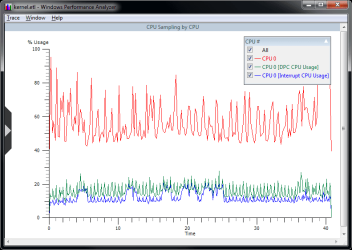
I hope it's possible to notice something in here, i have no idea if these hourly freezes are related to the one that uses to happen at midnight, but it's possible.

Sorry, nothing obvious. You can see that the processor rate, DPC rate, and Interrupt rates are all fairly consistent throughout the 40sec of log. While perfmon is limited to a 1sec resolution by default, Xperf does one sample roughly every 3ms on most machines, so it's vastly more granular.

It's still possible that there are other software reasons which are not obvious, so you might want to do another capture with these verbose settings:

xperf -on PROC_THREAD+LOADER+INTERRUPT+DPC+PROFILE+DISK_IO+ALL_FAULTS+DISPATCHER+DRIVERS+POWER+CSWITCH+MEMINFO

It's probably best if you log the "midnight" freeze since that one is longer and presumably a bigger target. It would also be useful if you could try to stop the trace say exactly 10sec after the start of the freeze, so that it's as obvious as possible where to look in the log.
 

Attachments

  • kernel.png
    kernel.png
    17.6 KB · Views: 26

My Computer My Computer

At a glance

Win7x64
Computer Manufacturer/Model Number
Multiple machines in various stages of decomposition.
OS
Win7x64
Ok i got it, the next hourly freeze should happen in about 40 minutes from now on so i will then post it after it's done.

Regarding the midnight freeze yes i know i should trace it too, it's just a matter of waiting 9 more hours :) (jeez it's really BAD that i can't change the clock to before midnight to test this)

update : damn there is always some problem, like remembering to do this only at the last minute, or the previous logs i did getting mixed with the new ones, i didn't know it actually merged the previous logs i did, so now i always delete them first. Now it's another 55 minutes of waiting, jeez...
 
Last edited:

My Computer My Computer

At a glance

Windows 7 Ultimate 64bit SP1AMD Phenom(tm) II X4 955 Processor 3200 BE8GB DD3 PC3-10700 (4X2GB modules)ATI Radeon HD 5770
OS
Windows 7 Ultimate 64bit SP1
CPU
AMD Phenom(tm) II X4 955 Processor 3200 BE
Motherboard
Asus M4A785TD-V EVO
Memory
8GB DD3 PC3-10700 (4X2GB modules)
Graphics Card(s)
ATI Radeon HD 5770
Sound Card
Onboard
Screen Resolution
1024x768
Hard Drives
320GB SAMSUNG SATA2
500GB SEAGATE SATA2
2000GB SAMSUNG SATA2
250GB HITACHI SATA2
Here's another log, i started it exact 10 seconds before the freeze time, and stopped after 10 seconds after freeze time, as always 1 dropped frame.

here's the archive : http://www.megaupload.com/?d=8U2A6KAQ
 
Last edited:

My Computer My Computer

At a glance

Windows 7 Ultimate 64bit SP1AMD Phenom(tm) II X4 955 Processor 3200 BE8GB DD3 PC3-10700 (4X2GB modules)ATI Radeon HD 5770
OS
Windows 7 Ultimate 64bit SP1
CPU
AMD Phenom(tm) II X4 955 Processor 3200 BE
Motherboard
Asus M4A785TD-V EVO
Memory
8GB DD3 PC3-10700 (4X2GB modules)
Graphics Card(s)
ATI Radeon HD 5770
Sound Card
Onboard
Screen Resolution
1024x768
Hard Drives
320GB SAMSUNG SATA2
500GB SEAGATE SATA2
2000GB SAMSUNG SATA2
250GB HITACHI SATA2
Now here's the "important" one, it's now 00:08 here and i started the log exactly 10 seconds before midnight and stopped 10 seconds after midnight and i used the new settings you told me to use. Just ignore the filename i used (hourly_freeze.etl) i forgot to change it, this is really the one from midnight.

By the way this time i choosed NOT to have a tv capture going, maybe that's why i noticed that the freeze was a bit shorter than last night... it was kinda like a half second instead of a entire second.

Now tell me if you notice anything strange in there? Even tough the freeze was shorter than last night i clearly noticed the freeze since i was hearing a music in winamp as well.

One last thing, the freeze happens EXACTLY when the clock goes to 23:59:59 to 00:00:00 and NOT from 00:00:00 to 00:00:01 (i used the analog clock of windows 7 to check this).
 

My Computer My Computer

At a glance

Windows 7 Ultimate 64bit SP1AMD Phenom(tm) II X4 955 Processor 3200 BE8GB DD3 PC3-10700 (4X2GB modules)ATI Radeon HD 5770
OS
Windows 7 Ultimate 64bit SP1
CPU
AMD Phenom(tm) II X4 955 Processor 3200 BE
Motherboard
Asus M4A785TD-V EVO
Memory
8GB DD3 PC3-10700 (4X2GB modules)
Graphics Card(s)
ATI Radeon HD 5770
Sound Card
Onboard
Screen Resolution
1024x768
Hard Drives
320GB SAMSUNG SATA2
500GB SEAGATE SATA2
2000GB SAMSUNG SATA2
250GB HITACHI SATA2
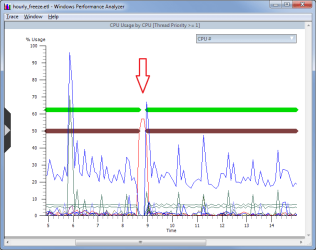
Good news: the nature of the "midnight" freeze is easy to see in the logs.
Bad news: Insufficient info (in Xperf) to tell which driver is responsible :(

Suggestion: do the "midnight" capture once more please, but this time crash the box on purpose afterwards so that a BSOD minidump is generated (once you've saved your data). Here's how...

1) Add the "CrashOnCtrlScroll" registry value as per this MSDN article: Forcing a System Crash from the Keyboard
2) Reboot at least once. Test that your machine then bugchecks (BSODs) whenever you press ctrl+ScrLk+ScrLk, and that it produces a minidump in \Windows\Minidump. (The minidump is the important part.)
3) For the next "midnight run", use: xperf -on PROC_THREAD+LOADER+INTERRUPT+DPC+PROFILE+DISPATCHER+DRIVERS+CSWITCH -stackwalk profile
4) A few minutes after you finish and save the Xperf logging, use ctrl+ScrLk+ScrLk to crash the machine and produce a minidump.

It's *vital* that the Xperf log and minidump be from the same boot. In other words, the crash has to occur after you run Xperf, but before you reboot. The combination of Xperf log and minidump may reveal more.

=================
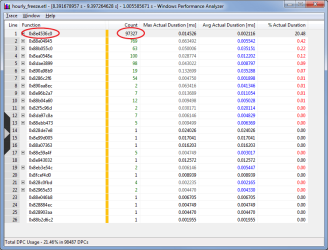
Longer version: you can see in the attached graph, which is a composite of several overlaid quantities, that everything else seems to cease during that phallic-looking "DPC" spike (in red). Think of a DPC as a very primitive and high-priority task that temporarily suspends everything else on the system. They normally occur somewhere between 200 and 500 times per second on your machine, but during the 1sec interval around that spike there are in excess of 98 thousand DPCs. Their combined effect is the temporary lockup that you experience - the system is so busy servicing DPCs that all other activity is basically suspended.

The table I attached shows the address of the function responsible as 0x8e4536c0. That's outside of the kernel range, and very probably a driver. The problem is that I can't tell which driver because of a randomisation feature that moves those addresses around on each boot (partially for security reasons). That's why the combination of Xperf log plus minidump may reveal which driver is involved - the minidump can be used to correlate the address to a particular driver name.

I have no idea whether this will lead to a practical solution, but hell, it's fun (at least for me ;)), and it may even pinpoint the hardware/driver combo that's doing weird stuff at midnight.
 

Attachments

  • DpcSpike.png
    DpcSpike.png
    18 KB · Views: 46
  • DpcTiming.png
    DpcTiming.png
    28.6 KB · Views: 58

My Computer My Computer

At a glance

Win7x64
Computer Manufacturer/Model Number
Multiple machines in various stages of decomposition.
OS
Win7x64
wow.... before that, i almost tought there was no solution for this :) Another problem, you see, is that even if we can fix this problem of the midnight freeze, it's the hourly small freeze that is the most important to me, since i almost never capture anything at midnight, i just hope if we solve this one at midnight, that it might also solve the hourly ones.

By the way can you download the log i uploaded in megaupload ? can you see if you are able to notice something similar to this too in that log ? As i told in the description, i did it exactly 10 seconds before and finished 10 seconds after.
 

My Computer My Computer

At a glance

Windows 7 Ultimate 64bit SP1AMD Phenom(tm) II X4 955 Processor 3200 BE8GB DD3 PC3-10700 (4X2GB modules)ATI Radeon HD 5770
OS
Windows 7 Ultimate 64bit SP1
CPU
AMD Phenom(tm) II X4 955 Processor 3200 BE
Motherboard
Asus M4A785TD-V EVO
Memory
8GB DD3 PC3-10700 (4X2GB modules)
Graphics Card(s)
ATI Radeon HD 5770
Sound Card
Onboard
Screen Resolution
1024x768
Hard Drives
320GB SAMSUNG SATA2
500GB SEAGATE SATA2
2000GB SAMSUNG SATA2
250GB HITACHI SATA2
wow.... before that, i almost tought there was no solution for this :) Another problem, you see, is that even if we can fix this problem of the midnight freeze, it's the hourly small freeze that is the most important to me, since i almost never capture anything at midnight, i just hope if we solve this one at midnight, that it might also solve the hourly ones.

Just because the problem's visible doesn't mean there's a practical solution ;)

I'd suggest focusing on the midnight thing first, if only because it's so easy to spot. Perhaps the hourly freeze is indeed related in some way which is not obvious right now.

By the way can you download the log i uploaded in megaupload ? can you see if you are able to notice something similar to this too in that log ? As i told in the description, i did it exactly 10 seconds before and finished 10 seconds after.

I just looked at the megaupload log. Nothing obvious I'm afraid. It doesn't mean it's not in there, just that it might be like looking for a needle in a stack of needles. Do you actually perceive any sort of lockup in the user interface during the hourly freezes, or is it only the dropped frames in your videos which alert you to the existence of a problem?
 

My Computer My Computer

At a glance

Win7x64
Computer Manufacturer/Model Number
Multiple machines in various stages of decomposition.
OS
Win7x64
I just looked at the megaupload log. Nothing obvious I'm afraid. It doesn't mean it's not in there, just that it might be like looking for a needle in a stack of needles. Do you actually perceive any sort of lockup in the user interface during the hourly freezes, or is it only the dropped frames in your videos which alert you to the existence of a problem?

Yeah indeed i don't notice anything at all in the user interface BUT there is for sure some freeze, because it's always exactly at each hour, and this never happened in windows xp by the way, it's ONLY in windows vista and windows 7 that this happens. altough just by the fact that it just drops ONE frame, that clearly indicates that the freeze should be quite small, therefore perhaps that's why it's not noticed in the logs. But since it also happens in a "scheduled" way it probably has a connection with the midnight freeze.

Oh also i almost forgot the 01:23:33 freeze too (this one it's not exactly a scheduled, it's just when the capture time duration reaches 01:23:33), altough i noticed that this one only happens if the other hourly one didn't happened in between. I will try also to do a log of this one too and also use the same method with the dump log too. This one you should notice because i also lose about the same amount of dropped frames, altough i don't remeber if there is any freeze in the user interface or not, i will check this out too when i do this.
 

My Computer My Computer

At a glance

Windows 7 Ultimate 64bit SP1AMD Phenom(tm) II X4 955 Processor 3200 BE8GB DD3 PC3-10700 (4X2GB modules)ATI Radeon HD 5770
OS
Windows 7 Ultimate 64bit SP1
CPU
AMD Phenom(tm) II X4 955 Processor 3200 BE
Motherboard
Asus M4A785TD-V EVO
Memory
8GB DD3 PC3-10700 (4X2GB modules)
Graphics Card(s)
ATI Radeon HD 5770
Sound Card
Onboard
Screen Resolution
1024x768
Hard Drives
320GB SAMSUNG SATA2
500GB SEAGATE SATA2
2000GB SAMSUNG SATA2
250GB HITACHI SATA2
Oh also i almost forgot the 01:23:33 freeze too (this one it's not exactly a scheduled, it's just when the capture time duration reaches 01:23:33), altough i noticed that this one only happens if the other hourly one didn't happened in between. I will try also to do a log of this one too and also use the same method with the dump log too. This one you should notice because i also lose about the same amount of dropped frames, altough i don't remeber if there is any freeze in the user interface or not, i will check this out too when i do this.

OK. If the theory is correct, the greater the magnitude of the freeze (the more it's apparent in the user interface), the easier it should be to spot in the Xperf log.

By the way, if you're interested you can easily look at those logs yourself (not that I mind doing it). The "xperfview" utility is included with that performance kit you installed - just feed it an ETL file and I'm sure you'll work out what to do from there.
 

My Computer My Computer

At a glance

Win7x64
Computer Manufacturer/Model Number
Multiple machines in various stages of decomposition.
OS
Win7x64
Oh also i almost forgot the 01:23:33 freeze too (this one it's not exactly a scheduled, it's just when the capture time duration reaches 01:23:33), altough i noticed that this one only happens if the other hourly one didn't happened in between. I will try also to do a log of this one too and also use the same method with the dump log too. This one you should notice because i also lose about the same amount of dropped frames, altough i don't remeber if there is any freeze in the user interface or not, i will check this out too when i do this.

OK. If the theory is correct, the greater the magnitude of the freeze (the more it's apparent in the user interface), the easier it should be to spot in the Xperf log.

By the way, if you're interested you can easily look at those logs yourself (not that I mind doing it). The "xperfview" utility is included with that performance kit you installed - just feed it an ETL file and I'm sure you'll work out what to do from there.

Hum... at first i tried to open them in explorer by double clicking in them but it would always appear this error :

---------------------------
Performance Analyzer
---------------------------
Trace 'E:\hourly_freeze.etl' could not be successfully opened [0x800700a1].

Aborting operation.

---------------------------
OK
---------------------------

And so i quit trying, but now that you said this, i had the idea of trying to open them in the program itself and it now worked. Lol i know this is something quite obvious but i am a bit lazy sometimes :)

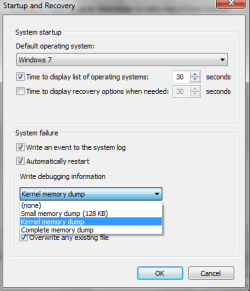
By the way in the windows 7 system properties the memory dump settings, should i let it stay with these settings i show in the attached screenshot ? I ask this because since i have to wait another 24 hours after i do this log, it would be better to choose the most detailed dump, no ? Or the one you see selected in the screenshot is more than enought?
 

Attachments

  • settings.png
    settings.png
    12.2 KB · Views: 18

My Computer My Computer

At a glance

Windows 7 Ultimate 64bit SP1AMD Phenom(tm) II X4 955 Processor 3200 BE8GB DD3 PC3-10700 (4X2GB modules)ATI Radeon HD 5770
OS
Windows 7 Ultimate 64bit SP1
CPU
AMD Phenom(tm) II X4 955 Processor 3200 BE
Motherboard
Asus M4A785TD-V EVO
Memory
8GB DD3 PC3-10700 (4X2GB modules)
Graphics Card(s)
ATI Radeon HD 5770
Sound Card
Onboard
Screen Resolution
1024x768
Hard Drives
320GB SAMSUNG SATA2
500GB SEAGATE SATA2
2000GB SAMSUNG SATA2
250GB HITACHI SATA2
By the way in the windows 7 system properties the memory dump settings, should i let it stay with these settings i show in the attached screenshot ? I ask this because since i have to wait another 24 hours after i do this log, it would be better to choose the most detailed dump, no ? Or the one you see selected in the screenshot is more than enought?

"Kernel" is fine. That actually produces two dumps:

  1. memory.dmp which is the resident portion of the system (kernel-mode code which was in RAM at the time of the crash), somewhere between 100MB and say 400MB in size.
  2. a minidump which is a summary of the file above, 64-300KB.
Because it's tiny and easy to transfer, the minidump will probably be sufficient by itself. If not, you've always got the kernel dump on your box (might want to copy it elsewhere so it doesn't get overwritten during a real crash ;)).

The "complete" dump you see listed there is literally all of RAM. The majority of it would be user-mode code which is useless for troubleshooting DPCs and driver activity - it just makes the dump unnecessarily big and unwieldy.


EDIT: I forgot to mention something that's very important, especially given this is an open forum. You really don't want to be giving "kernel" and "complete" dumps to strangers on the internet, unless the security of the machine in question is not a concern. Minidumps are purposefully designed to be devoid of sensitive information (99.999% of the time), but a "kernel" or "complete" dump can reveal all sorts of info about who you are and what you do with your computer.
 
Last edited:

My Computer My Computer

At a glance

Win7x64
Computer Manufacturer/Model Number
Multiple machines in various stages of decomposition.
OS
Win7x64
This time i started the trace exactly 15 seconds before midnight (using the latest settings you told me of course) and 15 seconds later i stopped. Then about 3 minutes later i did the crash as you told, and i send everything in the attached file. Wow around 192000 dpc's this time... Even tough the freeze was precisely one second.
 

My Computer My Computer

At a glance

Windows 7 Ultimate 64bit SP1AMD Phenom(tm) II X4 955 Processor 3200 BE8GB DD3 PC3-10700 (4X2GB modules)ATI Radeon HD 5770
OS
Windows 7 Ultimate 64bit SP1
CPU
AMD Phenom(tm) II X4 955 Processor 3200 BE
Motherboard
Asus M4A785TD-V EVO
Memory
8GB DD3 PC3-10700 (4X2GB modules)
Graphics Card(s)
ATI Radeon HD 5770
Sound Card
Onboard
Screen Resolution
1024x768
Hard Drives
320GB SAMSUNG SATA2
500GB SEAGATE SATA2
2000GB SAMSUNG SATA2
250GB HITACHI SATA2
This time i started the trace exactly 15 seconds before midnight (using the latest settings you told me of course) and 15 seconds later i stopped. Then about 3 minutes later i did the crash as you told, and i send everything in the attached file. Wow around 192000 dpc's this time... Even tough the freeze was precisely one second.

Hey, you're good at this computer lark ;)

This time, the address of the function corresponding to all those DPCs is 0x8f24b6c0, although we can be almost certain it's the exact same function as last time, only relocated in memory after a reboot.

As per the minidump, the address is squarely in "kl1.sys" -a Kaspersky Labs driver, according to the web:

kd> lmvm kl1
start end module name
8f21a000 8f73a000 kl1 T (no symbols)
Loaded symbol image file: kl1.sys
Image path: \SystemRoot\system32\DRIVERS\kl1.sys


Does fully uninstalling (not just disabling) Kaspersky AV improve matters for either the midnight or the hourly freezes?
 

My Computer My Computer

At a glance

Win7x64
Computer Manufacturer/Model Number
Multiple machines in various stages of decomposition.
OS
Win7x64
hum... first of all tell me how you did this, which program you use to find the adress in the minidump? It would be really usefull to me to find this later, since of course i am learning from this too and also i need to know how to diagnose dropped frames like this, because i am SO tired of dropped frames, that i need to do very advanced diagnosis like this. Also tell me if there is another way of finding those adresses or to make this minidump WITHOUT making windows crash like this ? There's gotta be another way without having to restart windows like this.

Well in fact i haven't tested yet the midnight freeze without kaspersky active, this is very interesting results altough i am WORRIED about this, because unfortunately as i said in the beginning of the topic, in a clean windows 7 install, that means WITHOUT kaspersky internet security suite installed the hourly freezes still happen, but in fact i haven't tested the midnight freeze like this, but then i am afraid this won't solve the hourly small freezes, i have to really analyse better the traces of the hourly freezes there's gotta be something in there to indicate the problem since if that didn't happened in windows xp there is someway to avoid it happening on windows vista and seven.

Ok then, next time i can i will test the midnight freeze with kaspersky disabled as you said. Meanwhile just tell me those things i asked in the first paragraph, since it's very important.
 

My Computer My Computer

At a glance

Windows 7 Ultimate 64bit SP1AMD Phenom(tm) II X4 955 Processor 3200 BE8GB DD3 PC3-10700 (4X2GB modules)ATI Radeon HD 5770
OS
Windows 7 Ultimate 64bit SP1
CPU
AMD Phenom(tm) II X4 955 Processor 3200 BE
Motherboard
Asus M4A785TD-V EVO
Memory
8GB DD3 PC3-10700 (4X2GB modules)
Graphics Card(s)
ATI Radeon HD 5770
Sound Card
Onboard
Screen Resolution
1024x768
Hard Drives
320GB SAMSUNG SATA2
500GB SEAGATE SATA2
2000GB SAMSUNG SATA2
250GB HITACHI SATA2
hum... first of all tell me how you did this, which program you use to find the adress in the minidump?

More info: http://www.sevenforums.com/crashes-...ck-bsod-process-crash-dumps-2.html#post288658

Also tell me if there is another way of finding those adresses or to make this minidump WITHOUT making windows crash like this ? There's gotta be another way without having to restart windows like this.

Yes. You can attach a "live" kernel debugger to a running system in a way that let's you inspect without modifying. Short version: start WinDBG as an admin (run as admin), ctrl+K, "local" tab, and then find the address via the 'lm' (list loaded modules) command.

...but then i am afraid this won't solve the hourly small freezes,...

I understand your concern. I was surprised when the address turned out to be in the kl1.sys range based on what you said about the hourly freeze happening even on a clean install (and I realise we were looking at a midnight log just then). Actually, I expected some sort of interaction between hal.dll and the hardware, but it's best not to guess in these situations. The memory address clearly implicates Kaspersky. Let's trust the numbers and see what happens with kl1 temporarily out of the picture.
 

My Computer My Computer

At a glance

Win7x64
Computer Manufacturer/Model Number
Multiple machines in various stages of decomposition.
OS
Win7x64
thanks so much for the info to make me use this by myself too :)

Ok i just remembered now, i ALREADY tried to disable or even close kaspersky completly in windows xp when i once tried to prevent the midnight freeze to happen, i think it STILL did the midnight freeze but the dropped frames reduced to half, i am not too sure since this was several months ago... I think it's because even tough kaspersky's main program will be closed, the drivers are still working at the background.

Anyway i am not sure anymore if we should go on with this anymore, the midnight freeze isn't much serious to me, specially if i would have to use another internet security suite instead of kaspersky, and since without it installed the hourly freezes still happen... i guess the only thing left to do, is making a clean install of windows 7 again, and make douzens of hourly traces, perhaps in a clean install there will be a lot less stuff to appear in the trace and like this perhaps it's easier to find the thing causing the hourly freezes.
 

My Computer My Computer

At a glance

Windows 7 Ultimate 64bit SP1AMD Phenom(tm) II X4 955 Processor 3200 BE8GB DD3 PC3-10700 (4X2GB modules)ATI Radeon HD 5770
OS
Windows 7 Ultimate 64bit SP1
CPU
AMD Phenom(tm) II X4 955 Processor 3200 BE
Motherboard
Asus M4A785TD-V EVO
Memory
8GB DD3 PC3-10700 (4X2GB modules)
Graphics Card(s)
ATI Radeon HD 5770
Sound Card
Onboard
Screen Resolution
1024x768
Hard Drives
320GB SAMSUNG SATA2
500GB SEAGATE SATA2
2000GB SAMSUNG SATA2
250GB HITACHI SATA2
Back
Top