Permissions issue with Win 7

speedlever

New member
Member
VIP
Local time
10:31 PM
Messages
128
I have a WLAN running at home. All computers are in the same workgroup and all updates have been applied.

The Main PC is running Win 7 home premium and is connected to the wireless router via ethernet. A wireless laptop is running XP/pro. Another wireless PC is running Vista Home Premium/32 bit.

The XP machine can see both the Win 7 and the Vista computer drives and files.

The Vista machine can also see both the Win 7 and the XP drives and files.

However, the Win 7 machine cannot access the Vista files without getting a permissions error msg. The Win 7 machine can see the drives on both the XP and the Vista machine. It can see the files on the XP machine. But it cannot get to the files on the Vista machine. It generates the permissions error msg every time.

I tried disabling the Win 7 firewall, but still got the permissions error.

What setting have I overlooked that could cause this?

Win7-> XP (sees drives and files)
***Win7-> Vista (sees drives but cannot access files - permissions problem)
XP-> Win7 (sees drives and files
XP-> Vista (sees drives and files)
Vista-> XP (sees drives and files)
Vista-> Win7 (sees drives and files)
 

My Computer

OS
Windows 7 x64 home premium
CPU
Intel core i5-2500k
Motherboard
Asus P8Z68-V Pro
Memory
2x4GB G.Skill DDR3-1333, 2x2GB AData DDR3-1333
Graphics Card(s)
HD3000 graphics
Sound Card
on board
Monitor(s) Displays
Samsung 19" syncmaster
Screen Resolution
1280x1024
Hard Drives
Intel 80 GB X25-M SSD
Samsung HD321KJ 320 GB SATA
Samsung HD204UI 2.0 TB SATA
WD 1.5 TB Green eSATA in an external NexStar enclosure
PSU
Corsair HX520W
Case
Antec Solo
Cooling
CoolerMaster Hyper 212+ with dual fans
Keyboard
MS Natural Ergonomic 4000
Mouse
Logitech
Internet Speed
RoadRunner
I have a WLAN running at home. All computers are in the same workgroup and all updates have been applied.

The Main PC is running Win 7 home premium and is connected to the wireless router via ethernet. A wireless laptop is running XP/pro. Another wireless PC is running Vista Home Premium/32 bit.

The XP machine can see both the Win 7 and the Vista computer drives and files.

The Vista machine can also see both the Win 7 and the XP drives and files.

However, the Win 7 machine cannot access the Vista files without getting a permissions error msg. The Win 7 machine can see the drives on both the XP and the Vista machine. It can see the files on the XP machine. But it cannot get to the files on the Vista machine. It generates the permissions error msg every time.

I tried disabling the Win 7 firewall, but still got the permissions error.

What setting have I overlooked that could cause this?

Win7-> XP (sees drives and files)
***Win7-> Vista (sees drives but cannot access files - permissions problem)
XP-> Win7 (sees drives and files
XP-> Vista (sees drives and files)
Vista-> XP (sees drives and files)
Vista-> Win7 (sees drives and files)


Ok... to do this, because of the mixed operating systems the Win7 machine will have to be on a Work network not a Home Network.

To switch to work network, go into your Network and Sharing center and
Click on Home Network in the center of the dialog
Select Work network from the dialog that pops up and click OK.

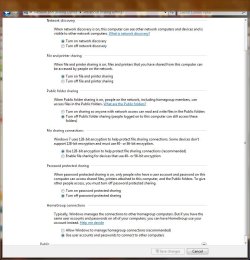
In your network connections and sharing control panel go to the advanced sharing settings and ...
Enable file and printer sharing
Enable network discovery
Disable password protected sharing
Enable User account and password sharing

Next go to your folder options and
Under View uncheck the "use sharing wizard" option.

Now for each shared folder on the Win7 machine...
Right click select sharing then advanced sharing and advanced sharing again
Check the "share this folder" box

The default permission is that "everyone" has read only access.
To change this click on permissions and enter the users or groups that you want and check the appropriate boxes for each.

DO NOT go into the local security panel. That is not necessary for this task.
 

My Computer

Computer Manufacturer/Model Number
Homebrew
OS
XP Pro SP3 X86 / Win7 Pro X86
CPU
Amd 64 x2 4200 (2.4ghz)
Motherboard
Asus M2N-MX SE Plus
Memory
Kingston DDR2 800 2gb
Graphics Card(s)
Nvidia GF-8400
Sound Card
Realtek on Motherboard
Monitor(s) Displays
Acer x-193bw
Screen Resolution
1440 x 900
Hard Drives
Western Digital 500g
PSU
350watt In-Win
Case
In-Win
Cooling
Air
Keyboard
yes
Mouse
yes
Internet Speed
5mpbs
Other Info
Also ASRock ION 330 as HTPC (on XP).
Acer Aspire as GP netbook (on XP).
Ok... to do this, because of the mixed operating systems the Win7 machine will have to be on a Work network not a Home Network.

To switch to work network, go into your Network and Sharing center and
Click on Home Network in the center of the dialog
Select Work network from the dialog that pops up and click OK.

In your network connections and sharing control panel go to the advanced sharing settings and ...
Enable file and printer sharing
Enable network discovery
Disable password protected sharing
Enable User account and password sharing

Next go to your folder options and
Under View uncheck the "use sharing wizard" option.

Now for each shared folder on the Win7 machine...
Right click select sharing then advanced sharing and advanced sharing again
Check the "share this folder" box

The default permission is that "everyone" has read only access.
To change this click on permissions and enter the users or groups that you want and check the appropriate boxes for each.

DO NOT go into the local security panel. That is not necessary for this task.

CommonTater,

Thanks for your assistance. Would you mind a few questions along the way?

1) why is work network chosen over home network? Is there a comparison somewhere that tells me the diff?

2) Just to be clear, the Vista (wireless) computer drives are visible to the W7 PC. However, the Vista files cannot be accessed by the W7 machine. The Vista files *are* accessible by the XP wireless laptop.

You last few paragraphs deal with sharing W7 files. That is not the problem. Accessing the files on the wireless Vista computer from the W7 machine is the problem.

3) There is a public folder sharing option under Home/Work profile as well as a separate Public profile option. Are those settings important in this scenario?
 

My Computer

OS
Windows 7 x64 home premium
CPU
Intel core i5-2500k
Motherboard
Asus P8Z68-V Pro
Memory
2x4GB G.Skill DDR3-1333, 2x2GB AData DDR3-1333
Graphics Card(s)
HD3000 graphics
Sound Card
on board
Monitor(s) Displays
Samsung 19" syncmaster
Screen Resolution
1280x1024
Hard Drives
Intel 80 GB X25-M SSD
Samsung HD321KJ 320 GB SATA
Samsung HD204UI 2.0 TB SATA
WD 1.5 TB Green eSATA in an external NexStar enclosure
PSU
Corsair HX520W
Case
Antec Solo
Cooling
CoolerMaster Hyper 212+ with dual fans
Keyboard
MS Natural Ergonomic 4000
Mouse
Logitech
Internet Speed
RoadRunner

My Computer

Computer type
PC/Desktop
Computer Manufacturer/Model Number
Home built
OS
Windows 7 Ult, Windows 8.1 Pro,
CPU
Q9650-4.275GHz, E8600 4.5GHz, E6750-3.8GHz
Motherboard
Evga 780i FTW
Memory
G.Skill PC2 9600 1200Mhz 5 5 5 15 2T
Graphics Card(s)
GTX480
Sound Card
Asus Xonar D2
Monitor(s) Displays
HannsG
Screen Resolution
1680X1050
Hard Drives
GSkill Phoenix Pro 120GB SSD
PSU
ThermalTake Toughpower 1000Watt modular
Case
ThermalTake XaserV
Cooling
Xigmatek S1283
Keyboard
Logitech G15
Mouse
Logitech G9
Internet Speed
T1
Thanks for your assistance. Would you mind a few questions along the way?

You DO NOT get to ask questions...

Just kidding :D


1) why is work network chosen over home network? Is there a comparison somewhere that tells me the diff?

Yeah there probably is but I've never seen one.

The Home Network concept is based on the idea of all computers in the home being wide open. Sharing is done by a single password that has to be entered on each computer (XP has no provision for this). Home Networks also allow media sharing and streaming with WMP and it has network access to mess with index your media folders (My Music, My Video, etc.) Home networks try to use ipv6 when possible.

In a work network the emphasis is on security. You need passwords and permissions to do anything. There's no network indexer running and windows does network discovery only by scanning computer names and share names. You can set up your shares on a folder by folder basis; the only snag being that when you share a folder all folders under (in) that folder are also shared. To make an open network in this format you simply use the same account name, password and workgroup name on all computers... this makes all shares visible to all machines. Work networks (xp: Workgroups) use ipv4 which is how the internet works.

Which is better? In your case it doesn't matter because XP --and probably Vista too-- doesn't understand Home Network's enumeration scheme and thus won't be seen by win 7 from a home network... although, if you experiment a little, you will discover the XP machine has some pretty interesting access to the win 7 machine.

(Sidebar: On the XP machine, open windows explorer and type \\BIXBOX\c$ into the address bar [of course you will have to substitute the Win7 machine's actual name for "bixbox"] and you should be looking at the root of an unshared drive. And they say win7 is more secure????)

2) Just to be clear, the Vista (wireless) computer drives are visible to the W7 PC. However, the Vista files cannot be accessed by the W7 machine. The Vista files *are* accessible by the XP wireless laptop.

Never used Vista so I can't give you an authoritive answer... perhaps someone else could enlighten us both ;)

You last few paragraphs deal with sharing W7 files. That is not the problem. Accessing the files on the wireless Vista computer from the W7 machine is the problem.

You may have to make similar adjustments in the Vista file sharing as well...

3) There is a public folder sharing option under Home/Work profile as well as a separate Public profile option. Are those settings important in this scenario?

Well... I would turn that off in the interests of security and a little privacy. But I see no harm in trying it both ways... it is afterall, your computer.


Overall, I would suggest your first step is to get it working AT ALL... you can always diddle the settings and experiment later.

And FWIW... I have 2 XP machines and a win7 for my personal use. There are 8 machines in the family ... 3 are on XP, 2 are on win7, 2 are on Ubuntu and the other is a Mac.... We all share files very easily... BUT that didn't come without a fair bit of messing about and my number one son-in-law is duely credited with inventing several new swear words in the process. :shock:

Lets hope this solves your problem....
 

My Computer

Computer Manufacturer/Model Number
Homebrew
OS
XP Pro SP3 X86 / Win7 Pro X86
CPU
Amd 64 x2 4200 (2.4ghz)
Motherboard
Asus M2N-MX SE Plus
Memory
Kingston DDR2 800 2gb
Graphics Card(s)
Nvidia GF-8400
Sound Card
Realtek on Motherboard
Monitor(s) Displays
Acer x-193bw
Screen Resolution
1440 x 900
Hard Drives
Western Digital 500g
PSU
350watt In-Win
Case
In-Win
Cooling
Air
Keyboard
yes
Mouse
yes
Internet Speed
5mpbs
Other Info
Also ASRock ION 330 as HTPC (on XP).
Acer Aspire as GP netbook (on XP).
chev65 said:

Thanks for that link.

I am still having the same issues, even after going through all the suggestions and the above link guide. Well, there is one difference. I can get to the public folder on the Vista machine now (it was disabled before).

Currently, I have 4 machines on the WLAN.
1 XP/pro
2 XP/home
1 Vista/32 bit

The W7 machine can see all drives on all computers, but cannot access the shared files on the Vista machine.

The XP laptop can see all drives on all computers and can access all shared files.

Interestingly, the 2 XP/home machines are functioning just like the W7 machine. They can see all drives and can access all shared files except for the Vista PC.

The Vista PC can see all drives and can access all shared files.

I'm going to enable password access on the Vista PC and see if that solves the problem. Stand by...
**********************************************************
..... OK. Enabling password protected sharing on the Vista machine enables my W7 PC to access the files.

Can anyone explain to me why this worked?

Also, the XP/home machines still cannot access the files on the Vista PC. (this is not important in my application, but I would like to understand what's going on).

Thanks for the help thus far.
 

My Computer

OS
Windows 7 x64 home premium
CPU
Intel core i5-2500k
Motherboard
Asus P8Z68-V Pro
Memory
2x4GB G.Skill DDR3-1333, 2x2GB AData DDR3-1333
Graphics Card(s)
HD3000 graphics
Sound Card
on board
Monitor(s) Displays
Samsung 19" syncmaster
Screen Resolution
1280x1024
Hard Drives
Intel 80 GB X25-M SSD
Samsung HD321KJ 320 GB SATA
Samsung HD204UI 2.0 TB SATA
WD 1.5 TB Green eSATA in an external NexStar enclosure
PSU
Corsair HX520W
Case
Antec Solo
Cooling
CoolerMaster Hyper 212+ with dual fans
Keyboard
MS Natural Ergonomic 4000
Mouse
Logitech
Internet Speed
RoadRunner
chev65 said:

Thanks for that link.

I am still having the same issues, even after going through all the suggestions and the above link guide. Well, there is one difference. I can get to the public folder on the Vista machine now (it was disabled before).

Currently, I have 4 machines on the WLAN.
1 XP/pro
2 XP/home
1 Vista/32 bit

The W7 machine can see all drives on all computers, but cannot access the shared files on the Vista machine.

The XP laptop can see all drives on all computers and can access all shared files.

Interestingly, the 2 XP/home machines are functioning just like the W7 machine. They can see all drives and can access all shared files except for the Vista PC.

The Vista PC can see all drives and can access all shared files.

I'm going to enable password access on the Vista PC and see if that solves the problem. Stand by...
**********************************************************
..... OK. Enabling password protected sharing on the Vista machine enables my W7 PC to access the files.

Can anyone explain to me why this worked?

Also, the XP/home machines still cannot access the files on the Vista PC. (this is not important in my application, but I would like to understand what's going on).

Thanks for the help thus far.

On the XP home machines go into your service list... Do you see "Computer Browser" and "Network Location Awareness"... if not you may need an update to install them. If they are there, they're usually off in XP home... right click set them to Automatic and start them... then try again.

In the win7 machine and now the Vista machine, you will have to turn off password protected sharing and enable sharing by username and password for the XP systems... Also check all machines, make sure all account names, passwords and workgroups are the same.

Basically you are setting up for the oldest common denominator. Your newer OSs are backward compatible but the older ones won't have crystal balls to predict the future....

Almost there!
 

My Computer

Computer Manufacturer/Model Number
Homebrew
OS
XP Pro SP3 X86 / Win7 Pro X86
CPU
Amd 64 x2 4200 (2.4ghz)
Motherboard
Asus M2N-MX SE Plus
Memory
Kingston DDR2 800 2gb
Graphics Card(s)
Nvidia GF-8400
Sound Card
Realtek on Motherboard
Monitor(s) Displays
Acer x-193bw
Screen Resolution
1440 x 900
Hard Drives
Western Digital 500g
PSU
350watt In-Win
Case
In-Win
Cooling
Air
Keyboard
yes
Mouse
yes
Internet Speed
5mpbs
Other Info
Also ASRock ION 330 as HTPC (on XP).
Acer Aspire as GP netbook (on XP).
CommonTater,

I tried your sidebar trick in my XP/pro machine, but each time I would get the password log on screen, and even with the correct log on info, I could not get into the Win 7 machine using \\mymachinename\c$. Oh well.

I appreciate your explanation of the home/work network differences. I've never been a Mac fan, but sometimes I wonder... :)

I can't say that I understand why my XP/pro laptop works just fine when the W7 PC was in either the home or the work network configuration. Just glad it works.
 

My Computer

OS
Windows 7 x64 home premium
CPU
Intel core i5-2500k
Motherboard
Asus P8Z68-V Pro
Memory
2x4GB G.Skill DDR3-1333, 2x2GB AData DDR3-1333
Graphics Card(s)
HD3000 graphics
Sound Card
on board
Monitor(s) Displays
Samsung 19" syncmaster
Screen Resolution
1280x1024
Hard Drives
Intel 80 GB X25-M SSD
Samsung HD321KJ 320 GB SATA
Samsung HD204UI 2.0 TB SATA
WD 1.5 TB Green eSATA in an external NexStar enclosure
PSU
Corsair HX520W
Case
Antec Solo
Cooling
CoolerMaster Hyper 212+ with dual fans
Keyboard
MS Natural Ergonomic 4000
Mouse
Logitech
Internet Speed
RoadRunner
chev65 said:

Thanks for that link.

I am still having the same issues, even after going through all the suggestions and the above link guide. Well, there is one difference. I can get to the public folder on the Vista machine now (it was disabled before).

Currently, I have 4 machines on the WLAN.
1 XP/pro
2 XP/home
1 Vista/32 bit

The W7 machine can see all drives on all computers, but cannot access the shared files on the Vista machine.

The XP laptop can see all drives on all computers and can access all shared files.

Interestingly, the 2 XP/home machines are functioning just like the W7 machine. They can see all drives and can access all shared files except for the Vista PC.

The Vista PC can see all drives and can access all shared files.

I'm going to enable password access on the Vista PC and see if that solves the problem. Stand by...
**********************************************************
..... OK. Enabling password protected sharing on the Vista machine enables my W7 PC to access the files.

Can anyone explain to me why this worked?

Also, the XP/home machines still cannot access the files on the Vista PC. (this is not important in my application, but I would like to understand what's going on).

Thanks for the help thus far.

Well at least you got the Vista machine to work. Sometimes using password protected sharing works better, other times not.

For the XP home machine to Vista access problem, you should try to disable simple file sharing on the XP machines which can help fix this type of problem. After that you should run the network set up wizard on the XP machines which should fix the access to Vista problem.
 

My Computer

Computer type
PC/Desktop
Computer Manufacturer/Model Number
Home built
OS
Windows 7 Ult, Windows 8.1 Pro,
CPU
Q9650-4.275GHz, E8600 4.5GHz, E6750-3.8GHz
Motherboard
Evga 780i FTW
Memory
G.Skill PC2 9600 1200Mhz 5 5 5 15 2T
Graphics Card(s)
GTX480
Sound Card
Asus Xonar D2
Monitor(s) Displays
HannsG
Screen Resolution
1680X1050
Hard Drives
GSkill Phoenix Pro 120GB SSD
PSU
ThermalTake Toughpower 1000Watt modular
Case
ThermalTake XaserV
Cooling
Xigmatek S1283
Keyboard
Logitech G15
Mouse
Logitech G9
Internet Speed
T1
QUOTE=speedlever;659789]CommonTater,

I tried your sidebar trick in my XP/pro machine, but each time I would get the password log on screen, and even with the correct log on info, I could not get into the Win 7 machine using \\mymachinename\c$. Oh well.
[/QUOTE]

GOOD... now we know the usernames and passwords are different between the two machines! This is helpful.... Enter your password and user name for the Win7 machine, click the "remember me" box and you should now be able to access files.

I appreciate your explanation of the home/work network differences. I've never been a Mac fan, but sometimes I wonder... :)

I can't say that I understand why my XP/pro laptop works just fine when the W7 PC was in either the home or the work network configuration. Just glad it works.

Ummm... from your above, I'm guessin it's the grandest of flukes...

Question... Did you follow my settings exactly on the Win7 machine?
Double check to be shure... I took them right out of my own system, so I know they work.

Capture.JPG[
 

My Computer

Computer Manufacturer/Model Number
Homebrew
OS
XP Pro SP3 X86 / Win7 Pro X86
CPU
Amd 64 x2 4200 (2.4ghz)
Motherboard
Asus M2N-MX SE Plus
Memory
Kingston DDR2 800 2gb
Graphics Card(s)
Nvidia GF-8400
Sound Card
Realtek on Motherboard
Monitor(s) Displays
Acer x-193bw
Screen Resolution
1440 x 900
Hard Drives
Western Digital 500g
PSU
350watt In-Win
Case
In-Win
Cooling
Air
Keyboard
yes
Mouse
yes
Internet Speed
5mpbs
Other Info
Also ASRock ION 330 as HTPC (on XP).
Acer Aspire as GP netbook (on XP).
Just a couple of clarifying points

Simple sharing, which is available in xp for backwards compatibility with older systems, should only be used with file systems that do not have file level security. ie. Fat, Fat32 exFAT.

With NTFS based disks you must use advanced sharing, as this works with the file level security.

The only difference between the Home and Work network types in Win7 is the functionality of Homegroup. This is available when on a home network but not on a work network.

Homegroup, of course, is only available between win7 systems, but will work fine in parallel with a standard workkgroup, (Peer to Peer), network.

Identical workgroup and subnet settings are essential for Microsoft networking (workgroup), Identical usernames with passwords does make things work better too.

The other thing to remember is that advanced workgroup sharing is a dual layer process, a user needs to have sharing rights and file access rights to access a shared file
 

My Computers

System One System Two

  • Computer type
    PC/Desktop
    Computer Manufacturer/Model Number
    ChillBlast - Custom to my design
    OS
    Windows 11 Pro x64 [Latest Release and Release Preview]
    CPU
    Ryzen 9 5950X, 3.8 - 5.2 MHz
    Motherboard
    Asus Prime X570-Pro
    Memory
    64GB [2 x 32GB] DDR4 3200MHz
    Graphics Card(s)
    4GB NVIDIA GEFORCE GTX 1650 Ti
    Sound Card
    On-board SPDIF to 5.1 System + HDMI [5.1 system]
    Monitor(s) Displays
    32" UHD 32 Bit HDR Monitor + 43" UHD 4K 32Bit HDR TV
    Screen Resolution
    2 x 3840 x 2160 @60Hz
    Hard Drives
    1TB M2 SSD OS, 500GB Fast Access SSD, 2 x 8TB Data + Various Externals from 1TB to 4TB, 10TB NAS
    PSU
    NZXT C750 80 PLUS Gold 750W Modular PSU
    Case
    Workstation Case [Matt Black]
    Cooling
    NZXT Kraken X63 280mm CPU Cooler +2x Quiet Case fans
    Keyboard
    Logitech Wireless MX Keys & K400 + others
    Mouse
    Logitech Wireless MX Master 3S
    Internet Speed
    920 MB Down 50 MB Up
    Antivirus
    BitDefender Total Security Pro
    Browser
    Chrome (always run latest Non-Beta)
    Other Info
    Also run ...
    Laptop - Quad 8GB - Windows 10 Pro x64
    Nexus 7 Android tablet x2
    Samsung 10.2" tablet
    Blackview TAB 8 4G Android Tablet c/w Keyboard
    Wacom Intuos Pro Medium Pen Pad
    Wacom Intuos Pro Small Pen Pad
    Wacom Expresskeys Remote
    Loopdeck+ Graphics Controller
    Shuttle Pro v2 Control
  • Computer type
    Laptop
    System Manufacturer/Model Number
    Dell XPS 17 10750H
    OS
    Windows 11 Pro x64 Latest RP
    CPU
    Intel I7 10750H 5.0GHz
    Motherboard
    Dell XPS
    Memory
    32GB [2x16GB] DDR4 2933 MHz
    Graphics Card(s)
    nVidia GTX1650Ti 4 GB GDDR6
    Sound Card
    Stock [Realtek] 4 Speaker
    Monitor(s) Displays
    17" IPS UHD+ Infinity Edge Touchscreen
    Screen Resolution
    3840 x 2400
    Hard Drives
    2TB M2 NVMe, 4TB External + various 500GB & 1TB External NVMe (also have access to spinner HDD from
    PSU
    Stock
    Case
    Stock XPS Aluminium & Carbon Fibre
    Cooling
    Stock - Active Fan Control
    Keyboard
    Backlit + Various Logitech
    Mouse
    Stock Track Pad + Logitech MX Trackball
    Internet Speed
    72 MB Down 18MB Up
    Browser
    Chrome
    Other Info
    Also run ...
    Laptop - Quad 8GB - Windows 10 Pro x64
    Nexus 7 Android tablet x2
    10.2" tablet
    Sony Z3 Android Smartphone
    Wacom Intuos Pro Medium Pen Pad
    Wacom Intuos Pro Small Pen Pad
    Wacom Expresskeys Remote
    Loopdeck+ Graphics Controller
    Shuttle Pro v2 Control Pad
    10TB NAS
Question... Did you follow my settings exactly on the Win7 machine?
Double check to be shure... I took them right out of my own system, so I know they work.

View attachment 64379[

I had to fix the very last setting... Home/Group settings.. use UA and pw to connect to other computers. Otherwise, everything was identical.

Now I'll have to log off/on to check it.
 

My Computer

OS
Windows 7 x64 home premium
CPU
Intel core i5-2500k
Motherboard
Asus P8Z68-V Pro
Memory
2x4GB G.Skill DDR3-1333, 2x2GB AData DDR3-1333
Graphics Card(s)
HD3000 graphics
Sound Card
on board
Monitor(s) Displays
Samsung 19" syncmaster
Screen Resolution
1280x1024
Hard Drives
Intel 80 GB X25-M SSD
Samsung HD321KJ 320 GB SATA
Samsung HD204UI 2.0 TB SATA
WD 1.5 TB Green eSATA in an external NexStar enclosure
PSU
Corsair HX520W
Case
Antec Solo
Cooling
CoolerMaster Hyper 212+ with dual fans
Keyboard
MS Natural Ergonomic 4000
Mouse
Logitech
Internet Speed
RoadRunner
I had to fix the very last setting... Home/Group settings.. use UA and pw to connect to other computers. Otherwise, everything was identical.

Now I'll have to log off/on to check it.

Okey dokey... keep me posted...
 

My Computer

Computer Manufacturer/Model Number
Homebrew
OS
XP Pro SP3 X86 / Win7 Pro X86
CPU
Amd 64 x2 4200 (2.4ghz)
Motherboard
Asus M2N-MX SE Plus
Memory
Kingston DDR2 800 2gb
Graphics Card(s)
Nvidia GF-8400
Sound Card
Realtek on Motherboard
Monitor(s) Displays
Acer x-193bw
Screen Resolution
1440 x 900
Hard Drives
Western Digital 500g
PSU
350watt In-Win
Case
In-Win
Cooling
Air
Keyboard
yes
Mouse
yes
Internet Speed
5mpbs
Other Info
Also ASRock ION 330 as HTPC (on XP).
Acer Aspire as GP netbook (on XP).
Just a couple of clarifying points

Simple sharing, which is available in xp for backwards compatibility with older systems, should only be used with file systems that do not have file level security. ie. Fat, Fat32 exFAT.

With NTFS based disks you must use advanced sharing, as this works with the file level security.

Yeah but that's easily turned off in Folder Settings->View.


Identical workgroup and subnet settings are essential for Microsoft networking (workgroup), Identical usernames with passwords does make things work better too.

The other thing to remember is that advanced workgroup sharing is a dual layer process, a user needs to have sharing rights and file access rights to access a shared file

Actually there's little if any reason to mess with file permissions for sharing. Since you have to log onto a given machine with a username and password that exists on that machine, it's THAT account that controls file access. The simple answer is to log into an account that has admin priveledges (the default in XP).

I do appreciate the extra infor about Home Networks though... Lord only knows why Microsoft keeps changing this. They had it right in Win2000 and they just have to keep tampering with it...
 

My Computer

Computer Manufacturer/Model Number
Homebrew
OS
XP Pro SP3 X86 / Win7 Pro X86
CPU
Amd 64 x2 4200 (2.4ghz)
Motherboard
Asus M2N-MX SE Plus
Memory
Kingston DDR2 800 2gb
Graphics Card(s)
Nvidia GF-8400
Sound Card
Realtek on Motherboard
Monitor(s) Displays
Acer x-193bw
Screen Resolution
1440 x 900
Hard Drives
Western Digital 500g
PSU
350watt In-Win
Case
In-Win
Cooling
Air
Keyboard
yes
Mouse
yes
Internet Speed
5mpbs
Other Info
Also ASRock ION 330 as HTPC (on XP).
Acer Aspire as GP netbook (on XP).
Just a couple of clarifying points

Simple sharing, which is available in xp for backwards compatibility with older systems, should only be used with file systems that do not have file level security. ie. Fat, Fat32 exFAT.

With NTFS based disks you must use advanced sharing, as this works with the file level security.

The only difference between the Home and Work network types in Win7 is the functionality of Homegroup. This is available when on a home network but not on a work network.

Homegroup, of course, is only available between win7 systems, but will work fine in parallel with a standard workkgroup, (Peer to Peer), network.

Identical workgroup and subnet settings are essential for Microsoft networking (workgroup), Identical usernames with passwords does make things work better too.

The other thing to remember is that advanced workgroup sharing is a dual layer process, a user needs to have sharing rights and file access rights to access a shared file

Interesting. I've always used simple file sharing on all my NTFS disks.

What you're saying about Home vs Work (W7) networks sounds like Home should work equally well in my XP/Vista/W7 mix.

My laptop and main PC have identical user names and passwords. The other 3 computers in the system have different user names and passwords.
 

My Computer

OS
Windows 7 x64 home premium
CPU
Intel core i5-2500k
Motherboard
Asus P8Z68-V Pro
Memory
2x4GB G.Skill DDR3-1333, 2x2GB AData DDR3-1333
Graphics Card(s)
HD3000 graphics
Sound Card
on board
Monitor(s) Displays
Samsung 19" syncmaster
Screen Resolution
1280x1024
Hard Drives
Intel 80 GB X25-M SSD
Samsung HD321KJ 320 GB SATA
Samsung HD204UI 2.0 TB SATA
WD 1.5 TB Green eSATA in an external NexStar enclosure
PSU
Corsair HX520W
Case
Antec Solo
Cooling
CoolerMaster Hyper 212+ with dual fans
Keyboard
MS Natural Ergonomic 4000
Mouse
Logitech
Internet Speed
RoadRunner
Interesting. I've always used simple file sharing on all my NTFS disks.

Ok, you should go to Folder Settings -> View ... at the bottom of the list uncheck the box for simple sharing. This will mean recreating the shares on your XP machines, but that shouldn't be much of a problem. Just right click the folder and select Sharing... The rest is pretty straight forward, just remember to check the permissions when you do.

What you're saying about Home vs Work (W7) networks sounds like Home should work equally well in my XP/Vista/W7 mix.

If you use user account and password sharing, with the homegroup password shut off... maybe... But I keep seeing problems so I just kill the whole homegroup thing and it seems to work a lot better.


My laptop and main PC have identical user names and passwords. The other 3 computers in the system have different user names and passwords.

Ok... after you create your shares... go to each machine on the network, from every other machine on the network... when you are asked for usernames and passwords enter the user name and password for the remote machine and click the "remember me" box... You should only have to do this once. You may have to go to a couple of your user accounts directly and actually create passwords for them.

I'm attaching a little autologon tool I wrote that you can use to have a pasworded account go direct to the desktop on startup... Just run the tool once, enter the username and password and click "Enable".... it's pretty easy.
 

Attachments

My Computer

Computer Manufacturer/Model Number
Homebrew
OS
XP Pro SP3 X86 / Win7 Pro X86
CPU
Amd 64 x2 4200 (2.4ghz)
Motherboard
Asus M2N-MX SE Plus
Memory
Kingston DDR2 800 2gb
Graphics Card(s)
Nvidia GF-8400
Sound Card
Realtek on Motherboard
Monitor(s) Displays
Acer x-193bw
Screen Resolution
1440 x 900
Hard Drives
Western Digital 500g
PSU
350watt In-Win
Case
In-Win
Cooling
Air
Keyboard
yes
Mouse
yes
Internet Speed
5mpbs
Other Info
Also ASRock ION 330 as HTPC (on XP).
Acer Aspire as GP netbook (on XP).
I guess XP/pro recreates its shares after that option (to use simple file sharing) is UNchecked. IAC, I have not had to logon to the XP/pro laptop in order to view the files. The initial problem is solved, other issues remain.

Am still having issues with the XP/home netbooks... but haven't had time to work on them.
 

My Computer

OS
Windows 7 x64 home premium
CPU
Intel core i5-2500k
Motherboard
Asus P8Z68-V Pro
Memory
2x4GB G.Skill DDR3-1333, 2x2GB AData DDR3-1333
Graphics Card(s)
HD3000 graphics
Sound Card
on board
Monitor(s) Displays
Samsung 19" syncmaster
Screen Resolution
1280x1024
Hard Drives
Intel 80 GB X25-M SSD
Samsung HD321KJ 320 GB SATA
Samsung HD204UI 2.0 TB SATA
WD 1.5 TB Green eSATA in an external NexStar enclosure
PSU
Corsair HX520W
Case
Antec Solo
Cooling
CoolerMaster Hyper 212+ with dual fans
Keyboard
MS Natural Ergonomic 4000
Mouse
Logitech
Internet Speed
RoadRunner
I guess XP/pro recreates its shares after that option (to use simple file sharing) is UNchecked. IAC, I have not had to logon to the XP/pro laptop in order to view the files. The initial problem is solved, other issues remain.

Am still having issues with the XP/home netbooks... but haven't had time to work on them.

As I explained, when you turn off simple file sharing you will have to create new shares on a folder by folder basis.

Anyway I'm glad you got your intial problem sorted... Good luck with the others.
 

My Computer

Computer Manufacturer/Model Number
Homebrew
OS
XP Pro SP3 X86 / Win7 Pro X86
CPU
Amd 64 x2 4200 (2.4ghz)
Motherboard
Asus M2N-MX SE Plus
Memory
Kingston DDR2 800 2gb
Graphics Card(s)
Nvidia GF-8400
Sound Card
Realtek on Motherboard
Monitor(s) Displays
Acer x-193bw
Screen Resolution
1440 x 900
Hard Drives
Western Digital 500g
PSU
350watt In-Win
Case
In-Win
Cooling
Air
Keyboard
yes
Mouse
yes
Internet Speed
5mpbs
Other Info
Also ASRock ION 330 as HTPC (on XP).
Acer Aspire as GP netbook (on XP).
I guess XP/pro recreates its shares after that option (to use simple file sharing) is UNchecked. IAC, I have not had to logon to the XP/pro laptop in order to view the files. The initial problem is solved, other issues remain.

Am still having issues with the XP/home netbooks... but haven't had time to work on them.

As I explained, when you turn off simple file sharing you will have to create new shares on a folder by folder basis.

Anyway I'm glad you got your intial problem sorted... Good luck with the others.

Guess I'm not exactly following what you mean on a folder by folder basis. I made the changes to the laptop's single drive under Tools/folder options/view/uncheck simple file sharing. I then shared the drive, chose the share name, set permissions and ok'd out.

When I go back into sharing of the drive/folder, I note that it changes the share name back to C$ (and the drop down list has both C$ and my chosen name). Does that mean it won't accept the changes I made?
 

My Computer

OS
Windows 7 x64 home premium
CPU
Intel core i5-2500k
Motherboard
Asus P8Z68-V Pro
Memory
2x4GB G.Skill DDR3-1333, 2x2GB AData DDR3-1333
Graphics Card(s)
HD3000 graphics
Sound Card
on board
Monitor(s) Displays
Samsung 19" syncmaster
Screen Resolution
1280x1024
Hard Drives
Intel 80 GB X25-M SSD
Samsung HD321KJ 320 GB SATA
Samsung HD204UI 2.0 TB SATA
WD 1.5 TB Green eSATA in an external NexStar enclosure
PSU
Corsair HX520W
Case
Antec Solo
Cooling
CoolerMaster Hyper 212+ with dual fans
Keyboard
MS Natural Ergonomic 4000
Mouse
Logitech
Internet Speed
RoadRunner
I guess XP/pro recreates its shares after that option (to use simple file sharing) is UNchecked. IAC, I have not had to logon to the XP/pro laptop in order to view the files. The initial problem is solved, other issues remain.

Am still having issues with the XP/home netbooks... but haven't had time to work on them.

As I explained, when you turn off simple file sharing you will have to create new shares on a folder by folder basis.

Anyway I'm glad you got your intial problem sorted... Good luck with the others.

Guess I'm not exactly following what you mean on a folder by folder basis. I made the changes to the laptop's single drive under Tools/folder options/view/uncheck simple file sharing. I then shared the drive, chose the share name, set permissions and ok'd out.

When I go back into sharing of the drive/folder, I note that it changes the share name back to C$ (and the drop down list has both C$ and my chosen name). Does that mean it won't accept the changes I made?

The dropdown is telling you it's shared under two different names. This is not an uncommon practice if you want to have differing permission levels for each user or usergroup.

But... a small suggestion (from hard experience) if I may... you should never share the ROOT of a drive... It is far more secure and far more manageable to make shares on only those folders you want shared... For example: you could right click on your "My Music" folder and share it... then "My Videos" and "My Pictures"... but not "My Documents" which may contain personal or private stuff you don't want people on your LAN to see.... It is, for reasons of security, far better to share 10 folders than 1 drive.

As for yourself as the Net Admin, you can always use the hidden C$, D$, etc. shares to access the root of the drive when necessary, as I demonstrated.

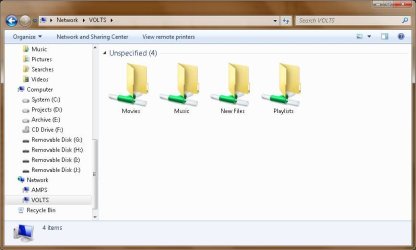
For an example... here's a screenshot of my HTPC's shares... The HTPC is running XP and the snip is taken from my desktop which is on Windows 7...

Capture.JPG

This is what anyone on my LAN will see.
As the network admin I can access the root of the drive as \\volts\d$ if I need to...

In XP the share->permissions contains 2 entries...

Everyone ... read box is checked.
CommonTater ... full access box is checked.

That way the kids can't delete each others files... but I can!
(Mind you the kids are in their late 20s and should know better)
 

My Computer

Computer Manufacturer/Model Number
Homebrew
OS
XP Pro SP3 X86 / Win7 Pro X86
CPU
Amd 64 x2 4200 (2.4ghz)
Motherboard
Asus M2N-MX SE Plus
Memory
Kingston DDR2 800 2gb
Graphics Card(s)
Nvidia GF-8400
Sound Card
Realtek on Motherboard
Monitor(s) Displays
Acer x-193bw
Screen Resolution
1440 x 900
Hard Drives
Western Digital 500g
PSU
350watt In-Win
Case
In-Win
Cooling
Air
Keyboard
yes
Mouse
yes
Internet Speed
5mpbs
Other Info
Also ASRock ION 330 as HTPC (on XP).
Acer Aspire as GP netbook (on XP).
Back
Top