Perpetual start up repair purgatory.

I seem to have spent quite a lot of time to not get very far, getting up in the night to switch download files etc...!

Firstly I now have 3 seperate downloaded copies of x-17 58997, all of them are the same size at 3,243,070 KB.

As they came from;

Windows 7 Direct Download Links, Official Disk Images from Digital River

I downloaded on a new formatted disc and verified to confirm it was complete.

This gave me the error as before CD/DVD failure.

Yet we know the CD/DVD can work and I was as careful as I could to construct the disc.

Next I went to the MIni tools partion tool. rebuilt MBR,,,,tried to reboot...as before, default to widows start up repair recommended,,,blue screen...etc.....

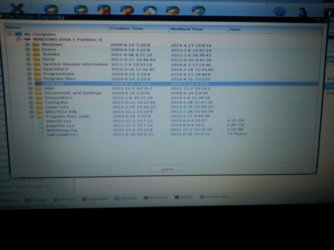
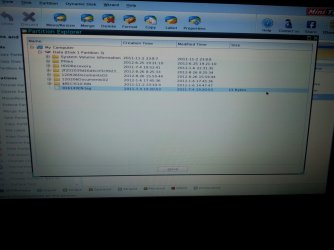
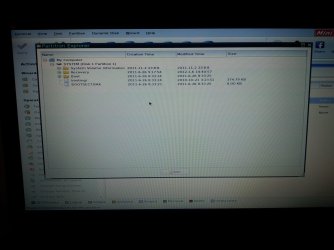
Here are the photos of the partitions;
 

Attachments
  • 20140710_085825_resized.jpg
    20140710_085825_resized.jpg
    178.3 KB · Views: 0
  • 20140710_085855_resized.jpg
    20140710_085855_resized.jpg
    89.9 KB · Views: 0
  • 20140710_085923_resized.jpg
    20140710_085923_resized.jpg
    142.8 KB · Views: 0

My Computer My Computer

At a glance

7 home premium6gb
Computer type
Laptop
Computer Manufacturer/Model Number
toshiba
OS
7 home premium
Memory
6gb
Hard Drives
Toshiba 640gb
Antivirus
virgin media mamaware bytes
Browser
google chrome
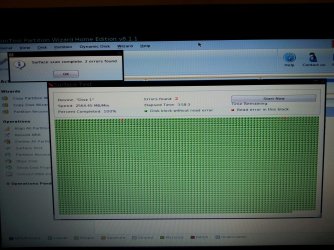
I then went on to look at the hard drive using the surface scan.

It showed 2 errors after 1% of scan was completed, when fully run there were only the same 2 errors

pic below..

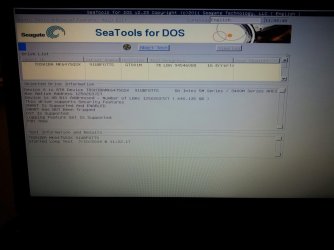
Next on to Sea Tools download.

I am currently running SeaTools for DOS which is taking forever the picture shows 16 errors detected at 7% of scan.
Currently at 33% and still 16 errors detected.........I assume I should continue?

I have also downloaded IMG burn and copied another V17-59887 IOS image to a new disc.

I assume this is ok as the celebratory music startled me an it said it was completed!

Grateful as ever for what to do next?

I am waiting on the Sea Tools scan to finish...another 2 hours???

Then I was going to attempt to boot with my newly formed Img burn 58997 IOS.

Would that be in order or is the Hard drive too much of a problem?

Cheers
 

Attachments

  • 20140710_025610_resized_1.jpg
    20140710_025610_resized_1.jpg
    323.5 KB · Views: 0
  • 20140710_113423_resized_1.jpg
    20140710_113423_resized_1.jpg
    131.5 KB · Views: 0

My Computer My Computer

At a glance

7 home premium6gb
Computer type
Laptop
Computer Manufacturer/Model Number
toshiba
OS
7 home premium
Memory
6gb
Hard Drives
Toshiba 640gb
Antivirus
virgin media mamaware bytes
Browser
google chrome
You are doing great, learning and progressing.

The HD tests do not look good but Seatools results should determine whether you keep the HD or replace it - ideally with an SSD for unbelievably fast performance. Google a video for your "PC model + replace hard drive with SSD" to see how to access and replace.

If the HD is iffy you can still try repairing or reinstalling if you can get the Win7 disk to boot. Are you sure you have a DVD drive and does it say DVD on the drive?

If you can boot the Win7 DVD to rescue any files and try repairs outlined earlier and further in Troubleshooting Windows 7 Failure to Start, you can report back your progress for other suggestions. At any time you can also cut to the reinstall. I would full format my drive due to the problems it has, using the commands in Step 2.2 of SSD - HDD Optimize for Windows Reinstallation.

If you can't get the DVD to boot then boot PW CD to Quick Wipe the HD, which should force the Win7 disk to autostart itself to do the above formatting commands.

Then Clean Reinstall - Factory OEM Windows 7. You'd want to follow those same steps if your replace the HD.
 
Apologies for my lack of follow up after all of your help.

I have had to do a system restore on the Windows 8 computer I borrowed, which took nearly 9 hours.

This not a new found desire to play with computers, more a run of dreadfully bad luck!

Back to my troublesome Toshiba,

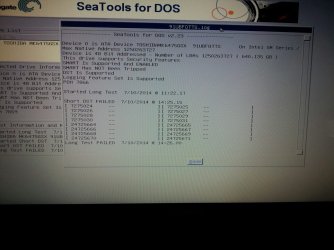
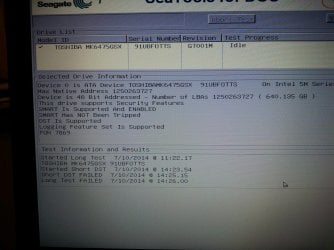
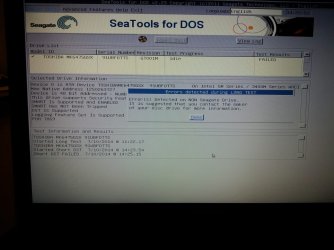
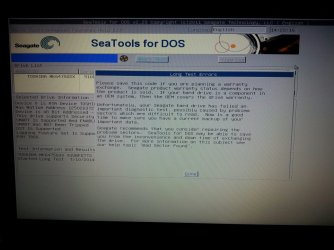
I was waiting for the results of the SeaTools Hard drive test, which took around 3 1/2 hours.

The outcome was that it failed both the short and extended tests.

Photos attached with the logs.

After this, once the disc drive was available I tried the run the Image burn version if the 58997 ISO that I had yet to try.

No dice, the same story, defaults to start up recovery recommended then blue screen and large cursor.

So, based on logs and test results, is it safe to say I cannot proceed from here until I change the hard drive for another...at which point hopefully an ISO will boot up and I can use my existing code.

Cheers
 

Attachments

  • 20140710_142420_resized.jpg
    20140710_142420_resized.jpg
    232.1 KB · Views: 0
  • 20140710_142157_resized.jpg
    20140710_142157_resized.jpg
    302.9 KB · Views: 0
  • 20140710_142134_resized.jpg
    20140710_142134_resized.jpg
    220.6 KB · Views: 0
  • 20140710_141859_resized.jpg
    20140710_141859_resized.jpg
    251.4 KB · Views: 0

My Computer My Computer

At a glance

7 home premium6gb
Computer type
Laptop
Computer Manufacturer/Model Number
toshiba
OS
7 home premium
Memory
6gb
Hard Drives
Toshiba 640gb
Antivirus
virgin media mamaware bytes
Browser
google chrome
While I am waiting for my new hard drive to arrive (sorry funds prohibited an SSD), I thought I would try to recover some of my old documents and photos.

Searching on this excellent resource I came upon the Peppermint tutorial.

http://www.sevenforums.com/tutorial...ate-live-cd-dvd-usb-use-emergency-backup.html

( I posted at the end of that thread with my problem).

The application seems to run smoothly, but the document folders Peppermint on my unbootable laptop with damaged HD finds are empty...

I am able to drag and drop the empty files over to my USB external hard drive.

Any thoughts please as to why my document folders are empty?

The latest version from the link is Peppermint 5, I downloaded the 32 bit version rather than the 64 as I assumed it would keep things simple?...is that my issue here?

Cheers.
 

My Computer My Computer

At a glance

7 home premium6gb
Computer type
Laptop
Computer Manufacturer/Model Number
toshiba
OS
7 home premium
Memory
6gb
Hard Drives
Toshiba 640gb
Antivirus
virgin media mamaware bytes
Browser
google chrome
Gregrocker, Thanks again for your help.

The windows 7 cut n paste recovery is not working for me, as as soon a we go near recovery, it reverts to blue screen etc..

Paragon 11 is potentially more interesting,

My aim is to copy and retrieve my previous documents/downloads/pictures.

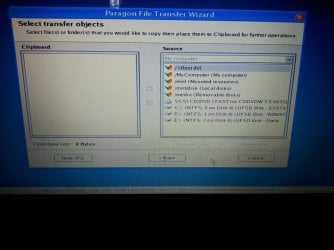
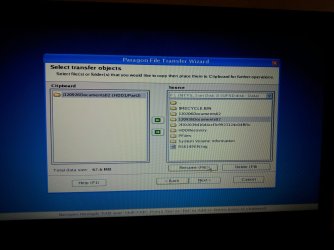
I get to the file transfer wizard and can't work out where to go next..... I have opened various parts of that screen, but none look like documents/downloads/pictures.

I have looked at the "help" section and online........Here is the screen I see where I hope to find the documents etc..

What should be my next move?

Cheers.
 

Attachments

  • 20140713_153659_resized.jpg
    20140713_153659_resized.jpg
    191.5 KB · Views: 0

My Computer My Computer

At a glance

7 home premium6gb
Computer type
Laptop
Computer Manufacturer/Model Number
toshiba
OS
7 home premium
Memory
6gb
Hard Drives
Toshiba 640gb
Antivirus
virgin media mamaware bytes
Browser
google chrome
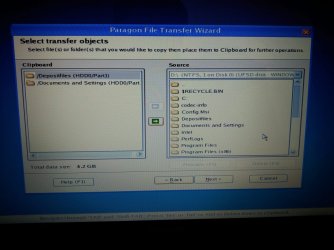
Double click D to see if you can find any and move to Clipboard. You'll need to save them to a USB device or another HD.
 
I clicked on D drive and found

depositfiles

and documents and settings pasted these to the clip board.

I am running Paragon from the CD/DVD drive and have a fresh formatted USB flash drive in the USB port.

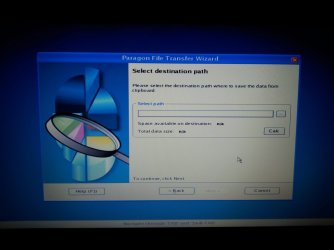
I need to find a path to send the files on clipboard, but it doesn't seem to recognise the USB drive as an option?

Please advise where I should send the files on the clipboard to retrive them.

Screen 1 shows clipboard

Screen 2 shows Path destination.

Cheers..
 

Attachments

  • 20140713_163755_resized.jpg
    20140713_163755_resized.jpg
    217.7 KB · Views: 0
  • 20140713_163818_resized.jpg
    20140713_163818_resized.jpg
    222.9 KB · Views: 0

My Computer My Computer

At a glance

7 home premium6gb
Computer type
Laptop
Computer Manufacturer/Model Number
toshiba
OS
7 home premium
Memory
6gb
Hard Drives
Toshiba 640gb
Antivirus
virgin media mamaware bytes
Browser
google chrome
You would browse in the C folder to your User data folders if that's where you keep it. I see an E Data folder so check if you have any data in there. There is more or less an assumption that you know where your data is and how to browse in an Explorer tree.

Move the folders you want to clipboard then click next to browse to the flash stick. It looks like there's a dropdown arrow on the top selection box to use to find the stick, which is why it says "Look in." If the stick isn't seen change the USB port and refresh window.
 
With Paragon loaded, I found the files I need somehow under the F drive.

AS per the first picture, I have sent them to clip board and calculated size (as per instructions)

Next I have to choose a path.....as per picture #2

Now I have a fresh USB stick in the port and a formatted DVD/RW in the CD/DVD drive.

I am happy to try either or both options if presented to me......but it's not the case!

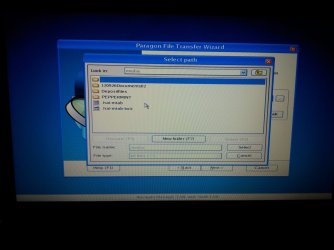
Picture #3.... I choose Media removable discs.

This then opens picture #4

Nowhere is CD/DVD to be seen.

I selected C, but this would only have the data save to another internal file rather than export it to my CD or USB I assumed?

I have tried so many options, everything works for a bit.....I get near the end and have yet to achieve anything at the end......it's such a tease!

Please have a good laugh and say I am doing not something so ridiculously obvious that can actually be resolved in a matter of moments?

Cheers.
 

Attachments

  • 20140713_201710_resized.jpg
    20140713_201710_resized.jpg
    145.7 KB · Views: 0
  • 20140713_201657_resized.jpg
    20140713_201657_resized.jpg
    138 KB · Views: 0
  • 20140713_201357_resized.jpg
    20140713_201357_resized.jpg
    120.7 KB · Views: 0
  • 20140713_201116_resized.jpg
    20140713_201116_resized.jpg
    172.4 KB · Views: 0

My Computer My Computer

At a glance

7 home premium6gb
Computer type
Laptop
Computer Manufacturer/Model Number
toshiba
OS
7 home premium
Memory
6gb
Hard Drives
Toshiba 640gb
Antivirus
virgin media mamaware bytes
Browser
google chrome
You'll just have to keep clicking on those directories until you find the one with your flash stick.

Is the Peppermint CD in the drive and if so how are you booting the Paragon CD? If you have more than one drive take out the Peppermint and put in a formatted disk or flash stick then look for it there.

Ask for help from Golden in the Peppermint tutorial to copy that way.
 
I booted up from the Paragon CD...it then says, once you have sent files to clipboard and calculated size to insert a new CD to save files to...plus I have a USB Flash stick in the other drive...in the hop that shows up somewhere.

I booted from Peppermint earlier......it appears to now be on my files.....I hadn't had a Peppermint boot Flash stick in for hours before reverting to the Paragon Cd boot up.

Back to look for USB or CD in files....

Thanks again!
 

My Computer My Computer

At a glance

7 home premium6gb
Computer type
Laptop
Computer Manufacturer/Model Number
toshiba
OS
7 home premium
Memory
6gb
Hard Drives
Toshiba 640gb
Antivirus
virgin media mamaware bytes
Browser
google chrome
Hmm now this is just a suggestion for an option and I am not trying to confuse the issue but I have used Ubuntu on many occasions to retrieve data and open dead and dying drives.
See this - it is up to you club what you want my ditty is just something I am really comfortable with, and I shall not be offended if you do not want to try it.


BOOTABLEUBUNTU

Makea bootable Ubuntu disk http://www.ubuntu.com/download

Setthe BIOS to boot from the optical when the machine boots it will show you ascreen with TRY or INSTALL > select TRY

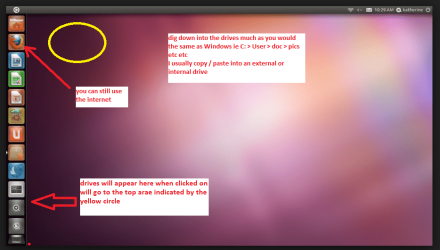
Whenit is finished - it takes very little time you will get a screen like in thepic .

Openthe drive you want > User and dig down until you get to the data / settingsyou may be able to copy / paste the material you want to an external source orother installed drive doing this.

Iam not sure if it will but I have recovered tons of data etc using this methodboth on "dead" or just plain drives that you cannot get data fromusing Windows.

You have the option of accessing the net with this too. see pic

By the by what model Toshiba is it as I can send a link for disassembly if you need to change the HDD and / or optical drive etc etc

PS Youcan of course remove the hard drive andany other drives when doing this as if the optical alone is the only drive leftin the machine then the BIOS will only find it to boot from.
 

Attachments

  • UBUTUX.PNG
    UBUTUX.PNG
    128.9 KB · Views: 0

My Computer My Computer

At a glance

Desk1 7 Home Prem / Desk2 10 Pro / Main lap A...Desk1 i5 3750K / Laptop i7 GTX 860M / Desk2 i...Desk1 8GB (1866) / Desk2 16GB (1333) / Laptop...Desk 1& 2NVidia GTX 650 & Laptops on board Intel
Computer type
PC/Desktop
Computer Manufacturer/Model Number
Own build (new) Desk1 / Asus ROG Win 7 / Desk2 1st build
OS
Desk1 7 Home Prem / Desk2 10 Pro / Main lap Asus ROG 10 Pro 2 laptop Toshiba 7 Pro Asus P2520 7 & 10
CPU
Desk1 i5 3750K / Laptop i7 GTX 860M / Desk2 i5 2500
Motherboard
Desk1 Asus P877-V / Desk2 Gigabyte H67 UD3H / Laptop ?
Memory
Desk1 8GB (1866) / Desk2 16GB (1333) / Laptop 8Gb DDR3
Graphics Card(s)
Desk 1& 2NVidia GTX 650 & Laptops on board Intel
Sound Card
Desk 1 & 2 -XONAR DG Realtek High Def audio Laptop
Monitor(s) Displays
Desk 1 Benq HD 2450 / Desk2 Philips 24" / Laptop 17.5"
Screen Resolution
1920x1080 D1 & D2 & Laptop 1
Hard Drives
Desk1 Samsung 120GB 830 SSD
Asus ROG 256GB 850 Pro SSD
Desk2 Samsung 840 256 SSD
Toshiba 120GB EVO
PSU
Desk 1 Corsair HX 1050/ Laptop ? / Desk 2 Corsair HX 650
Case
Desk 1 Cooler HAF XM ? Toshiba laptop / Desk2 Coolermaster
Cooling
Fans on all Desk1 -2 Desk2 - all Coolermasters 5 Laptop ?
Keyboard
Desk 1 MS Sidewinder X6 Desk 2 MS Sidewinder X 4
Mouse
Desk 1&2 - Gigabyte MS 900 gamer - laptop - Logitec wireless
Internet Speed
ADSL2+
Other Info
One other Desktop (tester) and spare Toshba laptop both with SSD's
Running Kaspersky 2016 ISS on all machines config'd identically
Logitec audio stereo systems on each machine (x3)
Canon MG5250MFC
Router/modem TP-Link running WPA2SK
Back
Top