Solved Personalized Image-Backup Strategy Advice please?

Well I'm on my bro's Vista laptop right now. Be back at the desktop later on. So in the meantime, could we just say...

Okay, step 1- OS & apps on C.

Then?
 

My Computer My Computer

Computer type
PC/Desktop
OS
Windows 7 Pro x64 SP1
CPU
AMD Phenom II x6 1090T Black Edition 3.2GHz
Motherboard
ASUS M4A88TD-V EVO/USB3
Memory
Patriot G ‘Sector 5’ Edition 8GB (2 x 4GB) 1600MHz
Sound Card
(onboard) Realtek® ALC 892 8-Channel High Definition Audio
Monitor(s) Displays
ViewSonic VX2253 22"
Screen Resolution
1920x1080
Hard Drives
Transcend SSD720 2.5" SATAIII 64GB SSD; Western Digital Caviar Green WD20EARS 2TB 64MB 3.5" HDD
LG WH10LS30 10X Blu-ray Burner with LightScribe
PSU
CORSAIR TX Series 950W ATX12V 80 Plus Bronze
Case
Cooler Master HAF X NVidia Edition; 5 Green LED Fans!
Cooling
CORSAIR A70 120mm Dual-Fan
Keyboard
Verbatim 97472 Mini Wireless Slim
Mouse
bundled Verbatim 97472 Wireless
Antivirus
Avast
Browser
Chrome
Other Info
Ultraportable/Desktop Replacement Laptop:
circa Oct 2006,
Dell XPS M1210,
Windows 7 Professional 32-bit,
Intel Core 2 Duo T7200 2.0GHz,
3.25 (4) GB of RAM,
NVidia GeForce Go 7400,
500GB Seagate Momentus 7200RPM HDD
I understand ISOs, but I've never seen a TIB before. So, you're saying that this .tib is not an image backup?
So, I suppose... Is there any other way I could have a User Profile (on C) direct to my folders (on D)? The only catch there is, can it be done without using only the precustomized User Folders? I have no use for most of them.
Tib stands for True Image Backup and it's Acronis's image file format.
Windows has vhd - virtual hard disk
Macrium has mrimg - macrium disk image

I'm still not getting your problem fully. You can operate folders outside of the Windows library structure. Apologies if this is trivial...
eg. K:\Entertainment\Jazz Music
You have a folder on drive K: called "Entertainment" and a sub folder called "Jazz Music". You can drag and drop, Robocopy, folder image (with paid imaging). Backup using third party file/folder backup programs.
Whatever you want.

Just keep your profile on C:
 

My Computer My Computer

Computer type
PC/Desktop
Computer Manufacturer/Model Number
Own build
OS
Windows 7x64 Home Premium SP1
CPU
Intel i7 2600k
Motherboard
ASUS P8Z68 Deluxe
Memory
G.Skill Ripjaws (DDR3-1600) 2x4GB
Graphics Card(s)
Nvidia GeForce GTS 450; Intel HD Graphics 3000(GT2+)
Monitor(s) Displays
Dell Ultrasharp IPS panel U2311H, Samsung SyncMaster P2350
Screen Resolution
1920x1080
Hard Drives
Samsung 850 Pro SSD 256GB, Samsung SSD 840 120GB, Seagates 1TB Barracuda ST31000528AS x2
PSU
Seasonic M12II 520W
Case
Lian Li Lancool PC-K60
Cooling
Case: 1x120mm, 3x140mm CPU: Hyper 212+
Keyboard
Logitech MK520 (wireless)
Mouse
Logitech MK520
Internet Speed
6-7 Mbps
Antivirus
Norton Security Premium, Malwarebytes on 2 (MSE on 3rd PC)
Browser
FireFox
Other Info
Audio: Logitech Z523 2.1
I'm still not getting your problem fully. You can operate folders outside of the Windows library structure.

I'm not talking about libraries. That's a whole other issue I can't stand for myself, though it's a great tool for me to make sure my mom & siblings stop losing things.
& well, yes, I could always navigate to Computer>D>Mira Nova>My Videos, or what have you. But, it's crazy to keep renavigating into D:\ every. single. time... It's the same reason so many people have used Kari's tutorial to simply move the actual User Profile there, and likewise Brink's similar tutorials.

But if it's going to cause problems trying to back up the system, I'm thinking now it is worth it to look into other ways to redirect the User Profile to my folders on D. :huh:
 

My Computer My Computer

Computer type
PC/Desktop
OS
Windows 7 Pro x64 SP1
CPU
AMD Phenom II x6 1090T Black Edition 3.2GHz
Motherboard
ASUS M4A88TD-V EVO/USB3
Memory
Patriot G ‘Sector 5’ Edition 8GB (2 x 4GB) 1600MHz
Sound Card
(onboard) Realtek® ALC 892 8-Channel High Definition Audio
Monitor(s) Displays
ViewSonic VX2253 22"
Screen Resolution
1920x1080
Hard Drives
Transcend SSD720 2.5" SATAIII 64GB SSD; Western Digital Caviar Green WD20EARS 2TB 64MB 3.5" HDD
LG WH10LS30 10X Blu-ray Burner with LightScribe
PSU
CORSAIR TX Series 950W ATX12V 80 Plus Bronze
Case
Cooler Master HAF X NVidia Edition; 5 Green LED Fans!
Cooling
CORSAIR A70 120mm Dual-Fan
Keyboard
Verbatim 97472 Mini Wireless Slim
Mouse
bundled Verbatim 97472 Wireless
Antivirus
Avast
Browser
Chrome
Other Info
Ultraportable/Desktop Replacement Laptop:
circa Oct 2006,
Dell XPS M1210,
Windows 7 Professional 32-bit,
Intel Core 2 Duo T7200 2.0GHz,
3.25 (4) GB of RAM,
NVidia GeForce Go 7400,
500GB Seagate Momentus 7200RPM HDD
Oh, & thanks! I couldn't think of what TIB could even stand for. :)
 

My Computer My Computer

Computer type
PC/Desktop
OS
Windows 7 Pro x64 SP1
CPU
AMD Phenom II x6 1090T Black Edition 3.2GHz
Motherboard
ASUS M4A88TD-V EVO/USB3
Memory
Patriot G ‘Sector 5’ Edition 8GB (2 x 4GB) 1600MHz
Sound Card
(onboard) Realtek® ALC 892 8-Channel High Definition Audio
Monitor(s) Displays
ViewSonic VX2253 22"
Screen Resolution
1920x1080
Hard Drives
Transcend SSD720 2.5" SATAIII 64GB SSD; Western Digital Caviar Green WD20EARS 2TB 64MB 3.5" HDD
LG WH10LS30 10X Blu-ray Burner with LightScribe
PSU
CORSAIR TX Series 950W ATX12V 80 Plus Bronze
Case
Cooler Master HAF X NVidia Edition; 5 Green LED Fans!
Cooling
CORSAIR A70 120mm Dual-Fan
Keyboard
Verbatim 97472 Mini Wireless Slim
Mouse
bundled Verbatim 97472 Wireless
Antivirus
Avast
Browser
Chrome
Other Info
Ultraportable/Desktop Replacement Laptop:
circa Oct 2006,
Dell XPS M1210,
Windows 7 Professional 32-bit,
Intel Core 2 Duo T7200 2.0GHz,
3.25 (4) GB of RAM,
NVidia GeForce Go 7400,
500GB Seagate Momentus 7200RPM HDD
I agree with everyone else, keep the profiles with the OS.

In fact, I would say, anything that needs to be installed should be with the OS as well.

The only exception is perhaps Games, which could be installed to a secondary drive.


As far as your User folders, you can just make a folder wherever you want it to store the DATA (Music, Videos, etc) and then in your libarary list just include that folder.
Or, move the location of that particular folder.


If you set it up like this, you can have Acronis make a full disc(or partition) image of your OS drive.
It will be ONLY the OS and installed applications, so should be fairly quick. It only cares about whats on that partition or disc, and doesnt matter where the rest is. So keep that in mind, and make a back up plan for that stuff as well.
((Macrium will do this as well))

As far as restoring, you will have the option to restore everything, in its entirety, OR... A specific folder or file to the same or different location.
((Im not sure if Macrium will allow you to single out files/folders from a image))

This way you will be covered no matter what may happen.


Then, as I do, you can set a different backup schedule for other folders and discs.
 

My Computer My Computer

Computer Manufacturer/Model Number
Custom (Self Build)
OS
Windows 7 Home Premium 64bit
CPU
Intel Core i7 2700k
Motherboard
eVGA P67 SLI
Memory
8GB Mushkin Redline Ridgebacks @1866
Graphics Card(s)
EVGA GTX570 SC
Sound Card
XiFi Titanium HD
Monitor(s) Displays
LG W2453V
Screen Resolution
1920x1080
Hard Drives
Intel 320 80GB -- Intel X25-V 40GB --WD Black 1TB x2 -- WD Blue 640GB
PSU
Seasonic x750
Case
Corsair 600T SE White
Cooling
eVGA Superclocked CPU Cooler
Keyboard
Saitek Cyborg
Antivirus
Kaspersky
Browser
IE
Other Info
LG BD/DVD
I agree with everyone else, keep the profiles with the OS.

In fact, I would say, anything that needs to be installed should be with the OS as well.

The only exception is perhaps Games, which could be installed to a secondary drive.


As far as your User folders, you can just make a folder wherever you want it to store the DATA (Music, Videos, etc) and then in your libarary list just include that folder.
Or, move the location of that particular folder.


If you set it up like this, you can have Acronis make a full disc(or partition) image of your OS drive.
It will be ONLY the OS and installed applications, so should be fairly quick. It only cares about whats on that partition or disc, and doesnt matter where the rest is. So keep that in mind, and make a back up plan for that stuff as well.
((Macrium will do this as well))

As far as restoring, you will have the option to restore everything, in its entirety, OR... A specific folder or file to the same or different location.
((Im not sure if Macrium will allow you to single out files/folders from a image))

This way you will be covered no matter what may happen.


Then, as I do, you can set a different backup schedule for other folders and discs.

Yes, yes, yes, but no to libraries.

But how can I "move the location to that particular folder?"
 

My Computer My Computer

Computer type
PC/Desktop
OS
Windows 7 Pro x64 SP1
CPU
AMD Phenom II x6 1090T Black Edition 3.2GHz
Motherboard
ASUS M4A88TD-V EVO/USB3
Memory
Patriot G ‘Sector 5’ Edition 8GB (2 x 4GB) 1600MHz
Sound Card
(onboard) Realtek® ALC 892 8-Channel High Definition Audio
Monitor(s) Displays
ViewSonic VX2253 22"
Screen Resolution
1920x1080
Hard Drives
Transcend SSD720 2.5" SATAIII 64GB SSD; Western Digital Caviar Green WD20EARS 2TB 64MB 3.5" HDD
LG WH10LS30 10X Blu-ray Burner with LightScribe
PSU
CORSAIR TX Series 950W ATX12V 80 Plus Bronze
Case
Cooler Master HAF X NVidia Edition; 5 Green LED Fans!
Cooling
CORSAIR A70 120mm Dual-Fan
Keyboard
Verbatim 97472 Mini Wireless Slim
Mouse
bundled Verbatim 97472 Wireless
Antivirus
Avast
Browser
Chrome
Other Info
Ultraportable/Desktop Replacement Laptop:
circa Oct 2006,
Dell XPS M1210,
Windows 7 Professional 32-bit,
Intel Core 2 Duo T7200 2.0GHz,
3.25 (4) GB of RAM,
NVidia GeForce Go 7400,
500GB Seagate Momentus 7200RPM HDD
WIN + F! key combo |type the word LIBRARY

Reading the material there will be of benefit to you.

WIN is the key with the Microsoft flag on top
 
Last edited:

My Computer My Computer

Computer Manufacturer/Model Number
Toshiba Satellite S875D-S7239 laptop
OS
MS Windows 7 Ultimate SP1 64-bit
CPU
AMD A10-4600M
Motherboard
AMD Pumori (Socket FT1)
Memory
6.00 GB Dual-Channel DDR3 @ 798MHz (11-11-12-28)
Graphics Card(s)
AMD Radeon HD 7660G
Sound Card
High Definition Audio Device
Monitor(s) Displays
Generic PnP Monitor (1600x900@60Hz)
Screen Resolution
1600x900@60Hz
Hard Drives
SSD 119GB Corsair CSSD-V128GB2 ATA Device
Keyboard
Standard PS/2 Keyboard
Mouse
HP Wireless Optical Mobile Mouse Model FHA-3410
Internet Speed
What the local pub, local coffee shop offers.
Other Info
Optical Drive:MATSHITA BD-CMB UJ160B ATA Device


Also have an Asus ha1002xp netbook with Win 7 Ultimate installed.
I've already looked into libraries and they're not for me. I keep my folders very organized. I know they can be altered to include/exclude certain folders, but still.

I know that there are ways to redirect the User Folders. I just can't figure out how I should have the User Profile redirect where my folders are.
 

My Computer My Computer

Computer type
PC/Desktop
OS
Windows 7 Pro x64 SP1
CPU
AMD Phenom II x6 1090T Black Edition 3.2GHz
Motherboard
ASUS M4A88TD-V EVO/USB3
Memory
Patriot G ‘Sector 5’ Edition 8GB (2 x 4GB) 1600MHz
Sound Card
(onboard) Realtek® ALC 892 8-Channel High Definition Audio
Monitor(s) Displays
ViewSonic VX2253 22"
Screen Resolution
1920x1080
Hard Drives
Transcend SSD720 2.5" SATAIII 64GB SSD; Western Digital Caviar Green WD20EARS 2TB 64MB 3.5" HDD
LG WH10LS30 10X Blu-ray Burner with LightScribe
PSU
CORSAIR TX Series 950W ATX12V 80 Plus Bronze
Case
Cooler Master HAF X NVidia Edition; 5 Green LED Fans!
Cooling
CORSAIR A70 120mm Dual-Fan
Keyboard
Verbatim 97472 Mini Wireless Slim
Mouse
bundled Verbatim 97472 Wireless
Antivirus
Avast
Browser
Chrome
Other Info
Ultraportable/Desktop Replacement Laptop:
circa Oct 2006,
Dell XPS M1210,
Windows 7 Professional 32-bit,
Intel Core 2 Duo T7200 2.0GHz,
3.25 (4) GB of RAM,
NVidia GeForce Go 7400,
500GB Seagate Momentus 7200RPM HDD
Libraries are for you. They are ideal for you.

They are one of the great advances over the XP days.
 

My Computer My Computer

Computer Manufacturer/Model Number
Toshiba Satellite S875D-S7239 laptop
OS
MS Windows 7 Ultimate SP1 64-bit
CPU
AMD A10-4600M
Motherboard
AMD Pumori (Socket FT1)
Memory
6.00 GB Dual-Channel DDR3 @ 798MHz (11-11-12-28)
Graphics Card(s)
AMD Radeon HD 7660G
Sound Card
High Definition Audio Device
Monitor(s) Displays
Generic PnP Monitor (1600x900@60Hz)
Screen Resolution
1600x900@60Hz
Hard Drives
SSD 119GB Corsair CSSD-V128GB2 ATA Device
Keyboard
Standard PS/2 Keyboard
Mouse
HP Wireless Optical Mobile Mouse Model FHA-3410
Internet Speed
What the local pub, local coffee shop offers.
Other Info
Optical Drive:MATSHITA BD-CMB UJ160B ATA Device


Also have an Asus ha1002xp netbook with Win 7 Ultimate installed.
I agree with ppark1. You should leave the user profile on the C drive. It is part of the system files. If you ever need to restore using your system image, it will restore your profile at the same time. That way your desktop will be the same, your icons will be the same, your taskbar will be the same, etc and so on. It will restore all your mods at once.
 

My Computer My Computer

Computer Manufacturer/Model Number
Dell Studio
OS
Windows 7 32 bit home premium
CPU
2.4 gig Intel core 2 quad Q6600
Motherboard
Dell
Now, where are all my documents going?
First, on your 2nd internal drive create a folder called "Documents". This is where all your documents are going to go!
Now, open Windows Explorer (the second icon from the start button on the taskbar) and find the folder called Computer>Win7 OS (C:/)>Users>"yourname">My Documents.
Right click on that folder and, in the dialog box that opens, choose the "Location" tab.
In the box in the center, enter the folder you created in step one: D:/My Documents. Or, you can choose "Find Target" and navigate to where ever you put it.
Now, click the "Move" button.
This will move the folder "My Documents" and all the files in it to the D: drive. And, all your programs that are set up to save files to My Documents will save them to this new location on the D: Drive.

You can then do the same with the My Pictures, My Music, My Videos and even the Downloads folder.

This will put all your data onto the D: drive. Separate from the C: drive. The C: Drive is now your system drive ONLY! Use Acronis (or whatever image software you choose) to make an image of the C: Drive ONLY. And, make regular images thereafter.

Then, make an separate image of the D: Drive. This is your backup of all your data. It is separate from your System files.

That way, if your system gets corrupted for whatever reason, you won't loose your data. And, you can restore your C: drive without erasing all your data.

I like Acronis. It's pretty user friendly. I make a full image on the first week of the month and then make incremental images for the rest of the month. Most of the other image software mentioned will do the same.

With Acronis (and some of the others) you can "mount" the data image and navigate to individual files and restore them file by file. Sometimes that is nice.

Good luck!
 

My Computer My Computer

Computer Manufacturer/Model Number
Dell Studio
OS
Windows 7 32 bit home premium
CPU
2.4 gig Intel core 2 quad Q6600
Motherboard
Dell
@nolakenoforest
The recommendation to retain user profile on C: has been offered to the OP multiple times.
The directions to move user folders off C: using an appropriate forum tutorial was given in post #2.
 

My Computer My Computer

Computer type
PC/Desktop
Computer Manufacturer/Model Number
Own build
OS
Windows 7x64 Home Premium SP1
CPU
Intel i7 2600k
Motherboard
ASUS P8Z68 Deluxe
Memory
G.Skill Ripjaws (DDR3-1600) 2x4GB
Graphics Card(s)
Nvidia GeForce GTS 450; Intel HD Graphics 3000(GT2+)
Monitor(s) Displays
Dell Ultrasharp IPS panel U2311H, Samsung SyncMaster P2350
Screen Resolution
1920x1080
Hard Drives
Samsung 850 Pro SSD 256GB, Samsung SSD 840 120GB, Seagates 1TB Barracuda ST31000528AS x2
PSU
Seasonic M12II 520W
Case
Lian Li Lancool PC-K60
Cooling
Case: 1x120mm, 3x140mm CPU: Hyper 212+
Keyboard
Logitech MK520 (wireless)
Mouse
Logitech MK520
Internet Speed
6-7 Mbps
Antivirus
Norton Security Premium, Malwarebytes on 2 (MSE on 3rd PC)
Browser
FireFox
Other Info
Audio: Logitech Z523 2.1
mirinova,
Listen to those who with decades of experience.

You put your system on one partition.
Everything else on other partitions.


ISO is a format. What is on that iso depends upon the program that put it there. SOMETIMES an iso file with contain an image file, for example, the Win 7 DVD contains a wim which in tern contains several versions of Win 7 in it.


If you correctly put your system on one and only partition, then any of the backup and restore softwares will have no problem "imaging" your system and restoring your system without interferring with any of the other partitions. You can use the backup features of any of several backup programs to backup your data partitions.

Go to the WIKI encyclopedia site for more info on the ISO format.

It's personal preference on how someone structures the way their file away their documents.

On external hard drive - I keep my recorded tv shows that I delete once I watch, so no need to back those.

When I did a complete back up of my operating system on Tuesday, I did everything on my hard drive, (including the documents and Photoshop files) along with the software and settings. To me that's just easier doing it that way. On a daily basis I do back up my my docs, pictures and downloads onto an other external source.
 

My Computer My Computer

Computer Manufacturer/Model Number
HP Pavilion pc6000
OS
Windows 7 Ultimate
CPU
Intel Core Processor 2 Quad Processor Q9400 Series
Memory
2 GIG
Graphics Card(s)
NVIDIA Geforce GT230 3D
Sound Card
Integrated Intel HIgh Definition Audio 5.1 Surround Sound
Monitor(s) Displays
20 Inch 2009F 16:9 HP LCD Monitor
Hard Drives
Primary 320GIG
External 1 500G
External 2 640G
Keyboard
HP USB Keyboard
Mouse
HP USB Mouse
It's personal preference on how someone structures the way their file away their documents.
Couldn't agree more. We are talking about Personal Computers after all.
I try to keep large amounts of static data off the partition I image the most so the imaging is smaller and faster.
 

My Computer My Computer

Computer type
PC/Desktop
Computer Manufacturer/Model Number
Own build
OS
Windows 7x64 Home Premium SP1
CPU
Intel i7 2600k
Motherboard
ASUS P8Z68 Deluxe
Memory
G.Skill Ripjaws (DDR3-1600) 2x4GB
Graphics Card(s)
Nvidia GeForce GTS 450; Intel HD Graphics 3000(GT2+)
Monitor(s) Displays
Dell Ultrasharp IPS panel U2311H, Samsung SyncMaster P2350
Screen Resolution
1920x1080
Hard Drives
Samsung 850 Pro SSD 256GB, Samsung SSD 840 120GB, Seagates 1TB Barracuda ST31000528AS x2
PSU
Seasonic M12II 520W
Case
Lian Li Lancool PC-K60
Cooling
Case: 1x120mm, 3x140mm CPU: Hyper 212+
Keyboard
Logitech MK520 (wireless)
Mouse
Logitech MK520
Internet Speed
6-7 Mbps
Antivirus
Norton Security Premium, Malwarebytes on 2 (MSE on 3rd PC)
Browser
FireFox
Other Info
Audio: Logitech Z523 2.1
It's personal preference on how someone structures the way their file away their documents.

Thank you! :p
I don't like libraries. They're great for controlling my mom & brother, but for my uses I'm too organized to add an unnecessary layer, worry if it's really going to the right places, and confusion. I inadvertently tried them when I first touched 7, and the OS made a terrible mess for me. There are many, many others who share my sentiments and we're doing just fine.

I have said a few times, that I am going to keep User Profile on C:/. I agreed with the arguments of the C system SSD speeding up AppData, imaging all mods & profile customizations, and not being dependent on 2 drives not failing.

I've decided to try to use symlinks. Hopefully it doesn't annoy me too much when I eventually alter my basic folder structure. Later I'll tackle getting rid of all the pre-packaged (or what have you) User Folders I don't use, but that keep reappearing. :rolleyes: Another thread, another time.
 

My Computer My Computer

Computer type
PC/Desktop
OS
Windows 7 Pro x64 SP1
CPU
AMD Phenom II x6 1090T Black Edition 3.2GHz
Motherboard
ASUS M4A88TD-V EVO/USB3
Memory
Patriot G ‘Sector 5’ Edition 8GB (2 x 4GB) 1600MHz
Sound Card
(onboard) Realtek® ALC 892 8-Channel High Definition Audio
Monitor(s) Displays
ViewSonic VX2253 22"
Screen Resolution
1920x1080
Hard Drives
Transcend SSD720 2.5" SATAIII 64GB SSD; Western Digital Caviar Green WD20EARS 2TB 64MB 3.5" HDD
LG WH10LS30 10X Blu-ray Burner with LightScribe
PSU
CORSAIR TX Series 950W ATX12V 80 Plus Bronze
Case
Cooler Master HAF X NVidia Edition; 5 Green LED Fans!
Cooling
CORSAIR A70 120mm Dual-Fan
Keyboard
Verbatim 97472 Mini Wireless Slim
Mouse
bundled Verbatim 97472 Wireless
Antivirus
Avast
Browser
Chrome
Other Info
Ultraportable/Desktop Replacement Laptop:
circa Oct 2006,
Dell XPS M1210,
Windows 7 Professional 32-bit,
Intel Core 2 Duo T7200 2.0GHz,
3.25 (4) GB of RAM,
NVidia GeForce Go 7400,
500GB Seagate Momentus 7200RPM HDD
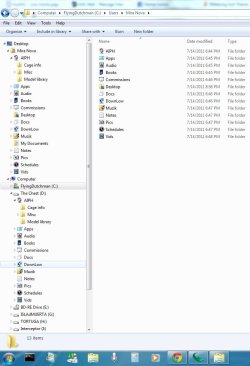
Untitled.jpg

This is what I meant. See? Symlinks to all my real folders. Seamless. The actual User Profile & AppData are still in C:\Users. I've done 3 image backups so far and all has gone relatively smoothly- even fast. Thank you all for the suggestions. :)
 

My Computer My Computer

Computer type
PC/Desktop
OS
Windows 7 Pro x64 SP1
CPU
AMD Phenom II x6 1090T Black Edition 3.2GHz
Motherboard
ASUS M4A88TD-V EVO/USB3
Memory
Patriot G ‘Sector 5’ Edition 8GB (2 x 4GB) 1600MHz
Sound Card
(onboard) Realtek® ALC 892 8-Channel High Definition Audio
Monitor(s) Displays
ViewSonic VX2253 22"
Screen Resolution
1920x1080
Hard Drives
Transcend SSD720 2.5" SATAIII 64GB SSD; Western Digital Caviar Green WD20EARS 2TB 64MB 3.5" HDD
LG WH10LS30 10X Blu-ray Burner with LightScribe
PSU
CORSAIR TX Series 950W ATX12V 80 Plus Bronze
Case
Cooler Master HAF X NVidia Edition; 5 Green LED Fans!
Cooling
CORSAIR A70 120mm Dual-Fan
Keyboard
Verbatim 97472 Mini Wireless Slim
Mouse
bundled Verbatim 97472 Wireless
Antivirus
Avast
Browser
Chrome
Other Info
Ultraportable/Desktop Replacement Laptop:
circa Oct 2006,
Dell XPS M1210,
Windows 7 Professional 32-bit,
Intel Core 2 Duo T7200 2.0GHz,
3.25 (4) GB of RAM,
NVidia GeForce Go 7400,
500GB Seagate Momentus 7200RPM HDD
Back
Top