Over the past couple days and even some over the past couple weeks, I still haven't found any posts here specific enough to my needs, and questions.
My drive setup right now:
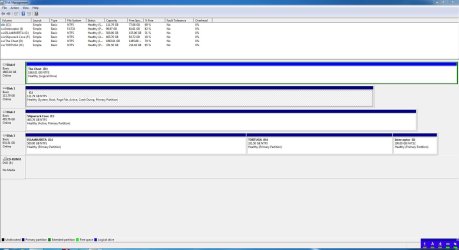
1. For my rig, I have the OS installed on a 118GB SSD.
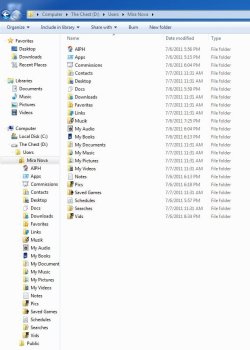
2. I followed Kari's tutorial here and have successfully had my User Profile running off of my 2nd drive, a 2TB HDD. For the time being, this usually contains between 350-400GB of data files. (I deal with a lot of video.)
3. I also own a 1TB external, partitioned into 3 parts. This is portable & updated manually since I may be changing these files while at school, then bringing it back home & updating my rig's same files with the new changes.
1 NTFS for personal pleasures (music, movies)
& 1 smaller 100GB FAT32 portion to bypass large file transfer limits when dealing with a Mac at school.
4. 500GB Maxtor One Touch. I grew frustrated with the program associated with it, reformatted it to completely empty, and now just keep it as a clean solid backup of everything. I'm considering reinstating it...
I'm looking into using just Windows or Maxtor, Acronis, Macrium-- but I'm not sure which will really give me what I'm concerned about. I'm all good with backing up the data files.
My problem: Windows image backup says that it must include any partition that has the OS installed on it, and that includes D:\ with my User Profile on it. However, the OS + 350GB of data is a lot to compress into an image. I understand it needs the User Profile to access the OS at all, but I don't need those data files included in the image. Not to mention, the larger it is the more something is likely to go wrong, or get corrupted, and then the whole thing is shot. How can I make a system image that excludes my data? I wouldn't mind moving them back over via firewire/esata. Also, just to make sure I understand, could I save that image on my Maxtor via firewire?
Any advice greatly appreciated, thanks!
[What's doubly annoying is that I used Acronis Disk Director to try to cut out of the 2TB a 50GB partition- not big enough. 100GB- still not big enough. 1TB- still not big enough, though I suspect Windows was trying to keep within a 30% of the partition rule. Finally, 1.5TB- ended up wiping itself out and I couldn't logon as there was now NOTHING on the entire HDD. --.-- I don't even know how it did that. :sarc: Reinstalled, whatever.]
My drive setup right now:
1. For my rig, I have the OS installed on a 118GB SSD.
2. I followed Kari's tutorial here and have successfully had my User Profile running off of my 2nd drive, a 2TB HDD. For the time being, this usually contains between 350-400GB of data files. (I deal with a lot of video.)
3. I also own a 1TB external, partitioned into 3 parts. This is portable & updated manually since I may be changing these files while at school, then bringing it back home & updating my rig's same files with the new changes.
1 NTFS for work files (school, commissions)1 NTFS for personal pleasures (music, movies)
& 1 smaller 100GB FAT32 portion to bypass large file transfer limits when dealing with a Mac at school.
4. 500GB Maxtor One Touch. I grew frustrated with the program associated with it, reformatted it to completely empty, and now just keep it as a clean solid backup of everything. I'm considering reinstating it...
I'm looking into using just Windows or Maxtor, Acronis, Macrium-- but I'm not sure which will really give me what I'm concerned about. I'm all good with backing up the data files.
My problem: Windows image backup says that it must include any partition that has the OS installed on it, and that includes D:\ with my User Profile on it. However, the OS + 350GB of data is a lot to compress into an image. I understand it needs the User Profile to access the OS at all, but I don't need those data files included in the image. Not to mention, the larger it is the more something is likely to go wrong, or get corrupted, and then the whole thing is shot. How can I make a system image that excludes my data? I wouldn't mind moving them back over via firewire/esata. Also, just to make sure I understand, could I save that image on my Maxtor via firewire?
Any advice greatly appreciated, thanks!
[What's doubly annoying is that I used Acronis Disk Director to try to cut out of the 2TB a 50GB partition- not big enough. 100GB- still not big enough. 1TB- still not big enough, though I suspect Windows was trying to keep within a 30% of the partition rule. Finally, 1.5TB- ended up wiping itself out and I couldn't logon as there was now NOTHING on the entire HDD. --.-- I don't even know how it did that. :sarc: Reinstalled, whatever.]
My Computer
- Computer type
- PC/Desktop
- OS
- Windows 7 Pro x64 SP1
- CPU
- AMD Phenom II x6 1090T Black Edition 3.2GHz
- Motherboard
- ASUS M4A88TD-V EVO/USB3
- Memory
- Patriot G ‘Sector 5’ Edition 8GB (2 x 4GB) 1600MHz
- Sound Card
- (onboard) Realtek® ALC 892 8-Channel High Definition Audio
- Monitor(s) Displays
- ViewSonic VX2253 22"
- Screen Resolution
- 1920x1080
- Hard Drives
- Transcend SSD720 2.5" SATAIII 64GB SSD; Western Digital Caviar Green WD20EARS 2TB 64MB 3.5" HDD
LG WH10LS30 10X Blu-ray Burner with LightScribe
- PSU
- CORSAIR TX Series 950W ATX12V 80 Plus Bronze
- Case
- Cooler Master HAF X NVidia Edition; 5 Green LED Fans!
- Cooling
- CORSAIR A70 120mm Dual-Fan
- Keyboard
- Verbatim 97472 Mini Wireless Slim
- Mouse
- bundled Verbatim 97472 Wireless
- Antivirus
- Avast
- Browser
- Chrome
- Other Info
- Ultraportable/Desktop Replacement Laptop:
circa Oct 2006,
Dell XPS M1210,
Windows 7 Professional 32-bit,
Intel Core 2 Duo T7200 2.0GHz,
3.25 (4) GB of RAM,
NVidia GeForce Go 7400,
500GB Seagate Momentus 7200RPM HDD
 I was so glad when I found how to just move the entire User Profile, and it's been so smooth. I guess, maybe for every folder & any hereafter I'd have to make it actually just a shortcut? (Like how My Documents is relocated in XP...) And wouldn't it still want to follow those links and include them-- maybe? I don't know...