Phantom disc drive

terz

New member
Local time
12:26 AM
Messages
17
Hi,
I had restore probs and was advise via this forum to not bother with Windows restore, but download a program called "Macrium Reflect".
This is the freeware version...so I cant get help from their forim.
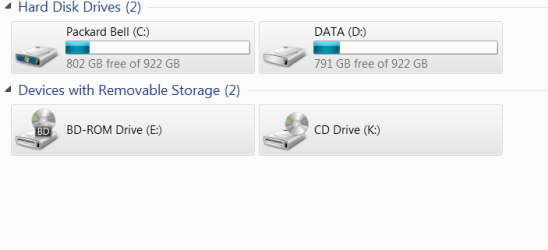
It works perfectly.... except the second time I used it in "Computer" it had created a phantom disc drive.
I have 2 internal hard drives, C and D. C is the operating, drive D is the backup drive.
I also have one disc drive Marked E. The phantom drive is called K
How can I remove this icon?
 

My Computer

OS
windows 7 64bit

My Computer

Computer type
Laptop
Computer Manufacturer/Model Number
Sony Vaio VPCEB47GM Laptop
OS
Win 7 Pro 64-bit
CPU
Intel i5 2.4 Ghz
Memory
8GB DDR3
Graphics Card(s)
Intel HD 3000
Sound Card
IDT High Definition
Monitor(s) Displays
15.6 WGXA Anti-Glare LED
Screen Resolution
1280x800
Hard Drives
640Gb 7200rpm
Antivirus
MSE
Browser
Opera (primary) with IE9 backup
terz
If you have a printer with a card slot that may be why the program is showing the drive marked "E"
I have an HP printer that does this since it hax a card readder it.
 

My Computer

Computer Manufacturer/Model Number
Intel DZ68BC Home Built
OS
Windows 7 Ultimate x64
CPU
Intel I7 2600k
Motherboard
Intel DZ68BC
Memory
16 GB Corsair Vengence
Graphics Card(s)
560 Ti
Sound Card
onboard
Monitor(s) Displays
Samgung 23"
Hard Drives
SSD Crucial 128GB
Seagate 1TB Sata 3
WD 1TB Sata 3
PSU
OCZ 850W
Case
Lian-Le 7f
Cooling
Intel Std./CPU
This is not a 'phantom drive' It is the mounted VHD of your image. You must have mounted it by double clicking on the image file. That is nothing serious.

Reboot and it will go away.
 

My Computer

Computer Manufacturer/Model Number
HP, Dell, Gateway, Toshiba - 4 laptops and 2 desktops
OS
Vista, Windows7, Mint Mate, Zorin, Windows 8
CPU
from 1.6GHz Duo to i7
Monitor(s) Displays
2x HP w2207
Hard Drives
5x HDD, 7x SSD, 12x Externals
Keyboard
with trackball - no mices
Mouse
Trackball mice
Internet Speed
DSL 6000
phantom disc drive

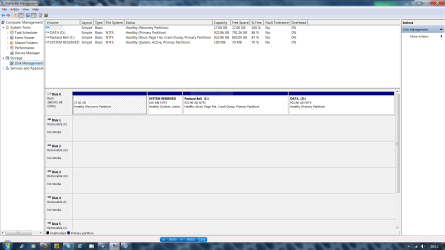
I have uploaded the screen shot as requested, (I hope)
I have rebooted but without any change.
My printer is Canon without a card slot
 

Attachments

  • Capture.PNG
    Capture.PNG
    69.9 KB · Views: 21

My Computer

OS
windows 7 64bit
On this screenshot it does not look like you have a mounted VHD. Could you also post a picture of the 'Computer' window.
 

My Computer

Computer Manufacturer/Model Number
HP, Dell, Gateway, Toshiba - 4 laptops and 2 desktops
OS
Vista, Windows7, Mint Mate, Zorin, Windows 8
CPU
from 1.6GHz Duo to i7
Monitor(s) Displays
2x HP w2207
Hard Drives
5x HDD, 7x SSD, 12x Externals
Keyboard
with trackball - no mices
Mouse
Trackball mice
Internet Speed
DSL 6000
phantom disc drive

Here is the screen shot of my "Computer"
 

Attachments

  • Capture 2.PNG
    Capture 2.PNG
    9.6 KB · Views: 5

My Computer

OS
windows 7 64bit
Hello terz,

Sorry to butt into your Gurus' Discussion, but I have just one question for you.

Are you using any CD/DVD Virtual Drive software to mount ISOs like Daemon Tools or Virtual CloneDrive?

Just curious.
 

My Computer

Computer Manufacturer/Model Number
DELL SXPS 1640
OS
Windows 7 x64 Professional SP1
CPU
Intel C2D T9550 2.66 GHz @ 2.793 GHz (Thanks ThrottleStop!!)
Motherboard
Intel PM45
Memory
8 GB DDR3
Graphics Card(s)
ATI MOBILITY RADEON 4670
Sound Card
CREATIVE XFI AUDIO NOTEBOOK
Monitor(s) Displays
16.1 WLED
Screen Resolution
1920x1080
Hard Drives
Seagate ST9500420AS 500GB (465GiBi) 7200 RPM Drive

External Drives:-
2 TB WD Essentials x 3
1 TB WD Mybook Gen 1
1 TB WD Mybook Gen 2
1 TB Seagate
1 TB Seagate
320 GB WD Scorpio Black (enclosed)
PSU
90W Dell Power Brick
Case
Dell Chassis
Cooling
Coolermaster Cooling Pad
Keyboard
Built-in backlighted Keyboard
Mouse
Logitech Wireless Mini Mouse
Internet Speed
4/0.5
Hi, thanks for your interest,
Am not using any virtual drives of any sort.
 

My Computer

OS
windows 7 64bit
Hi, thanks for your interest,
Am not using any virtual drives of any sort.

Thanks for the reply. Thought it'd be the case.

Alrighty then, carry on gents.
 

My Computer

Computer Manufacturer/Model Number
DELL SXPS 1640
OS
Windows 7 x64 Professional SP1
CPU
Intel C2D T9550 2.66 GHz @ 2.793 GHz (Thanks ThrottleStop!!)
Motherboard
Intel PM45
Memory
8 GB DDR3
Graphics Card(s)
ATI MOBILITY RADEON 4670
Sound Card
CREATIVE XFI AUDIO NOTEBOOK
Monitor(s) Displays
16.1 WLED
Screen Resolution
1920x1080
Hard Drives
Seagate ST9500420AS 500GB (465GiBi) 7200 RPM Drive

External Drives:-
2 TB WD Essentials x 3
1 TB WD Mybook Gen 1
1 TB WD Mybook Gen 2
1 TB Seagate
1 TB Seagate
320 GB WD Scorpio Black (enclosed)
PSU
90W Dell Power Brick
Case
Dell Chassis
Cooling
Coolermaster Cooling Pad
Keyboard
Built-in backlighted Keyboard
Mouse
Logitech Wireless Mini Mouse
Internet Speed
4/0.5
At first I had the same idea as Solarmystic. But beyond that I fail to see where this might have come from. But if it is only an 'optical disturbance', I would not really worry too much about it.
 

My Computer

Computer Manufacturer/Model Number
HP, Dell, Gateway, Toshiba - 4 laptops and 2 desktops
OS
Vista, Windows7, Mint Mate, Zorin, Windows 8
CPU
from 1.6GHz Duo to i7
Monitor(s) Displays
2x HP w2207
Hard Drives
5x HDD, 7x SSD, 12x Externals
Keyboard
with trackball - no mices
Mouse
Trackball mice
Internet Speed
DSL 6000
Are you using a USB internet dongle?
 

My Computer

Computer type
Laptop
Computer Manufacturer/Model Number
Hewlett-Packard/G62-107SA Notebook
OS
Microsoft Windows 7 Home Premium 64-bit Service Pack 1
CPU
Intel(R) Core(TM) i3 CPU M 330 @ 2.13GHz
Motherboard
Hewlett-Packard 1425
Memory
8 GB DDR3
Graphics Card(s)
Intel(R) HD Graphics
Sound Card
Realtek High Definition Audio
Monitor(s) Displays
Builtin
Screen Resolution
1366 x 768 x 32 bits (4294967296 colors) @ 60 Hz
Hard Drives
250 GB SATA Hard Disk Drive 7200 rpm
2TB Seagate GoFlex USB 2 Drive
1TB Iomega Prestige USB 2 Drive
1.5TB Iomega Prestige USB 2 Drive (Samsung)
2TB WD MyBook Live NAS.
Mouse
Logitech Anywhere MX
Internet Speed
152 Mbs download 10 Mbs upload
Antivirus
Norton 360
Browser
Chrome
Back
Top