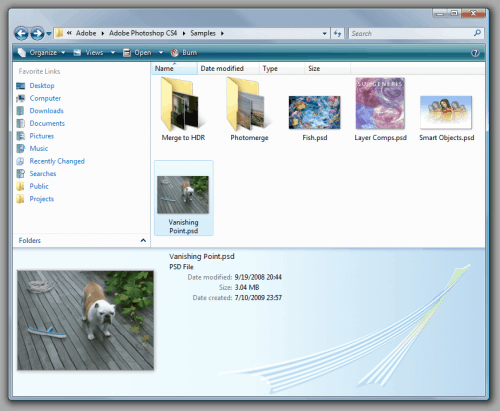
Photoshop PSD files [ thumbnail view ]

View Photoshop PSD thumbnails in Vista and Windows 7

ok guys.. i came here looking for just this.. and sadly, it wasnt here.. so i went on the hunt (via google lol) and i found it... and i did the heavy lifting already and attached the needed redist pkg and dll file so no need to go dl the links mentioned.. unless you want to i guess.. lol... nJoy!

UPDATED! [26July2010]
  • Confirmed, does not work with 64bit. Sorry for the late response on this one.
  • Make sure you use quotes in step three of Codec Installation!

View Photoshop PSD thumbnails in Vista and Windows 7

Windows introduced a new imaging stack, called Windows Imaging Component (WIC), and uses it in Windows Explorer to create thumbnails for most image file formats. 3rd parties can write their own WIC codec to support proprietary image formats such as Nikon NEF or Canon CR2 raw files and Explorer is able to show thumbnails for those files when the corresponding codec is installed. Microsoft maintain a page containing links to existing codecs. Sadly, there is no publicly available codec for the Photoshop PSD format but the newly released Microsoft Expression Blend 3 design tool (which, by the way, is nothing short of amazing for WPF and Silverlight design) includes such a codec so installing Blend 3 automatically installs the PSD codec. For those who don’t have a need for Blend and don’t want to install it, here is a little hacking guide to extract the codec (a 256KB dll) and use it separately:
Get the codec and its dependencies:

  • 1. Download Microsoft Expression Blend 3.0 (3.0.1927.0 7/20/2009) Trial: Link
  • 2. Using 7-Zip, open ‘Blend_Trial_en.exe’ from step (1) and in the ‘Setup’ subfolder, open ‘BlImp.cab’ then extract ‘PSDCodec.dll’
  • 3. Download the Visual C++ 2008 SP1 Redistributable Package (x86): Link

Codec Installation:

  • 1. Install the VC++ Runtime by running vcredist_x86.exe from step (3) above.
  • 2. Copy PSDCodec.dll from step (2) to some location on the harddisk, e.g. “C:\Program Files\PSDCodec”
  • 3. Register the codec from an administrator’s command prompt by running the following command, (provided C: is the drive you installed Win to) exactly:
    regsvr32 "C:\Program Files\PSDCodec\PSDCodec.dll"
    (remember, quotes!)

PSD_Thumbnails-500x411.png

That’s it, Windows Vista Explorer should soon begin to display thumbnails for all PSD files that were saved from Photoshop with the “Maximum Compatibility” option. As a side effect, WIC-aware image viewers such as FastPictureViewer Professional (Fast Picture Viewer | A Fast 32 and 64-bit Image Viewer for Windows 7, Vista & XP.) automatically benefit from the codec installation and uses it to open and display the same PSD files with full fidelity.


files i attached:
Microsoft Visual C++ 2008 SP1 Redistributable Package (x86).exe
AND
PSDCodec.dll.zip
 

Attachments

Last edited:

My Computer

OS
Windows 7 Ultimate x64
CPU
Dual Core 2.6ghz
Memory
4gb
Graphics Card(s)
Nvidia GeForce 9800gt
Monitor(s) Displays
2x19" 1x40"
Hard Drives
2x1tb, 2x500gb
PSD Files

I feel your pain. In the end I bought a viewer from Ardfry (Ardfry Imaging, LLC) It works extremely well and solves my problem of viewing thumbnails etc. Frankly I dont think we should have to buy this software as Adobe should have produced these codecs for Win 7. I am disappointed with how slow Adobe is to do this.

Howdy! new here..... :sa: ;)

guys, im curious if it is possible to make a thumbnail view for PSD files? like in windows XP....


also one more thing.... is desktop.ini not applicable in win7? cause my USB has a background image and it wont' show up in win7.... ?


-thanks! :mad: :D
 

My Computer

OS
Windows 7 Ultimate and Home premium on laptop
ok guys.. i came here looking for just this.. and sadly, it wasnt here.. so i went on the hunt (via google lol) and i found it... and i did the heavy lifting already and attached the needed redist pkg and dll file so no need to go dl the links mentioned.. unless you want to i guess.. lol... nJoy!

:party:

I just registered to say thank you,for ending my long time frustration with this.

I had tried MSFT's forums and got the standard pscicon.dll fix (didn't render thumbs on my external drive) and the Arfry's psicodec program. I installed that. The downside is while it does render excellent psd thumbs, it somehow won't cache them on my large PSD folder in my external drive. That means they have to be redrawn every time I plug in the drive. Not good if ya have several hundred.

This psd codec keeps the thumbs crisp even in large view and once rendered,stay rendered,even in other programs dialog boxes. Thanks for one great find and including the files :) and clear easy to follow instructions! Of all things Microsoft had it sitting there! Perhaps there's some legality or fee structure that prevents use in Windows.

If you happen to see small icons on the corner of the thumbs,uncheck "Display file icon on thumbnails"in Windows Explorer;s Tools menu > Folder Options > View Tab.


I had spoken with Adobe who had explained to me that MSFT had the psd spec and could do this themselves. On an MSFT forum I asked why they didn't implement this and got no answer on this issue other than third party suggestions.

Except for this forum and its' sharp members :D

Genex

Windows 7 on a Toshiba laptop.
 

My Computer

OS
Windows 7
Thumbnails of "Documents" makes absolutely no sense to me.
That just compounds my problem of not being able to see what file types I'm working with.

There's another post here somewhere ..
Where they are complaining about the fact that Adobe has fixed the W7 problem (confusion) and is providing Icons now.

I'll have to try to remember this :geek:

If only I could show Icons on my Desktop .. I might be able to use W7

for images its very handy... especially large images that you don't want to have to open photoshop to view. But for me its small images... i use my library of alpha images (small icons) in zbrush and I want to browse them without having to open them, just look and open the file.

you should have SHOW FILE TYPES on to show you what your file types are. This is important cause .EXE files can change the icon to whatever it wants. Someone could create a virus change the icon to a photoshop icon for example, put it on your computer or convince people to download the file somehow (they have their ways) you open it and have a virus. Not only that, MANY filetypes share icons.
 

My Computer

OS
W7
CPU
Core 2 Duo e7200 2.53ghz
Motherboard
Asus P5NE-sli
Memory
4gb
Graphics Card(s)
Geforce 8600 GTS
I finally got this working with mysticthumbs, had to reboot a couple times. and it doesn't change the icons on your desktop.. only in explorer
 

My Computer

OS
W7
CPU
Core 2 Duo e7200 2.53ghz
Motherboard
Asus P5NE-sli
Memory
4gb
Graphics Card(s)
Geforce 8600 GTS
My extensions are turned on .. but many times the names are too long.
The problem is .. Many times I have several Images (that will look the same in Thumbs) but are different types.
Thumbs are great in a folder Browse .. but not on the desktop .. IMHO.
At least .. M$ could have given me the option to turn thumbs off on the desktop only.


and it doesn't change the icons on your desktop
Right .. W7 isn't smart enough to see a psd file as an Image.
This makes it difficult to edit the registry Right Click context menus ..
to do the same file type R click customizing that XP can do.
 

My Computer

Computer Manufacturer/Model Number
HP d4996t (upgraded)
OS
XP MCE .... XP Pro 64 .... W7 U x64
CPU
E6750, 2.67GHz C2D
Memory
4GB, PC2 6400
Graphics Card(s)
GeForce 9400GT
Monitor(s) Displays
Twin Samsung 2443BWT
Screen Resolution
1920x1200
Hard Drives
Many .. 3 Installed
PSU
460W
Internet Speed
Cable
Followed the steps to a T I believe but I got this error on the last step...
The module ""C:\Program" failed to load.
Make sure the binary is stored at the specific path or debug it to check for problems with the binary or dependent .DLL files.
The specified module could not be found.


Running Windows 7 64bit
 

My Computer

OS
Windows 7
Ardfry do a full range of thumbnail viewers for PSD, NEF (Nikon's Raw) and DNG files. Find them at Ardfry Imaging, LLC unfortunately there is a charge :confused:, but the viewers are very good.:D. I use Win 7 64 bit and they work for me. As far as desktop ini is concerned, I don't think Win 7 uses that anymore. Look at your System / Device Manager to see if your USB ports show up there, if not you will need a driver.

Regards John F

Howdy! new here..... :sa: ;)

guys, im curious if it is possible to make a thumbnail view for PSD files? like in windows XP....


also one more thing.... is desktop.ini not applicable in win7? cause my USB has a background image and it wont' show up in win7.... ?


-thanks! :mad: :D
 

My Computer

OS
Windows 7 Ultimate and Home premium on laptop
Two Answers for you

I believe someone just wrote about the mystic thumbs program - and it works for me which was surprising since I'm working 64 bit, but before that I was using the Irfan View graphic program and you can use the thumbnail explorer and psd will show up.

Anyway, hope it helps!
T.
 

My Computer

Computer Manufacturer/Model Number
Hewlett Packard G71-340US
OS
windows 7 64 Bit
CPU
Intel(R) Core(TM)2 Duo CPU T6600 @ 220GHz
Memory
4 GB (2) 2 GB SODIMM DDR-2 800MHz Kinston
Graphics Card(s)
(2) Mobile Intell (R) 4 Series Express Chipset Family
Screen Resolution
1600 X 900 HD TrueBrite
Keyboard
IBM enhanced (101 or 102 key) keyboard
Mouse
Logitech Cordless and Microsoft Intelipoint 5000 Wireless
Internet Speed
Clearwire High Broadbrand
Followed the steps to a T I believe but I got this error on the last step...
The module ""C:\Program" failed to load.
Make sure the binary is stored at the specific path or debug it to check for problems with the binary or dependent .DLL files.
The specified module could not be found.


Running Windows 7 64bit

The quote marks around the regsvr32 command b33z wrote aren't interpreted correctly by the command prompt. Try copying and pasting but then deleting and retyping the quote marks manually before you hit enter.
 

My Computer

OS
Windows 7
tried pasting and deleting/re-typing the quotes.... no go... Also hand-typed the whole command... same error. Tried moving the dll to a few other spots and updating the cmd to match... still nada.

Thinking this fix isn't in the cards for me.
 

My Computer

OS
Windows 7
I tried a couple of the PSD Thumbnail fixes here ..
But since some of my Photoshop files are huge .. (I think this is the reason) ...
My Thumbnail viewing was really slow.

I've decided .. If I need to Browse psd's in Thumbs ... I'll just use my Irfanview Thumbnail browser.
 

My Computer

Computer Manufacturer/Model Number
HP d4996t (upgraded)
OS
XP MCE .... XP Pro 64 .... W7 U x64
CPU
E6750, 2.67GHz C2D
Memory
4GB, PC2 6400
Graphics Card(s)
GeForce 9400GT
Monitor(s) Displays
Twin Samsung 2443BWT
Screen Resolution
1920x1200
Hard Drives
Many .. 3 Installed
PSU
460W
Internet Speed
Cable
tried pasting and deleting/re-typing the quotes.... no go... Also hand-typed the whole command... same error. Tried moving the dll to a few other spots and updating the cmd to match... still nada.

Thinking this fix isn't in the cards for me.


Strange. Did you try moving the dll to somewhere without a space in the path, e.g. c:\PSDCodec.dll
 

My Computer

OS
Windows 7
well so far i can say OK. I rarely have time to play with my PS CS4 :(
 

My Computer

OS
window's 7
CPU
core 2 quad
Motherboard
gigabyte
Memory
2gb corsair
Graphics Card(s)
ati hd4850
Monitor(s) Displays
lg
Screen Resolution
1600 X 900
Case
power logic
Other Info
none of the spec above is accurate
I did try moving it to a path with no spaces but nothing changed...

Just tried it again though skipping the PSDCodec folder and just putting the dll in root C... I get a different error now...

*The module "C:\PSDCodec.dll" was loaded but the call to DllRegisterServer failed with error code 0x80070005.
For more information about this problem search online using the error code as a search term.*

tried searching for the error code in conjunction with the PSDCodec and found a Spanish site where someone got the same error but no solution was posted
 

My Computer

OS
Windows 7
Hmmm, I'm guessing that the error code is irrelevant to the dll file, so if you just try searching for regsvr32 0x80070005 then you might find a solution that works despite being about a different dll file. If that makes sense?


Also if you're doing

regsvr32 C:\PSDCodec.dll

then you probably won't need the quotes around the address. Don't know if you've done that or if it'll make a difference, but thought I'd mention it in case!
 

My Computer

OS
Windows 7
Another Thumbs Up for Mystic Thumbs for viewing psd files.
The only issue I've had was when I went from CS4 to CS5,. A simple un-install, re-install of Mystic Thumbs and back in business (on 64 bit).
 

My Computer

Computer Manufacturer/Model Number
One Man Band Build
OS
Windows 7 Home Premium O.E.M x64
CPU
DualCore Intel Pentium E5300, Wolfdale
Motherboard
ASRock G31-S
Memory
1x 2gb
Graphics Card(s)
Intel G33/G31 on board
Sound Card
Realtek ALC662 5.1 on board
Monitor(s) Displays
AOC 831S
Screen Resolution
1280x768
Hard Drives
Samsung 320gb SATA.
Maxtor 60gb Ultra ATA/100.
Maxtor 20gb Ultra ATA/100
PSU
A.N.Other 500W
Case
Misco (UK) own mark incl. PSU
Cooling
CPU + extra case fan, SpeedFan controlled.
Keyboard
Logitech wired
Mouse
Logitech Optical wired
Internet Speed
54Mbps (??) They TELL me.
Other Info
My dogs got fleas.
i performed the dll register guide and it worked, except for no difference before and after... explorer still doesn't render psd thumbnails....
 

My Computer

Computer Manufacturer/Model Number
White Box
OS
Windows 7 RTM x64
CPU
Core 2 Quad 2.6GHz
Motherboard
Gigabyte Ga-x48-ds5
Memory
4GB Ram
Graphics Card(s)
Asus nvidia 260
Sound Card
Built in, Using Optical Out with Logitech Z-5500 5.1
Monitor(s) Displays
Acer T230H & Samsung LCD TV FULL HD "LE46B530"
Screen Resolution
1920x1080 + 1920x1080
Hard Drives
8 of them, about 6.5TB
PSU
750 watt
Case
Antec P180
Cooling
Default Intel stock
Keyboard
Logitech Dinovo edge
Mouse
wireless laser mouse
Internet Speed
15mbit Cable
Other Info
Primary monitor is multitouch (yay)
Seriously this is the easiest thing to do actually.

Download psicon.dll

From : psicon.dll download - free dll files

Place it in c:\program files\common files\adobe\shell

If the shell directory isn't there create it.

now open notepad and copy and paste the next few lines:

Code:
Windows Registry Editor Version 5.00


[HKEY_LOCAL_MACHINE\SOFTWARE\Microsoft\Windows\CurrentVersion\SharedDLLs]


"C:\\Program Files\\Common Files\\Adobe\\Shell\\psicon.dll"=dword:00000001


[HKEY_CLASSES_ROOT\.psd\ShellEx]


[HKEY_CLASSES_ROOT\.psd\ShellEx\{BB2E617C-0920-11d1-9A0B-00C04FC2D6C1}]


@="{0B6DC6EE-C4FD-11d1-819A-00C04FB69B4D}"


[HKEY_CLASSES_ROOT\CLSID\{0B6DC6EE-C4FD-11d1-819A-00C04FB69B4D}]


@="Photoshop Icon Handler"


[HKEY_CLASSES_ROOT\CLSID\{0B6DC6EE-C4FD-11d1-819A-00C04FB69B4D}\InProcServer32]


@="C:\\Program Files\\Common Files\\Adobe\\Shell\\psicon.dll"


"ThreadingModel"="Apartment"

Save the file as psdreg.reg

Now double click the file and then click yes. Now just either restart or kill and restart the "explorer.exe" process.

go look at any .psd and you will see thumbnail ;-)

fxf97l.jpg
 

My Computer

Computer Manufacturer/Model Number
gigabyte q1580l
OS
windows 7
CPU
2.16 celeron
Motherboard
gigabyte
Memory
2gb
Graphics Card(s)
intem gma 450
Sound Card
realtek hd
Monitor(s) Displays
lcd
Hard Drives
160gb
Seriously this is the easiest thing to do actually.

Download psicon.dll

From : psicon.dll download - free dll files

Place it in c:\program files\common files\adobe\shell

If the shell directory isn't there create it.

now open notepad and copy and paste the next few lines:

Code:
Windows Registry Editor Version 5.00


[HKEY_LOCAL_MACHINE\SOFTWARE\Microsoft\Windows\CurrentVersion\SharedDLLs]


"C:\\Program Files\\Common Files\\Adobe\\Shell\\psicon.dll"=dword:00000001


[HKEY_CLASSES_ROOT\.psd\ShellEx]


[HKEY_CLASSES_ROOT\.psd\ShellEx\{BB2E617C-0920-11d1-9A0B-00C04FC2D6C1}]


@="{0B6DC6EE-C4FD-11d1-819A-00C04FB69B4D}"


[HKEY_CLASSES_ROOT\CLSID\{0B6DC6EE-C4FD-11d1-819A-00C04FB69B4D}]


@="Photoshop Icon Handler"


[HKEY_CLASSES_ROOT\CLSID\{0B6DC6EE-C4FD-11d1-819A-00C04FB69B4D}\InProcServer32]


@="C:\\Program Files\\Common Files\\Adobe\\Shell\\psicon.dll"


"ThreadingModel"="Apartment"
Save the file as psdreg.reg

Now double click the file and then click yes. Now just either restart or kill and restart the "explorer.exe" process.

go look at any .psd and you will see thumbnail ;-)

fxf97l.jpg
those are some very beautyful sig's.
 

My Computer

Computer type
PC/Desktop
Computer Manufacturer/Model Number
HP
OS
Windows 7 64Bit
CPU
Intel (R) Core (TM) 2 Duo CPU 2.80GHz
Memory
4,00 GB
Graphics Card(s)
NVIDIA Geforce GT 220
Monitor(s) Displays
Samsung
Screen Resolution
1280x1024
Hard Drives
1t
Back
Top