WretchedDeviant
New member
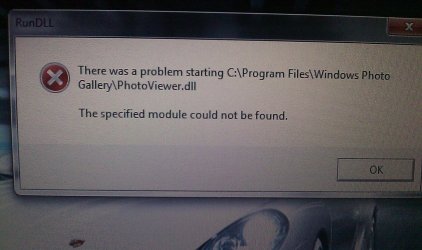
All right, I've seen plenty of "fixes" for this problem when I try to edit a program it pops up with PhotoViewer.dll unable to open or some such.
I've set it as my default program to open pictures and it still pops up with that, where's all the shadow, highlights, and so on editing and enhancement? I have three computers running Windows 7, all had the free upgrade when we bought them, the other two can use the Windows Photo Viewer without a problem so why can't my laptop? I don't want to open all pictures in Paint or some other program, I want the same thing my other computers use which, I thought, was Windows Photo Viewer. So...how do I fix it?
And how do I make my pictures that come off of my camera into a quarter the size that they are (say they're 1.5Mb when coming off of the card, in Windows XP and Vista I could open it in Paint, press save and it would make the pictures, like, 500Kb in size instead, because this new Paint makes them twice that size and Windows Photo Viewer, if, I'm lucky makes them several Kbs smaller or larger)?
I've set it as my default program to open pictures and it still pops up with that, where's all the shadow, highlights, and so on editing and enhancement? I have three computers running Windows 7, all had the free upgrade when we bought them, the other two can use the Windows Photo Viewer without a problem so why can't my laptop? I don't want to open all pictures in Paint or some other program, I want the same thing my other computers use which, I thought, was Windows Photo Viewer. So...how do I fix it?
And how do I make my pictures that come off of my camera into a quarter the size that they are (say they're 1.5Mb when coming off of the card, in Windows XP and Vista I could open it in Paint, press save and it would make the pictures, like, 500Kb in size instead, because this new Paint makes them twice that size and Windows Photo Viewer, if, I'm lucky makes them several Kbs smaller or larger)?
My Computer
- Computer Manufacturer/Model Number
- HP Pavilion dv7
- OS
- Windows 7
- CPU
- AMD Turion 2.20 GHz X2
- Memory
- 4.00 GB
- Graphics Card(s)
- ATI Radeon 3650
- Sound Card
- ATI HD
- Screen Resolution
- 1440x900
- Internet Speed
- 4.0Mbps