Hi,
I have a forum at work (hosted internally on a linux ubuntu VM machine - 10.25.40.16) and i have an issue with what i believe to be cookie settings.
Basically, if i insert a link from one post to another it logs people out when they click it.
I believe it does this due to the SID being in the URL, when the user enters their credentials then it shows the post that the link was too.
The URL at work is http://techforum01 (This is obviously inaccessible externally)
I have also create an entry in the host file so i can access it at www.techforum01.com:
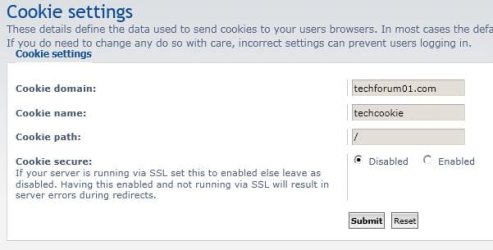
My cookie settings are:

Can anyone advise how to get the cookie settings working correctly so we don't keep getting logged out??
Are there any files i can upload that you can check or anything like that?
Regards,
JDobbsy1987
I have a forum at work (hosted internally on a linux ubuntu VM machine - 10.25.40.16) and i have an issue with what i believe to be cookie settings.
Basically, if i insert a link from one post to another it logs people out when they click it.
I believe it does this due to the SID being in the URL, when the user enters their credentials then it shows the post that the link was too.
The URL at work is http://techforum01 (This is obviously inaccessible externally)
I have also create an entry in the host file so i can access it at www.techforum01.com:
Code:
10.25.40.16 www.techforum01.comMy cookie settings are:
Can anyone advise how to get the cookie settings working correctly so we don't keep getting logged out??
Are there any files i can upload that you can check or anything like that?
Regards,
JDobbsy1987
My Computer
- Computer type
- PC/Desktop
- Computer Manufacturer/Model Number
- Self Built
- OS
- Windows 8.1 Pro x64
- CPU
- Intel Core i5-2500K @ 3.30GHz - S1155
- Motherboard
- Asus P8P67 LE Rev3, Intel P67, S115
- Memory
- 8GB Corsair DDR3 XMS3, PC3-12800
- Graphics Card(s)
- NVIDIA GeForce GTX 650
- Sound Card
- On-Board
- Monitor(s) Displays
- 3 x 24" {Extended Display}
- Screen Resolution
- 1920 x 1080
- Hard Drives
- 300GB Seagate Barracuda 7200
- PSU
- 550W Coolermaster GX550
- Case
- Silverstone Precision PS04B
- Cooling
- Stock
- Keyboard
- Logitech K120
- Mouse
- World of Warcraft Cataclysm MMO Gaming Mouse
- Internet Speed
- 80 MB
- Antivirus
- MSE / Windows Defender
- Browser
- Chrome
 or i am missing something?