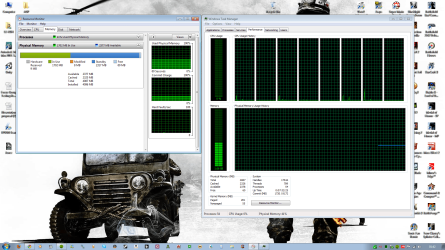
Physical Memory too high?

LEFISHzz

New member
Local time
12:59 AM
Messages
8
I'm a VERY paranoid person and want an opinion on whether or not this seems normal.

As you can see currently running Chrome, Spotify, ATI CCC, MSE.


Thanks youz :}
 

Attachments

  • tm.png
    tm.png
    326 KB · Views: 461

My Computer

Computer Manufacturer/Model Number
Custom built
OS
Windows 7 Home Premium 64bit
CPU
Intel Core i7 950 @ 3.07Ghz
Motherboard
ASUS P6X58D-E
Memory
4GB (2x2GB) Corsair Dominator DDR3 PC3-12800 (1600)
Graphics Card(s)
ATI Radeon HD 5870
Monitor(s) Displays
SAMSUNG SyncMaster P2270HD 22"
Screen Resolution
1920x1080
Hard Drives
WD VelociRaptor 300GB HDD 10,000 RPM (C:)
PSU
650W XFX P1-650S-NLB9 Core Edition
Case
Antec 300 Three Hundred Ultimate Gaming Case
Keyboard
Logitech Ultra-Flat Keyboard USB PS/2
Mouse
Logitech Gaming Mouse G500
That is perfectly normal, a bit on the high side but not abnormally so. Windows 7 uses memory differently than previous versions.. allocating 1/3 to 1/2 the physical memory for running processes during idle and the rest available for graphics/superfetch
 
Ahh kool. Just disabled homegroup via services and also using Firefox now. Chrome does use more resources :/
 

My Computer

Computer Manufacturer/Model Number
Custom built
OS
Windows 7 Home Premium 64bit
CPU
Intel Core i7 950 @ 3.07Ghz
Motherboard
ASUS P6X58D-E
Memory
4GB (2x2GB) Corsair Dominator DDR3 PC3-12800 (1600)
Graphics Card(s)
ATI Radeon HD 5870
Monitor(s) Displays
SAMSUNG SyncMaster P2270HD 22"
Screen Resolution
1920x1080
Hard Drives
WD VelociRaptor 300GB HDD 10,000 RPM (C:)
PSU
650W XFX P1-650S-NLB9 Core Edition
Case
Antec 300 Three Hundred Ultimate Gaming Case
Keyboard
Logitech Ultra-Flat Keyboard USB PS/2
Mouse
Logitech Gaming Mouse G500
you could probably reduce the memory usage by about 300-400 MB by disabling a few services and startup programs, but I wouldn't recommend experimenting too much unless you're not afraid to occasionally break a system in the process. If reinstalling windows is not a major task for you, you'll gain more speed by learning exactly what services and applications you want to use, then reinstalling windows and your programs and immediately disabling the list of services you don't want than by using third party clean up tools. It also helps to get into the habit of unchecking nearly every option whenever you install a program, especially any "run at startup" or "automatically check for updates" option.. they can usually be manually enabled later if it proves necessary, but disabling a previously enabled program feature/option or removing a program always results in a slower system than one that has never run that program or feature
 
I mean here take a look at what processes are currently running. Pretty much only have the ones I need to have stable OS.

I wouldn't mind installing W7 again but if I'm entirely honest with you I don't have the patience xD
 

Attachments

  • processes.png
    processes.png
    85.9 KB · Views: 223

My Computer

Computer Manufacturer/Model Number
Custom built
OS
Windows 7 Home Premium 64bit
CPU
Intel Core i7 950 @ 3.07Ghz
Motherboard
ASUS P6X58D-E
Memory
4GB (2x2GB) Corsair Dominator DDR3 PC3-12800 (1600)
Graphics Card(s)
ATI Radeon HD 5870
Monitor(s) Displays
SAMSUNG SyncMaster P2270HD 22"
Screen Resolution
1920x1080
Hard Drives
WD VelociRaptor 300GB HDD 10,000 RPM (C:)
PSU
650W XFX P1-650S-NLB9 Core Edition
Case
Antec 300 Three Hundred Ultimate Gaming Case
Keyboard
Logitech Ultra-Flat Keyboard USB PS/2
Mouse
Logitech Gaming Mouse G500

My Computer

Computer type
PC/Desktop
Computer Manufacturer/Model Number
Custom Build
OS
Windows 10 Pro x64
CPU
Intel Core i5 4440 @Stock
Motherboard
Gigabyte Z97 D3H
Memory
4 x 4GB HyperX Fury DDR3
Graphics Card(s)
Gigabyte GTX 1050Ti O4G
Sound Card
Integrated
Monitor(s) Displays
Dell P2417H
Screen Resolution
1920 x 1080
Hard Drives
Samsung EVO 850 120GB / Toshiba DT01ACA050 1TB 7200prm 32MB
PSU
Riotoro Onyx 750W
Case
NZXT H500 Black-Red
Cooling
Stock CPU + NZXT 120mm + 2x120mm red fans
Keyboard
Modecom Volcano Lanparty
Mouse
Asus ROG Gladius / DeepCool E-Pad Plus
Internet Speed
DOCSIS 50/3 Mbit
Browser
Google Chrome
Other Info
Asus K55VJ(i5 3210M, GT635M / 2GB, 8GB DDR3, 500GB HDD)
I'm a VERY paranoid person and want an opinion on whether or not this seems normal.

As you can see currently running Chrome, Spotify, ATI CCC, MSE.


Thanks youz :}

It is completely Normal. Win 7 deals with memory differently than previous systems. It takes ~half and holds it in fact access. The rest is used as needed leaving as little free as possible is a good thing. It all is used all of the the time. If you need more win 7 release it from its half fast.


Ken J
 

My Computer

Computer Manufacturer/Model Number
HP Pavillion dv-7 1005 Tx
OS
Win 8 Release candidate 8400
CPU
[email protected]
Memory
4 gigs
Graphics Card(s)
Nvidia 9600M
Sound Card
HD built-in
Monitor(s) Displays
17" Wxga
Screen Resolution
1440x900
Cooling
none
Internet Speed
45Mb down 5Mb up

My Computer

Computer Manufacturer/Model Number
Custom built
OS
Windows 7 Home Premium 64bit
CPU
Intel Core i7 950 @ 3.07Ghz
Motherboard
ASUS P6X58D-E
Memory
4GB (2x2GB) Corsair Dominator DDR3 PC3-12800 (1600)
Graphics Card(s)
ATI Radeon HD 5870
Monitor(s) Displays
SAMSUNG SyncMaster P2270HD 22"
Screen Resolution
1920x1080
Hard Drives
WD VelociRaptor 300GB HDD 10,000 RPM (C:)
PSU
650W XFX P1-650S-NLB9 Core Edition
Case
Antec 300 Three Hundred Ultimate Gaming Case
Keyboard
Logitech Ultra-Flat Keyboard USB PS/2
Mouse
Logitech Gaming Mouse G500
The above posts are correct. It is possible to reduce memory used as I stated, leaving more available for cached memory (superfetch/graphics), but your system is running pretty much normally and I tend to agree with microsoft's new philosophy that unused memory is wasted memory. You should see what resource monitor looks like on a win7 ultimate dual socket system with 96GB.. only 1.2 GB free but nothing starts up slowly.. even with over 100 running processes, but that machine is strictly for work. I don't play with it on the internet at all
 
You are lucky, your system uses nearly all the RAM you paid for. Worst case is when you have a lot of free RAM. I love when it is all green and dark blue - it's the light blue (free) that worries me.
 

My Computer

Computer Manufacturer/Model Number
HP, Dell, Gateway, Toshiba - 4 laptops and 2 desktops
OS
Vista, Windows7, Mint Mate, Zorin, Windows 8
CPU
from 1.6GHz Duo to i7
Monitor(s) Displays
2x HP w2207
Hard Drives
5x HDD, 7x SSD, 12x Externals
Keyboard
with trackball - no mices
Mouse
Trackball mice
Internet Speed
DSL 6000
You have a butt load of RAM...Seriously, STOP [deleted] worrying about it!
Do you see me worrying about my level of RAM? I have a max of 2 GB on this computer.

And also...enable Aero! What you have now is using your CPU.
Aero makes use of your GPU which is hardly ever used.
 

My Computer

Computer type
PC/Desktop
Computer Manufacturer/Model Number
Alienware Aurora ALX R4
OS
Windows 10 Pro (x64)
CPU
Intel Core i7-3930K (3.2GHz - 4.5GHz)
Motherboard
Alienware Aurora-R4 x79
Memory
4x Samsung 4GB PC3-12800 DDR3 (16GB 1600MHz)
Graphics Card(s)
Nvidia Geforce GTX 690
Sound Card
SteelSeries Siberia Elite
Monitor(s) Displays
Dell UltraSharp U3011
Screen Resolution
2560x1600
Hard Drives
Samsung 850 Pro 256 GB, Seagate 1TB Desktop Hybrid HDD, 2x Western Digital 4TB Green HDD
PSU
875W Some Dell PSU <.<
Case
Alienware Aurora ALX
Cooling
Custom Liquid Cooling (EK CPU & GPU blocks) dual EK 480RAD
Keyboard
Logitech G710+ Mechanical
Mouse
Logitech G700s
Internet Speed
Verizon Fios (50 mbps average)
Other Info
Server: Intel NUC D54250WYK: i5-4250U, 16GB, 256 GB mSATA, Windows Server 2012 R2
I wouldn't even worry about it.

I occasionally take a look at mine just to see how its using it, but for the most part dont even worry.

If you just let Windows manage it, you'll find that at times it will be very high useage, sometimes lower, but you'll never be in a situation where your running out.
In fact, if you count all it has in standby as well, youll see its actually using ALL RAM.

It knows what its doing and will certainly use all it can to its benefit :)
 

My Computer

Computer Manufacturer/Model Number
Custom (Self Build)
OS
Windows 7 Home Premium 64bit
CPU
Intel Core i7 2700k
Motherboard
eVGA P67 SLI
Memory
8GB Mushkin Redline Ridgebacks @1866
Graphics Card(s)
EVGA GTX570 SC
Sound Card
XiFi Titanium HD
Monitor(s) Displays
LG W2453V
Screen Resolution
1920x1080
Hard Drives
Intel 320 80GB -- Intel X25-V 40GB --WD Black 1TB x2 -- WD Blue 640GB
PSU
Seasonic x750
Case
Corsair 600T SE White
Cooling
eVGA Superclocked CPU Cooler
Keyboard
Saitek Cyborg
Antivirus
Kaspersky
Browser
IE
Other Info
LG BD/DVD
You have a butt load of RAM...Seriously, STOP [deleted] worrying about it!
Do you see me worrying about my level of RAM? I have a max of 2 GB on this computer.

And also...enable Aero! What you have now is using your CPU.
Aero makes use of your GPU which is hardly ever used.

I'm not keen on Aero :I I like it as 'Windows 7 Basic theme'
 

My Computer

Computer Manufacturer/Model Number
Custom built
OS
Windows 7 Home Premium 64bit
CPU
Intel Core i7 950 @ 3.07Ghz
Motherboard
ASUS P6X58D-E
Memory
4GB (2x2GB) Corsair Dominator DDR3 PC3-12800 (1600)
Graphics Card(s)
ATI Radeon HD 5870
Monitor(s) Displays
SAMSUNG SyncMaster P2270HD 22"
Screen Resolution
1920x1080
Hard Drives
WD VelociRaptor 300GB HDD 10,000 RPM (C:)
PSU
650W XFX P1-650S-NLB9 Core Edition
Case
Antec 300 Three Hundred Ultimate Gaming Case
Keyboard
Logitech Ultra-Flat Keyboard USB PS/2
Mouse
Logitech Gaming Mouse G500
I wouldn't even worry about it.

I occasionally take a look at mine just to see how its using it, but for the most part dont even worry.

If you just let Windows manage it, you'll find that at times it will be very high useage, sometimes lower, but you'll never be in a situation where your running out.
In fact, if you count all it has in standby as well, youll see its actually using ALL RAM.

It knows what its doing and will certainly use all it can to its benefit :)

When I run Bad Company 2 the max Physical Memory I've seen is 55% XD Never have I seen it more than that.

I guess an extra 2GB isn't necessary ;/ hmm Crysis 2 may require 4-6GB. Bah 4GB DDR3 tis fine me thinks.
 

My Computer

Computer Manufacturer/Model Number
Custom built
OS
Windows 7 Home Premium 64bit
CPU
Intel Core i7 950 @ 3.07Ghz
Motherboard
ASUS P6X58D-E
Memory
4GB (2x2GB) Corsair Dominator DDR3 PC3-12800 (1600)
Graphics Card(s)
ATI Radeon HD 5870
Monitor(s) Displays
SAMSUNG SyncMaster P2270HD 22"
Screen Resolution
1920x1080
Hard Drives
WD VelociRaptor 300GB HDD 10,000 RPM (C:)
PSU
650W XFX P1-650S-NLB9 Core Edition
Case
Antec 300 Three Hundred Ultimate Gaming Case
Keyboard
Logitech Ultra-Flat Keyboard USB PS/2
Mouse
Logitech Gaming Mouse G500
I wouldn't even worry about it.

I occasionally take a look at mine just to see how its using it, but for the most part dont even worry.

If you just let Windows manage it, you'll find that at times it will be very high useage, sometimes lower, but you'll never be in a situation where your running out.
In fact, if you count all it has in standby as well, youll see its actually using ALL RAM.

It knows what its doing and will certainly use all it can to its benefit :)

When I run Bad Company 2 the max Physical Memory I've seen is 55% XD Never have I seen it more than that.

I guess an extra 2GB isn't necessary ;/ hmm Crysis 2 may require 4-6GB. Bah 4GB DDR3 tis fine me thinks.
I agree. As I said earlier, more than 2GBs of RAM is normally not required for running any collection of programs. But where it helps is in the caching. The more processes you have in the RAM cache, the faster it is to get back to what you were running before. There are orders of magnitude difference in speed between fetching a program from cache or from disc - even from SSD.
 

My Computer

Computer Manufacturer/Model Number
HP, Dell, Gateway, Toshiba - 4 laptops and 2 desktops
OS
Vista, Windows7, Mint Mate, Zorin, Windows 8
CPU
from 1.6GHz Duo to i7
Monitor(s) Displays
2x HP w2207
Hard Drives
5x HDD, 7x SSD, 12x Externals
Keyboard
with trackball - no mices
Mouse
Trackball mice
Internet Speed
DSL 6000
I'm not keen on Aero :I I like it as 'Windows 7 Basic theme'

You could turn off the transparency and pick a color that match Aero Basic.

I just find it funny is all. You are concerned with memory usage but you ignore the one thing that can actually affect your performance.
 
Last edited:

My Computer

Computer type
PC/Desktop
Computer Manufacturer/Model Number
Alienware Aurora ALX R4
OS
Windows 10 Pro (x64)
CPU
Intel Core i7-3930K (3.2GHz - 4.5GHz)
Motherboard
Alienware Aurora-R4 x79
Memory
4x Samsung 4GB PC3-12800 DDR3 (16GB 1600MHz)
Graphics Card(s)
Nvidia Geforce GTX 690
Sound Card
SteelSeries Siberia Elite
Monitor(s) Displays
Dell UltraSharp U3011
Screen Resolution
2560x1600
Hard Drives
Samsung 850 Pro 256 GB, Seagate 1TB Desktop Hybrid HDD, 2x Western Digital 4TB Green HDD
PSU
875W Some Dell PSU <.<
Case
Alienware Aurora ALX
Cooling
Custom Liquid Cooling (EK CPU & GPU blocks) dual EK 480RAD
Keyboard
Logitech G710+ Mechanical
Mouse
Logitech G700s
Internet Speed
Verizon Fios (50 mbps average)
Other Info
Server: Intel NUC D54250WYK: i5-4250U, 16GB, 256 GB mSATA, Windows Server 2012 R2
cool my computer usally uses 1 gb 2 if im playin games
 

My Computer

Computer Manufacturer/Model Number
Toshiba Satellite L335-S7902
OS
Windows 7 Ultimate x86
CPU
Intel Pentium
Motherboard
Insyde H2O
Memory
3GB SDRAM
Monitor(s) Displays
17" Diagonal widescreen Trubrite
Hard Drives
250 HDD
Case
Toshiba
Cooling
Fan
Keyboard
Built-in
Mouse
Logitech Gaming Mouse
Internet Speed
1mph
Back
Top