Picture library printing to Fax

bduemig

New member
Local time
2:13 AM
Messages
3
Whenever I go to my picture library and print from there, rather than trying to print to my default printer, it tries to send as a fax. It never gives me a choice of where to print. I can work arounbd it by selecting preview rather than print and it goes to the picture viewer which allows mne to select the right printer.

Any suggestions as to how to change this so that it goes to the right place?
 

My Computer My Computer

At a glance

Windows 7 Home
OS
Windows 7 Home
Hi and welcome to SevenForums!

You might want to try this tutorial, it should be the right way to do this.
 

My Computer My Computer

At a glance

Windows 7 Ultimate 64 bit SP1Intel(R) Core(TM) i5-2500K12GB Kingston Hyperx 1600MHzAsus GTS 450
Computer type
PC/Desktop
Computer Manufacturer/Model Number
Custom Built PC
OS
Windows 7 Ultimate 64 bit SP1
CPU
Intel(R) Core(TM) i5-2500K
Motherboard
Gigabyte Technology Co., Ltd. Z68X-UD3-B3
Memory
12GB Kingston Hyperx 1600MHz
Graphics Card(s)
Asus GTS 450
PSU
500W Coolink
Other Info
Genius G-Pen F610 (PenPad)
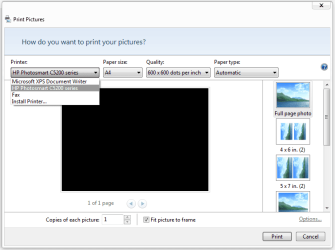
When it wants to fax it, don't you have an option at the top to select a printer?

screenshot002.png
 

My Computer My Computer

At a glance

Windows 7 Ultimate 64 bit SP1Intel(R) Core(TM) i5-2500K12GB Kingston Hyperx 1600MHzAsus GTS 450
Computer type
PC/Desktop
Computer Manufacturer/Model Number
Custom Built PC
OS
Windows 7 Ultimate 64 bit SP1
CPU
Intel(R) Core(TM) i5-2500K
Motherboard
Gigabyte Technology Co., Ltd. Z68X-UD3-B3
Memory
12GB Kingston Hyperx 1600MHz
Graphics Card(s)
Asus GTS 450
PSU
500W Coolink
Other Info
Genius G-Pen F610 (PenPad)
That is from the picture viewer. Yes it doesa on that screen. But from the library, if I select a few pictures and hit the print button, rather than bringing me to the picture viewer or printing to the defaulrt printer, it goes to the fax directly.
 

My Computer My Computer

At a glance

Windows 7 Home
OS
Windows 7 Home
I see now. I do not know what is causing this, but it seems to be a better option to remove the 'fax' device from the devices and printers section.

You can go to Cpanel > Devices and Printers, and then right click and remove it if you are not using this function. (I don't think this would is some permanent deletion)
 

My Computer My Computer

At a glance

Windows 7 Ultimate 64 bit SP1Intel(R) Core(TM) i5-2500K12GB Kingston Hyperx 1600MHzAsus GTS 450
Computer type
PC/Desktop
Computer Manufacturer/Model Number
Custom Built PC
OS
Windows 7 Ultimate 64 bit SP1
CPU
Intel(R) Core(TM) i5-2500K
Motherboard
Gigabyte Technology Co., Ltd. Z68X-UD3-B3
Memory
12GB Kingston Hyperx 1600MHz
Graphics Card(s)
Asus GTS 450
PSU
500W Coolink
Other Info
Genius G-Pen F610 (PenPad)
Back
Top