Solved pictures stopped auto associating

GRB70

New member
Member
VIP
Local time
10:05 PM
Messages
160
Location
ohio
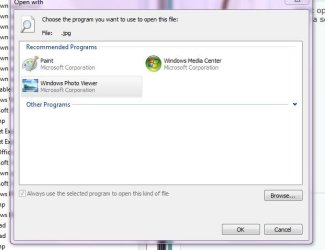
Since I can remember, I had receiving family photo's via my sisters phone. The automatically associated them selves to windows photo viewer, however, recently this is not the case. When I go to open the file, I'm presented with several programs to view with, including WPV. It will open the photo, but won't give me the option of associating with WPV. I went to use http://www.sevenforums.com/tutorials/19449-default-file-type-associations-restore.html, but didn't see anything about choosing a program to associate to.

I'd appreciate any advice.

TY
: )
 

My Computer My Computer

Computer type
PC/Desktop
OS
Windows 7 Home Premium 64-bit
CPU
i7-2600k
Motherboard
ASUS P8P67 Deluxe
Memory
Corsair Vengence 8GB
Graphics Card(s)
EVGA GTX 570 HD
Hard Drives
120 SSD
1 TB HDD
500 GB HDD
PSU
Corsair Gaming GS800
Case
HAF X
Cooling
Corsair H70
Here's how:
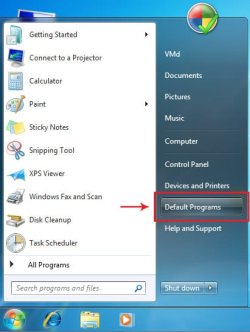
1. :orb: Start Menu> Default Programs.​

  • asso1.jpg


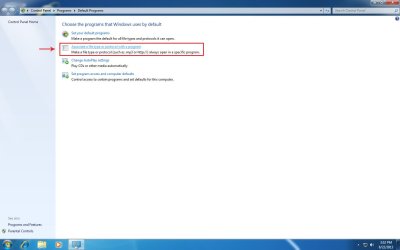
2. Click Associate a file type or protocol with a program.

  • asso2.jpg


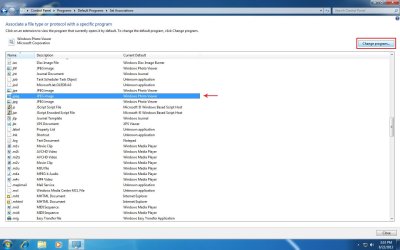
3. Select the file type you want to change the association of, and click Change program... at the top right corner of the window.


  • asso3.jpg


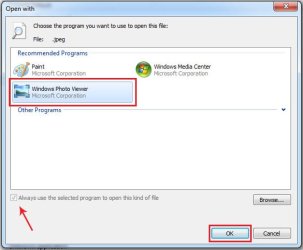
4. Choose the program you want to associate the file type with (Always use the selected program to open this kind of file should be check and grayed out) and click the OK button.

  • asso4.jpg


That's it :) .


My Computer My Computer

Computer type
PC/Desktop
OS
Windows 10
CPU
Intel Core i5 3570K
Motherboard
Asus P8Z77V-PRO
Memory
16GB 1600Mhz G.Skill
Graphics Card(s)
Gigabyte GTX 970 G1-Gaming
PSU
Seasonic 1000W Platinum
Case
Fractal Design Define R4
Cooling
Noctua NH-D14
Might be Windows self defense is blocking the file ?
Right click it and select Properties,
General section is there a Unblock button near the bottom ?
 

My Computer My Computer

Computer type
PC/Desktop
Computer Manufacturer/Model Number
Custom assembled by me :}
OS
Win-7-Pro64bit 7-H-Prem-64bit
CPU
i7-5930K 2nd i9-9940x both water blocked VRM's too
Motherboard
ASUS SABERTOOTH X99 2nd ASUS x299 Apex
Memory
Trident-z 3200C14 2nd Trident-z 3600C16
Graphics Card(s)
EVGA 1080ti ftw3 2nd Titan Xp both water blocked
Sound Card
Built-in Realtek
Monitor(s) Displays
1-AOC G2460PG 24"G-Sync 144Hz/ 2nd 1-ASUS VG248QE 24" 144Hz
Screen Resolution
1920 x 1080 144Hz
Hard Drives
2-Samsung M.2 Evo & Evo Plus
2-Samsung 850 EVO 500GB SSD's/ 3-2.5 W.D. Black 1tb-&3-1tb/3-3.5 WD Black 1tb hdd's
PSU
EVGA SuperNOVA 1000-P2 2nd 1200-P2
Case
2-Corsair Obsidian Series 450D Black ATX Mid Tower
Cooling
Custom water loops
Keyboard
Logitech G710+/ 2nd Logitech G910
Mouse
2-RedDragon M901 Perdition 16400 dpi Gaming mouse = wired
Internet Speed
Comcast Ping 19ms 89.31mbps download speed 6.12mbps upload
Antivirus
Malwarebytes Pro/ Superantispyware Pro
Browser
FireFox & Pale moon
Other Info
2nd ASUS X299 Apex/Intel i9-9940x with Custom water loop/7H-Prem-x64/Corsair 450D case/Ram Trident-z 3600C16 4x8gb / Samsung970Evo plus 500gb SSD/Dual ssd EZ swap evo/PSU EVGA SuperNova 1200w-P2 80+Platinum/GPU Titan Xp /8-ML-140 on push-pull on 2-280GTX rads
@yoyo155 this still does not let me choose the option to always open that file type with a program.

@ThrashZone, I thought that too, but wasn't the case.

Thank you both for your response
 

My Computer My Computer

Computer type
PC/Desktop
OS
Windows 7 Home Premium 64-bit
CPU
i7-2600k
Motherboard
ASUS P8P67 Deluxe
Memory
Corsair Vengence 8GB
Graphics Card(s)
EVGA GTX 570 HD
Hard Drives
120 SSD
1 TB HDD
500 GB HDD
PSU
Corsair Gaming GS800
Case
HAF X
Cooling
Corsair H70
What options do you get?
Post a screenshot.
 

My Computer My Computer

Computer type
PC/Desktop
OS
Windows 10
CPU
Intel Core i5 3570K
Motherboard
Asus P8Z77V-PRO
Memory
16GB 1600Mhz G.Skill
Graphics Card(s)
Gigabyte GTX 970 G1-Gaming
PSU
Seasonic 1000W Platinum
Case
Fractal Design Define R4
Cooling
Noctua NH-D14
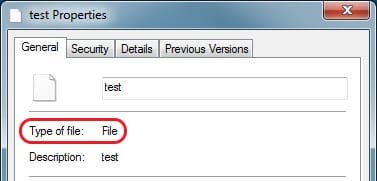
I did notice that option is checked by default, so I tried the procedure again. The ones that were associated didn't change, but neither did the ones unassociated. Don't know if this matters, but when I go to properties of the unassociated file, it's file type just says file.

thx again
 

Attachments

  • Capture.JPG
    Capture.JPG
    32.6 KB · Views: 1

My Computer My Computer

Computer type
PC/Desktop
OS
Windows 7 Home Premium 64-bit
CPU
i7-2600k
Motherboard
ASUS P8P67 Deluxe
Memory
Corsair Vengence 8GB
Graphics Card(s)
EVGA GTX 570 HD
Hard Drives
120 SSD
1 TB HDD
500 GB HDD
PSU
Corsair Gaming GS800
Case
HAF X
Cooling
Corsair H70
I did notice that option is checked by default, so I tried the procedure again. The ones that were associated didn't change, but neither did the ones unassociated. Don't know if this matters, but when I go to properties of the unassociated file, it's file type just says file.

thx again

That means the file has lost its extension!

Here is the problem and fix:

This is what you currently have:
noext1.jpgnoext2.jpg


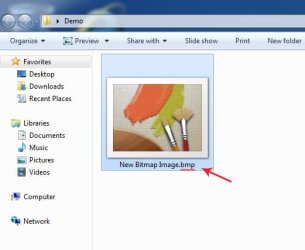
You need to add the extension back to the file!

Manually add the extension back to the file by adding a .xxx (xxx means the type you know the file is).
and hit enter, the extension should disappear and the file is now recognized by Windows.

  • noext5.jpg


If the extension remains visible (like in the picture above) here's how to hide it:


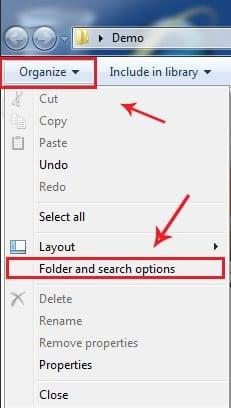
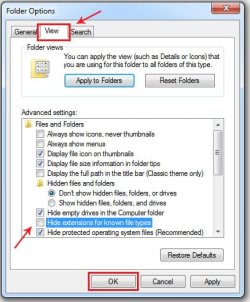
Click Organize and select Folder and search options.

  • noext3.jpg
Go to the View tab and tick the box next to Hide extensions for known file types and click OK.

  • noext4.jpg
 

My Computer My Computer

Computer type
PC/Desktop
OS
Windows 10
CPU
Intel Core i5 3570K
Motherboard
Asus P8Z77V-PRO
Memory
16GB 1600Mhz G.Skill
Graphics Card(s)
Gigabyte GTX 970 G1-Gaming
PSU
Seasonic 1000W Platinum
Case
Fractal Design Define R4
Cooling
Noctua NH-D14
You're welcome :rolleyes:.
 

My Computer My Computer

Computer type
PC/Desktop
OS
Windows 10
CPU
Intel Core i5 3570K
Motherboard
Asus P8Z77V-PRO
Memory
16GB 1600Mhz G.Skill
Graphics Card(s)
Gigabyte GTX 970 G1-Gaming
PSU
Seasonic 1000W Platinum
Case
Fractal Design Define R4
Cooling
Noctua NH-D14
Back
Top