Pictures viewing

mmartinez

New member
Local time
5:09 PM
Messages
5
Hi:
This may a stupid and simple question:
When I install any windows os and go to windows explorer to my pictures, I am able to see the thumbnails and or the pictures itself, after installing any picture application I am not able to see the thumbnails anymore,I just see the icon representing the picture, i.e. PNG, GIF or JPG.
Thank you
Mario
 

My Computer My Computer

At a glance

windows 7
OS
windows 7
Hi:
This may a stupid and simple question:
When I install any windows os and go to windows explorer to my pictures, I am able to see the thumbnails and or the pictures itself, after installing any picture application I am not able to see the thumbnails anymore,I just see the icon representing the picture, i.e. PNG, GIF or JPG.
Thank you
Mario

That is because whichever application it is you have installed has changed to file associations from the defaults.

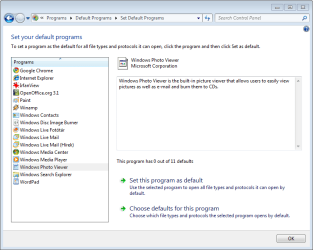
Try clicking on the Start Orb, then select "Default Programs" then "Set Default Programs". From there, select "Windows Photo Viewer" then click "Set this program as the default".

If that does not work, try this tutorial by Brink: Thumbnail Previews: Enable or Disable.

You might also want to try using Windows Live Photo Gallery, which provide some really useful features and does not interfere with Windows Explorer thumbnails.
 

My Computer My Computer

At a glance

Windows 7 Professional 32-bit SP1AMD A4/A63.00GB EDOVMware SVGA 3D
Computer type
PC/Desktop
Computer Manufacturer/Model Number
Virtual Machine
OS
Windows 7 Professional 32-bit SP1
CPU
AMD A4/A6
Motherboard
Intel Corporation 440BX Desktop Reference Platform
Memory
3.00GB EDO
Graphics Card(s)
VMware SVGA 3D
Sound Card
High Definition Audio Device
Monitor(s) Displays
Generic Non-PnP Monitor on VMware SVGA 3D
Screen Resolution
1440x900
Hard Drives
1 x 60GB VMware Virtual SATA Hard Drive ATA Device
Antivirus
Kaspersky Total Security
Pic preview

Hi:
This may a stupid and simple question:
When I install any windows os and go to windows explorer to my pictures, I am able to see the thumbnails and or the pictures itself, after installing any picture application I am not able to see the thumbnails anymore,I just see the icon representing the picture, i.e. PNG, GIF or JPG.
Thank you
Mario

Hi and welcome to SF. Its not a stupid question. There are two things that can change the OS'es initial setup. First the pic app you installed is now the default app for viewing the files. If you right click any pic file it will tell you what is being used to view it ( see pic 3). Initially you get this (pic 1) if you install something it may now "own the extension (like photoshop owning jpg files).

The other thing is that to see pic previews you need it set to small/med/large icons

Hope this helps

Ken
 
Last edited:

My Computer My Computer

At a glance

Win 8 Release candidate 8400[email protected]4 gigsNvidia 9600M
Computer Manufacturer/Model Number
HP Pavillion dv-7 1005 Tx
OS
Win 8 Release candidate 8400
CPU
[email protected]
Memory
4 gigs
Graphics Card(s)
Nvidia 9600M
Sound Card
HD built-in
Monitor(s) Displays
17" Wxga
Screen Resolution
1440x900
Cooling
none
Internet Speed
45Mb down 5Mb up
Thank you all for your reply.
Mario
 

My Computer My Computer

At a glance

windows 7
OS
windows 7

My Computer My Computer

At a glance

Windows 7 Ultimate x64 (Retail)i7-Q 7206 GBnVidia GeForce GT 230M (1GB)
Computer Manufacturer/Model Number
HP DV8t quad
OS
Windows 7 Ultimate x64 (Retail)
CPU
i7-Q 720
Motherboard
Motherboard Chipset Intel Ibex Peak-M PM55, Intel Lynnfield
Memory
6 GB
Graphics Card(s)
nVidia GeForce GT 230M (1GB)
Sound Card
IDT High Definition Audio CODEC
Monitor(s) Displays
18.4 inch HP Infinity FHD (Samsung 184HT03-001)
Screen Resolution
1920 x 1080
Hard Drives
Hitachi 500GB 7200 rpm (x2)
Seagate FreeAgent 1.5 TB External USB (x2)
Thermaltake BlacX eSATA/USB 2.0 3.5/2.5 HD dock
Cooling
Zalman NC-2000 notebook cooling pad
Keyboard
laptop
Mouse
Logitech VX Revolution
Other Info
Backup Unit: Lenovo T61p
hello gentlemen. please help me if You can, I have a really annoying problem about windows photo viewer.

I installed the new os today. everything works properly and seems fine except opening the image files. when I try it, or even if I just click on the file with the right button, the Windows Explorer seems to be frozen, then gives the message 'not answer'.
I even try to find the solution by changing the default viewer in the Default Programs, as You mentioned it but the problem still exist.
And one more thing I noticed with the icon in the window where you can set the default programs. is it possible that the windows photo viewer hasn't been installed correctly? Please look at the file I attached.

do You have any idea what to do? I hope so...
thank You to read my post.
 

Attachments

  • Capture.PNG
    Capture.PNG
    20.9 KB · Views: 21

My Computer My Computer

At a glance

Windows 7 RC
OS
Windows 7 RC
I haven't installed Windows 7 yet, but can you still change the "View" in explorer from "details" or "List" to "Thumbnail"...? Would that solve the issue?

EDIT: e.g.: Clicking the "View" button in Explorer on the toolbar and selecting "Thumbnail" or clicking in the "View" menu and selecting "Thumbnail".
 

My Computer My Computer

At a glance

Windows XP MCE (Soon to be 7)Duo Core 3.4 GHz
Computer Manufacturer/Model Number
HP Pavillion zd8000
OS
Windows XP MCE (Soon to be 7)
CPU
Duo Core 3.4 GHz
Back
Top