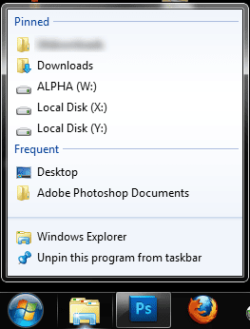
Pinned/frequent folders in taskbar

omegaman7

New member
Local time
4:45 PM
Messages
24
Location
Oregon
I'm curious how this option references itself. What I mean is there an editable folder/file somewhere, so I can instruct it what to put in this list? Because I recently installed yet another hard drive, and I love to reference them quickly. I love this list, and I don't like too many files on my desktop. I've tried to get it to acknowledge the drive by frequently opening it and referencing folders within, to no avail.
Which is why I'd like to know if there is a quicker way to instruct this list. It's pretty funny you know? I only open a particular folder once, and it ends up in the list. But I try to get it to acknowledge another folder, and it won't do it. Irritating to say the least ;)
 

Attachments

  • Frequent folders.png
    Frequent folders.png
    9.8 KB · Views: 3

My Computer My Computer

At a glance

Windows 7 Ultimate X64Phenom II 965 @ 3.9GhzRipjaws F3-12800CL7D-4GBRM 8,8,8,24 1T 1.65VNvidia Geforce GTX260(216 cores)
OS
Windows 7 Ultimate X64
CPU
Phenom II 965 @ 3.9Ghz
Motherboard
Gigabyte 790XTA-UD4
Memory
Ripjaws F3-12800CL7D-4GBRM 8,8,8,24 1T 1.65V
Graphics Card(s)
Nvidia Geforce GTX260(216 cores)
Sound Card
N/A
Monitor(s) Displays
Samsung 2433BW
Hard Drives
Velociraptor 150Gb 1500HLFS
PSU
Corsair HX750W
Case
CM HAF932
Cooling
ECO-R120 (ALC)

My Computer My Computer

At a glance

Windows 7 Ultimate x64P4 3.2DDR 400ATI HD3850
OS
Windows 7 Ultimate x64
CPU
P4 3.2
Motherboard
Intel 815GM
Memory
DDR 400
Graphics Card(s)
ATI HD3850
Sound Card
C-Media 7.1
Monitor(s) Displays
SyncMaster 244T
Screen Resolution
1920*1200
Hard Drives
Several
PSU
500
Case
PowerSpec $24
Cooling
ThermalTake copper
Internet Speed
Blazing
Not sure how the quick launch directory is gonna help my particular situation. It doesn't appear to effect the aforementioned list(when right clicking the folder). Placing a hard drive directory in my task bar is definitely useful, but a messy taskbar can happen too. I'd really much prefer that the location were in the frequent list. Surely there has to be a way to edit this list? :shock:
 

My Computer My Computer

At a glance

Windows 7 Ultimate X64Phenom II 965 @ 3.9GhzRipjaws F3-12800CL7D-4GBRM 8,8,8,24 1T 1.65VNvidia Geforce GTX260(216 cores)
OS
Windows 7 Ultimate X64
CPU
Phenom II 965 @ 3.9Ghz
Motherboard
Gigabyte 790XTA-UD4
Memory
Ripjaws F3-12800CL7D-4GBRM 8,8,8,24 1T 1.65V
Graphics Card(s)
Nvidia Geforce GTX260(216 cores)
Sound Card
N/A
Monitor(s) Displays
Samsung 2433BW
Hard Drives
Velociraptor 150Gb 1500HLFS
PSU
Corsair HX750W
Case
CM HAF932
Cooling
ECO-R120 (ALC)
%APPDATA%\Microsoft\Windows\Recent\AutomaticDestinations

The items are saved as a ".automaticDestinations-ms" file

Don't know how to edit it.
 

My Computer My Computer

At a glance

Windows 7 Ultimate x64P4 3.2DDR 400ATI HD3850
OS
Windows 7 Ultimate x64
CPU
P4 3.2
Motherboard
Intel 815GM
Memory
DDR 400
Graphics Card(s)
ATI HD3850
Sound Card
C-Media 7.1
Monitor(s) Displays
SyncMaster 244T
Screen Resolution
1920*1200
Hard Drives
Several
PSU
500
Case
PowerSpec $24
Cooling
ThermalTake copper
Internet Speed
Blazing

My Computer My Computer

At a glance

Windows 7 Ultimate x64P4 3.2DDR 400ATI HD3850
OS
Windows 7 Ultimate x64
CPU
P4 3.2
Motherboard
Intel 815GM
Memory
DDR 400
Graphics Card(s)
ATI HD3850
Sound Card
C-Media 7.1
Monitor(s) Displays
SyncMaster 244T
Screen Resolution
1920*1200
Hard Drives
Several
PSU
500
Case
PowerSpec $24
Cooling
ThermalTake copper
Internet Speed
Blazing
Well...I'm further along then when I started. Thank you very much :)
 

My Computer My Computer

At a glance

Windows 7 Ultimate X64Phenom II 965 @ 3.9GhzRipjaws F3-12800CL7D-4GBRM 8,8,8,24 1T 1.65VNvidia Geforce GTX260(216 cores)
OS
Windows 7 Ultimate X64
CPU
Phenom II 965 @ 3.9Ghz
Motherboard
Gigabyte 790XTA-UD4
Memory
Ripjaws F3-12800CL7D-4GBRM 8,8,8,24 1T 1.65V
Graphics Card(s)
Nvidia Geforce GTX260(216 cores)
Sound Card
N/A
Monitor(s) Displays
Samsung 2433BW
Hard Drives
Velociraptor 150Gb 1500HLFS
PSU
Corsair HX750W
Case
CM HAF932
Cooling
ECO-R120 (ALC)
LOL!!! I just found an obvious simple solution that hadn't occurred to me til now. Obviously ;)

I just right clicked within my computer, and dragged the new hard drive location into the jump list. Piece of cake! Drag it over the folder in the task bar, and let go. Thanks again for your time. I should have tried this a long time ago :rolleyes:
 

My Computer My Computer

At a glance

Windows 7 Ultimate X64Phenom II 965 @ 3.9GhzRipjaws F3-12800CL7D-4GBRM 8,8,8,24 1T 1.65VNvidia Geforce GTX260(216 cores)
OS
Windows 7 Ultimate X64
CPU
Phenom II 965 @ 3.9Ghz
Motherboard
Gigabyte 790XTA-UD4
Memory
Ripjaws F3-12800CL7D-4GBRM 8,8,8,24 1T 1.65V
Graphics Card(s)
Nvidia Geforce GTX260(216 cores)
Sound Card
N/A
Monitor(s) Displays
Samsung 2433BW
Hard Drives
Velociraptor 150Gb 1500HLFS
PSU
Corsair HX750W
Case
CM HAF932
Cooling
ECO-R120 (ALC)
I had to read your original post again. And again.

After looking at your attached image, I had failed to comprehend your question.

You had already pinned drives to the Explorer icon. So, today, you re-learned how to do that.
 

My Computer My Computer

At a glance

Windows 7 Ultimate x64P4 3.2DDR 400ATI HD3850
OS
Windows 7 Ultimate x64
CPU
P4 3.2
Motherboard
Intel 815GM
Memory
DDR 400
Graphics Card(s)
ATI HD3850
Sound Card
C-Media 7.1
Monitor(s) Displays
SyncMaster 244T
Screen Resolution
1920*1200
Hard Drives
Several
PSU
500
Case
PowerSpec $24
Cooling
ThermalTake copper
Internet Speed
Blazing
Yes, I have a much better understanding of the process now. Thanks! Before, I just waited til I noticed something in the frequent list, then I right clicked and pinned it that way. Now I can do it manually quickly!
 

My Computer My Computer

At a glance

Windows 7 Ultimate X64Phenom II 965 @ 3.9GhzRipjaws F3-12800CL7D-4GBRM 8,8,8,24 1T 1.65VNvidia Geforce GTX260(216 cores)
OS
Windows 7 Ultimate X64
CPU
Phenom II 965 @ 3.9Ghz
Motherboard
Gigabyte 790XTA-UD4
Memory
Ripjaws F3-12800CL7D-4GBRM 8,8,8,24 1T 1.65V
Graphics Card(s)
Nvidia Geforce GTX260(216 cores)
Sound Card
N/A
Monitor(s) Displays
Samsung 2433BW
Hard Drives
Velociraptor 150Gb 1500HLFS
PSU
Corsair HX750W
Case
CM HAF932
Cooling
ECO-R120 (ALC)
I learned a cool trick today also. Thanks to Mickey Megabyte on this forum.

Middle click the taskbar icon to easily launch a new instance of an open program/folder
 

My Computer My Computer

At a glance

Windows 7 Ultimate x64P4 3.2DDR 400ATI HD3850
OS
Windows 7 Ultimate x64
CPU
P4 3.2
Motherboard
Intel 815GM
Memory
DDR 400
Graphics Card(s)
ATI HD3850
Sound Card
C-Media 7.1
Monitor(s) Displays
SyncMaster 244T
Screen Resolution
1920*1200
Hard Drives
Several
PSU
500
Case
PowerSpec $24
Cooling
ThermalTake copper
Internet Speed
Blazing
I have a list of windows 7 shortcuts somewhere. I should really familiarize myself with it. Good stuff!

I'll probably use that middle button function. Could be handy at times.
 

My Computer My Computer

At a glance

Windows 7 Ultimate X64Phenom II 965 @ 3.9GhzRipjaws F3-12800CL7D-4GBRM 8,8,8,24 1T 1.65VNvidia Geforce GTX260(216 cores)
OS
Windows 7 Ultimate X64
CPU
Phenom II 965 @ 3.9Ghz
Motherboard
Gigabyte 790XTA-UD4
Memory
Ripjaws F3-12800CL7D-4GBRM 8,8,8,24 1T 1.65V
Graphics Card(s)
Nvidia Geforce GTX260(216 cores)
Sound Card
N/A
Monitor(s) Displays
Samsung 2433BW
Hard Drives
Velociraptor 150Gb 1500HLFS
PSU
Corsair HX750W
Case
CM HAF932
Cooling
ECO-R120 (ALC)
Back
Top