

When I right-click the Explorer icon in my Task bar I get a list of Frequent folders.
I would like to ask a few questions:
(a) What are the criteria for adding a folder to the list? As far as I can recall I have only accessed one folder on the list once or twice. And other folders that I access more often are not there.
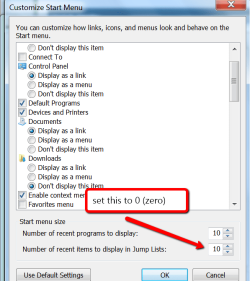
(b) How can I suppress the whole section? I see that I can remove individual entries from the list, but how about the whole lot?
(c) I don't recall seeing this before applying some Windows Updates. Was it an Update or did I just not notice it before?
I would like to ask a few questions:
(a) What are the criteria for adding a folder to the list? As far as I can recall I have only accessed one folder on the list once or twice. And other folders that I access more often are not there.
(b) How can I suppress the whole section? I see that I can remove individual entries from the list, but how about the whole lot?
(c) I don't recall seeing this before applying some Windows Updates. Was it an Update or did I just not notice it before?
Last edited:
My Computer
At a glance
Windows Home Premium (64)Intel Core i7 8608GB (4x2GB) Corsair TwinX XMS31GB Gainward 9500 GT
- Computer type
- PC/Desktop
- Computer Manufacturer/Model Number
- Scan 3XS P55 liteDAW
- OS
- Windows Home Premium (64)
- CPU
- Intel Core i7 860
- Motherboard
- Gigabyte GA-P55A-UD4
- Memory
- 8GB (4x2GB) Corsair TwinX XMS3
- Graphics Card(s)
- 1GB Gainward 9500 GT
- Sound Card
- M-Audio Delta 66
- Monitor(s) Displays
- Acer v223wBBd
- Screen Resolution
- 1680 x 1050
- Hard Drives
- 1 x 500 GB WD Barracuda (OS+Docs)
2 x 1TB Samsung Spinpoint F3 (Data)
- PSU
- Enermax EMD625AWT II - 625W Enermax Modu82+ II
- Case
- Fractal Design Define R2 Black
- Cooling
- Prolima Megahalems Super 6 Heatpipe Tower Cooler
- Keyboard
- Microsoft Digital Media Pro
- Mouse
- Belkin Optical Ergo
- Internet Speed
- 8 Mbps nominal (14.9 achieved !)
- Other Info
- Digital Audio Workstation

 I'll mark this thread as "Solved" as I have the answer, but that method is not suitable for me.