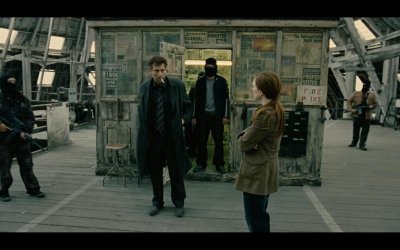
Pixelated movie rendering issue in full screen (nvidia)

Tenac

New member
Local time
11:24 AM
Messages
12
Hey,

I have been trying to fix this problem for 1 week, still have the problem unfortunately :(


Problem description :
Since I installed Windows 7 final version: While playing a movie in full screen, the rendering is some kind of pixelated ( shapes are pretty ugly :/ ). I have the problem with anykind of video ( .avi, .mkv, DVDs... ), with all my video players ( Media player classic, VLC... ).

I did not have the problem with my older config ( win 7 RC ) and have since I formated my computer to install windows 7 final ( home premium N ).

The only way it worked on my new windows 7 installation, was with a very old driver ( 169.62 ), but games work pretty bad with this driver :o

To see the problem, you can look the man at the right background :
Screen sample of my rendering : childmen02.jpg
Sample with another WORKING computer : childmen01.jpg


My old working configuration :
OS : windows 7 RC : version 7100
GC : geforce 8800 GTS 512 (MSI)
drivers version : 190.62

My old not working configuration ( after formating and installing final version of windows 7 ) :
OS : windows 7 home premium N
GC : geforce 8800 GTS 512 (MSI)
drivers version : 190.62 or all other generic nvidia or MSI's official drivers, exept the only "first" driver of the graphic card (169.06) in its box

My new not working configuration :
OS : windows 7 home premium N
GC : geforce GTX275 twin frozr OC (MSI)
drivers version : 190.62 (MSI driver) or any above nvidia generic driver


Anyone having the same issue, or have fixed it yet ?
Anyone having Windows 7 ( N version ) and not the problem ?
Could have something with the version of windows ? ( windows home premium "N" do not include native Windows media player )


I need your help !! Thanks anyway !
 
Last edited:

My Computer My Computer

OS
Seven Home Premium N 32B
hi Tenac, and welcome to sevenforums,

we can't see your screenshots - i see a login screen for some forum.

please use the attachment button to upload files from your harddrive.

thanks
 

Attachments

  • attach.JPG
    attach.JPG
    14.4 KB · Views: 8

My Computer My Computer

Computer Manufacturer/Model Number
mickey megabyte 1234
OS
ultimate 64 sp1
CPU
i5 2500K [email protected]
Motherboard
MSI P67A-GD53
Memory
8 gigs GSkill Ripjaws 1600
Graphics Card(s)
amd hd6950
Sound Card
creative x-fi gamer
Monitor(s) Displays
samsung 24"
Screen Resolution
1920x1080
Hard Drives
ocz vertex 2e 60 gig, samsung f3 1tb, buffalo 2tb ext
PSU
antec 550
Case
antec three hundred
Cooling
i'm a cooling fan
Keyboard
saitek eclipse ii
Mouse
logitech g3
Internet Speed
about 4 Mbps
Other Info
i love win7
Woops sorry ;)
Edited !
 

My Computer My Computer

OS
Seven Home Premium N 32B
ok - that's better.

what software are you using in the screenshots?
 

My Computer My Computer

Computer Manufacturer/Model Number
mickey megabyte 1234
OS
ultimate 64 sp1
CPU
i5 2500K [email protected]
Motherboard
MSI P67A-GD53
Memory
8 gigs GSkill Ripjaws 1600
Graphics Card(s)
amd hd6950
Sound Card
creative x-fi gamer
Monitor(s) Displays
samsung 24"
Screen Resolution
1920x1080
Hard Drives
ocz vertex 2e 60 gig, samsung f3 1tb, buffalo 2tb ext
PSU
antec 550
Case
antec three hundred
Cooling
i'm a cooling fan
Keyboard
saitek eclipse ii
Mouse
logitech g3
Internet Speed
about 4 Mbps
Other Info
i love win7
Media player classic, but I have the same problem with VLC.

With the driver 169.62, both were working ;)

BTW since I did not mentionned it, I have tested many codec that were working on my old config, new codec that I have been asked to test, and nothing change !
 

My Computer My Computer

OS
Seven Home Premium N 32B
ok - personally i use kmplayer for watching movies, and it has always worked fine on my x64, without needing codec packs (but can use them if you want).

with vlc, a lot of people change their video output to 'opengl' to improve pixelation (but latest release fixes this).

i don't know much about mpc, sorry.

or maybe it's an nvidia issue - sorry again, i know nothing :(

but lots of other people here may be able to help.

good luck
 

My Computer My Computer

Computer Manufacturer/Model Number
mickey megabyte 1234
OS
ultimate 64 sp1
CPU
i5 2500K [email protected]
Motherboard
MSI P67A-GD53
Memory
8 gigs GSkill Ripjaws 1600
Graphics Card(s)
amd hd6950
Sound Card
creative x-fi gamer
Monitor(s) Displays
samsung 24"
Screen Resolution
1920x1080
Hard Drives
ocz vertex 2e 60 gig, samsung f3 1tb, buffalo 2tb ext
PSU
antec 550
Case
antec three hundred
Cooling
i'm a cooling fan
Keyboard
saitek eclipse ii
Mouse
logitech g3
Internet Speed
about 4 Mbps
Other Info
i love win7
This is not a player / codec issue, this is a driver or windows problem ;)

Thanks for helping anyway ;)
 

My Computer My Computer

OS
Seven Home Premium N 32B
Bump :eek:
 

My Computer My Computer

OS
Seven Home Premium N 32B
First image actually seems better to me although both are of very similar quality.

I refer to the same man you say in rt background. Look to the left above him where sunlight is coming through and creates like a triangle. The lines of the triangle appear straight and not like stairs to climb.

The 2nd image, same place, looks like stairs to climb. (The part leading right into the man's right eye.)

Contrast appears more accurate to what probably is intended in 1st picture too.

Neither image is "bad" by any means. I have excellent eyesight and am picky too about encodes, but I just don't see a major problem anywhere. I'm currently using my specs machine, widescreen monitor to view.

1>2 in quality imho.

In the 2nd image, look to the left side of the vending booth (closer to floor). If you study it close, it appears that there is like a floating line on the side almost hanging off of it. Ultra thin but there. The 1st image does not exhibit this behavior.

Did you perhaps post the images in reverse order of your intentions?
 

My Computer My Computer

Computer Manufacturer/Model Number
self built
OS
7600.20510 x86
CPU
P4 550 3.4 GHz HT running at 3.5 GHz
Motherboard
MSI PM8M3-V (MS-7211 v1.x) Micro-ATX mainboard
Memory
OCZ 2 GB(2x1GB) DDR400mHz running @ 414 mHz
Graphics Card(s)
HIS Radeon HD 3850 IceQ 3 Turbo HDMI Dual DL-DVI AGP
Sound Card
MOTU Traveler firewire studio interface 192 kHz 24 bit
Monitor(s) Displays
22" widescreen Acer X223W LCD, 17" Compaq P75 CRT
Screen Resolution
1680x1050 and 1280x1024
Hard Drives
SATA I x2 WD, 400 GB and 120 GB, SATA 2 WD Caviar Black 1 TB
PSU
350W generic
Case
Cybertronpc, it glows blue
Cooling
stock cpu fan, Ice-Q 3 gpu and system, many case fans
Keyboard
Logitch Classical Keyboard 200
Mouse
Logitech Mediaplay cordless
Internet Speed
1792/448 kbits/sec
Other Info
SATA II PCI fake RAID adapter, 1 GB Readyboost, original ATI Remote Wonder (even works with WMC perfectly), Logitech Rumblepad 2 game controller x2

My Computer My Computer

Computer type
PC/Desktop
Computer Manufacturer/Model Number
Custom
OS
Windows 7 SP1 x64
CPU
Intel E8400 3.0 GHz
Motherboard
Gigabyte EP45-DS3R
Memory
4x1 Trascend DDR2 800 Mhz
Graphics Card(s)
Gainward 8800GT 512 Mb
Sound Card
Realtek HD Audio 889A
Monitor(s) Displays
LG L204WS
Screen Resolution
1680x1050
Hard Drives
Intel 520 Series 120Gb SSD (System)
Western Digital 6400AAKS 640Gb (Data)
PSU
Cooler Master 650W
Case
Cooler Master Centurion 532
Cooling
2x 12 cm fans
Keyboard
Logitech Wave
Mouse
Logitech G5
Internet Speed
10 Mbit Cable Flat
Antivirus
NOD32 Smart Security
Browser
Google Chrome
Did you perhaps post the images in reverse order of your intentions?
Woops, I did, sorry for that ;)


Ok thanks you very much, problem is solved for VLC, but I still have the problem on others installer player, and will have it with all others I could install I imagine ^^

So, is there any windows options that could set default output to be used with directX ? Nvidia control panel do not purpose this option :huh:
 

My Computer My Computer

OS
Seven Home Premium N 32B
On media player classic, I fixed the problem in that way :
Option > Playback > output > directshow video > selected VMR7 (renderless)
Others options don't work for me :/

Still looking for a general fix !
 

My Computer My Computer

OS
Seven Home Premium N 32B
How about in Classic, you set it to use EVR Custom Pres. **

That uses hardware acceleration from gpu. How does that seem to you? I'm curious more than anything, myself.

I'm glad you replied that the pictures were in reverse order and fixed now. I couldn't understand otherwise. :D
 

My Computer My Computer

Computer Manufacturer/Model Number
self built
OS
7600.20510 x86
CPU
P4 550 3.4 GHz HT running at 3.5 GHz
Motherboard
MSI PM8M3-V (MS-7211 v1.x) Micro-ATX mainboard
Memory
OCZ 2 GB(2x1GB) DDR400mHz running @ 414 mHz
Graphics Card(s)
HIS Radeon HD 3850 IceQ 3 Turbo HDMI Dual DL-DVI AGP
Sound Card
MOTU Traveler firewire studio interface 192 kHz 24 bit
Monitor(s) Displays
22" widescreen Acer X223W LCD, 17" Compaq P75 CRT
Screen Resolution
1680x1050 and 1280x1024
Hard Drives
SATA I x2 WD, 400 GB and 120 GB, SATA 2 WD Caviar Black 1 TB
PSU
350W generic
Case
Cybertronpc, it glows blue
Cooling
stock cpu fan, Ice-Q 3 gpu and system, many case fans
Keyboard
Logitch Classical Keyboard 200
Mouse
Logitech Mediaplay cordless
Internet Speed
1792/448 kbits/sec
Other Info
SATA II PCI fake RAID adapter, 1 GB Readyboost, original ATI Remote Wonder (even works with WMC perfectly), Logitech Rumblepad 2 game controller x2
How about in Classic, you set it to use EVR Custom Pres. **

That uses hardware acceleration from gpu. How does that seem to you? I'm curious more than anything, myself.

I cannot select EVR, option is in gray for me :sarc:
How could I enable it ? :)
 

My Computer My Computer

OS
Seven Home Premium N 32B

My Computer My Computer

Computer Manufacturer/Model Number
self built
OS
7600.20510 x86
CPU
P4 550 3.4 GHz HT running at 3.5 GHz
Motherboard
MSI PM8M3-V (MS-7211 v1.x) Micro-ATX mainboard
Memory
OCZ 2 GB(2x1GB) DDR400mHz running @ 414 mHz
Graphics Card(s)
HIS Radeon HD 3850 IceQ 3 Turbo HDMI Dual DL-DVI AGP
Sound Card
MOTU Traveler firewire studio interface 192 kHz 24 bit
Monitor(s) Displays
22" widescreen Acer X223W LCD, 17" Compaq P75 CRT
Screen Resolution
1680x1050 and 1280x1024
Hard Drives
SATA I x2 WD, 400 GB and 120 GB, SATA 2 WD Caviar Black 1 TB
PSU
350W generic
Case
Cybertronpc, it glows blue
Cooling
stock cpu fan, Ice-Q 3 gpu and system, many case fans
Keyboard
Logitch Classical Keyboard 200
Mouse
Logitech Mediaplay cordless
Internet Speed
1792/448 kbits/sec
Other Info
SATA II PCI fake RAID adapter, 1 GB Readyboost, original ATI Remote Wonder (even works with WMC perfectly), Logitech Rumblepad 2 game controller x2
Back
Top