"Play All" windows media player with out subfoders...???

hackertom

New member
Local time
10:16 PM
Messages
6
Hi all
I have used the search button but could not yet found any solution to my question.

I am using windows media player to play my music, however if I select a folder in windows explorer and click "play all" button play all music in my folder "music *.mp3" but play and all music in sunfolders...:cry:
e.g music--> music1*.mp3 (folder) or music--->music1-->music2 *.mp3

How to stop this and play music only in music folder with out move,delete subfolders ...?

Much appreciated
 

My Computer My Computer

At a glance

64
OS
64
You probably need to open the music folder, select just the songs and add them to the WMP list.
 

My Computer My Computer

At a glance

Windows 7 Home Premium 64 bitIntel Core i7-4790G.SKILL 8GB (2 x 4GB) DDR3 F3-10666CL9D-8GBNTAMD Radeon R7 250
Computer type
PC/Desktop
Computer Manufacturer/Model Number
Custom Build
OS
Windows 7 Home Premium 64 bit
CPU
Intel Core i7-4790
Motherboard
GA-Z87X-D3H
Memory
G.SKILL 8GB (2 x 4GB) DDR3 F3-10666CL9D-8GBNT
Graphics Card(s)
AMD Radeon R7 250
Sound Card
Realtek ALC892
Monitor(s) Displays
Samsung UN32EH5000, Dell 1703FPT
Screen Resolution
1920 x 1080, 1280 x 1024
Hard Drives
WD5003AZEX
WD10EZEX
Samsung HD103SJ
Samsung 128 GB 840 PRO
PSU
SeaSonic M12II SS-500GM
Case
Fractal Design Define R4
Cooling
Zalman CNPS9900ALED
Keyboard
Logitech K800
Mouse
Logitech M705
Internet Speed
16 Mbps
Antivirus
Avast
Browser
Firefox
Other Info
Bose Companion 2 Multimedia Speakers
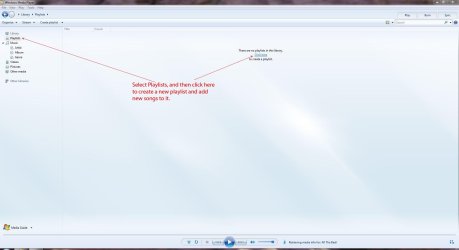
If you really want to control what is played, just create a new playlist from tracks you've ripped.

Playlist.JPG
 

My Computer My Computer

At a glance

Windows 7 Ultimate SP1 64-BitIntel Core i7 870 @ 2.93GHz8Gb Dual-Channel DDR3 @ 664MHznVidia GeForce GTX 460 1024MB dedicated RAM
Computer Manufacturer/Model Number
HP Pavilion Elite 495UK
OS
Windows 7 Ultimate SP1 64-Bit
CPU
Intel Core i7 870 @ 2.93GHz
Motherboard
MSI 2A9C (CPU1)
Memory
8Gb Dual-Channel DDR3 @ 664MHz
Graphics Card(s)
nVidia GeForce GTX 460 1024MB dedicated RAM
Sound Card
Realtek HD Audio
Monitor(s) Displays
HP2310i
Screen Resolution
1920 x 1080
Hard Drives
1x1954GB Hitachi HDS22020ALA 330 (RAID), 1x1954GB Hitachi External for backup and storage
PSU
460W
Case
HP Elite
Cooling
Air cooled
Keyboard
Logitech K750 solar-powered keyboard
Mouse
Logitech Wireless M180 mouse
Internet Speed
2Mb
Other Info
Pure Avanti Flow Internet Radio with iPod Dock, 64Gb iPod, HP USB Speakers, Sony MDR-V500 Headphones, Sony Vaio F-Series Laptop
What I want to avoid is the creation playlists...

And if you add in folder new mp3 create again and again or add mp3 in lists... :cry:

The play all button is convenient... :p

Any tweak to play only mp3 in first folder with click play all button?
 

My Computer My Computer

At a glance

64
OS
64
Quick solution: select all the music files in the opened folder and drag-and-drop onto the WMP icon.

Long-term solution: re-think on how the music files are organized. :)
 

My Computer My Computer

At a glance

Windows 7 Home Premium x64
OS
Windows 7 Home Premium x64
Quick solution: select all the music files in the opened folder and drag-and-drop onto the WMP icon.

Long-term solution: re-think on how the music files are organized. :)

700 mp3... !!! In first folder... and GB in Subfolders...

The best quick solution is ONE CLICK and play my music... ;)
 

My Computer My Computer

At a glance

64
OS
64
put the 700 mp3's in one folder, then open that folder and select play all, it wont open subfolders then.
 

My Computer My Computer

At a glance

Microsoft Windows 7 Home Premium 64-bit 7600IIx4 amd athelon 635 processor2x2gbati radeon HD 5450
Computer Manufacturer/Model Number
Hewlett packard/p6512uk
OS
Microsoft Windows 7 Home Premium 64-bit 7600
CPU
IIx4 amd athelon 635 processor
Motherboard
FOXCONN 2AA9
Memory
2x2gb
Graphics Card(s)
ati radeon HD 5450
Sound Card
(1) Realtek High Definition Audio (2) AMD High Definition
Monitor(s) Displays
samsung lcd tv 32"
Screen Resolution
1360x 768
Hard Drives
(1) WDC WD10 01FAES-60Z2A0 SATA Disk Device (2) Maxtor OneTouch USB Device (3) ST310003 33AS USB Device (4) WD My Book 1111 USB Device
PSU
?
Cooling
air!
Keyboard
wireless hp
Mouse
wireless Hp,optical
Internet Speed
1.10mb/s
Antivirus
MSE
Browser
Firefox
put the 700 mp3's in one folder, then open that folder and select play all, it wont open subfolders then.

the point is not to move something...

In your situation, by creating a folder within a folder, Windows doesn't move the files.
It just simply places them in the new folder.
Dragging and dropping will be instantaneous.
 

My Computer My Computer

At a glance

Windows 7 Home Premium 64 bitIntel Core i7-4790G.SKILL 8GB (2 x 4GB) DDR3 F3-10666CL9D-8GBNTAMD Radeon R7 250
Computer type
PC/Desktop
Computer Manufacturer/Model Number
Custom Build
OS
Windows 7 Home Premium 64 bit
CPU
Intel Core i7-4790
Motherboard
GA-Z87X-D3H
Memory
G.SKILL 8GB (2 x 4GB) DDR3 F3-10666CL9D-8GBNT
Graphics Card(s)
AMD Radeon R7 250
Sound Card
Realtek ALC892
Monitor(s) Displays
Samsung UN32EH5000, Dell 1703FPT
Screen Resolution
1920 x 1080, 1280 x 1024
Hard Drives
WD5003AZEX
WD10EZEX
Samsung HD103SJ
Samsung 128 GB 840 PRO
PSU
SeaSonic M12II SS-500GM
Case
Fractal Design Define R4
Cooling
Zalman CNPS9900ALED
Keyboard
Logitech K800
Mouse
Logitech M705
Internet Speed
16 Mbps
Antivirus
Avast
Browser
Firefox
Other Info
Bose Companion 2 Multimedia Speakers
put the 700 mp3's in one folder, then open that folder and select play all, it wont open subfolders then.

the point is not to move something...
if i understand correctly you have a music folder , in that folder there are 700 mp3's and several subfolders.
make another subfolder within the music folder.nothing is moved just organised. i have a music folder and in it there is several hundred gb of albums all in subfolders of their own, to play an album i open the sub folder then select play all.

to make it easy to move the mp3's to the new folder . click organize / folder and search options / view tab , scroll to bottom of list then check the box to have a checkbox when selecting items.
then apply
when you open the music folder click organize /select all then de select the subfolders including the new one and drag the 700 mp3's into the new folder .you can see it has 700 as the number of files will show when dragging. if it says more then stop dragging and check to see if there is another subfolder with the box ticked.
its easy to move an extra file or folder using this method so be careful. after a while you get used to using it this way but in the beginning its best to take care, if you dont like having the checkbox method then once you move the files then retrace the steps to turn check boxes off.

Edit: its occured to me that you wont need to use the above method as your folders will probably be first then all the mp3 files so selecting will be easy. i have auto arrange disabled and in some folders (not the music one)have a mix up of files and folders, using the check box method is ideal in my situation.
however if you are adamant that you will not create a new subolder to make it easy for yourself, then using the check box method ,select all/ de selecting the subfolders then play all will work without playing the subfolders. you would have to do this every time you want to play the 700 mp3's bit of a drag IMO
 
Last edited:

My Computer My Computer

At a glance

Microsoft Windows 7 Home Premium 64-bit 7600IIx4 amd athelon 635 processor2x2gbati radeon HD 5450
Computer Manufacturer/Model Number
Hewlett packard/p6512uk
OS
Microsoft Windows 7 Home Premium 64-bit 7600
CPU
IIx4 amd athelon 635 processor
Motherboard
FOXCONN 2AA9
Memory
2x2gb
Graphics Card(s)
ati radeon HD 5450
Sound Card
(1) Realtek High Definition Audio (2) AMD High Definition
Monitor(s) Displays
samsung lcd tv 32"
Screen Resolution
1360x 768
Hard Drives
(1) WDC WD10 01FAES-60Z2A0 SATA Disk Device (2) Maxtor OneTouch USB Device (3) ST310003 33AS USB Device (4) WD My Book 1111 USB Device
PSU
?
Cooling
air!
Keyboard
wireless hp
Mouse
wireless Hp,optical
Internet Speed
1.10mb/s
Antivirus
MSE
Browser
Firefox
Back
Top