Please help! Cannot install any MS Visual C++! Error 1935

hudzell

New member
Local time
2:23 AM
Messages
3
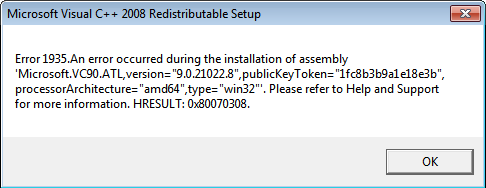
So, I'm just going to get straight to the point. I'm trying to install Microsoft Visual C++ 20xx so I can play games like Grand Theft Auto IV or BeamNG Drive, Ship Simulator Extremes, etc., but every time I try to install any of the Microsoft Visual C++ versions (anything between 2004 and 2013) it gives me this error:
wOQtPqt.png


I was told that it was a registry error, and I've already looked at all of the helpful looking pages on Google, nothing helped. I think it may be some kind of Malware but my antivirus doesn't find it. (Phantom Virus maybe?) Please help! It's preventing me from playing one of my most favorite games. :(
 

My Computer

Computer type
PC/Desktop
Computer Manufacturer/Model Number
Custom Build
OS
Windows 7 Ultimate x64
CPU
Intel Core i5-4670K CPU 3.40GHz
Motherboard
BIOSTAR Hi-Fi B85S3+
Memory
8131 MB
Graphics Card(s)
ATI Radeon HD 4600 Series
Hard Drives
Unknown
Antivirus
Avast! free Antivirus
Browser
Google Chrome

My Computer

Computer type
PC/Desktop
Computer Manufacturer/Model Number
Custom Build
OS
Windows 7 Ultimate 64-bit
CPU
Intel G3420 3.2GHZ Dual Core
Motherboard
Gigabyte H87-HD3
Memory
Kingson 8GB 1600mhz
Graphics Card(s)
MSI R7970 TF 3GD5/OC BE
Monitor(s) Displays
21" LG & "19 Vertical Samsung
Hard Drives
120GB SSD - Boot
1TB WD
350GB External
2TB External (Wireless)
PSU
Corsair CX 500 modular
Case
Zalman Z11 Plus (modified)
Cooling
Corsair H55, 2x 120mm SP Corsair, 1x 140 Coolermaster
Keyboard
Corsair K50
Mouse
CSL Gaming
Internet Speed
164Mbps
Antivirus
Avast, Malwarebytes
Browser
Google Chrome, IE, Firefox
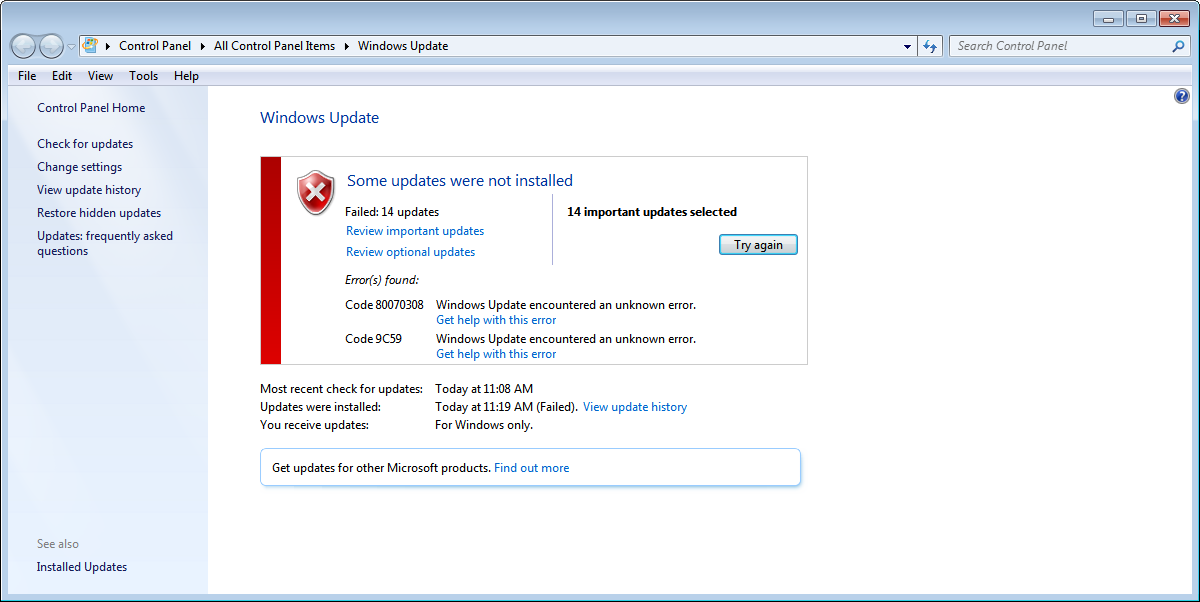
It did not work. I got this.

oLMobGu.png
 

My Computer

Computer type
PC/Desktop
Computer Manufacturer/Model Number
Custom Build
OS
Windows 7 Ultimate x64
CPU
Intel Core i5-4670K CPU 3.40GHz
Motherboard
BIOSTAR Hi-Fi B85S3+
Memory
8131 MB
Graphics Card(s)
ATI Radeon HD 4600 Series
Hard Drives
Unknown
Antivirus
Avast! free Antivirus
Browser
Google Chrome
Figured out how to avoid Error 1935

All I need to do is install Microsoft Visual C++ 20xx with a third party installer. It seems to only occur (Error 1935) when I use the normal VC++ installers, so I thought if I could find third party installers, I could install them and play the games I've wanted to. Anyone have tips on where to look for these installers?

Source: Installed Unturned from steam, and it also installed VC++ 2010 with no errors
 
Last edited by a moderator:

My Computer

Computer type
PC/Desktop
Computer Manufacturer/Model Number
Custom Build
OS
Windows 7 Ultimate x64
CPU
Intel Core i5-4670K CPU 3.40GHz
Motherboard
BIOSTAR Hi-Fi B85S3+
Memory
8131 MB
Graphics Card(s)
ATI Radeon HD 4600 Series
Hard Drives
Unknown
Antivirus
Avast! free Antivirus
Browser
Google Chrome

My Computer

Computer type
PC/Desktop
OS
Windows 10 Home x64
CPU
INTEL Core i5-750 Quad-Core 3.37GHz
Motherboard
ASUS P7P55D
Memory
HyperX Fury Black Series 8GB (2 x 4GB) 1866Mhz
Graphics Card(s)
EVGA GeForce GTX 750 Superclocked 1GB 128-Bit GDDR5
Monitor(s) Displays
LG 32MA68HY 32" IPS
Screen Resolution
1920 x 1080
Hard Drives
Samsung 840 Evo 120GB, SEAGATE 500GB Barracuda® 7200.12, SATA 3 Gb/s, 7200 RPM, 16MB cache
PSU
ANTEC TruePower New TP-550, 80 PLUS, 550W
Case
ANTEC Three Hundred Illusion
Cooling
COOLER MASTER Hyper 212 Plus, 4 x 120mm 1 x 140mm Noctua's
Internet Speed
85 + Mbps
Antivirus
Avast
Browser
Vivaldi
Back
Top