On its face, and with my years of experience helping people with computer issues, it seems likely that the use of the low power state of sleep or hibernation
may have goofed something up. Particularly on the GPU side. These low power states mess around with ACPI. Run through this entry on what that is:
Advanced Configuration and Power Interface - Wikipedia
Does that mean you can't use a low power state? No, but I'd really encourage you not to use it. Being very honest with you, I've seen my fair share of issues posted all over the Internet due to these low power states. It doesn't cause a problem for all, but it can be a source of issues and hard drive data corruption. This is what I'm thinking the issue is at the moment. You have driver corruption or something. The playing of music is interesting. Is a media player open when you turn the computer on? Lets have a look at ALL auto running services anmd what not. Run Autoruns, go to File and save the ARN file. Zip the ARN file and upload here.
Autoruns for Windows - Windows Sysinternals | Microsoft Docs
Do not mess with turning things off, on or deleting them unless you know EXACTLY what you're doing.
So, in a nutshell you may have some OS corruption or it's the GPU driver. Lets first tackle the GPU.
Go to the start orb. In the search box enter dxdiag. In the dxdiag window that appears click each and every single tab on top and see if there are any problems reported. Do this in the 64 bit version of dxdiag as well. You'll see that option in my screenshot attached to this post.
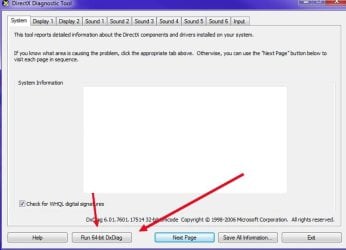
Now, lets check for any problem devices. Go to the search orb again, in the search box enter msinfo32.exe. On the left click on Components. In Components go to Problem Devices. Whada got?
Lets have a look at Even Viewer. Event Viewer is in the Control Panel, but lets just make this an easy process. Attached are two batch files. Run each one on the desktop. Each file will be for the System and Application events. zip those two files that were produced and upload the zip file here.
If you can't even get in the computer to do this, then try safe mode. If that doesn't work it'll require a live boot CD using Hirens to extract the Event Viewer files. It's a pain when I'm not sitting there. You can get into safe mode by fully restarting the computer and repeatedly taping the F8 key as the computer boots. In the provided options just chose the first option of "Safe Mode." If you needed networking or Internet in safe mode you'd chose with the networking option. But, if you're trying to iron out a TCP/IP/networking issue this will load those drivers. Just food for thought.
View attachment Create some event logs_yo.zip
This is just a preliminary assignment. I'm not in front of your computer so it's hard to know for sure what's going on. It really could be a lot of things. The aforementioned malware, bad hardware, high component temperatures, corrupt system files, DLLs, even bad memory (RAM). The list goes on and on.
- - - Updated - - -
=Off topic=
Re: Your website.
WordPress Security Scan | HackerTarget.com
Keep those plug-ins updated if you can. WordPress is a HUGE sought after CMS by hackers so you need to make sure it's as secure as possible. There are many things that can be done.
WordPress just released a major update so if your website auto updates be on the look out for that.
News – WordPress 5.9 “Josephine” – WordPress.org
Also, you're listed on one blacklist for email.
Network Tools: DNS,IP,Email
Namecheap really isn't the best and your shared IP is on the radar at AbuseIPDB. The blacklist listing needs to be taken care of by Namecheap. This
may affect your email on the site for sending. It shouldn't be an issue to receive email though. Check this site out:
Newsletters spam test by mail-tester.com
Anyway... LOL



