Please Help I don't know what else to do.

djfernie

New member
Local time
5:04 AM
Messages
11
Hello All, I am new to the forums and I've been using Windows 7 32 bit for a long time now on my HP Pavilion DV2000. I created an account just so that I could get help on this issue that is driving me insane. Here's the thing, I'm working on Producing my own music, and I use a variety of programs like FL Studio and Nexus, programs that I've had for ages and never given me a problem. So I was about to finish the final touches on a song when I restarted my PC one day and voila! No Audio Output Device is Installed. This is a problem on so many levels for me, specially since I need Audio more than I need anything on my PC. So now I'm as frustrated as a guy can be. Here's what I tried doing:

*Followed Countless of Websites looking for help
*Read Thousands of ways to repair this
*Watched every Youtube Video on the Subject
*Downloaded updates and drivers from HP, Realtek and many others hoping I would get the right one (And yes, the very LATEST UPDATES)
*Looked for Sound Video and Game Controller option on Device manager but guess what? IT'S GONE!!
*I don't even get an 'Unknown' section in Device Manager like some people I saw did.
*This just happened literally overnight, like I saved my music project like always , turned off the PC like always, turned it on the next day and Sound is gone!!

Please I'm running out of ideas, it acts as if there is no sound card at ALL which there obviously is otherwise I wouldn't have been able to play music all these years. I can't update something that is not there so I don't think an update is what I need, specially since I seem to have tried them all. I hope to hear from somebody, anybody willing to help, soon, because I live off of this and I desperately need my sound back. Thanks so much for reading this and to all who will try to help :)


-Fernie.
 

My Computer

OS
Windows 7 Ultimate 32 Bit
Welcome to the Forums, djfermie! If the sound card does not show up in the device manager then indeed no software solution would help. I would recommend trying to re-seat the sound card - i.e. just turn everything off, unplug your PC, open it up and take that sound card out (may be get rid of the dust while you're at it). Then plug it back in and see if Windows will see it, i.e. if something will show up in the device manager.

If that fails, I'm afraid there might be a need for you to buy a new sound card, but wait for others to suggest something first.
 

My Computer

Computer Manufacturer/Model Number
Dell Inspiron 530
OS
Windows 7 Ultimate (x64)
CPU
Q6600
Memory
8 GB
Graphics Card(s)
ATI Radeon HD 2600 XT
Monitor(s) Displays
Samsung Syncmaster P2450
Screen Resolution
1920x1080
Hard Drives
Samsung HD103UJ
Samsung HD501LJ
Internet Speed
25 Mb/s
Unfortunately if the sound card is on the motherboard the option would be to buy a PCI card, install it and update the BIOS. But first go into your BIOS settings and make sure that your onboard sound device is shown and selected.
 

My Computer

Computer Manufacturer/Model Number
MSI
OS
Windows 7 Professional 64bit
CPU
Intel Celeron 2.4 GH
Memory
4 GB
Graphics Card(s)
NVidia GeForce 9800GT
Sound Card
ATI HDMI Audio
Monitor(s) Displays
Acer S231HL Dual Monitors
Hard Drives
Hitachi 300GB ATA
Maxtor 300GB USB
Cooling
Standard
Keyboard
Logitech wireless
Mouse
Logitech wireless
Internet Speed
Cable
BIOS Settings

Have you checked that your BIOS settings haven't mysteriously changed?
 

My Computer

Computer type
PC/Desktop
Computer Manufacturer/Model Number
n/a
OS
W7 Ultimate SP1, LM19.2 MATE, W10 Home 1703, W10 Pro 1703 VM, #All 64 bit
CPU
AMD Phenom II x6 1100T, 3.3 GHz
Motherboard
ASUS M4A88T-M/USB3 (AM3)
Memory
12GB DDR3 1333 G-Skill (4GB x 2), G-Skill (2GB x 2)
Graphics Card(s)
NVIDIA GeForce GTX 660
Sound Card
Realtek?
Monitor(s) Displays
Samsung S23B350
Screen Resolution
1920x1080
Hard Drives
WD Green 2TB (SATA), WD Green 3TB (SATA), WD Blue 4TB (SATA), WD Blue 6TB (SATA)
PSU
Cooler Master
Case
Antec GX300 Tower
Cooling
3x Antec TRICOOL 120mm Fans
Mouse
Wired Optical
Internet Speed
DSL
Antivirus
Avast
Browser
Pale Moon (64 bit)
Other Info
2018-12-27 Upgraded HDDs
2015-12-10 Upgraded case, graphics card, storage
2015-08-15 Upgraded motherboard & RAM
2015-07-15 Upgraded LM17.1 to LM17.2
BIOS are a completely new thing to me I know nothing about it but I have read that If I mess with them I can mess up my computer for good, so I decided to leave it alone for now. But maybe you guys could guide me as to what to do with the BIOS?? I believe it's worth a shot. Thanks for the help, I'd really like to solve this problem and learn while I'm at it.
 

My Computer

OS
Windows 7 Ultimate 32 Bit
Getting in can be tricky

Do you have the docs for your PC?
The procedure might be detailed in them.

Normally, when you first start your PC, you should see one or 2 screens, before Windows starts to boot (The flying coloured ball screen).

The first screen on my PC has the MB makers logo.
At the bottom of the screen it says, "Press Del to enter setup."
Yours may say something different.

It make take several reboots, before you get the timing right.

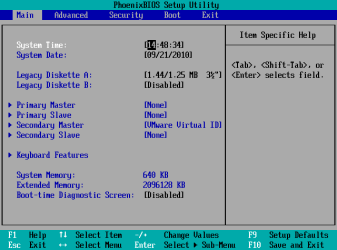
Here's a an example picture of a BIOS screen (from a Virtual Machine).
BIOS 01a.png

You have to use the arrow keys to move around the BIOS option menus (no mouse support).
In the example picture, the options you want would be in the "Advanced" menu.
There will probably be an entry like "On-board Sound" with "Disabled" or "Enabled" by it.

Once you have made your changes, you must save them by pressing the appropriate key.
In the example picture, the key is "F10".

If you make a mistake, exit the BIOS without saving.
You can do this by pressing the "Esc" key one or two times.
You should see a message like "Discard changes and exit?"

Then all you have to do is re-enter the BIOS, when your machine reboots.

Since you don't have much experience with the BIOS, I suggest that you only change 1 setting (and remember it or write it down).
Let Windows boot and see if your change worked.
If not re-enter the BIOS and reset the setting that you changed.
 

My Computer

Computer type
PC/Desktop
Computer Manufacturer/Model Number
n/a
OS
W7 Ultimate SP1, LM19.2 MATE, W10 Home 1703, W10 Pro 1703 VM, #All 64 bit
CPU
AMD Phenom II x6 1100T, 3.3 GHz
Motherboard
ASUS M4A88T-M/USB3 (AM3)
Memory
12GB DDR3 1333 G-Skill (4GB x 2), G-Skill (2GB x 2)
Graphics Card(s)
NVIDIA GeForce GTX 660
Sound Card
Realtek?
Monitor(s) Displays
Samsung S23B350
Screen Resolution
1920x1080
Hard Drives
WD Green 2TB (SATA), WD Green 3TB (SATA), WD Blue 4TB (SATA), WD Blue 6TB (SATA)
PSU
Cooler Master
Case
Antec GX300 Tower
Cooling
3x Antec TRICOOL 120mm Fans
Mouse
Wired Optical
Internet Speed
DSL
Antivirus
Avast
Browser
Pale Moon (64 bit)
Other Info
2018-12-27 Upgraded HDDs
2015-12-10 Upgraded case, graphics card, storage
2015-08-15 Upgraded motherboard & RAM
2015-07-15 Upgraded LM17.1 to LM17.2
I know you said you've done just about everything you could, but did you do a System Restore to a date just before the problem occurred. If you haven't it's not too late. (And be sure to back up your personal files before you do anything further!)
 

My Computer

Computer Manufacturer/Model Number
HP Pavillion dv5t (generation 1)
OS
Vista 64 bit and 32 bit (SP2)
CPU
Intel(R) Core(TM)2 Duo Processor T9400 (2.53 GHz
Memory
4GB DDR2 System Memory (2 Dimm)
Graphics Card(s)
512 MB NVIDIA GeForce 9600M GT
Monitor(s) Displays
15.4" diagonal WSXGA+ High-Definition HP BrightView Widescre
Screen Resolution
1680 x 1050
Hard Drives
320GB 5400RPM SATA Hard Drive with HP ProtectSmart Hard Drive Protection
Keyboard
Built-in HP
Mouse
Built in - Synaptics TouchPad V6.5 on PS/2 Port
Internet Speed
Max
Other Info
~ Intel Next-Gen Wireless-N Mini-card w/Bluetooth ~ Blu-Ray ROM DVD+/-R/RW ~ Integ. HDTV Hybrid Tuner ~ 12 Cell Battery ~ MS Office (Home Premium) 2007 ~
I know you said you've done just about everything you could, but did you do a System Restore to a date just before the problem occurred. If you haven't it's not too late. (And be sure to back up your personal files before you do anything further!)
+1 Im guessing you have already, but sometimes we overlook the obvious. (well i do ) :D
 

My Computer

Computer Manufacturer/Model Number
Hewlett packard/p6512uk
OS
Microsoft Windows 7 Home Premium 64-bit 7600
CPU
IIx4 amd athelon 635 processor
Motherboard
FOXCONN 2AA9
Memory
2x2gb
Graphics Card(s)
ati radeon HD 5450
Sound Card
(1) Realtek High Definition Audio (2) AMD High Definition
Monitor(s) Displays
samsung lcd tv 32"
Screen Resolution
1360x 768
Hard Drives
(1) WDC WD10 01FAES-60Z2A0 SATA Disk Device (2) Maxtor OneTouch USB Device (3) ST310003 33AS USB Device (4) WD My Book 1111 USB Device
PSU
?
Cooling
air!
Keyboard
wireless hp
Mouse
wireless Hp,optical
Internet Speed
1.10mb/s
Antivirus
MSE
Browser
Firefox
This could easily just be a pure hardware failure that no settings are going to fix. Those laptops are notorious for getting so hot they fry hardware components (most often wireless and graphics cards), so it's not out of the question that the same has happened for your audio card. If it is a hardware failure like this (which I hope it is not), then you are unfortunately out of luck. HP will not replace it unless your model specifically falls under a recall, even if it has the same exact symptoms and failures as a recall. Don't ask me how I know all of this.
 

My Computer

OS
XP / Win7 x64 Pro
CPU
Intel Quad-Core Q9450 @ 3.2GHz
Motherboard
Asus P5-E
Memory
2x2GB GSkill DDR2
Graphics Card(s)
NVIDIA GeForce 8600 GTS (EVGA)
Monitor(s) Displays
Dell 2408WFP
Screen Resolution
1920x1200
Yes I Have done System Restores to a variety of dates, that was in fact the first thing I tried since all I had to do was Restore it to the day before. Since that didn't work I kept restoring back and forth to a lot of date even ending up somewhere in 2010, but since they wouldn't work, I kept Undoing them so now it's like I hadn't done any System Restores. Now I will try the BIOS guide that was posted here and see if I get lucky with that.
Also, yes I am aware of how these laptops get so hot you can make marshmallows. But since the last time I sent it to the repair shop it hasn't gotten hot at ALL which is surprising and everything has been normal and working just fine for a whiiiile now. It's weird that his is a problem that not only seems to not have a concrete solution to it (yet) but also something we don't know what exactly causes to originate, specially when it happens overnight. And I probably slept like 6 hours that day so it wasn't even that long and the audio just stopped lol.
Let's try these BIOS settings.
 

My Computer

OS
Windows 7 Ultimate 32 Bit
I was gonna do the BIOS guide, to see about the advanced options and the if the Onboard sound is enabled, but before I did that, I noticed something interesting. I opened HP Support assistant, and it gives you a lot of options, (neither of which help me at this point) and underneath it shows the model of the laptop and other specs, now remember I have a DV2000, and here's what it's showing me:

kcnd4.jpg


Weird right??? On the very top of the laptop, to the right of the webcam, there's a sign that says HP Pavilion dv2000, sooo...I'm lost on this one lol.
 

My Computer

OS
Windows 7 Ultimate 32 Bit
DV2000 is the series. Your actual model is the DV2700. Nothing wrong there.
 

My Computer

OS
XP / Win7 x64 Pro
CPU
Intel Quad-Core Q9450 @ 3.2GHz
Motherboard
Asus P5-E
Memory
2x2GB GSkill DDR2
Graphics Card(s)
NVIDIA GeForce 8600 GTS (EVGA)
Monitor(s) Displays
Dell 2408WFP
Screen Resolution
1920x1200
@ lehnerus2000
I tried doing what you told me for the BIOS, I pressed F10, F2, Del, and pretty much every F Key, and I get different screens, but none of them display the options that you have. How do I get them to show up? Thanks :)
 

My Computer

OS
Windows 7 Ultimate 32 Bit
You might have to press escape to enter into the BIOS. It should tell you for a split second at the bottom of the screen when the first black BIOS screen comes up.
 

My Computer

OS
XP / Win7 x64 Pro
CPU
Intel Quad-Core Q9450 @ 3.2GHz
Motherboard
Asus P5-E
Memory
2x2GB GSkill DDR2
Graphics Card(s)
NVIDIA GeForce 8600 GTS (EVGA)
Monitor(s) Displays
Dell 2408WFP
Screen Resolution
1920x1200
The options that appear, depend on the BIOS manufacturer

@ lehnerus2000
I tried doing what you told me for the BIOS, I pressed F10, F2, Del, and pretty much every F Key, and I get different screens, but none of them display the options that you have. How do I get them to show up? Thanks :)

It can be tricky to get into the BIOS.
The options that appear, depend on the BIOS manufacturer.
The picture was just an example, my PC BIOS has a slightly different layout.

I take it that you don't have a user manual for your HP Pavilion dv2000.

On the very first screen you see (when you turn your computer on) there should be a message at the bottom of the screen, telling you which key to press.

By the time you read the message, it is too late to enter the BIOS (in my experience).

What I normally do is hold down the required key, as soon as I press the power button.
I ignore the PC's hysterical beeping and wait for the BIOS screen to appear.

I've never seen the BIOS on any laptop, so I have no idea what your screen will look like.
Also I don't know what key the HP Pavilion dv2000 uses to enter the BIOS.

Hopefully another member can answer those questions.

Sorry. :(

Additional
You could try an Internet search for the user manual (HP might even have one on their website).
 
Last edited:

My Computer

Computer type
PC/Desktop
Computer Manufacturer/Model Number
n/a
OS
W7 Ultimate SP1, LM19.2 MATE, W10 Home 1703, W10 Pro 1703 VM, #All 64 bit
CPU
AMD Phenom II x6 1100T, 3.3 GHz
Motherboard
ASUS M4A88T-M/USB3 (AM3)
Memory
12GB DDR3 1333 G-Skill (4GB x 2), G-Skill (2GB x 2)
Graphics Card(s)
NVIDIA GeForce GTX 660
Sound Card
Realtek?
Monitor(s) Displays
Samsung S23B350
Screen Resolution
1920x1080
Hard Drives
WD Green 2TB (SATA), WD Green 3TB (SATA), WD Blue 4TB (SATA), WD Blue 6TB (SATA)
PSU
Cooler Master
Case
Antec GX300 Tower
Cooling
3x Antec TRICOOL 120mm Fans
Mouse
Wired Optical
Internet Speed
DSL
Antivirus
Avast
Browser
Pale Moon (64 bit)
Other Info
2018-12-27 Upgraded HDDs
2015-12-10 Upgraded case, graphics card, storage
2015-08-15 Upgraded motherboard & RAM
2015-07-15 Upgraded LM17.1 to LM17.2
Quick Question, how do I find out what Motherboard I have?
 

My Computer

OS
Windows 7 Ultimate 32 Bit

Attachments

  • SIW_MB_Snip.JPG
    SIW_MB_Snip.JPG
    95.8 KB · Views: 11

My Computer

Computer type
PC/Desktop
Computer Manufacturer/Model Number
Built them myself, Science Experiments !
OS
Win7 Enterprise, Win7 x86 (Ult 7600), Win7 x64 Ult 7600, TechNet RTM on AMD x64 (2.8Ghz)
CPU
AMD fx8350 4ghz, AMD-32 2400mhz, AMD-64 3200mhz, AMDx64 2.8G
Motherboard
SIS 755, ECS-K8M890M-M (Ult 7600), GigaByte & others
Memory
2gb, 4gb on the Ult 7600, 4gb on Technet RTM, 32gb on FX8350
Graphics Card(s)
Draw my own Graphics, several nVidia cards
Sound Card
on motherboard
Monitor(s) Displays
19" flat scr, 28" I-Inc widescr,22" Emprex Widescr, 23" Acer
Screen Resolution
1280 x 1024, 1440 x 900, 1920 x 1080
Hard Drives
6 pata Ide HD's & 2 Sata HD's
added 80gb external on Ult 7600 computer,
numerous extra 1tb, 2TB, 3Tb SATA HD's
A collection of ext HD Docks w/ HDs
PSU
430w, 550w, 600w, 700, 800, etc
Case
All Generic Full Towers
Cooling
Open Air & a few fans, some w/ colored LEDs
Keyboard
Compaq & Dell recycled from GoodWill
Mouse
Made in China Optical Wired Mouse
Internet Speed
Fast Cable InterNet
Antivirus
AVG Free on 24 different Desktops, NO Problems!
Browser
IE 8 is preferred, but use FireFox sometimes
Other Info
Linksys Routers, switches, & Hubs
Too Many USB Flash Drives to count, Biggest is 64GB !
Eight computers in my home network.
Sixteen computers at my business network.
Linked via TeamViewer !
Lots of old used spare computer parts everywhere!

My Computer

Computer type
PC/Desktop
Computer Manufacturer/Model Number
n/a
OS
W7 Ultimate SP1, LM19.2 MATE, W10 Home 1703, W10 Pro 1703 VM, #All 64 bit
CPU
AMD Phenom II x6 1100T, 3.3 GHz
Motherboard
ASUS M4A88T-M/USB3 (AM3)
Memory
12GB DDR3 1333 G-Skill (4GB x 2), G-Skill (2GB x 2)
Graphics Card(s)
NVIDIA GeForce GTX 660
Sound Card
Realtek?
Monitor(s) Displays
Samsung S23B350
Screen Resolution
1920x1080
Hard Drives
WD Green 2TB (SATA), WD Green 3TB (SATA), WD Blue 4TB (SATA), WD Blue 6TB (SATA)
PSU
Cooler Master
Case
Antec GX300 Tower
Cooling
3x Antec TRICOOL 120mm Fans
Mouse
Wired Optical
Internet Speed
DSL
Antivirus
Avast
Browser
Pale Moon (64 bit)
Other Info
2018-12-27 Upgraded HDDs
2015-12-10 Upgraded case, graphics card, storage
2015-08-15 Upgraded motherboard & RAM
2015-07-15 Upgraded LM17.1 to LM17.2
Ok so my Motherboard is Wistron 30D6 Version 81.53
So if my Sound Card is built into it, how do I go about restoring it? What do I need to download? I looked for 'updates' 'sound card' 'drivers' under Wistron 30D6 with no luck. Anybody have a clue on how I can get my sound card working again? I mena, the motherboard is detected, why isn't the Sound card? Hmmm...

In SIW, when I click on Sound Device, it just shows the name of my computer, not the sound card or anything. Idk, I'm confused about that one.
I recently updated the BIOS on my PC by using the Phoenix Technology Flash setup, it went from 2.4 to 2.7, but still no sound!!
I also pressed Del in the intro, along with:

  • F3
  • F4
  • F10
  • F12
  • Tab
  • Ctrl+Alt+F3
  • Ctrl+Alt+Del
  • Ctrl+Alt+Shift+Del
  • Ctrl+Insert
  • Ctrl+Shift+Esc
  • Pretty much any key known to man
No luck!!! I need to get into the BIOS menu but I searched everywhere for "HP" "my PC model" 'PhoenixBios" but nothing shows up with regard to how to access the BIOS, at least they don't work for me. Anyone?

I'm trying to install Windows Vista back, since that's the original windows version the laptop came with. So I got a copy (not legitimate, I don't want to spend any more money on this piece of trash) and the setup works, but it tells me that "This Computer does not have enough space for Temporary files" Error 0x80070103. How do I clear this issue so I can continue downgrading to Vista? Here's what I already tried to do and it didn't work:


  1. Open Control Panel by clicking the Start button, and then selecting Control Panel.
  2. Click System and Maintenance.
  3. Click Administrative Tools.
  4. Double-click Computer Management. If you are prompted for an administrator password or confirmation, type the password or provide confirmation.
  5. In the navigation pane, click Disk Management under Storage.
  6. Select the volume that contains the existing Windows Vista installation. Typically, this is drive C.
  7. Right click the volume, and then select Mark Partition as Active.
  8. Click Yes to confirm the action

    Note At this point, the existing Windows installation will not be able to start until the remaining steps are completed.
  9. Close Computer Management.
  10. Insert the Windows Vista DVD.
  11. Restart the computer.
  12. Use the Windows Vista DVD to start the computer.
  13. Choose the desired language and keyboard settings, and then click Next.
  14. Click the Repair Your Computer link on the bottom left of the screen.
  15. When you are prompted to repar the startup data, click Repair and Restart.
  16. After the computer restarts, repeat steps 12 through 14.
  17. If your computer has a single Windows installation, click Next. Otherwise, choose the correct WIndows installation, and then click Next.
  18. Click the Startup Repair link.
  19. Click Finish when the repair has completed. The computer should restart to Windows Vista.
  20. Start the upgrade using the Windows Vista DVD.

So hopefully another solution that isn't that. Sorry for asking so many questions, but I have sent this PC to get repaired so many times I'm getting tired, and I desperately need sound, I don't even need internet, I just need sound lol. I appreciate all the people who posted and tried to help, and as well to those who will help me with this one! Thanks! :)
 

My Computer

OS
Windows 7 Ultimate 32 Bit
Back
Top