Solved Please Help Me Understand the Partitions on My Hard-Drive

peGGi

New member
Local time
8:01 AM
Messages
6
Hi all,

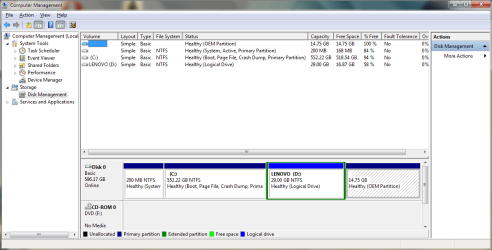
I have attached a screen-shot of my partitions. This is how it is out-of-the-box.

From reading up, I know that a hard-drive can have maximum four primary partitions or three primaries and one extended, and that the extended partition can be sub-divided into several logical partitions.

You can see from my screen-shot that I have one tiny, 200mb primary partition (something to do with the boot loader I think?); the large, C: partition, which is marked as primary; the D: partition which is marked as logical; and an un-named partition for the OEM's back-up software which is also primary.

So does that mean I currently have three, separate primary partitions and one logical partition?

If so, then why is the logical partition not marked as an extended partition, if there is only one?
 

Attachments
  • Disk Partitions ideapad peGGi.png
    Disk Partitions ideapad peGGi.png
    32.5 KB · Views: 206

My Computer My Computer

At a glance

Windows 7 Home Premium 64bitIntel Core i5-2410m @ 2.3 GHz6 Gb DDR3NVIDIA GeForce GT 520M
Computer Manufacturer/Model Number
Lenovo IdeaPad Z570
OS
Windows 7 Home Premium 64bit
CPU
Intel Core i5-2410m @ 2.3 GHz
Memory
6 Gb DDR3
Graphics Card(s)
NVIDIA GeForce GT 520M
Sound Card
Realtek
It is an extended partition. There is no "Extended" naming. The first logical is automatically an extended. Else you got everthing right. You can go ahead and make more partitions - if you like. No danger of "Dynamics".

PS: and you are right. The 200MB partition does contain the bootmgr. Do not touch it or you will not be able to boot any more.
 

My Computer My Computer

At a glance

Vista, Windows7, Mint Mate, Zorin, Windows 8from 1.6GHz Duo to i7
Computer Manufacturer/Model Number
HP, Dell, Gateway, Toshiba - 4 laptops and 2 desktops
OS
Vista, Windows7, Mint Mate, Zorin, Windows 8
CPU
from 1.6GHz Duo to i7
Monitor(s) Displays
2x HP w2207
Hard Drives
5x HDD, 7x SSD, 12x Externals
Keyboard
with trackball - no mices
Mouse
Trackball mice
Internet Speed
DSL 6000
Thank you whs for your quick response.

I was confused because the colour-code in partition manager shows green for an extended partition, yet it seems that you'd never have an extended on it's own, so why have a colour for it?

Anyway, is it possible for me to shrink the C: drive, then increase the D: drive (logical) and divide it into three, separate logicals? So in the end I'll have
  1. the hidden bootmgr partition (primary)
  2. the C: drive (primary)
  3. the D: drive (logical)
  4. a new E: drive (logical)
  5. a new F: drive (logical)
  6. and the hidden, OEM drive?
 

My Computer My Computer

At a glance

Windows 7 Home Premium 64bitIntel Core i5-2410m @ 2.3 GHz6 Gb DDR3NVIDIA GeForce GT 520M
Computer Manufacturer/Model Number
Lenovo IdeaPad Z570
OS
Windows 7 Home Premium 64bit
CPU
Intel Core i5-2410m @ 2.3 GHz
Memory
6 Gb DDR3
Graphics Card(s)
NVIDIA GeForce GT 520M
Sound Card
Realtek
In principle that is possible. You must, however, also delete the D: partition so that you get a contiguous unallocated space. If you have stuff on D:, save it first.

Question though - why do you want that many partitions. Usually you are better off with one big partition which you subdivide into folders. That is more flexible.
 

My Computer My Computer

At a glance

Vista, Windows7, Mint Mate, Zorin, Windows 8from 1.6GHz Duo to i7
Computer Manufacturer/Model Number
HP, Dell, Gateway, Toshiba - 4 laptops and 2 desktops
OS
Vista, Windows7, Mint Mate, Zorin, Windows 8
CPU
from 1.6GHz Duo to i7
Monitor(s) Displays
2x HP w2207
Hard Drives
5x HDD, 7x SSD, 12x Externals
Keyboard
with trackball - no mices
Mouse
Trackball mice
Internet Speed
DSL 6000
I don't particularly want all those partitions, but I want to install a Linux distro but keep Windows 7, so have a dual-boot set-up.

What I'm aiming for is:

1. the hidden bootmgr partition - 200mb - (primary)
2. the C: drive - for Windows - about 80 Gb - (primary)
3. the D: drive - for Lenovo software/drivers - 30 Gb - (logical)
4. the new E: drive - for the Linux distro - about 80 Gb - (logical)
5. the new F: drive - for data - about 430 Gb - (logical)
6. the hidden, OEM drive - for Lenovo's recovery software - about 15 Gb - (primary)

Do you think this is possible?

I don't know if I can delete the D: because the Lenovo drivers, etc., are on it...
 

My Computer My Computer

At a glance

Windows 7 Home Premium 64bitIntel Core i5-2410m @ 2.3 GHz6 Gb DDR3NVIDIA GeForce GT 520M
Computer Manufacturer/Model Number
Lenovo IdeaPad Z570
OS
Windows 7 Home Premium 64bit
CPU
Intel Core i5-2410m @ 2.3 GHz
Memory
6 Gb DDR3
Graphics Card(s)
NVIDIA GeForce GT 520M
Sound Card
Realtek
no its not possible
 

My Computer My Computer

At a glance

windows7 enterprise,ultimate 32bit & 64bit
OS
windows7 enterprise,ultimate 32bit & 64bit
I was confused because the colour-code in partition manager shows green for an extended partition, yet it seems that you'd never have an extended on it's own, so why have a colour for it?

Hi peGGi,

the reason is simple - did you notice the green frame around your logical volume? That frame represents the extended partition itself - the logical volume is just what's contained within.

You can have an extended partition without anything in it - in that case, the green helps you distinguish it from plain "unallocated space" so you don't get confused.

For example, if you wanted to create a primary partition where the extended partition is, you would know to delete the extended partition first (even though there's already nothing in it) instead of trying to create the primary partition and wondering why the system won't allow you to.

And yes, your partition layout with the 3 logical volumes is absolutely possible. However, Disk Management in Windows 7 has its limitations, so your best option is to use the bootable CD version of Partition Wizard which is a free .iso download.
 

My Computer My Computer

At a glance

Windows 7 Professional SP1 32-bitIntel Core 2 Duo E6600 2.4GHz4GB DDR2-667 (4x1GB in dual-channel config)nVidia GeForce 9800 GT
Computer type
PC/Desktop
Computer Manufacturer/Model Number
Custom-built
OS
Windows 7 Professional SP1 32-bit
CPU
Intel Core 2 Duo E6600 2.4GHz
Motherboard
Asus PL5D2
Memory
4GB DDR2-667 (4x1GB in dual-channel config)
Graphics Card(s)
nVidia GeForce 9800 GT
Sound Card
Creative X-Fi XtremeMusic
Monitor(s) Displays
Acer P236H
Screen Resolution
1920x1200 (DVI)
Hard Drives
OCZ SSD Vertex Plus 60GB SATA (Firmware 3.55), 64MB cache
Hitachi HD321KJ SATA, 320GB, 7200rpm, 16MB cache
PSU
Antec TruePower 2.0
Case
Cooler Master Centurion
Cooling
Too many fans
Keyboard
Standard
Mouse
Microsoft wireless optical mouse
Internet Speed
AT&T U-verse (18mbit/sec)
Antivirus
Microsoft Security Essentials
Browser
Firefox
Other Info
Other devices:
Compaq CQ-60 laptop
Google Nexus 7 (2012) tablet
Nvidia SHIELD tablet (US/LTE)
Hardkernel ODROID-XU single-board computer (Samsung Exynos 5420)

My Computer My Computer

At a glance

Microsoft Windows 7 Home Premium 64-bit Servi...Intel(R) Core(TM) i3 CPU M 330 @ 2.13GHz8 GB DDR3Intel(R) HD Graphics
Computer type
Laptop
Computer Manufacturer/Model Number
Hewlett-Packard/G62-107SA Notebook
OS
Microsoft Windows 7 Home Premium 64-bit Service Pack 1
CPU
Intel(R) Core(TM) i3 CPU M 330 @ 2.13GHz
Motherboard
Hewlett-Packard 1425
Memory
8 GB DDR3
Graphics Card(s)
Intel(R) HD Graphics
Sound Card
Realtek High Definition Audio
Monitor(s) Displays
Builtin
Screen Resolution
1366 x 768 x 32 bits (4294967296 colors) @ 60 Hz
Hard Drives
250 GB SATA Hard Disk Drive 7200 rpm
2TB Seagate GoFlex USB 2 Drive
1TB Iomega Prestige USB 2 Drive
1.5TB Iomega Prestige USB 2 Drive (Samsung)
2TB WD MyBook Live NAS.
Mouse
Logitech Anywhere MX
Internet Speed
152 Mbs download 10 Mbs upload
Antivirus
Norton 360
Browser
Chrome
I don't particularly want all those partitions, but I want to install a Linux distro but keep Windows 7, so have a dual-boot set-up.

What I'm aiming for is:

1. the hidden bootmgr partition - 200mb - (primary)
2. the C: drive - for Windows - about 80 Gb - (primary)
3. the D: drive - for Lenovo software/drivers - 30 Gb - (logical)
4. the new E: drive - for the Linux distro - about 80 Gb - (logical)
5. the new F: drive - for data - about 430 Gb - (logical)
6. the hidden, OEM drive - for Lenovo's recovery software - about 15 Gb - (primary)

Do you think this is possible?

I don't know if I can delete the D: because the Lenovo drivers, etc., are on it...
Sure that is possible. But I am with Kado. An installation in Virtual Box is a much better deal. I am running Ubuntu that way and it runs beautifully - plus you can switch to your host Win7 with 1 click and back to Ubuntu the same.

Double booting with Linux is always a problem because the Grub takes over the bootmgr and that can be a big mess the day you want to uninstall Linux. If you go this route, make sure you first make an image of the 100MB system partition so that you can easily restore that without all the Grub mess.
 

My Computer My Computer

At a glance

Vista, Windows7, Mint Mate, Zorin, Windows 8from 1.6GHz Duo to i7
Computer Manufacturer/Model Number
HP, Dell, Gateway, Toshiba - 4 laptops and 2 desktops
OS
Vista, Windows7, Mint Mate, Zorin, Windows 8
CPU
from 1.6GHz Duo to i7
Monitor(s) Displays
2x HP w2207
Hard Drives
5x HDD, 7x SSD, 12x Externals
Keyboard
with trackball - no mices
Mouse
Trackball mice
Internet Speed
DSL 6000

My Computer My Computer

At a glance

Microsoft Windows 7 Home Premium 64-bit Servi...Intel(R) Core(TM) i3 CPU M 330 @ 2.13GHz8 GB DDR3Intel(R) HD Graphics
Computer type
Laptop
Computer Manufacturer/Model Number
Hewlett-Packard/G62-107SA Notebook
OS
Microsoft Windows 7 Home Premium 64-bit Service Pack 1
CPU
Intel(R) Core(TM) i3 CPU M 330 @ 2.13GHz
Motherboard
Hewlett-Packard 1425
Memory
8 GB DDR3
Graphics Card(s)
Intel(R) HD Graphics
Sound Card
Realtek High Definition Audio
Monitor(s) Displays
Builtin
Screen Resolution
1366 x 768 x 32 bits (4294967296 colors) @ 60 Hz
Hard Drives
250 GB SATA Hard Disk Drive 7200 rpm
2TB Seagate GoFlex USB 2 Drive
1TB Iomega Prestige USB 2 Drive
1.5TB Iomega Prestige USB 2 Drive (Samsung)
2TB WD MyBook Live NAS.
Mouse
Logitech Anywhere MX
Internet Speed
152 Mbs download 10 Mbs upload
Antivirus
Norton 360
Browser
Chrome
Kado, does VMWare player allow for seemless switching between the host and the guest ??
 

My Computer My Computer

At a glance

Vista, Windows7, Mint Mate, Zorin, Windows 8from 1.6GHz Duo to i7
Computer Manufacturer/Model Number
HP, Dell, Gateway, Toshiba - 4 laptops and 2 desktops
OS
Vista, Windows7, Mint Mate, Zorin, Windows 8
CPU
from 1.6GHz Duo to i7
Monitor(s) Displays
2x HP w2207
Hard Drives
5x HDD, 7x SSD, 12x Externals
Keyboard
with trackball - no mices
Mouse
Trackball mice
Internet Speed
DSL 6000
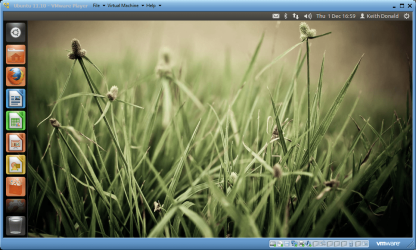
Yes it does whs. It can run windowed, full screen or in what they call Unity mode which is the same as VirtualBox seamless. The screenshot is Ubuntu 11.10 in windowed mode.

screenshot63_2011-12-01.png
 

My Computer My Computer

At a glance

Microsoft Windows 7 Home Premium 64-bit Servi...Intel(R) Core(TM) i3 CPU M 330 @ 2.13GHz8 GB DDR3Intel(R) HD Graphics
Computer type
Laptop
Computer Manufacturer/Model Number
Hewlett-Packard/G62-107SA Notebook
OS
Microsoft Windows 7 Home Premium 64-bit Service Pack 1
CPU
Intel(R) Core(TM) i3 CPU M 330 @ 2.13GHz
Motherboard
Hewlett-Packard 1425
Memory
8 GB DDR3
Graphics Card(s)
Intel(R) HD Graphics
Sound Card
Realtek High Definition Audio
Monitor(s) Displays
Builtin
Screen Resolution
1366 x 768 x 32 bits (4294967296 colors) @ 60 Hz
Hard Drives
250 GB SATA Hard Disk Drive 7200 rpm
2TB Seagate GoFlex USB 2 Drive
1TB Iomega Prestige USB 2 Drive
1.5TB Iomega Prestige USB 2 Drive (Samsung)
2TB WD MyBook Live NAS.
Mouse
Logitech Anywhere MX
Internet Speed
152 Mbs download 10 Mbs upload
Antivirus
Norton 360
Browser
Chrome
Sounds good. I have to try that one day. Any other advantages over vBox that you can think of.
 

My Computer My Computer

At a glance

Vista, Windows7, Mint Mate, Zorin, Windows 8from 1.6GHz Duo to i7
Computer Manufacturer/Model Number
HP, Dell, Gateway, Toshiba - 4 laptops and 2 desktops
OS
Vista, Windows7, Mint Mate, Zorin, Windows 8
CPU
from 1.6GHz Duo to i7
Monitor(s) Displays
2x HP w2207
Hard Drives
5x HDD, 7x SSD, 12x Externals
Keyboard
with trackball - no mices
Mouse
Trackball mice
Internet Speed
DSL 6000
Sounds good. I have to try that one day. Any other advantages over vBox that you can think of.

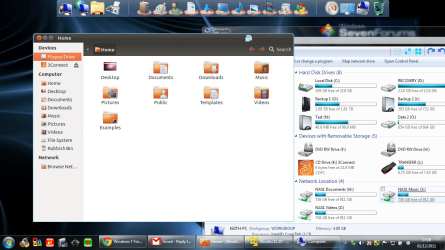
Not really. I use both and they have much the same facilities. I find that some thing run better in VBox and others in VMPlayer. The screenshot is Unity running.

screenshot64_2011-12-01.png
 

My Computer My Computer

At a glance

Microsoft Windows 7 Home Premium 64-bit Servi...Intel(R) Core(TM) i3 CPU M 330 @ 2.13GHz8 GB DDR3Intel(R) HD Graphics
Computer type
Laptop
Computer Manufacturer/Model Number
Hewlett-Packard/G62-107SA Notebook
OS
Microsoft Windows 7 Home Premium 64-bit Service Pack 1
CPU
Intel(R) Core(TM) i3 CPU M 330 @ 2.13GHz
Motherboard
Hewlett-Packard 1425
Memory
8 GB DDR3
Graphics Card(s)
Intel(R) HD Graphics
Sound Card
Realtek High Definition Audio
Monitor(s) Displays
Builtin
Screen Resolution
1366 x 768 x 32 bits (4294967296 colors) @ 60 Hz
Hard Drives
250 GB SATA Hard Disk Drive 7200 rpm
2TB Seagate GoFlex USB 2 Drive
1TB Iomega Prestige USB 2 Drive
1.5TB Iomega Prestige USB 2 Drive (Samsung)
2TB WD MyBook Live NAS.
Mouse
Logitech Anywhere MX
Internet Speed
152 Mbs download 10 Mbs upload
Antivirus
Norton 360
Browser
Chrome
Thanks Kado.
 

My Computer My Computer

At a glance

Vista, Windows7, Mint Mate, Zorin, Windows 8from 1.6GHz Duo to i7
Computer Manufacturer/Model Number
HP, Dell, Gateway, Toshiba - 4 laptops and 2 desktops
OS
Vista, Windows7, Mint Mate, Zorin, Windows 8
CPU
from 1.6GHz Duo to i7
Monitor(s) Displays
2x HP w2207
Hard Drives
5x HDD, 7x SSD, 12x Externals
Keyboard
with trackball - no mices
Mouse
Trackball mice
Internet Speed
DSL 6000
Thank you, Corazon, for that explanation. Makes sense :)
 

My Computer My Computer

At a glance

Windows 7 Home Premium 64bitIntel Core i5-2410m @ 2.3 GHz6 Gb DDR3NVIDIA GeForce GT 520M
Computer Manufacturer/Model Number
Lenovo IdeaPad Z570
OS
Windows 7 Home Premium 64bit
CPU
Intel Core i5-2410m @ 2.3 GHz
Memory
6 Gb DDR3
Graphics Card(s)
NVIDIA GeForce GT 520M
Sound Card
Realtek
Thanks for the advice everyone.

Kado - I like your virtual machine suggestion. It looks promising. Can you answer a few questions for me first though before I try it?

If I install a Linux distro using VMWare, will I still have to download all the drivers that Linux needs (for graphics, wireless, etc.) And if so, could these drivers interfere with my Windows drivers? I ask because I was trying Ubuntu on a Live USB on Friday, and had trouble getting wireless working on it. I did eventually, but when I re-booted into Windows, wireless wasn't working. It had totally screwed up my wireless profiles in Windows and even on my router. I had to get assistance from Netgear's tech support to sort it out!

In the installation instructions, it shows that you have to assign some RAM to Windows and some to Linux. I have 6 Gb RAM. Say I install with 4Gb to Linux and 2 Gb to Windows, does that mean the maximum RAM Linux can access is 4 Gb? And will Windows still have the full 6 Gb when VMWare isn't running?

Finally, is it easy to uninstall VMWare &/or the Linux distro?
 
Last edited:

My Computer My Computer

At a glance

Windows 7 Home Premium 64bitIntel Core i5-2410m @ 2.3 GHz6 Gb DDR3NVIDIA GeForce GT 520M
Computer Manufacturer/Model Number
Lenovo IdeaPad Z570
OS
Windows 7 Home Premium 64bit
CPU
Intel Core i5-2410m @ 2.3 GHz
Memory
6 Gb DDR3
Graphics Card(s)
NVIDIA GeForce GT 520M
Sound Card
Realtek
You should have no problems with installing most Linux distros in VMware Player.

To install VMPlayer just download the installer and install it like any other program. I think it may ask you to reboot before you use it.

Once you have it installed all you need to do is download the Ubuntu ISO, create a new VM in the player using a wizard, attach the Ubuntu ISO to the VMs virtual CD drive and play the machine and the installation will be done for you including the installation of special drivers to make it run better as a VM. This works for the common Linux distros and for versions of Windows including the W8 developer preview.

You can create as many VMs as you like but I think the free version of the player can only run one at a time.

You don't usually have to worry about drivers as the VM will handle that. There should be no problem with internet access as the VM uses the host to supply that.

The VM will obviously use CPU cycles from the host but usually runs well in combination with other programs. One thing to be aware of is that any memory you assign to the running VM will not be available to other programs. Any virtual disks that the VM needs are just files to the host system, there is no need for extra partitions.

One further thing. I have found that 32bit guests run better than 64bit ones even on a 64bit Host.
 

My Computer My Computer

At a glance

Microsoft Windows 7 Home Premium 64-bit Servi...Intel(R) Core(TM) i3 CPU M 330 @ 2.13GHz8 GB DDR3Intel(R) HD Graphics
Computer type
Laptop
Computer Manufacturer/Model Number
Hewlett-Packard/G62-107SA Notebook
OS
Microsoft Windows 7 Home Premium 64-bit Service Pack 1
CPU
Intel(R) Core(TM) i3 CPU M 330 @ 2.13GHz
Motherboard
Hewlett-Packard 1425
Memory
8 GB DDR3
Graphics Card(s)
Intel(R) HD Graphics
Sound Card
Realtek High Definition Audio
Monitor(s) Displays
Builtin
Screen Resolution
1366 x 768 x 32 bits (4294967296 colors) @ 60 Hz
Hard Drives
250 GB SATA Hard Disk Drive 7200 rpm
2TB Seagate GoFlex USB 2 Drive
1TB Iomega Prestige USB 2 Drive
1.5TB Iomega Prestige USB 2 Drive (Samsung)
2TB WD MyBook Live NAS.
Mouse
Logitech Anywhere MX
Internet Speed
152 Mbs download 10 Mbs upload
Antivirus
Norton 360
Browser
Chrome
Hi Peggi -

Researching the Lenovo partition it appears that any changes to the partition structure will cause Lenovo One-Key Recovery Button to not work: Installing Windows 7-Can I Dlete Lenovo Partition? - Lenovo Community

However with WIn7's built-in backup imaging you can save externally your own image backup of your personalized setup that can be run from System Recovery Options to reimage the HD or its replacement in 20 minutes:
Backup Complete Computer - Create an Image Backup
System Image Recovery

So if you decide to Dual Boot with Ubuntu, you can go ahead and delete the Lenovo partition which only contains drivers that are already installed and can be backed up at windows/system32/drivers, and are also available and may have newer versions on the Lenovo Support Downloads webpage for your model. Partition or Volume - Delete

You can then shrink C in Disk Management to create new Logical partitions as you wish in the shrink space: Partition or Volume - Shrink
Partition or Volume - Create New

If you need more flexibility to resize from the left or anything else Disk Management can't do, use free Partition Wizard bootable CD.

Dual-Boot Windows 7 and Ubuntu in Perfect Harmony - windows 7 - Lifehacker

Tips to Clean up factory bloatware.
 
Thanks Kado. Sounds great. I think I will give it a try. I might go with dual-boot further down the road, depending on how well (or not) virtual Linux works.

Thanks for your input Gregrocker. I had discovered that any changes to any partitions makes Lenovo's OKR not work (which makes it a bit crap in my opinion - you can't change any of your partitions? Very restrictive, Lenovo) so yeah I know you'd have to give up on OKR. I back up with Windows and EaseUs anyway (back-up overkill maybe...) so don't need it. I'm slightly concerned though that it might invalidate my Lenovo warranty if I change partitions and abandon OKR (thought I read that somewhere) so need to research that a bit....

I'm going to mark this as solved as I feel that I now understand my partitions and understand how to re-partition, what that entails, and the potential consequences. So thanks all contributors! Super helpful and friendly (and didn't make me feel like an idiot). This is a great forum :)
 

My Computer My Computer

At a glance

Windows 7 Home Premium 64bitIntel Core i5-2410m @ 2.3 GHz6 Gb DDR3NVIDIA GeForce GT 520M
Computer Manufacturer/Model Number
Lenovo IdeaPad Z570
OS
Windows 7 Home Premium 64bit
CPU
Intel Core i5-2410m @ 2.3 GHz
Memory
6 Gb DDR3
Graphics Card(s)
NVIDIA GeForce GT 520M
Sound Card
Realtek
Back
Top